
ODDSAN 30x30 Lighted LED Bathroom Mirror
ODDSAN 30 x 30 Lighted LED Bathroom Mirror User Manual
Model: 30"L x 30"W
1. Introduction
This manual provides detailed instructions for the installation, operation, and maintenance of your ODDSAN 30 x 30 Lighted LED Bathroom Mirror. Please read this manual thoroughly before installation and use to ensure proper function and safety. Keep this manual for future reference.

Image 1.1: The ODDSAN 30 x 30 Lighted LED Bathroom Mirror in a bathroom setting.
2. Important Safety Information
WARNING: Risk of Electric Shock. Always disconnect power at the circuit breaker before installation or servicing.
- Ensure the mirror is installed by a qualified electrician if hardwiring is chosen.
- Do not attempt to modify the mirror or its electrical components.
- This mirror is made of tempered glass, which is designed to be shatter-proof. However, handle with care during installation to prevent damage.
- Keep packaging materials away from children.
- Do not spray cleaning agents directly onto the mirror's electrical components.

Image 2.1: The mirror features tempered, shatter-proof glass for enhanced safety.
3. Package Contents
Verify that all components are present and undamaged before proceeding with installation.
- ODDSAN 30 x 30 Lighted LED Bathroom Mirror (1 unit)
- Mounting Brackets (French Cleat System)
- Installation Hardware (screws, anchors)
- User Manual (this document)
4. Setup and Installation
4.1 Mounting the Mirror
The mirror utilizes a French cleat system for secure wall mounting. It can be installed vertically or horizontally.
- Prepare the Wall: Choose a suitable location on the wall. Ensure the wall material can support the mirror's weight (approximately 21.4 lbs). Use a level to mark the desired height and position for the mounting brackets.
- Install Mounting Brackets: Secure the two mounting brackets horizontally to the wall using the provided screws and anchors. Ensure they are level and spaced correctly to align with the mirror's rear hanging mechanism.
- Hang the Mirror: Carefully lift the mirror and align the long brackets on the back edge of the mirror with the installed wall brackets. Gently lower the mirror until it is securely seated on the wall brackets.

Image 4.1: Step-by-step guide for hanging the mirror using the French cleat system.
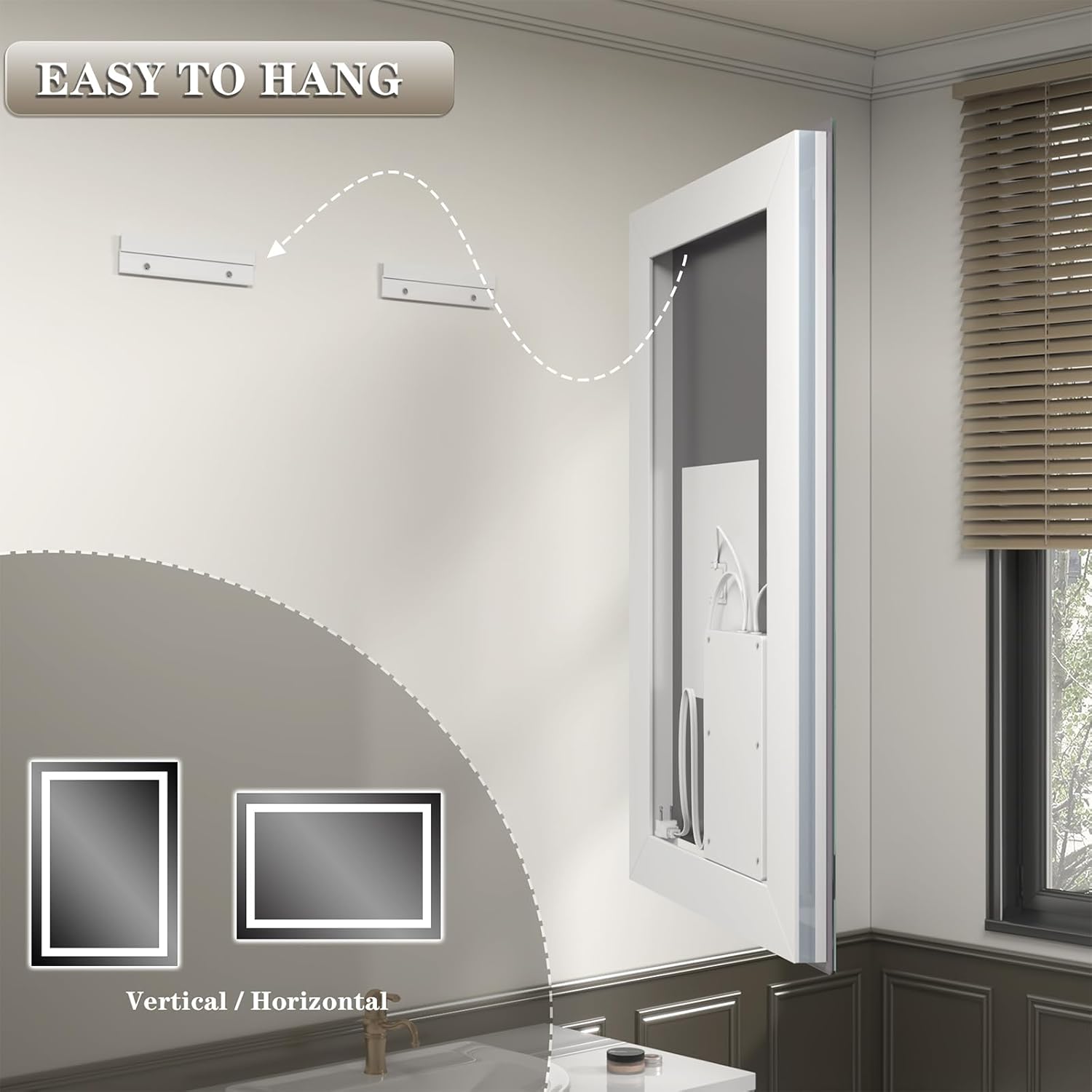
Image 4.2: The mirror's design allows for easy hanging on wall-mounted brackets.
4.2 Power Connection
The mirror offers two power connection options: plug-in or hardwire.
- Plug-in: Connect the mirror's power cord directly into a standard electrical outlet.
- Hardwire: For a seamless installation, the mirror can be hardwired directly into your home's electrical system. This option requires professional installation by a qualified electrician to ensure compliance with local electrical codes and safety standards.
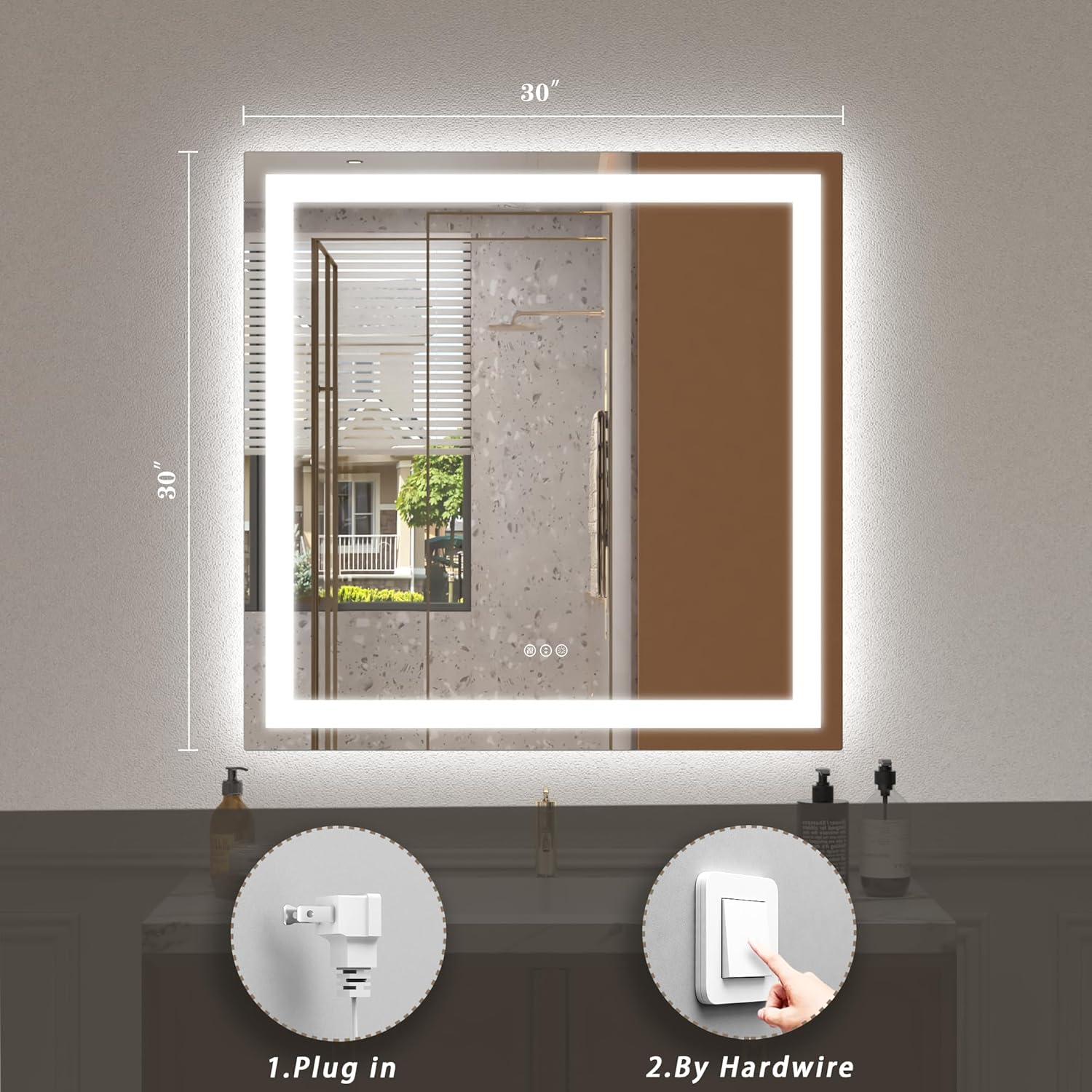
Image 4.3: Choose between plug-in or hardwire installation for power.
5. Operating Instructions
The mirror features touch-sensitive controls integrated into the mirror surface.
5.1 Power On/Off and Light Control
The mirror has both front lights and backlit illumination. Use the touch button to control the lighting.
- Power On/Off: Tap the power icon on the mirror surface to turn the lights on or off.
- Color Temperature Adjustment: Tap the light icon to cycle through three color temperatures:
- Warm White (3000K)
- Natural Light (4500K)
- Cool White (6000K)
- Brightness Dimming: Press and hold the light icon to adjust the brightness level. The brightness will gradually increase or decrease. Release when the desired brightness is reached. The mirror has a memory function that retains the last brightness setting.

Image 5.1: The mirror offers three color temperatures and dimmable brightness.
5.2 Anti-Fog Function
The mirror includes an anti-fog feature to maintain a clear reflection in humid conditions.
- Activate Anti-Fog: Tap the anti-fog icon on the mirror surface to turn the function on. The icon will illuminate white when active.
- Deactivate Anti-Fog: Tap the anti-fog icon again to turn the function off. The icon will illuminate blue when inactive.
- Automatic Shut-off: The anti-fog function will automatically turn off after 1 hour of continuous operation.

Image 5.2: The anti-fog feature ensures a clear mirror surface.
6. Maintenance
- Cleaning: Use a soft, damp cloth with a mild glass cleaner to wipe the mirror surface. Do not use abrasive cleaners or harsh chemicals. Avoid spraying liquids directly onto the mirror's edges or electrical components.
- Inspection: Periodically check the mounting hardware to ensure the mirror remains securely attached to the wall.
- Electrical: Ensure all electrical connections are secure if hardwired. If using a plug, ensure it is firmly seated in the outlet.
7. Troubleshooting
| Problem | Possible Cause | Solution |
|---|---|---|
| Mirror lights do not turn on. | No power supply; loose connection; faulty switch. | Check if the power cord is plugged in or if the hardwire connection is secure. Verify the circuit breaker is not tripped. Ensure the touch switch is functioning. |
| Anti-fog function not working. | Function not activated; power issue. | Tap the anti-fog icon to activate. Check power supply to the mirror. |
| Lights are too dim or too bright. | Brightness setting needs adjustment. | Press and hold the light icon to adjust brightness. |
| Buzzing noise when lights are off. | Electrical interference or component issue. | Ensure proper grounding. If the issue persists, consult a qualified electrician or contact customer support. |
8. Specifications
| Feature | Detail |
|---|---|
| Brand | ODDSAN |
| Model | 30"L x 30"W Lighted LED Bathroom Mirror |
| Dimensions | 30 inches (Length) x 30 inches (Width) |
| Shape | Square |
| Light Type | LED (Front Lights + Backlit) |
| Color Temperature | 3000K (Warm White), 4500K (Natural Light), 6000K (Cool White) |
| Dimmable | Yes |
| Anti-Fog Function | Yes, with 1-hour auto shut-off |
| Glass Type | Tempered, Shatter-Proof Glass |
| Mounting Type | Wall Mount (French Cleat System), Vertical/Horizontal |
| Power Options | Plug-in or Hardwire |
| Certifications | ETL Listed |
| Item Weight | 21.4 pounds |
9. Warranty and Customer Support
For warranty information or technical assistance, please refer to the product packaging or contact ODDSAN customer support through the retailer where the product was purchased. Please have your model number (30"L x 30"W Lighted LED Bathroom Mirror) and purchase date available when contacting support.
You can also visit the ODDSAN Store on Amazon for more information and contact options.
Ask a question about this manual
Ask about setup, troubleshooting, compatibility, parts, safety, or missing instructions. Manuals+ will review the question and use this page’s manual context to help answer it.