
1. Introduction
This manual provides essential information for the safe and efficient operation, installation, and maintenance of your York Iceberg Split Inverter Air Conditioner, Model YHQE30XT2CHS-R4. Please read this manual thoroughly before using the appliance and keep it for future reference.
Safety Information
- WARNING: Only qualified personnel should install, repair, or service this equipment. Improper installation, adjustment, alteration, service, or maintenance can cause property damage, injury, or death.
- Ensure the power supply matches the specifications on the unit's nameplate.
- Do not insert fingers or objects into the air inlet/outlet.
- Keep the remote control out of reach of children.
- Do not attempt to repair the unit yourself. Contact authorized service personnel.
2. Product Features
The York Iceberg Split Inverter Air Conditioner is designed for optimal comfort and energy efficiency. Key features include:
- Powerful Cooling & Heating: 27,600 BTU capacity suitable for areas between 41 to 64 square meters.
- Integrated Wi-Fi Control: Manage your AC settings remotely via a smartphone app.
- Advanced Inverter Technology: Ensures high energy efficiency, contributing to reduced power consumption and electricity bills.
- Quiet Operation: Designed for minimal noise, providing a peaceful environment.
- Modern Design: A sleek and compact unit that complements various interior styles.
- 3D Airflow: Provides even air distribution throughout the room.
- Air Purification Filter: Helps maintain clean and healthy indoor air quality.
- Golden Fins: Enhanced protection against corrosion for extended durability.

Figure 2.1: York Iceberg Indoor Unit. This image shows the sleek, white indoor unit of the York Iceberg air conditioner, designed to blend seamlessly with modern interiors.
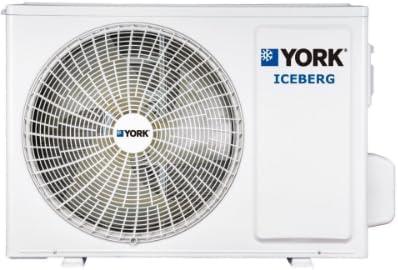
Figure 2.2: York Iceberg Outdoor Unit. The robust outdoor unit of the York Iceberg air conditioner, featuring a large fan for efficient heat exchange.
3. Setup
Proper installation is crucial for the performance and longevity of your air conditioner. It is highly recommended that installation be performed by a certified technician.
3.1 Pre-Installation Checklist
- Verify that the power supply meets the unit's requirements (Voltage: 30V, Power: 40W).
- Ensure adequate space for both indoor and outdoor units for proper airflow and maintenance.
- Confirm that the installation area is structurally sound to support the unit's weight.
- Have all necessary tools and materials ready.
3.2 Indoor Unit Placement
The indoor unit should be mounted on a wall, ensuring it is level and has clear space around it for optimal air circulation. Avoid placing it near heat sources or direct sunlight.
3.3 Outdoor Unit Placement
The outdoor unit should be placed on a stable, level surface, away from direct sunlight and obstructions that could impede airflow. Ensure proper drainage for condensate.
3.4 Electrical Connection
Connect the unit to a dedicated power circuit as specified in the electrical requirements. All electrical work must comply with local codes and regulations.
3.5 Wi-Fi Setup
- Download the "MY YORK" application from your smartphone's app store.
- Follow the in-app instructions to connect your air conditioner to your home Wi-Fi network.
- Once connected, you can control the unit remotely.

Figure 3.1: Remote Wi-Fi Control. This image illustrates the convenience of controlling the air conditioner remotely using a smartphone application, highlighting features like remote power on/off, airflow distribution control, and temperature adjustment.
4. Operating Instructions
Your York Iceberg air conditioner can be operated using the included remote control or via the "MY YORK" Wi-Fi application.
4.1 Remote Control Overview

Figure 4.1: Remote Control. This image displays the remote control for the York Iceberg air conditioner, showing buttons for temperature, mode, fan speed, sleep, health airflow, swing, clock, timer, and power.
4.2 Basic Operations
- Power On/Off: Press the POWER button to turn the unit on or off.
- Mode Selection: Press the MODE button to cycle through modes: Auto, Cool, Dry, Fan, Heat.
- Temperature Adjustment: Use the TEMP + or TEMP - buttons to set your desired temperature.
- Fan Speed: Press the FAN SPEED button to adjust the fan speed (Auto, Low, Medium, High).
- Swing Function: Use the SWING button to activate or deactivate the horizontal and vertical louver swing for 3D airflow.
4.3 Special Functions
- Sleep Mode: Activates a quiet operation mode with gradual temperature adjustments for comfortable sleep.
- Timer Function: Set the unit to turn on or off automatically after a specified period (up to 24 hours).
- Health Airflow: Engages the air purification filter for improved air quality.
Video 4.1: York Air Conditioner Features Overview. This video demonstrates various features of York air conditioners, including smart sleep mode, multi-speed fan, 3D airflow, golden fins, 24-hour timer, and warranty information. While the video title mentions "Stellar", the features shown are generally applicable to York's advanced AC models like the Iceberg.
5. Maintenance
Regular maintenance ensures optimal performance and extends the lifespan of your air conditioner.
5.1 Air Filter Cleaning
- Turn off the unit and disconnect power.
- Open the front panel of the indoor unit.
- Remove the air filters.
- Clean filters with a vacuum cleaner or wash with lukewarm water.
- Dry thoroughly before reinstalling.
- Clean filters every two weeks or more frequently depending on usage.

Figure 5.1: Air Quality Feature. An icon representing clean air, emphasizing the importance of maintaining the air purification filter.
5.2 Outdoor Unit Cleaning
Periodically clean the outdoor unit's coils and fan blades to remove dust and debris. This should ideally be done by a professional technician.
5.3 Seasonal Checks
Before the cooling or heating season, have a qualified technician inspect the refrigerant levels, electrical connections, and overall system operation.
6. Troubleshooting
Before contacting service, check the following common issues:
| Problem | Possible Cause | Solution |
|---|---|---|
| Unit does not turn on | No power, remote control batteries dead, circuit breaker tripped. | Check power supply, replace batteries, reset circuit breaker. |
| Insufficient cooling/heating | Dirty air filters, blocked outdoor unit, wrong mode selected, low refrigerant. | Clean filters, clear obstructions, select correct mode, contact service for refrigerant check. |
| Unusual noise | Loose parts, fan obstruction, compressor issue. | Turn off unit, check for obstructions. If noise persists, contact service. |
| Water leakage from indoor unit | Blocked drain pipe, improper installation. | Check and clear drain pipe. If issue persists, contact service. |
7. Specifications
Detailed technical specifications for the York Iceberg Split Inverter Air Conditioner (Model YHQE30XT2CHS-R4):
| Feature | Detail |
|---|---|
| Model Name | York Iceberg Inverter High Wall Split 27,600 BTU |
| Model Number | YHQE30XT2CHS-R4 |
| Cooling Capacity | 27,600 BTU |
| Heating Capacity | 8.35 kW |
| Capacity (Tons) | 2 Ton |
| Seasonal Energy Efficiency Ratio (SEER) | 14.5 |
| Annual Energy Consumption | 6842 kWh |
| BEE Star Rating | 3 Stars |
| Noise Level | 15 dB |
| Product Dimensions (Indoor Unit) | 27 cm (Depth) x 131.6 cm (Width) x 36.5 cm (Height) |
| Item Weight | 25.5 kg |
| Color | White |
| Installation Type | Split System |
| Compressor Type | Rotary Scroll (Inverter) |
| Filter Type | Nano Aqua Filter |
| Control Method | Remote Control, Wi-Fi App |
| Power Source | Corded Electric |
| Country of Manufacture | China |

Figure 7.1: Saudi Energy Efficiency Label. This label provides details on the unit's cooling capacity, heating capacity, SEER rating, and annual energy consumption, indicating its energy efficiency class.
For more information on energy efficiency, visit: sls.gov.sa
8. Warranty and Support
Your York Iceberg Air Conditioner comes with a comprehensive warranty:
- General Warranty: 2 years
- Compressor Warranty: 7 years
For technical support, service requests, or warranty claims, please contact your local York service center or the retailer from whom you purchased the product. Ensure you have your model number (YHQE30XT2CHS-R4) and proof of purchase available.
For more information about York products and services, visit the official York website or contact customer support.


