
1. Product Overview
The ZEEHOO DC-80 is a versatile 3-in-1 foldable wireless charging station designed to simultaneously charge your iPhone (MagSafe compatible), Apple Watch, and AirPods. Its ultra-compact and foldable design makes it an ideal solution for both home and travel, simplifying your charging setup and reducing cable clutter.

The ZEEHOO DC-80 charging station, showcasing its sleek design and compact form factor.
Official product video demonstrating the ZEEHOO DC-80's foldable design and 3-in-1 charging capabilities.
2. Package Contents
- ZEEHOO DC-80 Wireless Charging Station
- USB Type-C Charging Cable
Note: A 20W or higher wall charger is required for fast charging and is not included in the package.
3. Setup Instructions
- Unfold the Charging Station: Gently unfold the ZEEHOO DC-80 from its compact travel state. The phone charging pad will articulate upwards, and the Apple Watch charging stand will extend.
- Connect Power: Insert the provided USB Type-C charging cable into the charging port on the back of the station. Connect the other end of the cable to a compatible USB wall charger (20W or higher recommended for optimal performance, not included).
- Placement: Place the charging station on a flat, stable surface. Ensure there are no metallic objects or foreign materials between the charging surfaces and your devices.

The top part of the image displays the ZEEHOO DC-80 charging station providing a clean, organized charging solution on a desk. The bottom part contrasts this with a cluttered desk, showing multiple individual chargers and cables, emphasizing the space-saving benefit of the 3-in-1 station.
4. Operating Instructions
4.1 Charging Your Devices
- iPhone (MagSafe Compatible): Place your iPhone onto the upright magnetic charging pad. The strong magnetic alignment will securely hold your device in place and initiate charging. The station supports 15W fast charging for compatible iPhones.
- Apple Watch: Place your Apple Watch onto the dedicated charging stand. Ensure the watch is properly aligned with the charging module. The station provides 3W charging for Apple Watch models.
- AirPods: Place your AirPods charging case onto the flat wireless charging area at the base of the station. Ensure the case is centered on the charging icon. The station provides 5W charging for AirPods.

This image illustrates the ZEEHOO DC-80 charging an iPhone, Apple Watch, and AirPods at the same time, highlighting the 15W (Max) for phone, 3W (Max) for Apple Watch, and 5W for AirPods charging capabilities.
4.2 Adjustable Viewing
The iPhone charging pad offers 360-degree rotation and a 70.5-degree adjustable angle, allowing you to position your phone for optimal viewing in both portrait and landscape modes while charging. This is ideal for video calls, watching media, or using StandBy mode.
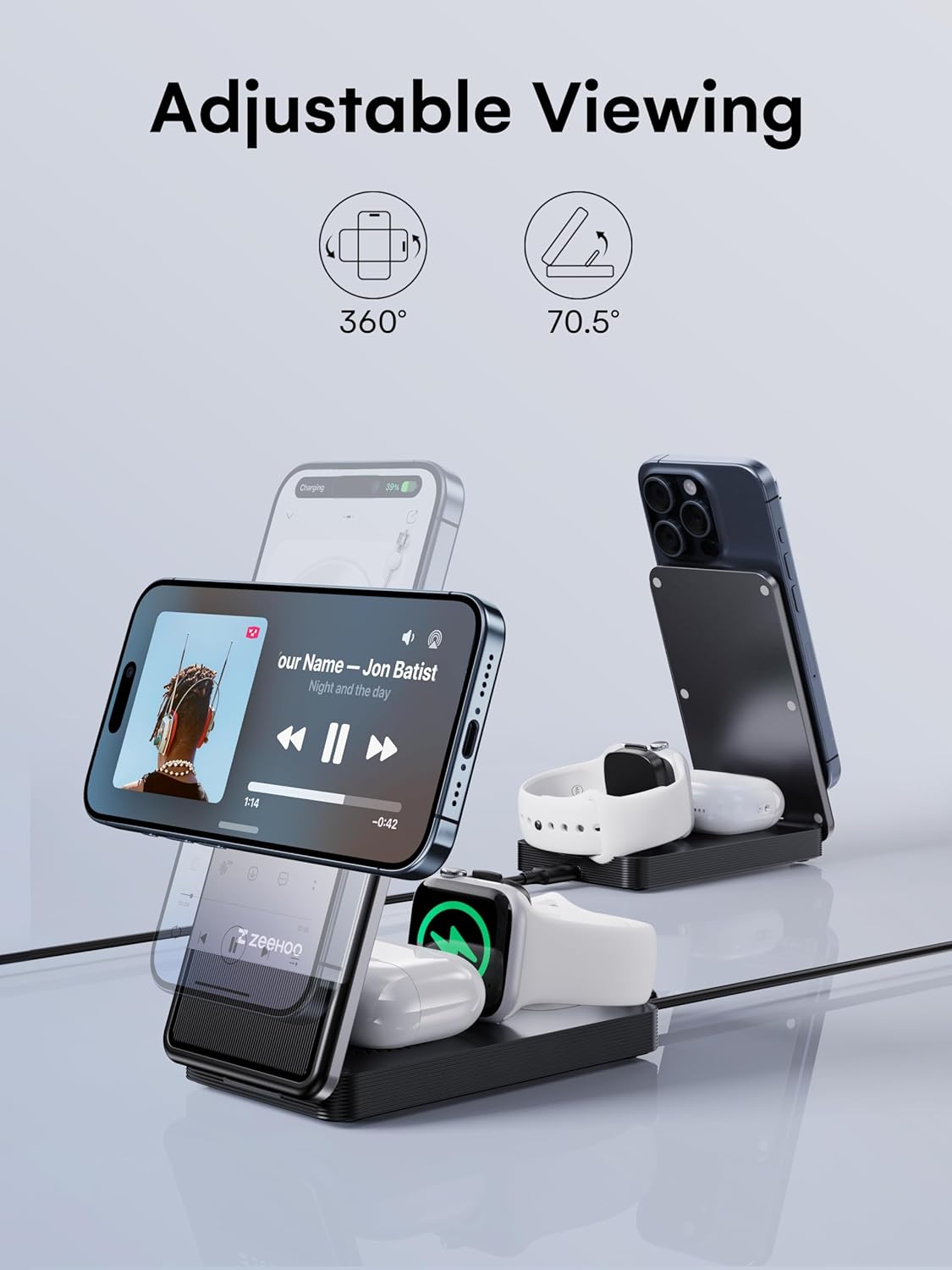
This image shows the ZEEHOO DC-80 charging station with an iPhone positioned horizontally, ideal for watching videos or making video calls. It highlights the 360-degree rotation and 70.5-degree adjustable viewing angle features.
4.3 Portability
When not in use, the charging station can be folded back into its ultra-compact form, making it easy to carry in a bag or pocket for travel.

The top section of the image demonstrates the ultra-slim foldable design of the ZEEHOO DC-80, showing its compact size when folded and unfolded. The bottom section illustrates its portability, with the folded charging station easily fitting into a bag.

This image collage presents various practical uses for the ZEEHOO DC-80 charging station. It shows the device being used upright on a desk while working on a laptop, laid flat for charging, and serving as a bedside charging hub with an iPhone displaying the time.
5. Safety Information
The ZEEHOO DC-80 charging station incorporates comprehensive safety protections to ensure safe and reliable charging:
- Over-Current Protection: Prevents damage from excessive current.
- Over-Voltage Protection: Safeguards against voltage spikes.
- Short-Circuit Protection: Protects against electrical shorts.
- Foreign Object Detection: Prevents charging when foreign metallic objects are detected on the charging surface.
General Safety Precautions:
- Do not expose the device to liquids, moisture, or extreme temperatures.
- Avoid dropping or subjecting the device to strong impacts.
- Do not attempt to disassemble or modify the charging station.
- Use only the provided USB-C cable or a certified equivalent.
6. Maintenance
- Cleaning: Disconnect the charging station from power before cleaning. Use a soft, dry cloth to wipe the surfaces. Avoid using abrasive cleaners or solvents.
- Storage: When not in use, fold the charging station into its compact form and store it in a cool, dry place away from direct sunlight.
7. Troubleshooting
- Device not charging:
- Ensure the charging station is properly connected to a working power source.
- Verify that your wall charger is 20W or higher for optimal performance.
- Check for proper alignment of your device on the charging pad. For iPhones, ensure MagSafe alignment.
- Remove any thick phone cases or metallic objects that might interfere with wireless charging.
- Restart your device and try again.
- Slow charging:
- Confirm you are using a 20W or higher power adapter. Lower wattage adapters will result in slower charging speeds.
- Ensure your device is correctly aligned on the charging pad.
- Avoid using your device extensively while it is charging, as this can slow down the charging process.
- Charging indicator light is too bright:
- The charging indicator light illuminates when a device is actively charging. This is normal operational behavior and indicates that the station is functioning correctly.
8. Specifications
| Model Number | DC-80 |
| Product Dimensions | 2.68 x 4.96 x 0.87 inches |
| Item Weight | 7.2 ounces |
| Input Voltage | 120 Volts |
| Max Phone Output | 15W (for MagSafe compatible iPhones) |
| Max Apple Watch Output | 3W |
| Max AirPods Output | 5W |
| Connector Type | USB Type C |
| Compatible Devices | Cellular Phones (MagSafe compatible), Headphones (Wireless charging cases), Smartwatches (Apple Watch) |
9. Warranty and Support
ZEEHOO products are manufactured with high-quality standards. This product is covered by a limited warranty against defects in materials and workmanship from the date of purchase. Please retain your proof of purchase for warranty claims.
For technical support, warranty inquiries, or any questions regarding your ZEEHOO DC-80 charging station, please contact ZEEHOO customer service. ZEEHOO is committed to responding and resolving your issues within 24 hours.
Contact Information: Please refer to the contact details provided on the ZEEHOO official website or your product packaging for the most up-to-date support channels.


