
1. Product Overview
The Renimer I50 Wireless Earbuds are designed for high-quality audio and convenient use. They feature Bluetooth 5.3 technology, ENC noise-cancelling microphones for clear calls, and an IP7 waterproof rating, making them suitable for various activities.

Image 1.1: Renimer I50 Wireless Earbuds in their charging case, displaying the LED battery indicator.
Package Contents:
- Renimer I50 Wireless Earbuds (Left and Right)
- Charging Case
- USB-C Charging Cable
- User Manual
2. Setup and First Use
2.1 Charging the Earbuds and Case
Before first use, fully charge the earbuds and the charging case. Connect the provided USB-C cable to the charging port on the case and a power source. The dual LED display on the charging case will show the battery percentage of the case and individual earbuds. A full charge typically takes 1.5 hours.

Image 2.1: Illustration of the earbuds and charging case, highlighting the 48-hour total playtime and 1.5-hour fast charging capability.
2.2 Pairing with Your Device
- Ensure the charging case is charged and open the lid. The earbuds will automatically power on.
- On your device (smartphone, tablet, etc.), enable Bluetooth.
- Search for "i50" in the list of available Bluetooth devices and select it to pair.
- Once paired, the earbuds will automatically connect to your device when taken out of the case for subsequent uses.

Image 2.2: Visual guide demonstrating the one-step pairing process with a mobile device.
2.3 Wearing the Earbuds
The earbuds feature an ergonomic design for a secure and comfortable fit. Each earbud weighs approximately 3g. Gently insert the earbuds into your ears and adjust them until they feel snug and stable. This ensures optimal sound quality and comfort during extended use.

Image 2.3: A user wearing the earbuds, demonstrating the comfortable and lightweight design.
3. Operating Instructions
3.1 Touch Controls
The Renimer I50 earbuds are equipped with sensitive touch controls on each earbud for easy management of audio playback, calls, and voice assistant activation.
| Action | Left Earbud (L) | Right Earbud (R) |
|---|---|---|
| Play/Pause | Double Tap | |
| Next Track | Long Tap (2s) | |
| Previous Track | Long Tap (2s) | |
| Answer/End Call | Once Click | |
| Reject Call | Long Tap (2s) | |
| Activate Voice Assistant | Triple Tap | |
| Volume Up | Once Click | |
| Volume Down | Once Click | |

Image 3.1: Detailed diagram illustrating the various touch control functions on the earbuds.
3.2 Audio Quality and Call Functionality
The I50 earbuds feature 14.2mm graphene dynamic drivers and support AAC/SBC audio coding for HiFi stereo sound with enhanced low frequencies. For calls, the integrated 4 HD microphones and ENC (Environmental Noise Cancellation) technology work to filter out external noise, ensuring clear communication even in noisy environments.

Image 3.2: Exploded view of the earbud's 14.2mm dynamic driver, highlighting its components for superior audio.

Image 3.3: Visual representation of the crystal-clear call feature, demonstrating noise reduction during phone conversations.
4. Maintenance
4.1 Water Resistance
The Renimer I50 earbuds are IP7 waterproof, providing protection against sweat and rain. This makes them suitable for workouts and outdoor activities. However, they are not designed for swimming or submersion in water for extended periods.
4.2 Cleaning and Storage
- Regularly clean the earbuds and charging case with a soft, dry, lint-free cloth.
- Avoid using abrasive materials, solvents, or aerosol sprays.
- Store the earbuds in their charging case when not in use to protect them and ensure they remain charged.
- Keep the charging port free of dust and debris.
5. Troubleshooting
5.1 Pairing Issues
- Earbuds not connecting: Ensure Bluetooth is enabled on your device and the earbuds are charged. Place them back in the case, close the lid, then open it again to re-initiate pairing mode.
- "i50" not appearing in Bluetooth list: Turn off and on your device's Bluetooth. If the issue persists, try restarting your device.
5.2 Sound Issues
- No sound or low volume: Check the volume levels on both your device and the earbuds. Ensure earbuds are properly seated in your ears.
- Intermittent sound: Ensure you are within the 15-meter Bluetooth range and there are no significant obstructions between your device and the earbuds.
5.3 Charging Issues
- Earbuds not charging: Ensure the charging contacts on the earbuds and inside the case are clean and dry. Verify the charging cable is securely connected to both the case and the power source.
- Charging case not charging: Try a different USB-C cable or power adapter.
6. Specifications
| Feature | Detail |
|---|---|
| Model Name | I50 |
| Connectivity Technology | Wireless (Bluetooth 5.3) |
| Audio Drivers | 14.2mm Graphene Dynamic |
| Noise Control | ENC Noise Cancelling (for calls) |
| Earbud Weight | 3 Grams (each) |
| Water Resistance | IP7 Waterproof |
| Battery Life (Earbuds) | Up to 8 hours (single charge) |
| Total Playtime (with Case) | Up to 48 hours |
| Charging Time (Case) | Approx. 1.5 hours (USB-C) |
| Wireless Range | Up to 15 meters |
| Control Type | Touch Control |
| Frequency Range | 20 Hz - 20,000 Hz |
| Compatible Devices | Most Bluetooth-enabled devices (iOS 9.0+/Android 5.0+ with Bluetooth 5.0+) |
7. Warranty and Support
7.1 Two-Year Warranty Service
Renimer provides a two-year warranty service for this product. If you encounter any issues such as missing parts, product malfunction, or damage, please contact our customer service team. We are committed to providing a satisfactory solution within the warranty period.

Image 7.1: Information regarding the two-year warranty service provided by Renimer.
7.2 Customer Support
For any questions, concerns, or assistance, Renimer offers 24-hour online customer service. Please contact our support team directly if you:
- Did not receive the product on time.
- Are not satisfied with the product.
- Experience problems during use.
- Cannot return the item through Amazon.
- Find that Amazon customer service cannot solve your problem.
- Have any other suggestions.
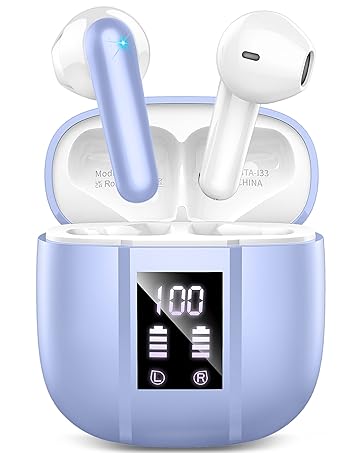
Image 7.2: Information regarding Renimer's 24-hour online customer service.
