
1. Introduction
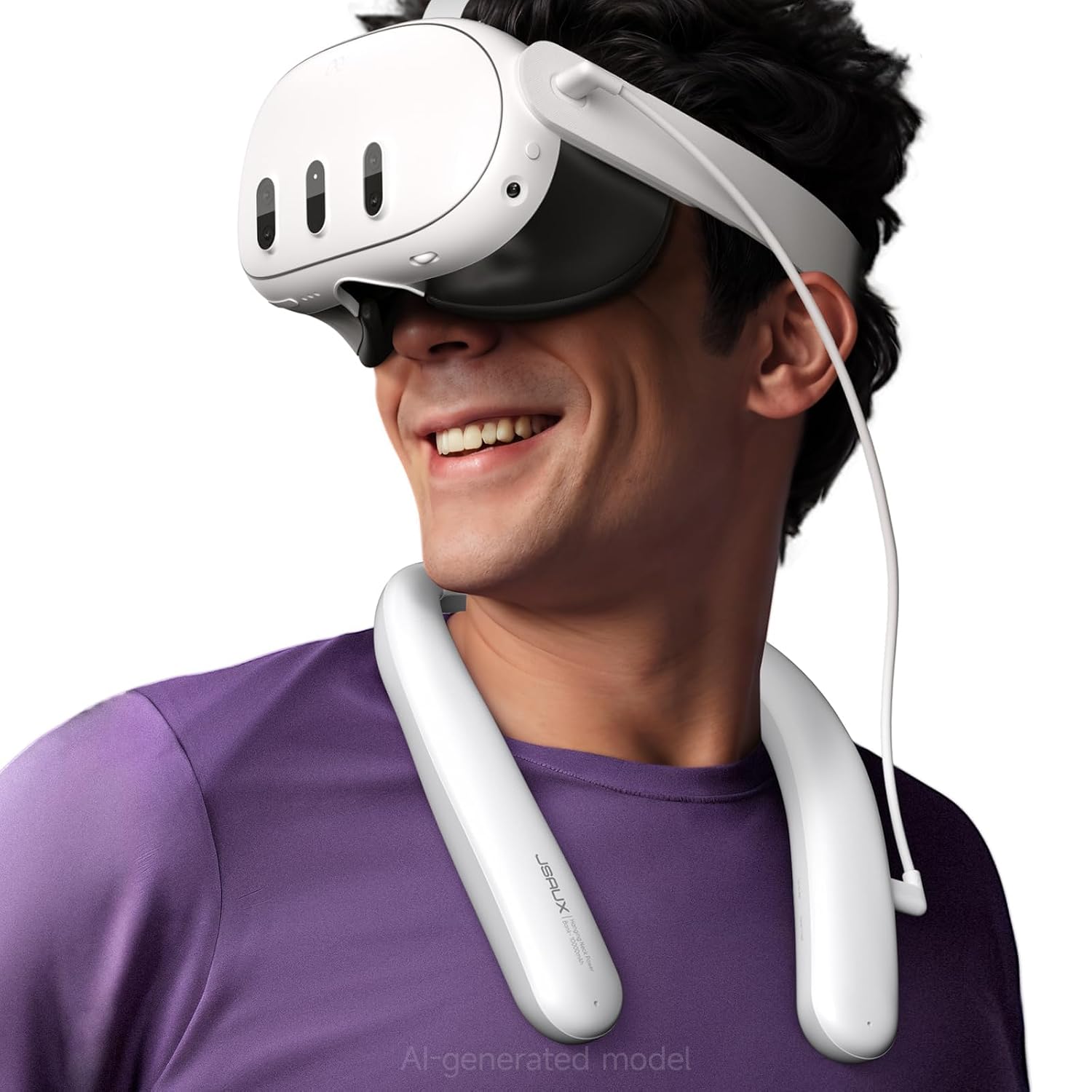
This manual provides instructions for the JSAUX 10000mAh PD VR Neck Power Bank, designed to extend the playtime of your VR headset and improve tracking in low-light conditions. Please read this manual carefully before use to ensure proper operation and safety.
2. Safety Information
- Do not expose the device to extreme temperatures or direct sunlight.
- Keep away from water and other liquids.
- Do not attempt to disassemble or repair the device.
- Use only the provided charging cable or a certified USB-C cable.
- Store in a cool, dry place when not in use.
- Dispose of the battery pack according to local regulations. Do not dispose of in household waste.
3. Package Contents
Verify that all items are present in the package:
- JSAUX 10000mAh PD VR Neck Power Bank
- USB-C Charging Cable
- Silicone Tape Cable Manager
- 2 AA batteries (included)
4. Product Overview
The JSAUX VR Neck Power Bank is a wearable battery pack designed for comfort and extended VR gameplay. It features a 10000mAh capacity and an infrared function to enhance VR tracking.
Components:
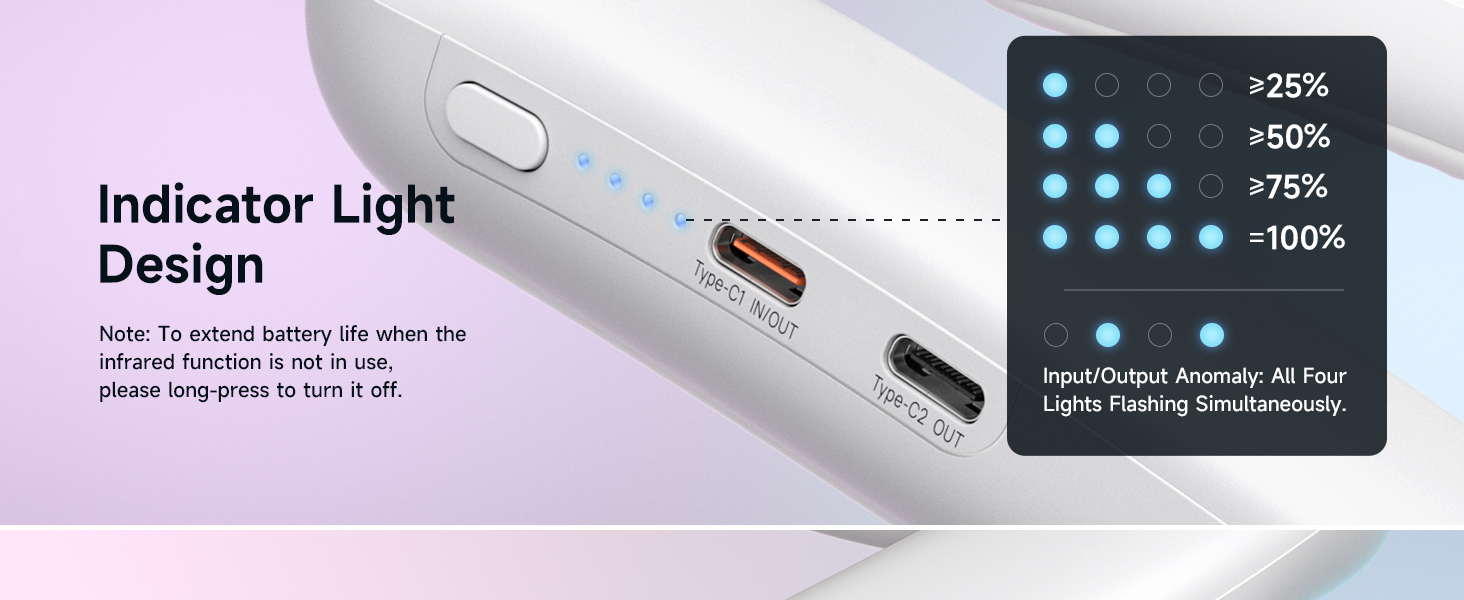
- Type-C1 Input/Output Port: For charging the power bank and charging other devices.
- Type-C2 Output Port: For charging devices.
- Power Button: To turn the device on/off and activate/deactivate the infrared function.
- LED Indicator Lights: Display battery level and charging status.
- Infrared Emitters: Located on the device to assist VR tracking.

5. Setup
5.1 Wearing the Power Bank
- Place the power bank around your neck, ensuring the JSAUX logo faces forward.
- Adjust for a comfortable fit. The flexible design allows for easy adjustment to suit various users.
- Connect the power bank to your VR headset using the provided USB-C cable. Use the silicone tape cable manager to secure the cable and prevent tangling.


6. Operating Instructions
6.1 Charging the Power Bank
- Connect the provided USB-C charging cable to the Type-C1 Input/Output port on the power bank.
- Connect the other end of the cable to a compatible USB power adapter (not included).
- The LED indicator lights will show the charging progress. All four lights indicate a full charge.
6.2 Charging Your VR Headset or Device
- Connect one end of the USB-C charging cable to the Type-C1 Input/Output or Type-C2 Output port on the power bank.
- Connect the other end to your VR headset (e.g., Meta Quest 3S/3/2) or other compatible USB-C device.
- The power bank will automatically begin charging the connected device.
- Note: For Oculus devices, connect to the Type-C1 port for maximum 18W charging.

6.3 Using the Infrared Function
- To activate the infrared function, long-press the power button. The infrared emitters will turn on.
- This function provides additional infrared light to improve VR tracking in low-light environments, reducing 'low light warnings'.
- To deactivate the infrared function, long-press the power button again. This helps extend battery life when the function is not needed.

Video 6.1: This video demonstrates the features and usage of the JSAUX 10000mAh PD Fast Charger Battery Pack for VR Headsets, including its fast charging capabilities and ergonomic design.
7. Maintenance
7.1 Cleaning
Wipe the device with a soft, dry cloth. Do not use harsh chemicals or abrasive cleaners, as these can damage the surface or internal components.
7.2 Storage
Store the power bank in a cool, dry place away from direct sunlight and extreme temperatures. Avoid storing in environments with high humidity.
7.3 Battery Health
To prolong battery life, avoid fully discharging the power bank regularly. Charge it periodically even when not in use to maintain optimal battery health.

8. Troubleshooting
-
Device not charging from power bank:
- Ensure the power bank is charged. Check the LED indicators for battery level.
- Verify the USB-C cable is securely connected to both the power bank and the device.
- Try a different USB-C cable to rule out cable malfunction.
-
Infrared function not working:
- Ensure the infrared function is activated by long-pressing the power button.
- Check for any obstructions blocking the infrared emitters on the power bank.
-
Power bank not charging:
- Ensure the charging cable is connected to the Type-C1 Input/Output port.
- Verify the power adapter is functioning correctly and provides sufficient power.
- Check for any visible damage to the charging cable or ports on the power bank.
9. Specifications
| Feature | Detail |
|---|---|
| Brand | JSAUX |
| Model Name | JSAUX Battery Pack |
| Battery Capacity | 10000 mAh |
| Connector Type | USB Type C |
| Special Features | Infrared function, exclusive hanging neck design |
| Compatible Devices | VR Headset, Pico 4, Pico 4 Pro, PS VR2, HTC Vive, phones, tablets |
| Battery Cell Type | Lithium |
| Battery Weight | 138.6 g |
| Color | White |
| Included Components | USB C Charging Cable, Silicone Tape Cable Manager |
| Number of Batteries | 2 AA batteries required (included) |
10. Warranty Information
This JSAUX product comes with a Limited Warranty. For detailed warranty terms, conditions, and registration information, please refer to the official JSAUX website or contact their customer support directly.
11. Support
For further assistance, technical support, or warranty claims, please visit the official JSAUX website at www.jsaux.com or refer to the contact information provided on the product packaging.