
Introduction
The Boldr Klima Smart Thermostat is designed to provide intelligent climate control for various air conditioning and heating systems, including window A/C units, mini splits, and heat pumps. It offers remote control capabilities via a mobile application, voice command integration with Amazon Alexa and Google Home, smart scheduling, and energy monitoring features to enhance comfort and optimize energy consumption.
Package Contents
Verify that all items listed below are present in your Boldr Klima Smart Thermostat package:
- 1x Klima Smart Thermostat Unit
- 1x Magnetic Wall Mount
- 1x Dock Mount
- 1x USB-C Cable
- 1x Power Brick (with interchangeable plugs for US, EU, AU)
- 1x Quick Guide
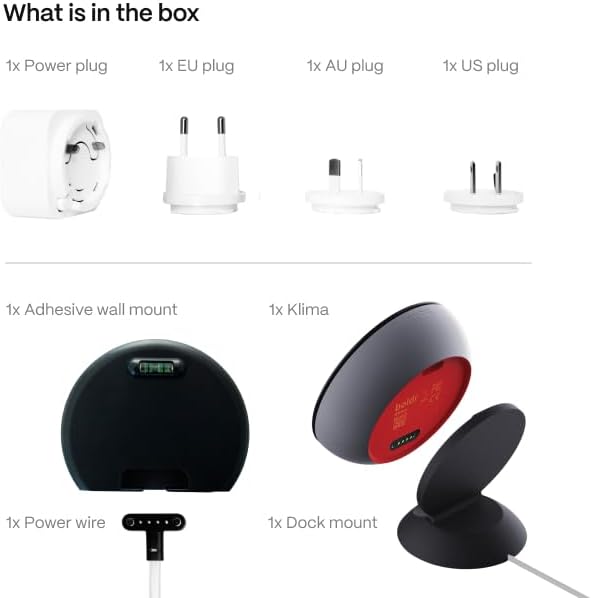
Image: Components included in the Boldr Klima Smart Thermostat package. This includes the main Klima device, a magnetic wall mount, a dock mount for tabletop use, a USB-C power cable, a power adapter with interchangeable international plugs (US, EU, AU), and a quick start guide.
Product Overview
The Boldr Klima Smart Thermostat features a sleek design crafted from low-carbon aluminum and mirror glass, providing both durability and an elegant aesthetic. It integrates a clear LCD display for temperature and settings, along with touch controls for direct interaction. The device is designed for effortless DIY installation, offering both wall-mount and dock-mount options.

Image: The Boldr Klima Smart Thermostat in Graphite Grey, positioned next to a mini-split air conditioning unit and a smartphone displaying the Klima app interface. The thermostat shows a temperature of 70 degrees Fahrenheit, and the app reflects similar climate control settings, highlighting the integrated system.
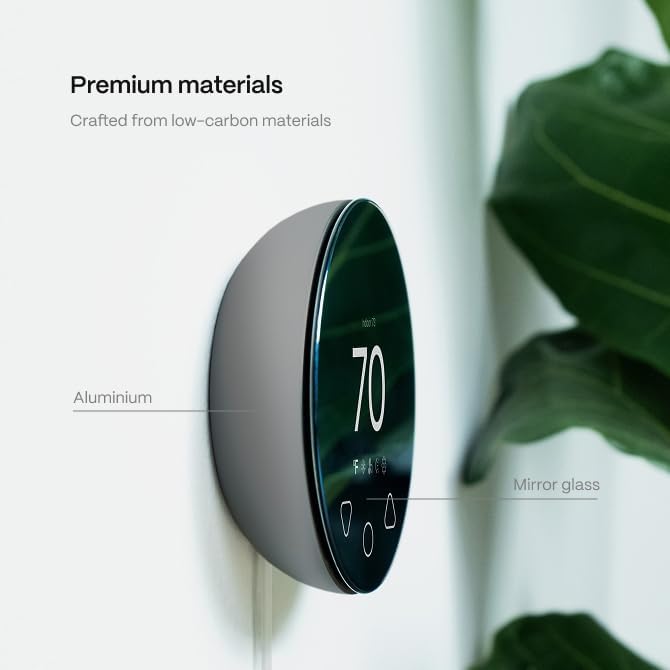
Image: A detailed view of the Boldr Klima Smart Thermostat, emphasizing its construction from premium materials like aluminum and mirror glass. The image points out these components, illustrating the device's quality and design.
Installation
Physical Placement
The Klima thermostat offers flexible placement options:
- Wall Mount: Use the included magnetic wall mount for a renter-friendly, adhesive installation. Ensure the surface is clean and dry before applying.
- Dock Mount: Place the Klima unit on any flat surface using the provided dock mount. This is ideal for desks, shelves, or nightstands.

Image: The Boldr Klima Smart Thermostat resting on its dock mount, showcasing its round shape and digital display indicating 70 degrees Fahrenheit. This setup is suitable for placement on any flat surface.
Power Connection
Connect the Klima thermostat to a standard power outlet using the provided USB-C cable and power brick. The device requires 5 Volts of power.
Initial Setup
App Download & Account Creation
- Download the Boldr Energy App from your device's app store (available for iOS and Android).
- Open the app and create a new user account. Follow the on-screen prompts for email verification.
Device Pairing
- Ensure your Klima thermostat is powered on and within range of your Wi-Fi network.
- In the Boldr Energy App, select the option to add a new device.
- Follow the in-app instructions to pair the Klima thermostat with your home Wi-Fi network. The device uses both Bluetooth and Wi-Fi for connectivity.
AC Unit Pairing
The Klima thermostat learns and controls your existing AC unit by mimicking its remote control signals. During the setup process, the app will guide you through identifying your AC unit's brand and model to ensure proper communication.
Operation
Manual Control
The Klima thermostat features touch controls on its display for direct temperature adjustments and mode changes without needing the app.
App Control (Remote Access & Zonal Control)
The Boldr Energy App provides comprehensive control over your climate from anywhere. You can adjust settings, change modes, and monitor temperatures remotely. For homes with multiple Klima units, the app allows for individual room control, enabling zonal climate management to optimize comfort and energy savings.

Image: A smartphone screen showing the Boldr Klima app interface, which allows users to control their entire home's climate. The screen displays indoor temperatures for various rooms like Master Bedroom, Living Room, Kitchen, and Office, demonstrating the ability to manage multiple zones from a single interface.
Smart Scheduling
Create customizable weekly schedules through the intuitive app interface. This feature allows you to set specific temperature profiles for different times of the day and days of the week, ensuring your home is always at the desired temperature without manual adjustments.
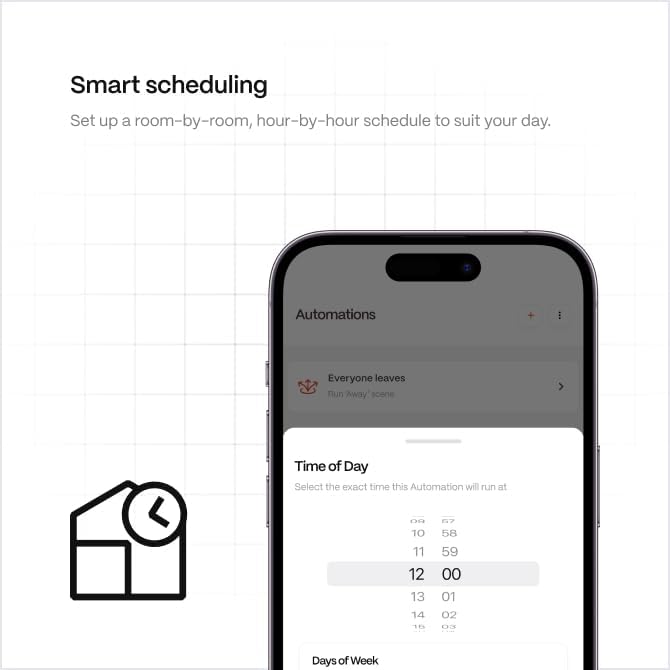
Image: A screenshot of the Boldr Klima app's scheduling interface, demonstrating how users can set up room-by-room, hour-by-hour schedules. The image shows options for selecting time of day and days of the week for automated climate control.
Energy Monitoring
The Klima thermostat allows you to track energy usage and costs over time directly within the app. This feature provides real-time consumption data and accurate bill predictions, helping you understand and optimize your energy efficiency.

Image: The Boldr Klima app's dashboard showing energy monitoring features. It displays live usage in watts, along with hourly, daily, weekly, and monthly consumption data, including estimated costs, to help users track and manage their energy consumption.
Voice Control Integration
Klima pairs seamlessly with Amazon Alexa and Google Assistant, enabling convenient voice commands to control your air conditioning or heating system. You can turn systems on/off, change temperatures, and inquire about current settings using simple voice prompts.

Image: Amazon Alexa and Google Home smart speakers positioned near the Boldr Klima Smart Thermostat. Speech bubbles illustrate common voice commands such as "Alexa, turn on my AC," "Turn the heating up a notch," "Turn the heating off," "Turn the aircon on," and "What's the temperature," demonstrating the thermostat's compatibility with these voice assistants.
Compatibility
The Boldr Klima Smart Thermostat is designed to be compatible with a wide range of AC brands and models that utilize a remote control with a display. This includes various types of units such as Ceiling Cassette, Window AC, Portable AC, and Mini-split AC systems.
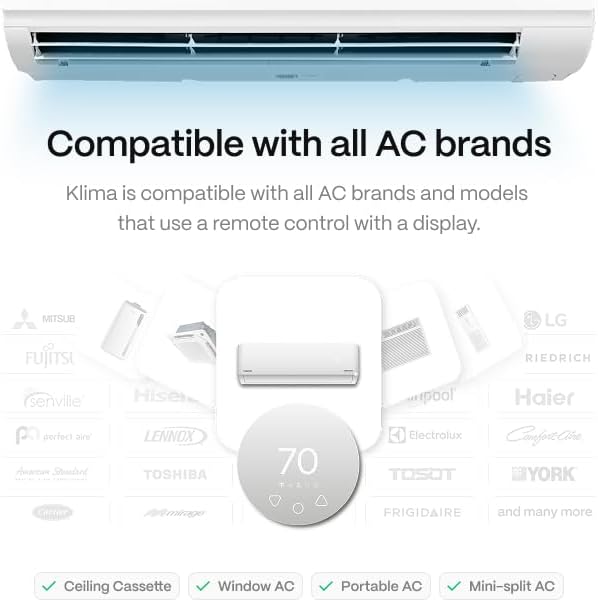
Image: A graphic illustrating the broad compatibility of the Boldr Klima Smart Thermostat with numerous AC brands. Logos of various manufacturers like Mitsubishi, Daikin, Fujitsu, Carrier, LG, and others are displayed, along with checkmarks indicating compatibility with Ceiling Cassette, Window AC, Portable AC, and Mini-split AC types.
Care and Maintenance
- Cleaning: Use a soft, dry cloth to clean the exterior of the thermostat. Avoid abrasive cleaners or solvents that could damage the finish or display.
- Software Updates: Ensure your Boldr Energy App is always updated to the latest version to receive new features, performance improvements, and security patches for your Klima thermostat. Firmware updates for the device will be managed through the app.
- Power: Always use the provided power brick and USB-C cable to power the device.
Troubleshooting
Common Issues and Solutions
- Device Not Powering On:
- Ensure the USB-C cable is securely connected to both the Klima unit and the power brick.
- Verify that the power brick is plugged into a functional wall outlet.
- Try a different power outlet.
- Unable to Connect to Wi-Fi:
- Ensure your Wi-Fi network is 2.4 GHz. The Klima thermostat may not support 5 GHz networks.
- Check your Wi-Fi password for accuracy.
- Move the Klima unit closer to your Wi-Fi router to improve signal strength.
- Restart your Wi-Fi router and the Klima thermostat.
- AC Unit Not Responding to Klima:
- Ensure the Klima thermostat has a clear line of sight to your AC unit's infrared receiver. Obstructions can block signals.
- Verify that the correct AC unit brand and model were selected during the app setup process. If incorrect, re-pair the AC unit through the app settings.
- Confirm your AC unit's original remote control is functioning correctly.
- App Not Displaying Correct Temperature/Status:
- Ensure your smartphone has a stable internet connection.
- Close and reopen the Boldr Energy App.
- Check if the Klima thermostat itself is displaying the correct information.
- Voice Commands Not Working:
- Ensure your Klima thermostat is properly linked to your Amazon Alexa or Google Home account via their respective apps.
- Verify that your voice assistant device is online and functioning.
- Use the exact commands specified in the voice assistant's app or the Klima app.
For further assistance, please refer to the support section or contact Boldr customer service.
Technical Specifications
| Brand | BOLDR |
| Model Name | Klima |
| Product Dimensions | 1.18"D x 3.94"W x 3.94"H |
| Controller Type | Amazon Alexa, Android, Google Assistant, iOS |
| Special Features | Auto-Away Mode, Auto-Scheduling, Geofence Technology, Programmable, Temperature Display |
| Color | Graphite Grey |
| Specific Uses For Product | Air Conditioner, Heat Pump |
| Temperature Control Type | Heating & Cooling |
| Connectivity Technology | Bluetooth, Wi-Fi |
| Included Components | Magnetic Wall Mount, Power Brick, Quick Guide, USB C Cable |
| Power Source | Corded Electric |
| Item Weight | 250 Grams (8.8 ounces) |
| Voltage | 5 Volts |
| Material | Aluminum, Glass, Plastic |
| Display Type | LCD |
| Mounting Type | Wall Mount |
| Manufacturer | Boldr |
Warranty and Support
The Boldr Klima Smart Thermostat comes with a manufacturer's warranty. For specific details regarding warranty coverage, duration, and terms, please refer to the warranty card included in your product packaging or visit the official BOLDR website. For technical support, troubleshooting assistance beyond this manual, or warranty claims, please contact BOLDR customer service through their official channels. Contact information can typically be found on the BOLDR website or in the product's quick guide.


