
1. Introduction
Thank you for choosing the Roinside Electric Scooter RS-AD-R22. This manual provides essential information for the safe operation, assembly, maintenance, and troubleshooting of your electric scooter. Please read this manual thoroughly before your first ride to ensure optimal performance and safety.

The Roinside Electric Scooter RS-AD-R22 is designed for efficient commuting.
2. Safety Guidelines
Your safety is paramount. Always wear a helmet and appropriate protective gear when riding. Adhere to local traffic laws and regulations. Avoid riding in adverse weather conditions or on slippery surfaces. Ensure the scooter is in good working order before each use.
- Always wear a helmet and protective gear.
- Check brakes, tires, and battery level before each ride.
- Do not ride under the influence of alcohol or drugs.
- Observe local traffic laws and regulations.
- Avoid riding in heavy rain, snow, or on icy roads.
3. Initial Setup and Assembly
The Roinside Electric Scooter RS-AD-R22 requires minimal assembly. Follow these steps to prepare your scooter for its first ride:
- Unboxing: Carefully remove all components from the packaging. Inspect for any damage.
- Handlebar Attachment: Attach the handlebar to the main stem. Secure it using the provided screws and tools. Ensure all connections are tight.
- Cable Connection: Connect any loose cables according to the diagrams in the quick start guide.
- Initial Charge: Fully charge the scooter's battery before its first use. Refer to the charging section for details.
This video demonstrates the assembly process and initial setup of the electric scooter.
This video provides an overview of unboxing and initial setup steps.
4. Operating Instructions
4.1 Power On/Off
To power on the scooter, press and hold the power button on the handlebar display until the screen illuminates. To power off, press and hold the power button again until the display turns off.
4.2 Riding Modes
The Roinside Electric Scooter features multiple riding modes to suit different preferences and conditions:

The display shows different speed modes for varied riding experiences.
- Glide Start Mode: Requires a push-off to initiate movement, then automatically maintains a constant speed.
- Electric Start Mode: Provides immediate acceleration from a standstill.
- Speed Modes: Cycle through different speed settings (e.g., Eco, Standard, Sport) by pressing the mode button on the display.
4.3 Braking System
The scooter is equipped with a dual braking system for reliable stopping power:
- Disc Braking: Engaged via the brake lever on the handlebar.
- EABS Regenerative Anti-lock Braking: Provides additional stopping power and recharges the battery during braking.
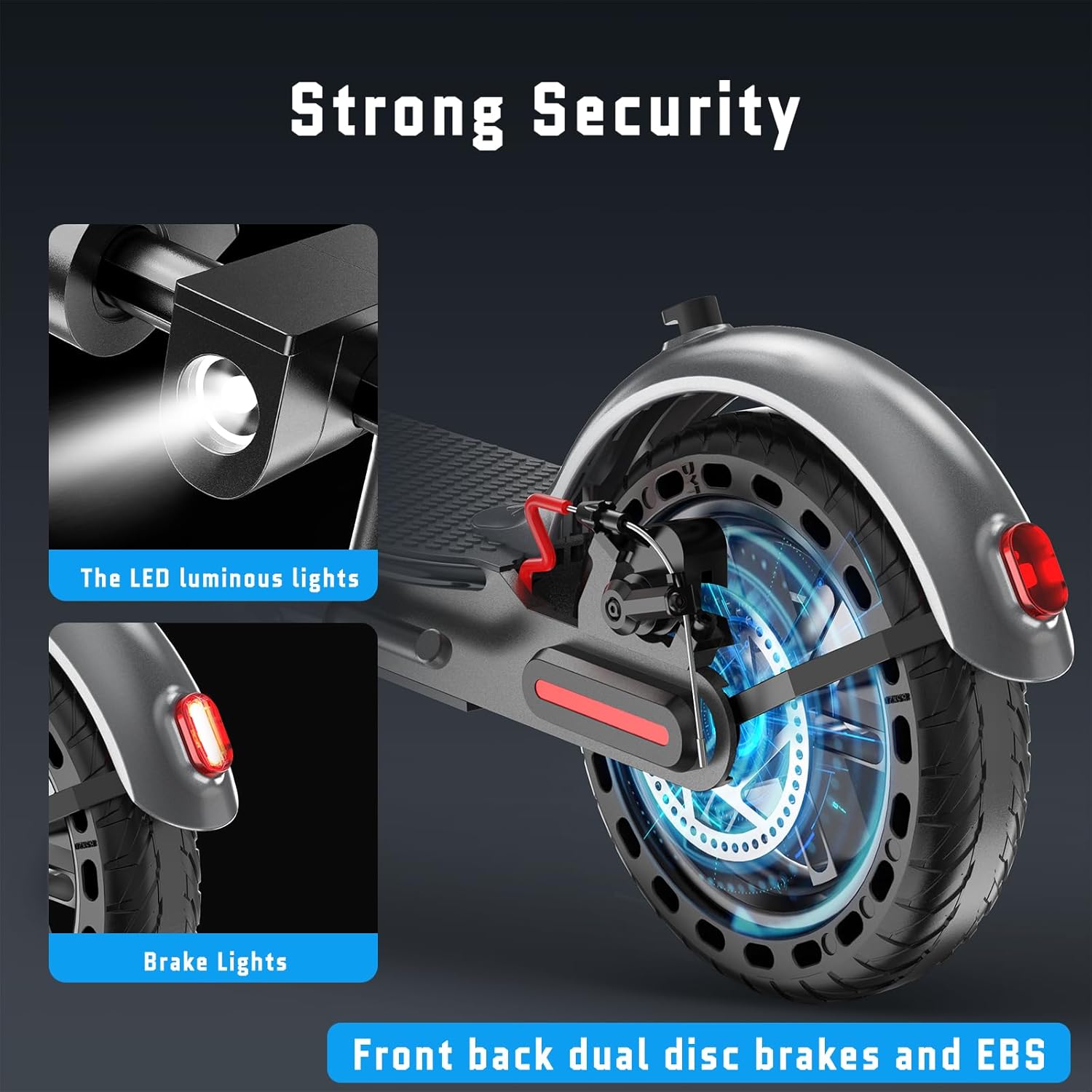
Detail of the rear wheel with disc brake and integrated brake lights for enhanced safety.
4.4 Lights and App Control
The scooter features an integrated LED headlight and brake lights for visibility. Utilize the smartphone app to control the LED display, cruise system, Bluetooth connectivity, speed mode selection, and a locking function to secure your scooter.

The handlebar controls include power, speed adjustment, and light switch for easy access.
5. Maintenance
Regular maintenance ensures the longevity and safe operation of your Roinside Electric Scooter.
- Tire Pressure: Check tire pressure regularly. The 8.5-inch solid tires require minimal maintenance but ensure they are free from damage.
- Brake Inspection: Periodically inspect the disc brakes and EABS system for wear and proper function. Adjust or replace components as needed.
- Cleaning: Clean the scooter with a damp cloth. Avoid using high-pressure water or harsh chemicals.
- Battery Care: Charge the 323Wh battery for approximately 4 hours. Avoid overcharging or completely draining the battery to prolong its lifespan. Store the scooter in a cool, dry place when not in use.
6. Troubleshooting
If you encounter any issues with your scooter, refer to the following common troubleshooting tips:
- Scooter Not Turning On: Ensure the battery is charged and the power button is pressed firmly.
- Reduced Range/Speed: Check tire pressure, ensure the battery is fully charged, and verify that you are in the desired speed mode. Rider weight and terrain can also affect performance.
- Brake Issues: Inspect brake cables and pads for wear. Adjust cable tension if brakes feel loose.
- App Connectivity: Ensure Bluetooth is enabled on your smartphone and the scooter is powered on and within range.
For persistent issues, please contact customer support.
7. Specifications
Below are the key specifications for the Roinside Electric Scooter RS-AD-R22:
| Feature | Specification |
|---|---|
| Brand | Roinside |
| Model Number | RS-AD-R22 |
| Motor Power | 350W |
| Max Speed | Up to 19 MPH |
| Battery Capacity | 323Wh |
| Charging Time | Approximately 4 Hours |
| Max Distance Range | Up to 20 Miles |
| Tire Type | 8.5" Solid Tires |
| Braking System | Double Braking (Disc Brake, EABS Regenerative Anti-lock Braking) |
| Max Weight Capacity | 265 Pounds |
| Item Weight | 28 Pounds |
| Suspension Type | Front Suspension |

Visual representation of the powerful motor and performance capabilities.

The scooter features a portable folding design for easy transport and storage.
8. Warranty and Support
Roinside offers a 12-month service period for various parts, including returns and exchanges. For any questions, concerns, or support needs, please contact Roinside customer service through the platform where you purchased the product or refer to the contact information provided in your product packaging.