
Dabbsson DBS1000Pro
Dabbsson Portable Power Station DBS1000 Pro User Manual
Comprehensive instructions for operating, maintaining, and troubleshooting your Dabbsson DBS1000 Pro portable power station.
1. Introduction
Thank you for choosing the Dabbsson DBS1000 Pro Portable Power Station. This manual provides essential information for the safe and efficient use of your device. Please read it thoroughly before operation and retain it for future reference.

Image: The Dabbsson DBS1000 Pro Portable Power Station, showcasing its front panel with various ports and a digital display, alongside a smartphone screen demonstrating the companion app's interface.
2. Safety Information
Always observe the following safety precautions to prevent injury or damage to the device:
- Do not disassemble, repair, or modify the unit.
- Keep the unit away from fire, heat sources, and direct sunlight.
- Avoid exposure to water or high humidity.
- Do not use the unit if it is damaged or has been dropped.
- Ensure proper ventilation during use and charging.
- Keep out of reach of children and pets.
- Dispose of the product according to local regulations.
Battery Safety and Certifications
The DBS1000 Pro utilizes a semi-solid LiFePO4 battery, known for its enhanced safety and longevity. It is designed with multiple protection features.

Image: An illustration of the internal semi-solid LiFePO4 battery structure, highlighting its 4500+ cycle life and 15+ years lifespan, along with safety certifications including EMC Class-B, UL2743, ETL, Dab Shield Protection System, and a 5-year warranty period.
The unit is constructed from high-quality ABS and PC fire-retardant materials, achieving UL94-V0 certification for safety. An AI Algorithm-Powered BMS (Battery Management System) provides comprehensive protection during charging and discharging.
3. Product Overview and Components
Package Contents
The following items are included with your Dabbsson DBS1000 Pro:
- 1 x DBS1000 Pro Portable Power Station
- 1 x AC Charging Cable
- 1 x Car Charging Cable
- 1 x Solar Charging Cable
- 1 x User Manual

Image: A visual representation of the Dabbsson DBS1000 Pro package contents, including the power station, AC charging cable, car charging cable, solar charging cable, and user manual.
Unit Features and Ports
The DBS1000 Pro is equipped with various input and output ports to power a wide range of devices.

Image: A detailed diagram illustrating the various ports available on the Dabbsson DBS1000 Pro, including USB-A (2x 18W, 1x 12W), USB-C (2x 100W, 1x 30W), DC 5521 (2x 50W), Car Power Outlet (1x 126W 10A), and AC Outlets (4x 2000W, Power Boost Mode 3000W).
- AC Outlets: 4x 120V AC (Pure Sine Wave, 2000W continuous, up to 3000W with Power Boost Mode)
- USB-A Ports: 2x 18W, 1x 12W
- USB-C Ports: 2x 100W, 1x 30W
- Car Power Outlet: 1x 126W 10A
- DC 5521 Ports: 2x 50W
- Input Ports: AC, Solar (XT60), Car
- Digital Display: Shows battery level, input/output power, remaining runtime.
- LED Light: Integrated light with multiple modes.
4. Setup
Initial Charging
Before first use, fully charge the DBS1000 Pro. Connect the AC charging cable to the unit's AC input port and then to a wall outlet. The digital display will indicate charging status. It is recommended to fully charge the unit every 3 months if not in regular use.
App Installation (Optional)
For advanced control and monitoring, download the Dabbsson Smart App from your device's app store. Follow the in-app instructions to pair your power station.
5. Operating Instructions
Charging the Power Station
The DBS1000 Pro offers multiple charging methods:
- AC Charging: Connect the AC charging cable to a standard wall outlet. The unit supports up to 1200W AC input, charging from 0% to 80% in approximately 50 minutes.
- Solar Charging: Connect compatible solar panels (up to 1200W max input) to the XT60 solar input port using the provided solar charging cable. MPPT technology ensures efficient solar conversion. A full charge from 0% to 100% can be achieved in approximately 1.2 hours under ideal solar conditions.
- Car Charging: Use the car charging cable to connect the unit to your vehicle's 12V/24V cigarette lighter port.

Image: The Dabbsson DBS1000 Pro being charged from a standard AC wall outlet, reaching 80% in 47 minutes, and also being charged by solar panels, reaching 100% in 1.2 hours with 1200W solar input.
Using the Power Station (Discharging)
To use the output ports, press the corresponding power button (AC, USB, DC) to activate them. The digital display will show the output wattage.
- AC Output: Connect your AC appliances to the 120V AC outlets. The unit provides 2000W continuous power, with a peak of 3000W in Power Boost Mode.
- USB Output: Connect your USB-powered devices to the USB-A or USB-C ports.
- DC Output: Use the DC 5521 ports or the car power outlet for compatible 12V devices.

Image: An illustration demonstrating the Dabbsson DBS1000 Pro powering various home appliances, including a smartphone (49 times), television (3 hours), refrigerator (2.2 hours), router (35 hours), and coffee maker (52 minutes), highlighting its 1024Wh capacity and 2000W rated power.
Expandable Capacity
The DBS1000 Pro's capacity can be expanded from 1024Wh up to 10240Wh by connecting additional DBS2000B batteries. This allows for increased power output (up to 4400W) and longer runtimes for demanding applications.

Image: A visual guide demonstrating the expandable capacity of the Dabbsson DBS1000 Pro, showing configurations from a single unit (2000W, 1024Wh) to two units with four DBS2000B batteries (4400W, 10240Wh).
Emergency Power Supply (EPS) Function
The DBS1000 Pro can function as an Emergency Power Supply (EPS). When connected to an AC wall outlet and powering devices, it will automatically switch to battery power within 15 milliseconds during a power outage, providing seamless backup for critical equipment.

Image: A scene depicting the Dabbsson DBS1000 Pro providing emergency power during a thunderstorm, with a laptop and lamp remaining operational, emphasizing its less than 15ms power switch time.
Smart App Control
The Dabbsson Smart App allows you to monitor and manage your DBS1000 Pro remotely. Features include real-time status updates, energy management, low battery reminders, and scheduled startup/shutdown/charging/discharging to optimize energy usage and potentially save on electricity bills.
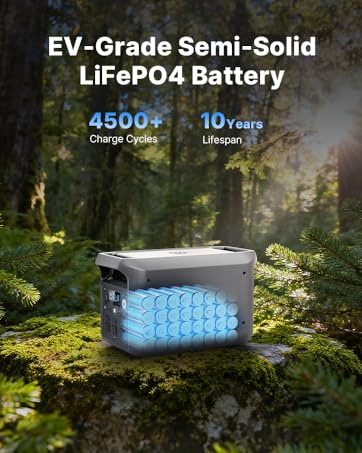
Image: A smartphone displaying the Dabbsson Smart App interface, showing options for scheduled startup, shutdown, charging, and discharging, illustrating the time management feature for optimizing energy use.
Versatile Lighting Modes
The integrated LED light offers customizable lighting with soft glow, powerful beam, and SOS modes for various situations.

Image: The Dabbsson DBS1000 Pro illuminating a dark outdoor camping scene, demonstrating its versatile lighting modes for different environments.
6. Maintenance
- Cleaning: Use a dry, soft cloth to clean the exterior of the unit. Do not use harsh chemicals or abrasive materials.
- Storage: Store the unit in a cool, dry place, away from direct sunlight and extreme temperatures. For long-term storage, charge the battery to approximately 50-80% every 3-6 months to maintain battery health.
- Battery Care: The semi-solid LiFePO4 battery is designed for longevity (4500+ cycles to 80% capacity). Avoid fully discharging the battery frequently to prolong its lifespan.
- Ventilation: Ensure the ventilation openings are clear of dust and debris to prevent overheating.
7. Troubleshooting
| Problem | Possible Cause | Solution |
|---|---|---|
| Unit does not turn on. | Battery is depleted. | Connect to an AC outlet and charge the unit. |
| AC output not working. | AC output is not enabled. Overload protection activated. | Press the AC power button. Reduce the load on the AC outlets. |
| Slow charging via solar. | Insufficient sunlight. Panels not optimally angled. Dirty panels. | Ensure panels are in direct sunlight and angled correctly. Clean panels. |
| App connection issues. | Bluetooth/Wi-Fi off. Unit not in pairing mode. | Ensure Bluetooth/Wi-Fi is enabled on your phone and the unit. Refer to app instructions for pairing. |
| Unit overheating. | Poor ventilation. Excessive load. | Ensure vents are clear. Reduce connected load. Allow unit to cool down. |
If the problem persists, please contact Dabbsson customer support.
8. Specifications

Image: A person carrying the Dabbsson DBS1000 Pro power station in an outdoor setting, with callouts for its weight (36.5 lbs / 15.6 kg) and dimensions (17 inches length, 10 inches width, 9.7 inches height), emphasizing its compact and portable design.
| Feature | Detail |
|---|---|
| Brand | Dabbsson |
| Model Name | DBS1000Pro |
| Battery Type | Semi-Solid LiFePO4 |
| Capacity | 1024Wh |
| AC Output (Rated) | 2000W |
| AC Output (Peak/Boost) | 3000W (Power Boost Mode) |
| Max Expandable Capacity | 10240Wh (with DBS2000B batteries) |
| Max Expandable Output | 4400W (with DBS2000B batteries) |
| AC Input | 1200W (0-80% in ~50 mins) |
| Solar Input | 1200W Max (MPPT, 0-100% in ~1.2 hours) |
| Car Charging Input | 12V/24V |
| USB-A Output | 2x 18W, 1x 12W |
| USB-C Output | 2x 100W, 1x 30W |
| Car Power Outlet | 1x 126W 10A |
| DC 5521 Output | 2x 50W |
| Battery Cycle Life | 4500+ cycles to 80% capacity |
| Estimated Battery Lifespan | 15+ years |
| EPS Switch Time | <15ms |
| Weight | 36.5 lbs (16.5 kg) |
| Dimensions (L x W x H) | 14.25" x 10.83" x 8.7" |
| Material | ABS, PC (UL94-V0 fire-retardant) |
| Special Features | Digital Display, Overload Protection, Rechargeable Battery, Remote Start (via app), Short Circuit Protection, AI Algorithm-Powered BMS, Versatile Lighting Modes |
9. Warranty and Support
Warranty Information
The Dabbsson DBS1000 Pro comes with a 3+2 Years Warranty. Please refer to the official Dabbsson website or your purchase documentation for full warranty terms and conditions.
Customer Support
For technical assistance, troubleshooting, or warranty claims, please contact Dabbsson customer support. Our team is available to provide expert support.

Image: A group of customer service representatives wearing headsets, indicating available support for Dabbsson products.
You can typically find contact information on the Dabbsson official website or within the Dabbsson Smart App.
Related documentsDBS1000Pro


Ask a question about this manual
Ask about setup, troubleshooting, compatibility, parts, safety, or missing instructions. Manuals+ will review the question and use this page’s manual context to help answer it.