1. Introduction
This user manual provides essential information for the safe and effective installation, operation, and maintenance of the Anchilly SZMD DZKA-5 Trigger Switch, Model 90553261. Please read this manual thoroughly before using the product and retain it for future reference. This trigger switch is designed for use in compatible power tools, providing reliable control with a rated voltage of 250V and current of 10A.
2. Safety Information
Always observe the following safety precautions to prevent injury or damage to the product:
- Electrical Safety: Ensure the power supply is disconnected before installation, maintenance, or troubleshooting. Work with electricity can be hazardous.
- Qualified Personnel: Installation and replacement should only be performed by qualified and experienced personnel.
- Correct Voltage/Current: Verify that the trigger switch's rated voltage (250V) and current (10A) match the requirements of the tool it is being installed into.
- Secure Connections: Ensure all electrical connections are secure and properly insulated to prevent short circuits or electrical shock.
- Environmental Conditions: Do not expose the switch to excessive moisture, dust, or extreme temperatures unless specified for such conditions. The switch has an IP65 rating, indicating protection against dust and low-pressure water jets.
- Intended Use: Use the switch only for its intended purpose as a power tool trigger switch.
3. Product Overview
The Anchilly SZMD DZKA-5 Trigger Switch is a replacement component designed for various power tools. It features a robust construction and is rated for 250V and 10A operation. Key components include the trigger mechanism, internal contacts, and screw terminals for electrical connections.

Figure 3.1: Front view of the SZMD DZKA-5 Trigger Switch. This image displays the main trigger lever and the printed electrical specifications, including 250V and 10A ratings.
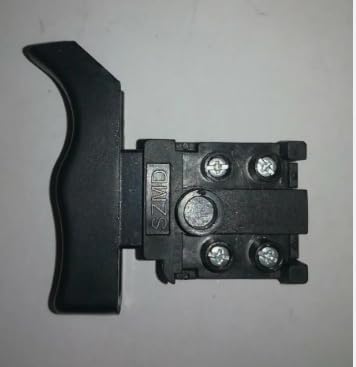
Figure 3.2: Back view of the SZMD DZKA-5 Trigger Switch. This image highlights the screw terminals where electrical wires are connected for power input and output.

Figure 3.3: Side view of the SZMD DZKA-5 Trigger Switch. This perspective illustrates the depth and overall profile of the switch body.

Figure 3.4: Dimensional drawing of the SZMD DZKA-5 Trigger Switch. This technical drawing provides precise measurements in millimeters, useful for compatibility assessment and installation planning.
4. Specifications
| Feature | Specification |
|---|---|
| Model Number | 90553261 |
| Part Number | SZMD DZKA-5 |
| Brand | Anchilly |
| Operation Mode | Manual |
| Current Rating | 10 Amps |
| Operating Voltage | 250 Volts |
| Contact Type | Normally Open |
| Connector Type | Screw Terminals |
| Terminal | Screw |
| Circuit Type | 1-way |
| Actuator Type | Rotary |
| Contact Material | Metal |
| International Protection Rating | IP65 |
| Number of Positions | 1 |
| Wattage | 2500 Watts |
| UPC | 749691465001 |
5. Setup and Installation
5.1. Before Installation
- Disconnect Power: Always ensure the power tool is unplugged from its power source before beginning any installation or repair work.
- Identify Original Switch: Carefully observe how the existing trigger switch is wired and mounted within the power tool. Take photos if necessary for reference.
- Compatibility Check: Confirm that the SZMD DZKA-5 switch is the correct replacement part for your specific power tool model. Refer to the dimensional drawing (Figure 3.4) and specifications.
- Gather Tools: You may need screwdrivers, wire strippers, and possibly a multimeter for testing.
5.2. Installation Steps
- Access the Switch: Open the casing of your power tool to gain access to the existing trigger switch. This usually involves removing screws.
- Disconnect Wiring: Carefully disconnect the wires from the old trigger switch. Note the position of each wire (e.g., line, load, auxiliary connections).
- Remove Old Switch: Unmount the old switch from its housing.
- Install New Switch: Place the Anchilly SZMD DZKA-5 Trigger Switch into the designated slot in the tool's housing. Ensure it fits securely.
- Connect Wiring: Connect the wires to the screw terminals of the new switch, matching the configuration of the original switch. Ensure connections are tight and secure. Refer to any wiring diagrams provided with your power tool or the original switch.
- Secure Casing: Carefully reassemble the power tool casing, ensuring no wires are pinched and all screws are tightened.
- Test Functionality: Plug the power tool into a power source and perform a brief test to ensure the switch operates correctly (e.g., tool turns on/off as expected). Observe for any unusual sounds, smells, or sparks. If any issues arise, immediately disconnect power and re-check installation.
6. Operation
The Anchilly SZMD DZKA-5 Trigger Switch operates as a standard power tool trigger. When installed correctly, pressing the trigger will complete the electrical circuit, supplying power to the tool's motor. Releasing the trigger will open the circuit, cutting power to the motor and stopping the tool. Some power tools may incorporate additional features like variable speed control or a lock-on button, which are functions of the tool's design and not inherent to the basic operation of this trigger switch itself.
7. Maintenance
The SZMD DZKA-5 Trigger Switch is designed for durability and requires minimal maintenance. However, regular inspection can prolong its lifespan and ensure safe operation:
- Visual Inspection: Periodically inspect the switch for any signs of physical damage, cracks, or wear on the trigger mechanism.
- Cleanliness: Keep the area around the trigger free from excessive dust, debris, or moisture. Use a dry, soft cloth to clean the exterior. Do not use harsh chemicals or abrasive cleaners.
- Connection Check: If the tool is frequently disassembled or subjected to vibration, periodically check the screw terminals to ensure wires remain securely connected. Always disconnect power before performing this check.
- Functionality Test: If the tool exhibits intermittent power or unusual behavior, test the switch's responsiveness. If it feels sticky or unresponsive, it may require replacement.
8. Troubleshooting
If you encounter issues with your power tool after installing the SZMD DZKA-5 Trigger Switch, refer to the following table for common problems and solutions:
| Problem | Possible Cause | Solution |
|---|---|---|
| Tool does not turn on | No power to tool Loose wiring connections Faulty switch | Check power outlet and tool's power cord. Disconnect power and re-check all wire connections to the switch. If connections are secure, the switch may be faulty and require replacement. |
| Tool turns on intermittently | Loose wiring connections Intermittent fault in switch | Disconnect power and tighten all wire connections. If problem persists, the switch may have an internal fault and require replacement. |
| Switch feels stiff or stuck | Debris in mechanism Internal damage | Disconnect power and carefully inspect for any foreign objects obstructing the trigger. Clean if necessary. If no debris, the switch may be damaged and require replacement. |
| Smoke or burning smell | Overload Short circuit Faulty component | Immediately disconnect power. Do not use the tool. This indicates a serious electrical issue. Seek professional repair. |
If troubleshooting steps do not resolve the issue, or if you are unsure about performing any repairs, it is recommended to consult a qualified technician or the power tool manufacturer.
9. Warranty and Support
For warranty information regarding the Anchilly SZMD DZKA-5 Trigger Switch, please refer to the terms and conditions provided by your original point of purchase or contact the manufacturer directly. Keep your purchase receipt as proof of purchase. Technical support may be available through the seller or the power tool manufacturer for compatibility and installation guidance.