
1. Introduction
This manual provides essential instructions for the installation, operation, and maintenance of your MJX Hyper Go RC Vehicle Wheels and Tires. These wheels and tires are specifically designed for MJX Hyper Go RC models M162 and M163, and may also be compatible with 16207, 16208, 16209, and 16210 series vehicles. Please read this manual thoroughly before installation to ensure proper use and longevity of your product.
2. Safety Information
Always observe the following safety precautions to prevent injury or damage to your RC vehicle:
- Keep small parts away from children. This product is not intended for use by children under 12 years of age.
- Ensure all components are securely fastened before operating the RC vehicle.
- Do not modify the wheels or tires. Unauthorized modifications can compromise performance and safety.
- Inspect wheels and tires regularly for wear, damage, or debris.
- Use appropriate tools for installation and removal to avoid damage to the parts or injury.
3. Package Contents
Verify that all items are present in your package:
- 2 x MJX Hyper Go RC Vehicle Wheels & Tires
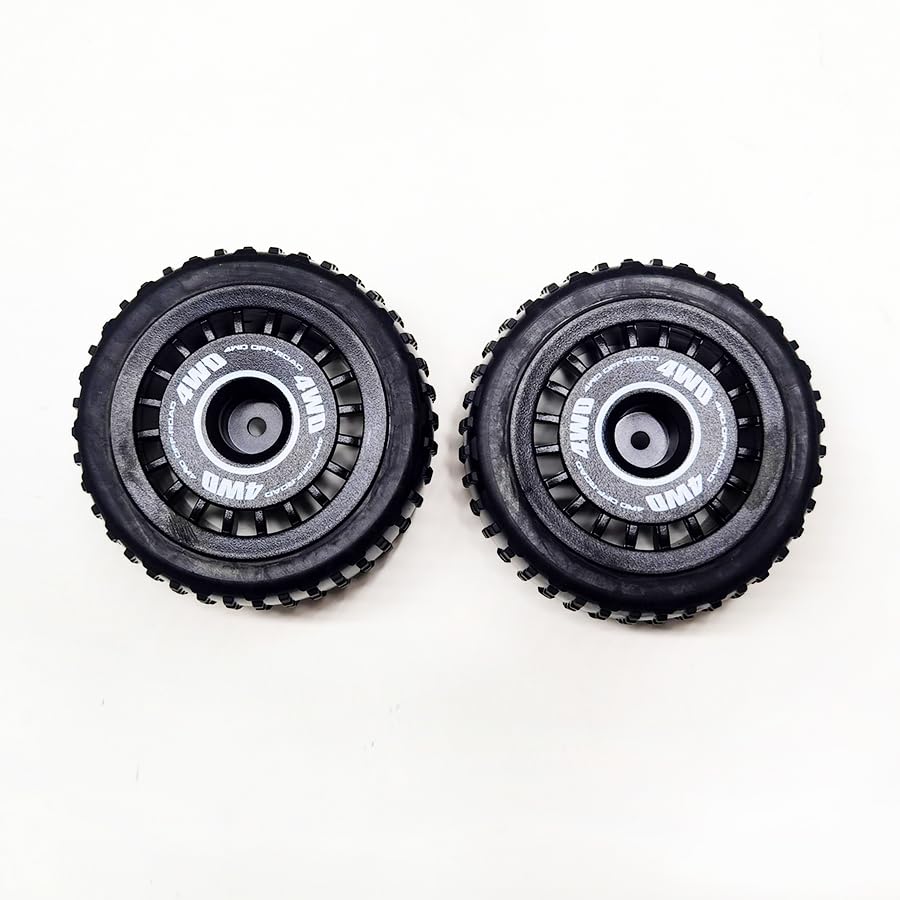
Figure 3.1: A set of two MJX Hyper Go RC vehicle wheels and tires, designed for models such as the M162 and M163. The tires feature an aggressive tread pattern for off-road performance, mounted on black multi-spoke rims.
4. Setup and Installation
Follow these steps to properly install the new wheels and tires on your MJX Hyper Go RC vehicle:
- Prepare the Vehicle: Ensure your RC vehicle is powered off and placed on a stable, flat surface.
- Remove Existing Wheels:
- Locate the wheel nuts or screws securing the existing wheels to the axle.
- Using an appropriate wrench or screwdriver, carefully loosen and remove the fasteners.
- Gently pull the old wheel and tire assembly off the axle. Keep the fasteners in a safe place if you intend to reuse them or for future reference.
- Inspect Axle and Hub: Before installing the new wheels, inspect the vehicle's axle and wheel hub for any damage, dirt, or debris. Clean if necessary.
- Install New Wheels:
- Align the new MJX Hyper Go wheel and tire assembly with the vehicle's axle. Ensure the hex hub on the wheel properly engages with the hex on the axle.
- Push the wheel onto the axle until it sits flush against the hub.
- Re-attach the wheel nuts or screws. Tighten them securely, but do not overtighten, as this can strip threads or damage the wheel/axle. Ensure the wheel spins freely without excessive wobble.
- Repeat for all Wheels: Follow the same procedure for all wheels you intend to replace.
- Final Check: After installation, gently shake each wheel to ensure it is firmly attached. Spin each wheel by hand to confirm smooth rotation and no binding.
5. Operating Guidelines
While these wheels and tires are designed for durability and performance, proper operating practices will extend their lifespan:
- Terrain Awareness: These tires feature an aggressive tread suitable for various off-road conditions. Avoid prolonged use on abrasive surfaces like concrete or asphalt if not designed for it, as this can accelerate tread wear.
- Avoid Obstacles: While robust, direct impacts with sharp or hard obstacles can damage rims or puncture tires.
- Check Before Each Run: Always perform a quick visual inspection of your wheels and tires before operating your RC vehicle to check for any damage or loose components.
6. Maintenance
Regular maintenance helps preserve the condition and performance of your wheels and tires:
- Cleaning: After use, especially in dirty or wet conditions, clean the wheels and tires. Use a soft brush or cloth to remove dirt, mud, and debris. Avoid harsh chemicals that could degrade the rubber or plastic.
- Inspection: Periodically inspect the tire tread for excessive wear, cracks, or punctures. Check the wheel rims for cracks, bends, or damage. Ensure the wheel nuts remain tight.
- Storage: Store wheels and tires in a cool, dry place away from direct sunlight and extreme temperatures. Prolonged exposure to UV light can degrade rubber.
7. Troubleshooting
Here are some common issues and their solutions:
| Problem | Possible Cause | Solution |
|---|---|---|
| Wheel wobbles excessively | Loose wheel nut; damaged wheel hex; bent axle. | Tighten wheel nut. Inspect wheel hex for damage and replace if necessary. Check axle for bends and replace if needed. |
| Poor grip/traction | Worn tire tread; incorrect tire for terrain; dirt/debris on tires. | Replace worn tires. Ensure tires are suitable for the operating surface. Clean tires thoroughly. |
| Tire separates from rim | Adhesive failure; extreme impact. | Re-glue the tire to the rim using appropriate RC tire adhesive. If rim is damaged, replace the wheel assembly. |
| Difficulty installing wheel | Misalignment of hex; debris in hub. | Ensure hex on wheel aligns perfectly with axle hex. Clean any debris from the wheel hub or axle. |
8. Specifications
| Feature | Detail |
|---|---|
| Product Type | RC Vehicle Wheels & Tires |
| Brand | MJX |
| Compatibility | MJX Hyper Go M162, M163. Also compatible with 16207, 16208, 16209, 16210 series. |
| Quantity | 2 pieces per package |
| Dimensions (Approx.) | 5 x 5 x 5 inches (per wheel/tire assembly) |
| Manufacturer | MJX - HELIDIRECT |
9. Warranty and Support
For warranty information or technical support regarding your MJX Hyper Go RC Vehicle Wheels & Tires, please contact your retailer or the manufacturer directly. Keep your proof of purchase for any warranty claims.
Manufacturer: MJX - HELIDIRECT
For further assistance, please visit the official MJX or Helidirect website, or contact their customer service.


