
ATOTOZONE A6PL
ATOTOZONE A6PF Plus 9-inch QLED Android Car Stereo Instruction Manual
Model: A6PL
1. Introduction
This manual provides detailed instructions for the installation, operation, and maintenance of your ATOTOZONE A6PF Plus 9-inch QLED Android Double DIN Car Stereo. Please read this manual thoroughly before using the product to ensure proper functionality and safety.
2. Key Features
- Android 10.0 with 8-Core Processor: Features an 8-Core ARM Cortex A55 processor and 4GB RAM + 64GB storage for smooth performance.
- Integrated 4G LTE & Versatile Connectivity: Built-in 4G LTE for independent connectivity, along with Wi-Fi, USB, and Bluetooth Tethering options.
- DriveChat AI Driving Assistant: ChatGPT-powered voice control for managing stereo functions, calls, and music playback. Customizable wake-up words and Drivebots for tailored advice.
- Wireless CarPlay & Android Auto: Seamless wireless connection for CarPlay and Android Auto, with automatic reconnection after initial pairing. Supports MirrorLink for unsupported apps.
- Enhanced Audio Quality: Advanced DSP with 36-Band EQ, Time Correction, and Speed Compensated Volume Control (SCVC). Built-in amplifier (Max 4x45W, 4x24W RMS).
- GPS Tracking with TrackHU App: Real-time vehicle tracking with up to 5-second refresh rates, OsmAnd's 4-satellite positioning, playback management, reports, and geofence alerts.
- Dual Bluetooth Functionality: BT1 for calls and audio streaming, BT2 for third-party device connections. Automatic unlock feature when phone is connected to BT1.
- Dual Zone Video Output: Simultaneous video viewing on multiple screens (requires separate adapters AC-AHV68 or AC-AHV48).
- 9-inch QLED Touchscreen: High-definition 1280x720p QLED display for clear visuals.
3. Package Contents
The following components are included in your package:
- 9-inch QLED touchscreen head unit
- In-dash audio receiver and multimedia system
- GPS tracking module
- Wiring harness (Power Cable, Rear Camera Input, RCA Connector)
- 4G LTE Antenna
- USB External Storage cable
- USB Phone Link cable
- GPS Antenna
- External Microphone
- Double-DIN Brackets
- Mounting Brackets
- Screen Protector (1 pack)
- Mounting Screws
- Adaptive Cage
Note: Dash kits, wiring cables, antenna adapters, and USB TPMS are not included and may be required for specific vehicle installations.

Figure 3.1: Product dimensions and included accessories.
4. Installation
4.1 Physical Dimensions
The A6PF Plus features a 9-inch screen. The main unit has standard double DIN dimensions for compatibility with most dash kits. Refer to the diagram below for detailed measurements.

Figure 4.1: Standard Double DIN Size and Dimensions.
4.2 Wiring Diagram
Proper wiring is essential for the functionality of your car stereo. Follow the diagram below for connecting power, speakers, and other peripherals. Ensure all connections are secure before powering on the unit.
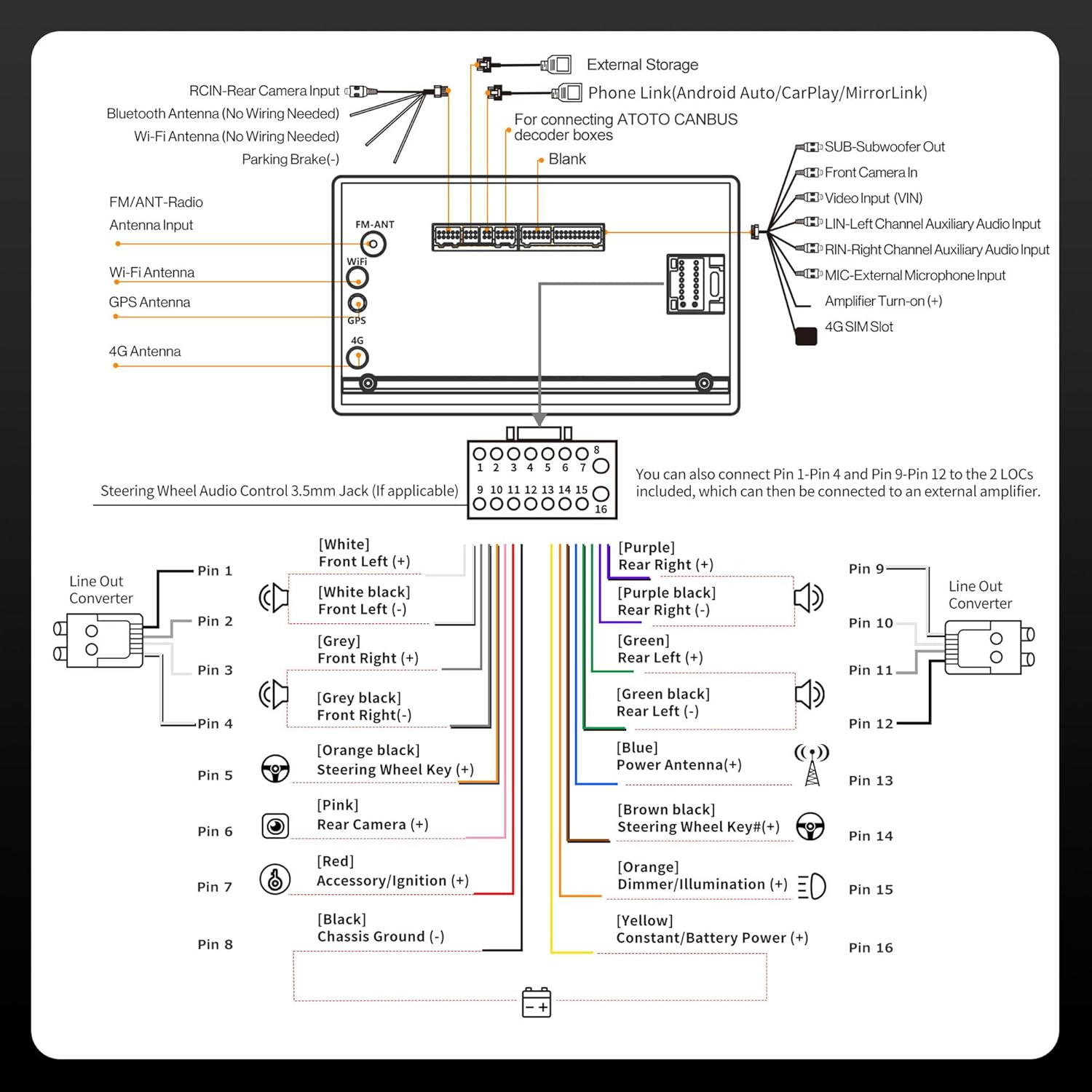
Figure 4.2: Main Wiring Harness Connections.
4.3 Universal Fitment
The A6PF Plus is designed for universal fitment in most double DIN dash kits. If your package includes a Line Out Converter, follow its instructions for connection. If not, locate the RL & RR wires from your package and use the FL and FR wires from the included RCA Connector for RCA output. Additional accessories like dash kits, wiring cables, and antenna adapters may be required depending on your specific vehicle model. Use the SBV (Search By Vehicle) tool for customized compatibility information.
5. Operating Instructions
5.1 Home Screen Navigation
The home screen provides quick access to frequently used applications. Swipe left or right to view additional app pages. Tap on an icon to launch the corresponding application. The bottom bar features quick access controls for volume, track skipping, and returning to the home screen.

Figure 5.1: Home Screen Overview.
5.2 Connectivity
The A6PF Plus offers multiple ways to stay connected:
- 4G LTE: Utilize the built-in 4G LTE for independent internet access and navigation.
- Wi-Fi: Connect to available Wi-Fi hotspots.
- Bluetooth Tethering: Share your phone's internet connection via Bluetooth.
- USB Tethering: Share your phone's internet connection via USB.

Figure 5.2: Internet Access Options.
5.3 Smart Features (CarPlay, Android Auto, MirrorLink, DriveChat AI)
Enjoy seamless smartphone integration and an AI driving assistant:
- Wireless CarPlay & Android Auto: Connect your iPhone or Android device wirelessly for navigation, music, messages, and more.
- MirrorLink: Use MirrorLink to display and control apps from your smartphone that are not natively supported by CarPlay or Android Auto.
- DriveChat AI: Interact with the ChatGPT-powered DriveChat app for voice commands, answering calls, managing music, and receiving expert advice from various Drivebots. Customize wake-up words for a personalized experience.

Figure 5.3: Wireless CarPlay and Android Auto.

Figure 5.4: DriveChat AI Assistant.
5.4 Audio System
Optimize your audio experience with the following features:
- Digital Signal Processor (DSP): Provides balanced sound and advanced audio processing.
- 36-Band EQ: Customize your sound profile with a 36-band equalizer.
- Time Correction: Adjust audio timing to ensure sound from all speakers reaches your ears simultaneously.
- Speed Compensated Volume Control (SCVC): Automatically adjusts volume based on your vehicle's speed for consistent audio levels.
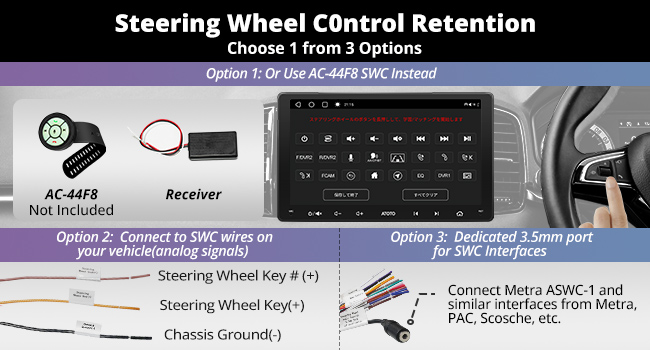
Figure 5.5: Enhanced Audio Features.
5.5 Navigation & GPS Tracking
The A6PF Plus supports both online and built-in GPS for offline navigation. Utilize the TrackHU app for advanced vehicle tracking:
- Real-time Tracking: Monitor your vehicle's location with up to 5-second refresh rates using OsmAnd's 4-satellite positioning.
- Track Playback: Review past routes and driving history.
- Instant Alerts: Receive notifications for geofence breaches and other events.
Video 5.1: Demonstration of the TrackHU GPS Tracking APP for Android System, highlighting its features and interface.
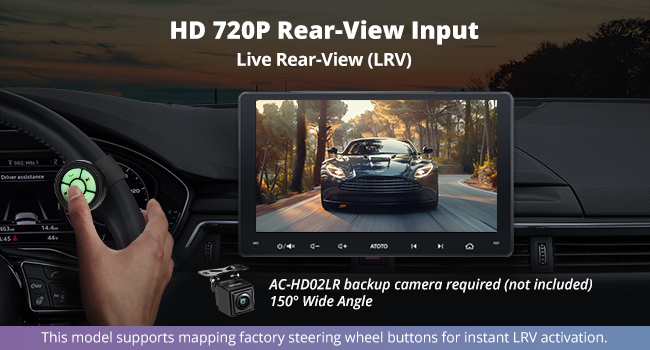
Figure 5.6: TrackHU App Features.
5.6 Display & Video
- 9-inch QLED Touchscreen: Enjoy a vibrant 1280x720p HD display with a 178° viewing angle.
- Dual Zone Video Output: Connect external monitors (e.g., for rear-seat entertainment) via optional AC-AHV68 (USB to HDMI) or AC-AHV48 (USB to RCA) adapters for simultaneous viewing.
- HD 720P Rear View Camera Input: Supports live rear view (LRV) and night vision with compatible cameras (e.g., AC-HD02LR, sold separately).
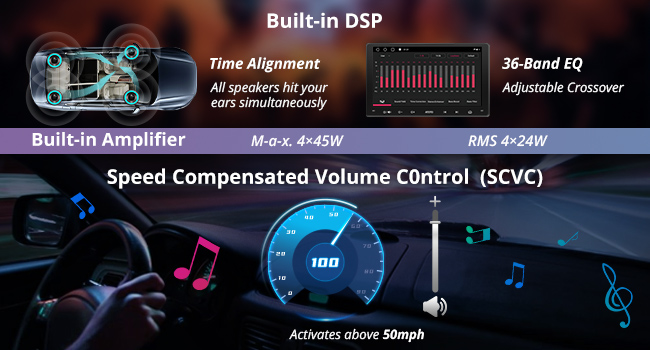
Figure 5.7: QLED Touchscreen Display.

Figure 5.8: Dual Zone Video Output.

Figure 5.9: HD Rear View Camera Input.
5.7 Steering Wheel Control (SWC)
The A6PF Plus supports steering wheel control retention. You have several options for connecting your vehicle's SWC:
- Option 1: Use an optional AC-44F8 wireless remote.
- Option 2: Connect to SWC wires on your vehicle (analog signals).
- Option 3: Utilize the dedicated 3.5mm port for SWC interfaces (e.g., Metra ASWC-1).

Figure 5.10: Steering Wheel Control Options.
5.8 Dual Bluetooth
The unit features dual Bluetooth modules:
- BT1: Handles hands-free calling and audio streaming. Supports automatic screen lock/unlock for privacy as you approach or leave the vehicle.
- BT2: Connects with various third-party Bluetooth devices.

Figure 5.11: Dual Bluetooth Functionality.
5.9 Fast Boot
The A6PF Plus is designed for fast boot-up, typically less than 2 seconds. This feature protects your battery and ensures quick readiness. If the unit does not start up within 2 seconds, verify your wiring connections.

Figure 5.12: Fast Boot Feature.
6. Maintenance
To ensure the longevity and optimal performance of your ATOTOZONE A6PF Plus, follow these general maintenance guidelines:
- Cleaning: Use a soft, dry cloth to clean the screen and exterior. Avoid abrasive cleaners or solvents.
- Temperature: Operate the unit within recommended temperature ranges. Extreme temperatures can affect performance and lifespan.
- Software Updates: Regularly check for and install software updates to enhance features and improve stability.
7. Troubleshooting
If you encounter issues with your A6PF Plus, consider the following basic troubleshooting steps:
- No Power: Check all power connections and ensure the vehicle's ignition is on. Verify fuses.
- No Sound: Check speaker connections, volume levels, and audio settings (EQ, DSP). Ensure the unit is not muted.
- Touchscreen Unresponsive: Try restarting the unit. If the issue persists, perform a factory reset (refer to system settings).
- CarPlay/Android Auto Disconnection: Ensure your phone's Bluetooth and Wi-Fi are enabled. Re-pair the device if necessary. Check for software updates for both the stereo and your phone.
- GPS Signal Issues: Ensure the GPS antenna is properly installed and has a clear view of the sky.
For more complex issues, refer to the online support resources or contact ATOTOZONE customer service.
8. Technical Specifications
| Feature | Specification |
|---|---|
| Model Name | A6G209PL |
| Screen Size | 9 Inches |
| Display Type | QLED 1280x720p HD Touchscreen |
| Operating System | Android 10.0 |
| Processor | 8-Core ARM Cortex A55 |
| RAM + Storage | 4GB + 64GB |
| Connectivity | 4G LTE (Built-in), Wi-Fi, Bluetooth, USB |
| Audio Output Mode | Stereo |
| Amplifier Power | Max 4x45W, 4x24W RMS |
| Special Features | 36-Band EQ DSP, Wireless CarPlay & Android Auto, DriveChat AI, GPS Tracking, Dual Bluetooth, Dual Zone Video Output, Fast Boot |
| Mounting Type | Dashboard Mount (Double DIN) |
| Item Weight | 4.49 pounds |
| Package Dimensions | 11.5 x 9.69 x 4.29 inches |
9. Compatibility & Accessories
The A6PF Plus is compatible with a range of accessories to expand its functionality:
- Amplifiers: CA-AEC01 / CA-AEC02
- Speakers: CS-651DST / CS-651DC
- Subwoofers: CS-101SW
- DVR Cameras: AC-44P2
- HDMI-to-AHD Converter: AC-HAV50
- OBD II Diagnostic Scanner: AC-4450
- TPMS: AC-UTP5
- Rear Cameras: AC-HD02LR
- Headrest Monitor Adapters: AC-AHV68 (USB to HDMI) / AC-AHV48 (USB to RCA)
- Wireless Remote (SWC): AC-44F8
- DAB+ Receiver: AC-4475
- Footwell Light Kits: CI-FLT01
- Wireless Rearview Camera: WRC-HD10LR
- HDMI-to-USB Adapter: AC-HBV86
- 3rd-party Gamepads
Note: Accessories marked with an asterisk (*) are not included and must be purchased separately.

Figure 9.1: Compatible Accessories.
9.1 SBV (Search By Vehicle) Tool
Use the SBV tool to find tailored solutions and compatible installation components for your specific vehicle.

Figure 9.2: SBV Tool for Vehicle Compatibility.
10. Support & Warranty
ATOTOZONE provides exceptional product care, including regular software updates to ensure your device remains current and performs optimally. The product comes with 18-month product care.

Figure 10.1: System Updates and Product Care.
For further assistance, please visit the ATOTOZONE store or contact customer support.
Ask a question about this manual
Ask about setup, troubleshooting, compatibility, parts, safety, or missing instructions. Manuals+ will review the question and use this page’s manual context to help answer it.