
Introduction
This instruction manual provides essential information for the safe and efficient operation, maintenance, and care of your SunSare X7A Cordless Stick Vacuum Cleaner. Please read this manual thoroughly before first use and retain it for future reference.
Product Overview
The SunSare X7A is a powerful and versatile cordless stick vacuum cleaner designed for various cleaning tasks on hard floors, carpets, and for pet hair removal. It features a 600W motor, 50KPa suction, a smart touch screen display, and a self-standing design.

Image: The SunSare X7A Cordless Stick Vacuum Cleaner shown with its main body, extension wand, floor brush, and various accessories like the crevice tool and wall mount.
Package Contents
Verify that all components are present in the package:

Image: An exploded view showing all included components of the SunSare X7A vacuum cleaner, including the main body, telescopic tube, floor brush, wall mount, crevice nozzle, hair cleaning tool, quick start guide, adapter, and extra air intake filters.
- Telescopic Tube
- Wall Mount (with screws and expansion plugs)
- Battery
- Extra Air Intake Filters (2 pieces)
- Floor Brush & Roller
- Main Body (Handle, Battery, Air outlet Filters, Dust Cup, Stainless steel filter, Air intake Filters)
- Adapter
- Hair Cleaning Tool
- Crevice Nozzle
- Quick Start Guide
Setup and Assembly
1. Assembling the Vacuum
- Insert the telescopic tube into the main body until it clicks securely.
- Attach the floor brush to the other end of the telescopic tube until it clicks.
- For handheld use, detach the telescopic tube and attach desired accessories (e.g., crevice nozzle) directly to the main body.
2. Charging the Battery
Before first use, fully charge the battery. The battery can be charged while attached to the vacuum or separately.
- Direct Charging: Connect the adapter to the charging port on the main body.
- Wall-Mounted Charging: Install the wall mount in a suitable location. Place the vacuum onto the wall mount. Connect the adapter to the wall mount's charging port.
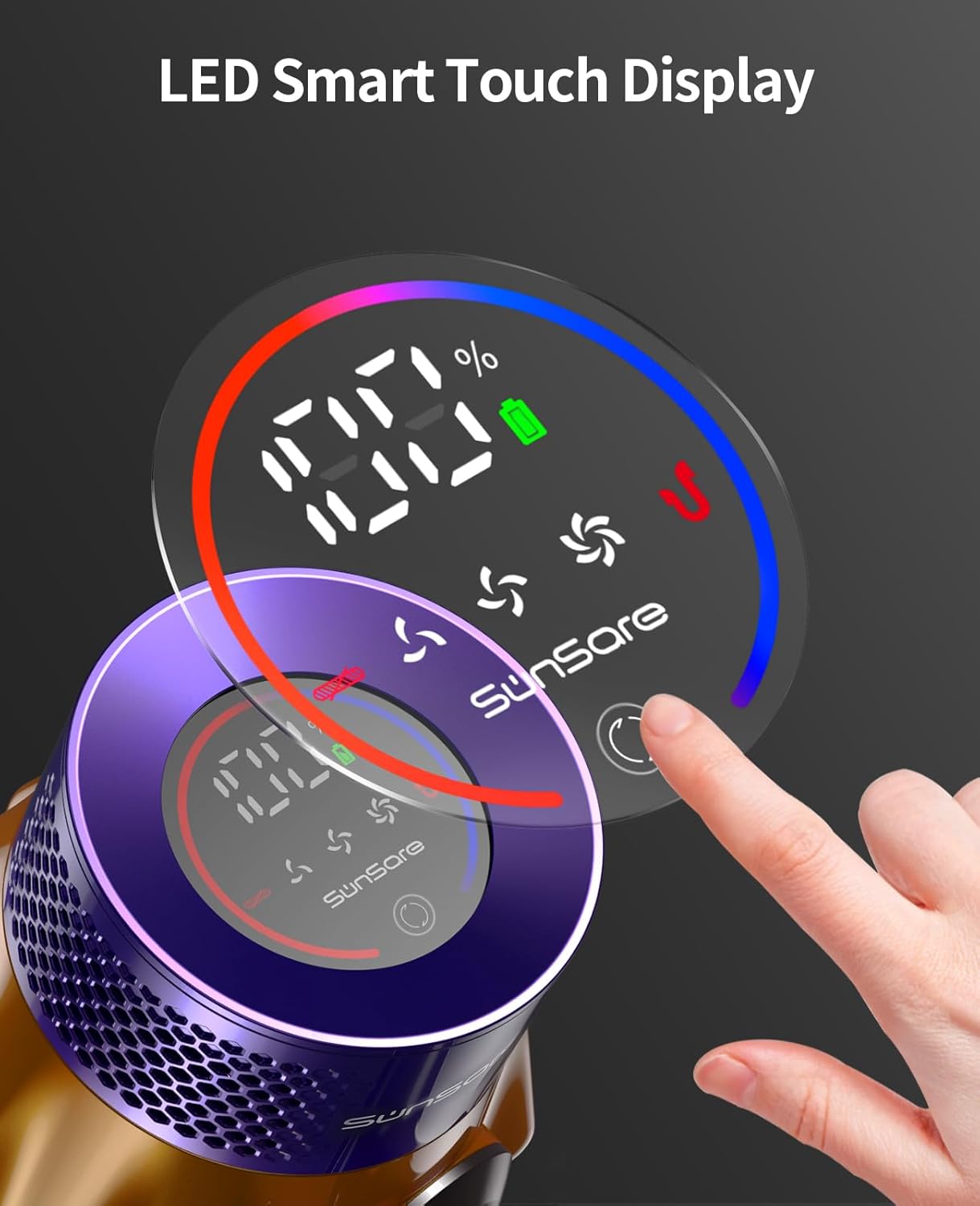
Image: The SunSare X7A vacuum cleaner mounted on its wall charging station, illustrating the charging process.
A full charge typically takes 4-5 hours. The smart touch display will indicate charging status and battery level.
Operating Instructions
1. Power On/Off and Suction Adjustment
The vacuum features a smart touch display for easy control.

Image: A close-up of the SunSare X7A's smart touch display, showing battery percentage, suction mode indicator (ECO/MID/MAX), and a suction adjustment button.
- Press the power button on the handle to turn the vacuum on or off.
- Touch the screen to adjust suction power between ECO, Standard, and Max modes.
- The display shows real-time running status and remaining battery power.
2. Self-Standing Feature
The vacuum is designed to stand upright independently, allowing you to pause cleaning at any time without needing to lean it against a wall or use a separate stand.

Image: The SunSare X7A vacuum cleaner standing upright on its own, demonstrating its self-standing design.
3. Battery Runtime
The 8-cell battery provides extended cleaning time:
- ECO mode: Up to 65 minutes
- Standard mode: Up to 35 minutes
- Max mode: Up to 20 minutes

Image: A graphic illustrating the 8x2500mAh battery and its runtime of up to 65 minutes for the SunSare X7A vacuum cleaner.
Maintenance
1. Emptying the Dust Cup
To maintain optimal suction, empty the dust cup regularly, especially when it reaches the MAX fill line.
- Hold the main body over a trash receptacle.
- Press the dust cup release button to open the bottom flap and empty contents.
- Close the flap securely until it clicks.

Image: A hand demonstrating the one-click dust cup emptying feature of the SunSare X7A vacuum cleaner, showing debris falling into a trash can.
2. Cleaning the Filters
The X7A features a multi-layer high-density filtration system. Regular cleaning of filters is crucial for performance and to prevent secondary pollution.

Image: A diagram illustrating the multi-layer filtration system of the SunSare X7A vacuum cleaner, highlighting how it captures dust and allergens.
- HEPA Filter: Remove the HEPA filter from the main body. Tap it gently to remove loose dust. Rinse under cold water if necessary, ensuring it is completely dry before reinserting.
- Stainless Steel Filter: Clean as needed, rinsing with water and allowing to air dry completely.
- Air Intake Filters: Replace or clean the air intake filters as indicated by the quick start guide or when suction decreases. An extra set is included.
Note: Ensure all filters are completely dry before reassembling the vacuum to prevent damage.
3. Cleaning the Brush Roll
Periodically check the brush roll for tangled hair or debris. Use the included hair cleaning tool to cut and remove any obstructions.
Troubleshooting
| Problem | Possible Cause | Solution |
|---|---|---|
| Vacuum does not turn on | Battery is depleted or not properly installed. | Charge the battery. Ensure the battery is securely clicked into place. |
| Reduced suction power | Dust cup is full, filters are clogged, or brush roll is obstructed. | Empty the dust cup. Clean all filters. Remove any tangled hair or debris from the brush roll. |
| Battery runtime is short | Operating in Max mode frequently, or battery not fully charged. | Ensure battery is fully charged. Use ECO or Standard mode for longer runtime. |
| Vacuum makes unusual noise | Obstruction in the air path or brush roll. | Check for and remove any blockages in the telescopic tube, floor brush, or main body. Clean the brush roll. |
Specifications
| Feature | Detail |
|---|---|
| Brand | SunSare |
| Model Name | X7A |
| Special Feature | Colour Touch Screen, 50kPa Powerful Suction, 600W Upgraded Motor, 20-65 Minutes Runtime, Self-standing Design, 7 Levels of Advanced Filtration, Removable Battery, Height Adjustable (94cm~118cm), 270° Swivel with Front Light, 1.5L Dust Cup, Anti-tangling Brushes for All Floors and Carpet, Low noise level ≤ 62dB |
| Filter Type | HEPA Filter |
| Is Cordless? | Yes |
| Capacity | 0.3 Liters |
| Wattage | 600 watts |
| Recommended Uses | Hard Floor, Carpet, Hardwood |
| Form Factor | Stick |
| Product Dimensions | 7"L x 10"W x 9"H |
| Battery Description | Lithium-Ion (8 cells, 2500mAh) |
| Noise Level | 62 Decibels |
| Item Weight | 6.16 pounds |
| Number of Speeds | 3 (ECO, Standard, Max) |
| Display Type | Touchscreen |
Warranty and Support
SunSare provides comprehensive customer support for your X7A Cordless Stick Vacuum Cleaner.
- Warranty: Enjoy a 3-year free protection plan.
- Customer Service: 24/7 after-sales service is available.
- Contact: For any inquiries or support, please contact us at support-us@sunsare.com.

Image: Information regarding SunSare's quality after-sales service, including 3 years after-sales support, 24-hour quick reply, 30-day exchange & money-back guarantee, and the support email address.


