
1. Introduction
The ATuMan LS6 is a versatile 3-in-1 laser distance meter designed for high-precision measurements. It combines distance measurement, laser projection, and angle detection, making it suitable for a wide range of applications from home DIY projects to professional construction and interior design. This manual provides detailed instructions on how to set up, operate, and maintain your device to ensure optimal performance and longevity.

Image 1.1: The ATuMan LS6 Laser Distance Meter, showcasing its compact design and integrated display.
2. Package Contents
Please verify that all items are present in the package before use:
- Laser Distance Meter (LS6) x1
- Charging Cable (USB Type-C) x1
- Lanyard x1
- User Manual x1

Image 2.1: Contents of the ATuMan LS6 package, including the device, charging cable, and lanyard.
3. Safety Information
The ATuMan LS6 uses a Class 1 laser. While generally safe, please observe the following precautions:
- Do not stare directly into the laser beam.
- Do not aim the laser beam at people or animals.
- Keep the device out of reach of children.
- Do not attempt to disassemble or modify the device.
- Use the device only for its intended purpose as described in this manual.
- Avoid exposing the device to extreme temperatures, humidity, or direct sunlight.
4. Product Overview
The ATuMan LS6 features a durable aluminum body and a clear TFT color display. Its intuitive user interface allows for effortless one-handed operation.
4.1 Key Components
- Laser Emitter/Receiver: Located at the top of the device for sending and receiving laser signals.
- TFT Color Display: High-definition screen for displaying measurements, modes, and settings.
- Control Buttons: For power, measurement activation, mode selection, and settings adjustment.
- USB Type-C Port: For charging the internal battery.

Image 4.1: Close-up view of the ATuMan LS6 laser emitter, highlighting its precision.

Image 4.2: The TFT color display of the LS6, showing clear and easy-to-read data with an intuitive user interface.
5. Setup
5.1 Charging the Device
The ATuMan LS6 is equipped with a 300mAh rechargeable battery. Before first use, or when the battery indicator shows low power, charge the device using the provided USB Type-C cable.
- Connect the USB Type-C cable to the charging port on the device.
- Connect the other end of the cable to a standard USB power adapter (not included) or a computer USB port.
- The battery indicator on the display will show charging status.
- Once fully charged, disconnect the cable.

Image 5.1: The ATuMan LS6 connected to a USB Type-C charger, illustrating its long battery life feature.
5.2 Powering On/Off
- To Power On: Press and hold the main control button (center button) for a few seconds until the display lights up.
- To Power Off: Press and hold the main control button again for a few seconds. The device also features an auto-off function after 180 seconds of inactivity to conserve battery.
6. Operation
The ATuMan LS6 offers 19 measurement functions. Familiarize yourself with the control buttons and display icons for efficient use.
6.1 Basic Measurement (Distance)
- Ensure the device is powered on.
- Point the laser emitter towards the target surface.
- Press the main control button once to activate the laser beam.
- Press the main control button a second time to take the measurement. The distance will be displayed on the screen.
6.2 Measurement Modes
The device supports various measurement modes. Use the side button(s) to cycle through the available modes. The current mode will be indicated on the display.
- Continuous Measurement: Provides real-time distance updates as you move the device.
- Area Measurement: Measure two sides (length and width) to automatically calculate the area.
- Volume Measurement: Measure three sides (length, width, and height) to automatically calculate the volume.
- Pythagorean Measurement (Pythagoras-1 & Pythagoras-2): Used for indirect measurements where direct measurement is not possible. Follow the on-screen prompts to take the required measurements (e.g., hypotenuse and one leg).
- Angle Measurement: Utilizes the visual aligning beam for precise angle detection.
- Addition & Subtraction: Allows for adding or subtracting measurements.
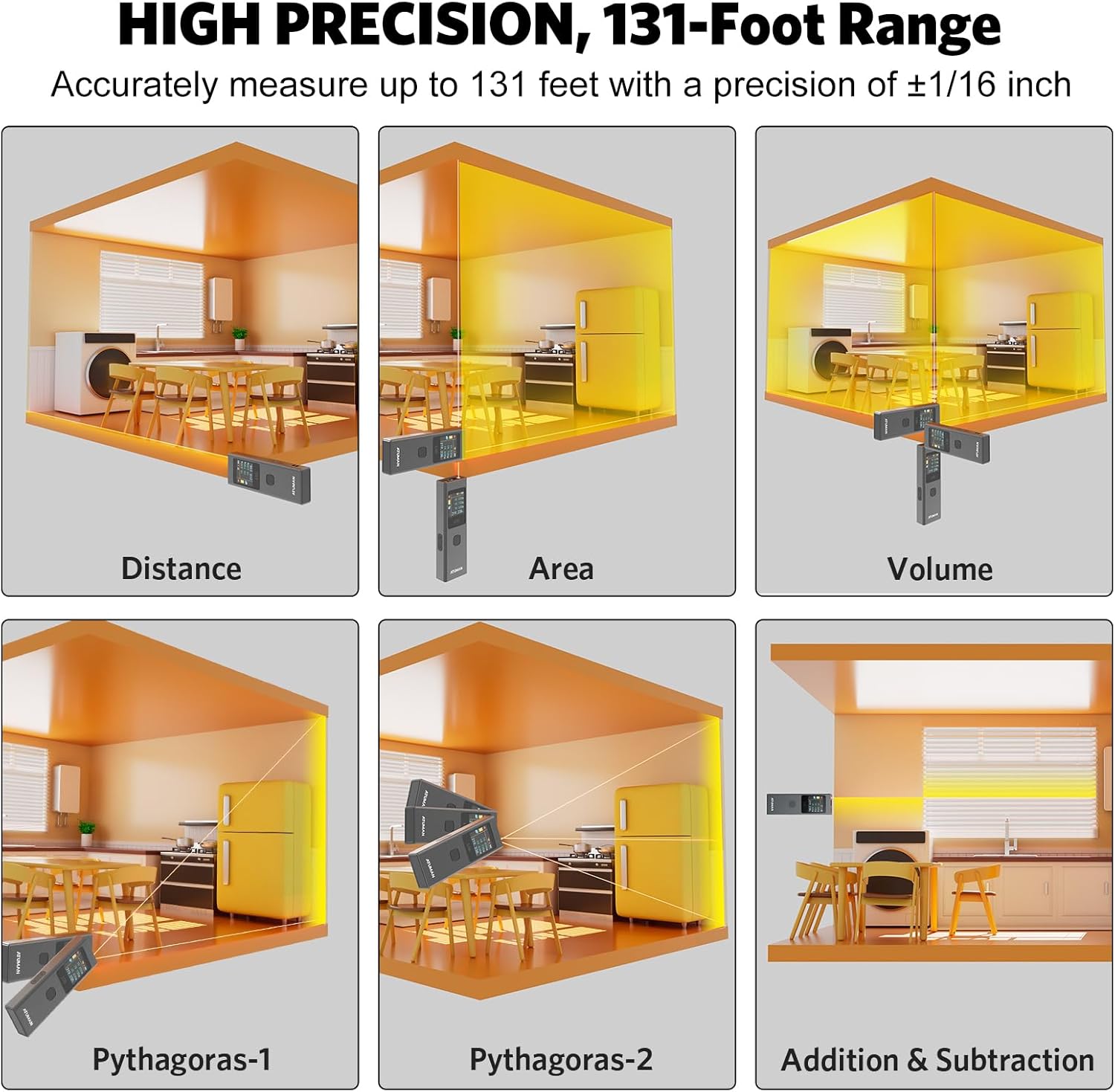
Image 6.1: Visual representation of various measurement modes including Distance, Area, Volume, and Pythagorean calculations.

Image 6.2: Examples of advanced measurement types, including various Pythagorean calculations and area/volume measurements in different settings.

Image 6.3: Overview of the 19+ built-in functions for versatile use, including linear, continuous, area, volume, and various Pythagorean modes.
6.3 Switching Units
The device supports switching between meters (M), inches (IN), and feet (FT). Refer to the user manual's specific instructions for unit switching, as it may involve multiple button presses.

Image 6.4: The ATuMan LS6 display showing measurements in meters, inches, and feet, demonstrating unit switching capability.
6.4 Data Storage
The LS6 can store up to 20 sets of measurement data. This feature allows for efficient data management and review of past measurements.

Image 6.5: The ATuMan LS6 displaying multiple stored measurement data sets, indicating its 20-data set storage capacity.
7. Maintenance
Proper care and maintenance will extend the life of your ATuMan LS6.
- Cleaning: Use a soft, dry cloth to clean the device. Do not use abrasive cleaners or solvents. For the lens, use a lens cleaning cloth.
- Storage: Store the device in a cool, dry place away from direct sunlight and extreme temperatures. If storing for extended periods, ensure the battery is partially charged (around 50%) and recharge every few months to prevent deep discharge.
- Avoid Impact: While durable, avoid dropping the device or subjecting it to strong impacts.
8. Troubleshooting
If you encounter issues with your ATuMan LS6, refer to the following common problems and solutions:
| Problem | Possible Cause | Solution |
|---|---|---|
| Device does not power on. | Low battery. | Charge the device using the USB Type-C cable. |
| Display is difficult to read outdoors. | High ambient light. | The TFT color display may be less visible in direct bright sunlight. Try to shade the screen or use in less direct light. |
| Inaccurate measurements. | Obstruction in laser path, unstable surface, or incorrect measurement mode. | Ensure a clear path for the laser. Measure from a stable surface. Verify you are in the correct measurement mode for the task. |
| Difficulty changing settings (e.g., units). | Unfamiliarity with button combinations. | Refer to the detailed instructions in the full printed user manual for specific button sequences for settings adjustments. Practice the button presses. |
| Laser dot not visible at long distances. | Environmental factors (bright light) or target surface. | In very bright conditions or on non-reflective surfaces, the laser dot may be hard to see. Consider using a target plate or measuring at closer distances if possible. For very long distances, a tripod may help stabilize the device. |
If the problem persists after trying these solutions, please contact ATuMan customer support.
9. Specifications
Technical specifications for the ATuMan LS6 Laser Distance Meter:
| Feature | Specification |
|---|---|
| Brand | ATuMan |
| Model Name | LS6 Laser Distance Meter |
| Measuring Range | Up to 131 feet (40 meters) |
| Accuracy | +/- 1/16 inch |
| Laser Class | Class 1 |
| Laser Output | 0.081mW |
| Laser Type | 520nm±10nm |
| Battery Type | Lithium (300mAh rechargeable) |
| Charging Port | USB Type-C |
| Material | Aluminum |
| Color | Black |
| Dimensions (L x W x H) | 5.04 x 2.76 x 0.75 inches |
| Weight | Approx. 0.1 Kilograms |
| Data Storage | 20 data sets |
| Auto-off | 180 seconds |
10. Warranty and Support
10.1 Manufacturer Warranty
The ATuMan LS6 Laser Distance Meter comes with a 2-Year Manufacturer Warranty. This warranty covers defects in materials and workmanship under normal use. Please retain your proof of purchase for warranty claims.
10.2 Customer Support
For technical assistance, troubleshooting not covered in this manual, or warranty inquiries, please contact ATuMan customer support through their official channels or the retailer from whom you purchased the product.
You can visit the official ATuMan store on Amazon for more information and support: ATuMan Amazon Store
