
1. Setup and Installation
This section provides detailed instructions for the proper setup and installation of your Della Tri-Zone Mini Split Air Conditioner. Please note that this system mandates professional installation to ensure correct operation and safety. It is not a DIY mini split AC.
Tools Needed for Installation:
- Wrench
- Service Wrench
- Hole Saw Bit
- Power Drill
- Wire Cutter
- Screw Driver
- Leveler
- Drywall Anchor
Installation Steps Overview:
- Use the provided template to mark locations for the line set wall hole and the mini split bracket.
- Securely attach the mini split bracket to the wall using the provided screws.
- Use a leveler to ensure the bracket is correctly aligned.
- Route the line set, drain hose, and electrical wiring through the wall opening.
- Securely mount the mini split indoor unit onto the bracket.
- Tape the drain hose and line sets together for a neat and organized installation.
- Use zip ties to secure the electrical wires around the taped line sets and drain hose.
- Position the outdoor condenser unit in its designated location.
- Remove the cover of the electrical compartment and valve compartment on the outdoor unit.
- Remove the valve covers.
- Connect the unit line set to the condenser line set and secure it firmly.
- If available, use a digital torque wrench to verify that the line sets are securely tightened according to specifications.
- Securely fasten the line set to the outdoor condenser.
- Remove the cover of the electrical compartment on the indoor unit.
- Connect the ground wire (green) first, followed by each numbered wire (black, white, and yellow) to their corresponding terminals on the indoor unit's electrical block.
- Connect the ground wire (green) first, followed by the line (black) and neutral (red) wires on the outdoor condenser.
- Ensure the outlet box is powered off before proceeding.
- Ensure you have the appropriate vacuum equipment.
- Connect the hose from the outdoor condenser unit to the gauge.
- Properly connect the hose from the vacuum to the gauge.
- Open the valves on the gauge and activate the vacuum.
- Monitor the micron reading closely and close the valves once it reaches 350.
- Turn off the vacuum pump.
- Restore power to the outlet.
- Activate the mini split unit and set it to the lowest cooling setting.
- Allow a few minutes for the outdoor condenser fan to initiate.
- Use a service wrench to gradually open the high side (top valve).
- Monitor the gauge closely as the readings will decrease into the negative range when opening the high side valve.
- After opening the high side valve, promptly proceed to open the low side (bottom valve).
- After opening the high side valve, monitor the gauge closely as the readings will increase, which is expected.
Installation Visual Guide:
This video provides a step-by-step guide on how to install your Della Mini Split Air Conditioner unit, covering mounting, electrical connections, and refrigerant line setup.
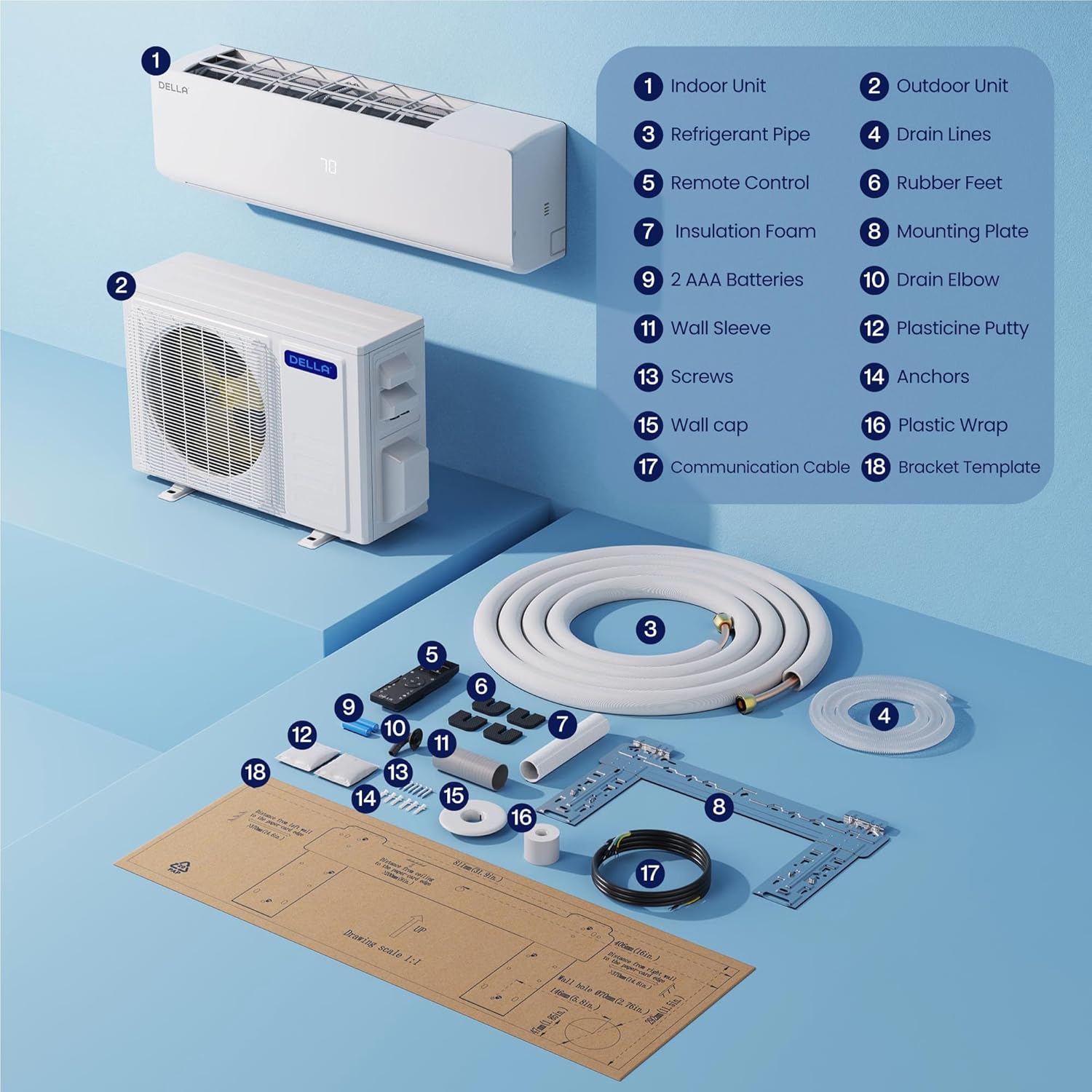
Exploded view diagram of the Della mini split system components, including indoor unit, outdoor unit, refrigerant pipe, remote control, and various installation parts.
2. Operating Instructions
Your Della Tri-Zone Mini Split Air Conditioner is designed with several smart functions for ease of use and optimal comfort.
Key Operating Modes:
- Cooling: Provides efficient cooling for your space.
- Heating: Functions as a heat pump, operating in environments as low as 5 degrees Fahrenheit (-20 degrees Celsius).
- Dry Mode (Dehumidifying): Helps reduce humidity levels in the room.
- Sleep Mode: Adjusts temperature for comfortable sleep and energy saving.
- Eco Energy Saving Mode: Optimizes operation for reduced power consumption.
- Turbo Function: Provides rapid cooling or heating.
Advanced Features:
- 4D Air Flow: Allows for adjustable air direction (up-down, left-right) for even air distribution.
- I Feel Mode: Senses the temperature around the remote control to provide precise comfort.
- 24-Hour Timer: Schedule the unit to turn on or off at specific times.
- Multiple Fan Speeds: Choose from various fan speeds for customized airflow.
Smart Control and Connectivity:
- Wi-Fi Enabled: Control your unit remotely via the Della+ app.
- Works with Alexa: Seamlessly integrates with Amazon Alexa for voice control.
- Della+ App: Use the free Della+ app for complete wireless control, including setting schedules and monitoring temperatures.
- Smart Geo Location: The Della+ app allows for unique automatic AC controls based on your location, even hands-free while driving.
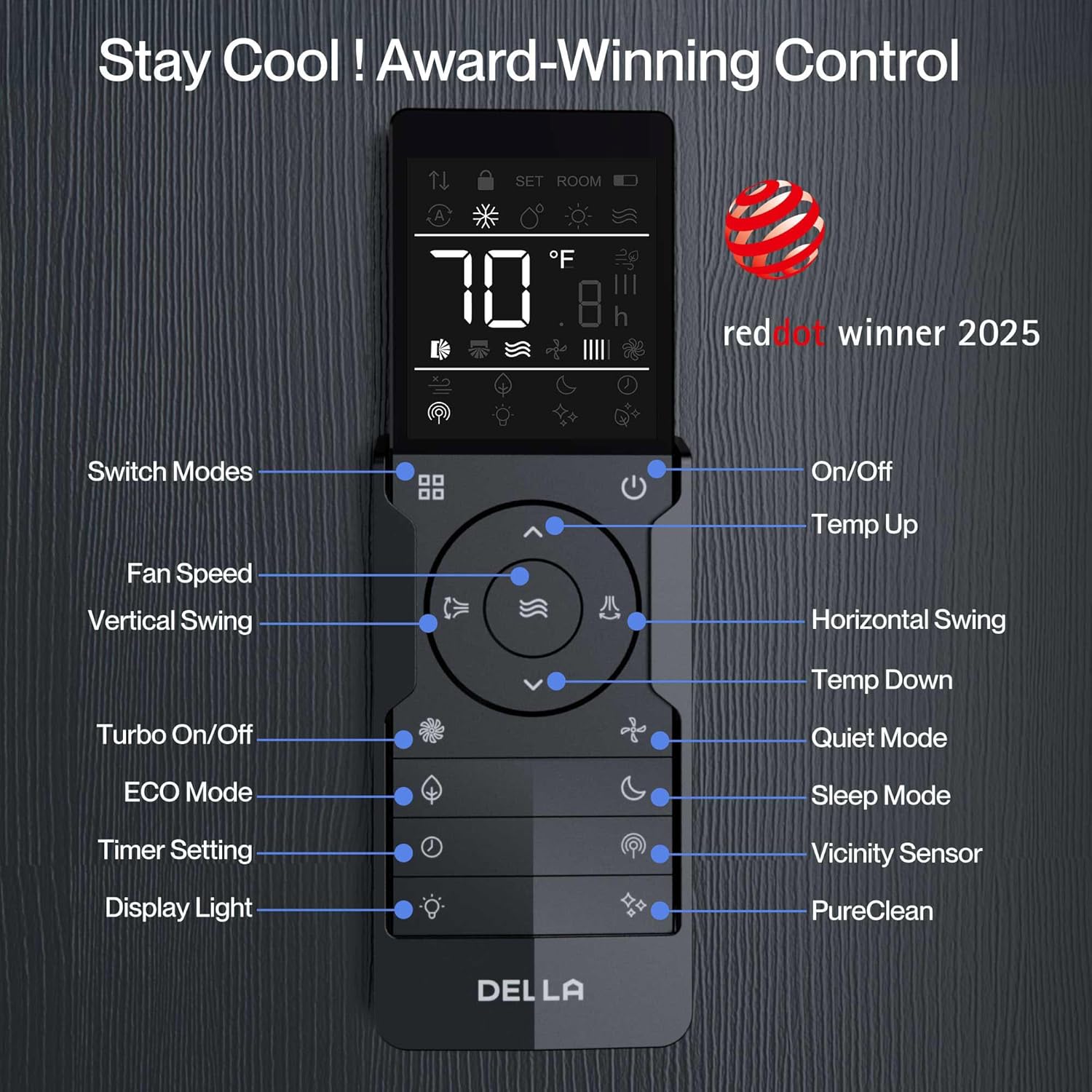
Detailed view of the Della mini split remote control with labeled buttons for various functions like mode, fan speed, swing, timer, and sleep.

Three smartphones displaying the Della+ smart app interface for wireless control of the mini split unit, showing timer, schedule, and mode settings.

Image of a person driving, with a smartphone displaying the Della+ app's smart geo-location feature, which automatically adjusts AC based on proximity.
3. Maintenance
Regular maintenance ensures the longevity and efficient performance of your Della Mini Split Air Conditioner.
- Filter Cleaning: Regularly clean the air filters of the indoor units to maintain optimal airflow and air quality. Refer to the full PDF user manual for specific filter cleaning instructions and frequency.
- Self-Cleaning Function: Please note that this specific model does not support the Self-Cleaning Function, even if the option appears on the display.
- Line-Set and Freon Levels: Line-set vacuuming is required during initial installation. Any alteration of line-set length requires adjusting freon levels by a qualified professional.
- Corrosion Prevention: The unit features gold-plated fins to help prevent rust and corrosion, contributing to durable and efficient performance.
4. Troubleshooting
If you encounter issues with your Della Mini Split Air Conditioner, please refer to the following general troubleshooting tips. For complex problems, contact professional support.
- No Power: Check if the unit is properly plugged in and if the circuit breaker or outlet box is switched on. Ensure the power supply is stable.
- Not Cooling/Heating Effectively: Verify that the correct mode (Cool or Heat) is selected and the temperature setting is appropriate. Check if air filters are clean and not obstructed. Ensure no windows or doors are open, allowing conditioned air to escape.
- Unusual Noises: Some operational noises are normal (e.g., refrigerant flow). If you hear loud or unusual sounds, contact a professional.
- Remote Control Issues: Check the batteries in the remote control. Ensure there are no obstructions between the remote and the indoor unit.
- Water Leakage: Ensure the drain hose is not clogged or kinked, allowing for proper condensation drainage.
If issues persist after basic troubleshooting, it is recommended to contact Della customer support or a qualified HVAC technician.
5. Specifications
Detailed technical specifications for the Della 27K BTU Tri-Zone Mini Split Air Conditioner (Model: 27K+T999).
| Specification | Value |
|---|---|
| Model Number | 27K+T999 |
| Size | Tri Zone(3) 27000 BTU 9+9+9 |
| SEER2 Rating | 19 SEER2 |
| Voltage | 208-230V |
| Coverage Area | Cools/Heats up to 1200 Sq.Ft (3 indoor units recommended area 400 Sq. Ft each) |
| Sound Level | 41 dBa (Ultra Silent) |
| Item Weight | 186.2 pounds |
| Product Dimensions | 31.92 x 11.49 x 8.07 inches |
| Power Source | Corded Electric |
| Installation Method | Split System |
| Special Features | Alexa and WiFi Enabled, Dehumidifier, Energy Efficient, Heating And Cooling Function, Sleep Mode |
| Operating Temperature Range | 60-90 degrees Fahrenheit (able to work as low as 5 degrees Fahrenheit) |

Comparison chart showing 20 SEER2 efficiency with up to 43% energy savings compared to 14 SEER2.

Diagram illustrating multi-room temperature control with three indoor units in a house, showing 75ft total pre-charged line set.
6. Warranty and Support
Della is committed to providing best-in-class support and comprehensive warranty coverage for your peace of mind.
Warranty Information:
- Limited Lifetime Warranty: Your Della Mini Split Air Conditioner comes with a limited lifetime warranty.
- No Additional Costs: Enjoy peace of mind with no hidden or additional costs related to warranty claims.
Customer Support:
- 24/7 Customer Support: Access support around the clock.
- Phone Support: Available Monday to Friday, 6 AM - 4 PM PST.
- Live Chat: Available 24/7 for immediate assistance.
- Seller: Align Inc.

Graphic illustrating Della's lifetime coverage with icons for 'Best In-Class', 'No Additional Costs', and '24/7 Customer Support'.
For further details and a complete guide, please refer to the official User Manual (PDF).


