
Introduction
This manual provides essential information for the proper use, installation, and maintenance of your TELESIN Waterproof Case for iPhone 15 Pro. Designed for robust protection, this case offers IP68 waterproof capabilities, shockproof and dustproof features, and supports MagSafe wireless charging. Please read this manual thoroughly before use to ensure optimal performance and longevity of your product.
What's in the Box
- iPhone 15 Pro Waterproof Case ×1
- Wipe ×1
- Manual ×1
- Mobile Phone Lanyard ×1
Key Features
- IP68 Waterproof Rating: Submersible up to 2 meters for 1 hour, protecting your device from water ingress during various activities like swimming or light snorkeling.
- Full Body Protection: Certified to exceed military-grade drop test standards, withstanding drops up to 3.6 meters. Features a unique double-layer shock-absorbing design and 4 impact corners.
- Integrated Screen & Lens Protection: Built-in HD PET protective film prevents screen scratches while maintaining touch sensitivity. A specially designed tempered glass camera lens protector preserves original pixels and flash functionality.
- MagSafe Compatibility & Stand: The magnetic ring on the back supports MagSafe wireless charging and doubles as a convenient desktop phone stand.
- Clear Audio & Charging Access: Designed with waterproof plugs for the charging port and microphone, allowing for clear calls and wired charging without removing the case.
- Dustproof & Shockproof: Fully enclosed design shields the phone from sand, dust, and other environmental elements.
Setup and Installation
1. Pre-Installation Waterproof Test (Self-Check)
Before installing your phone, it is crucial to perform a waterproof test to ensure the case's integrity. This prevents potential water damage to your device.
- Open the phone case and place a piece of tissue inside. Seal the bottom dust plug completely.
- Immerse the case in water for 30 minutes.
- After removal, refrain from opening the case immediately. Shake the tissue inside and check for wetness. If the tissue moves freely and is dry, there is no leakage. If the tissue is wet or immovable, contact customer service promptly.

Figure 1: Steps for performing the waterproof self-check.
2. Phone Installation
The case is designed for quick and secure installation, ensuring a tight and seamless fit to provide comprehensive protection.
Video: This video demonstrates the quick installation process of the TELESIN Waterproof Case, showcasing how the phone fits tightly and seamlessly into the case. It also illustrates the case's waterproof capabilities, drop resistance, touch screen functionality underwater, wireless and wired charging support, and high-definition filming through the case.
To install, carefully align your iPhone 15 Pro with the case and press firmly around the edges until it clicks securely into place. Ensure all seals, including the charging port and microphone plugs, are properly closed to maintain waterproof integrity.

Figure 2: The TELESIN Waterproof Case for iPhone 15 Pro, highlighting its design and wireless charging compatibility.
Operating Instructions
Touch Sensitivity
The built-in HD PET protective film is designed to provide sensitive touch response. Ensure your screen is clean before installation for optimal performance. Avoid using additional tempered glass screen protectors on your phone, as this may affect touch sensitivity.
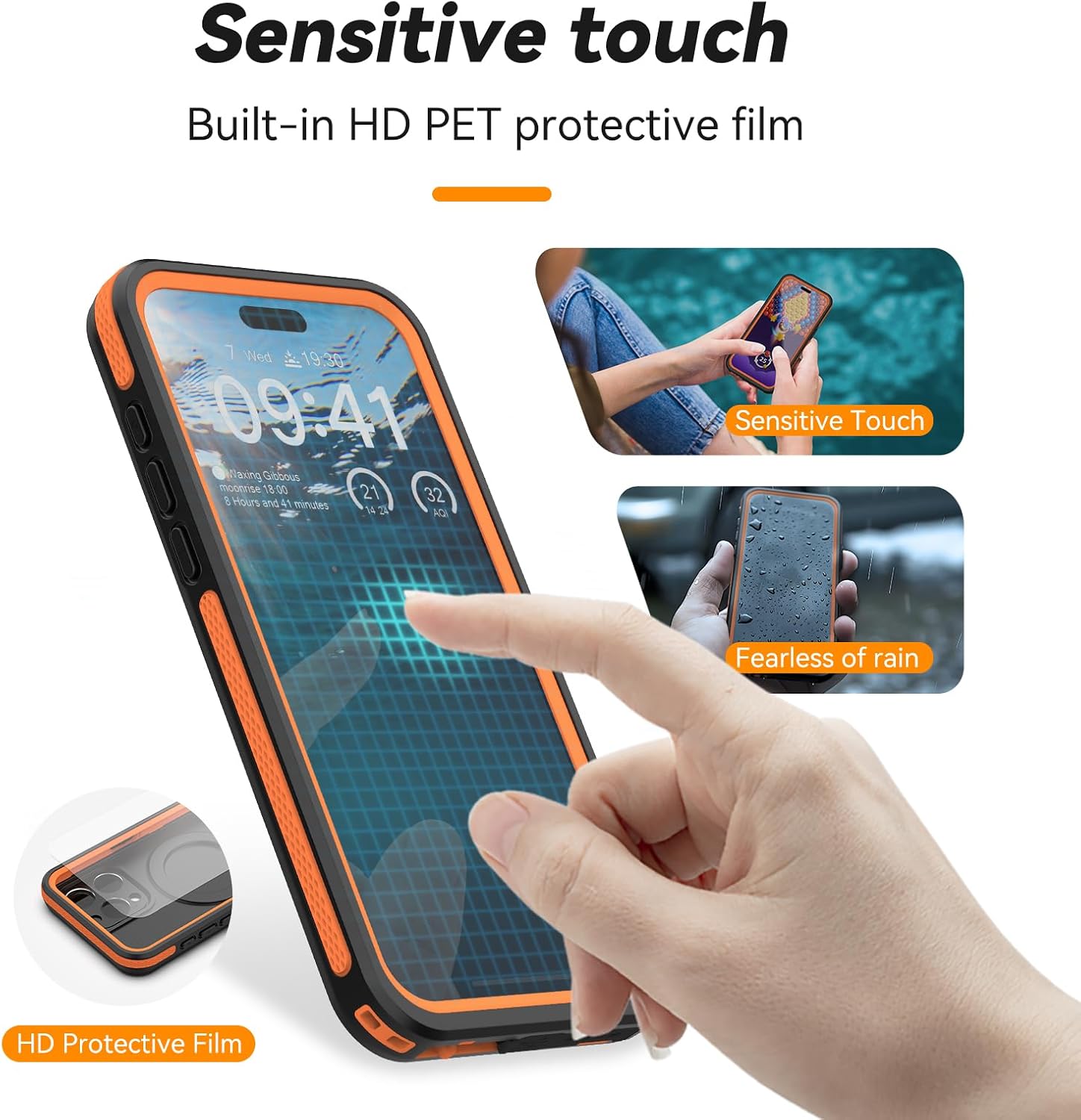
Figure 3: Sensitive touch functionality with the built-in HD PET protective film.
Charging
The case supports both wireless (MagSafe compatible) and wired charging. For wired charging, open the waterproof plug at the charging port. For wireless charging, simply place your phone with the case on a compatible MagSafe charger.

Figure 4: Magnetic stand and charging capabilities.

Figure 5: Charging port and microphone plugs for convenience.
Audio Quality
The case is designed with a call sound hole to ensure clearer playback and call quality. Ensure the microphone plug is properly sealed when not in use to maintain waterproof integrity.
Photography and Video
The integrated lens protector is made from HD PC material, allowing for high-definition filming and photography without compromising image quality. The protector does not interfere with the use of the flash.

Figure 6: Underwater photography with the IP68 waterproof case.
Maintenance
- Regular Cleaning: Clean the case regularly with a soft, damp cloth. For stubborn dirt, use mild soap and water, then rinse thoroughly.
- Inspect Seals: Before each use, especially before water exposure, inspect all seals, plugs, and the case body for any signs of wear, tear, or damage. Ensure they are free from debris.
- Avoid Sharp Objects: Do not use sharp objects to open the plugs or clean the case, as this can damage the waterproof seals.
- Storage: Store the case in a cool, dry place away from direct sunlight and extreme temperatures when not in use.
- Protective Film: Keep the transparent protective film on the built-in screen protector until installation and use are confirmed to avoid impacting resale and refunds.
Troubleshooting
- Muffled Sound During Calls: Ensure the microphone plug is fully open during calls. If the issue persists, check for any debris obstructing the microphone opening.
- Reduced Touch Sensitivity: Verify that no additional screen protector is applied to your phone. Ensure the phone screen and the case's built-in protector are clean and free of smudges or air bubbles.
- Water Ingress: If water enters the case during a waterproof test, immediately cease use and contact customer support. Do not attempt to use the case with your phone if it fails the waterproof test.
- Difficulty with Buttons: Ensure the phone is correctly seated within the case and that the case is fully closed. The buttons on the case should align perfectly with your phone's buttons.
Specifications
| Brand | TELESIN |
| Model Number | P4-WTP-02 |
| Compatible Phone Models | iPhone 15 Pro |
| Water Resistance Level | IP68 Waterproof (up to 2 meters for 1 hour) |
| Drop Resistance | Up to 3.6 meters (Military-grade certified) |
| Special Features | Built-in Lens & Screen Protector, Can Be Used as a Phone Holder, Charge Directly without Removing the Case (for Magsafe), Dustproof, Shock-Absorbent, Waterproof |
| Material | TPU, PC |
| Color | Black & Orange |
| Item Weight | 3.87 ounces |
| Package Dimensions | 7.24 x 4.17 x 0.87 inches |
Warranty and Support
TELESIN products are manufactured to high-quality standards. For warranty information, technical support, or any inquiries regarding your product, please refer to the contact details provided on the product packaging or visit the official TELESIN website. Keep your purchase receipt for warranty claims.