
Introduction
This user manual provides detailed instructions for the setup, operation, maintenance, and troubleshooting of your mingwear I50 Military Smartwatch. Please read this manual thoroughly to ensure proper use and to maximize the functionality of your device.
Product Overview
The mingwear I50 Military Smartwatch is designed for active lifestyles, featuring a durable build, a 1.32-inch full-touch color screen, and comprehensive fitness tracking capabilities. It supports Bluetooth calling and offers a variety of smart functions compatible with both Android and iPhone devices.
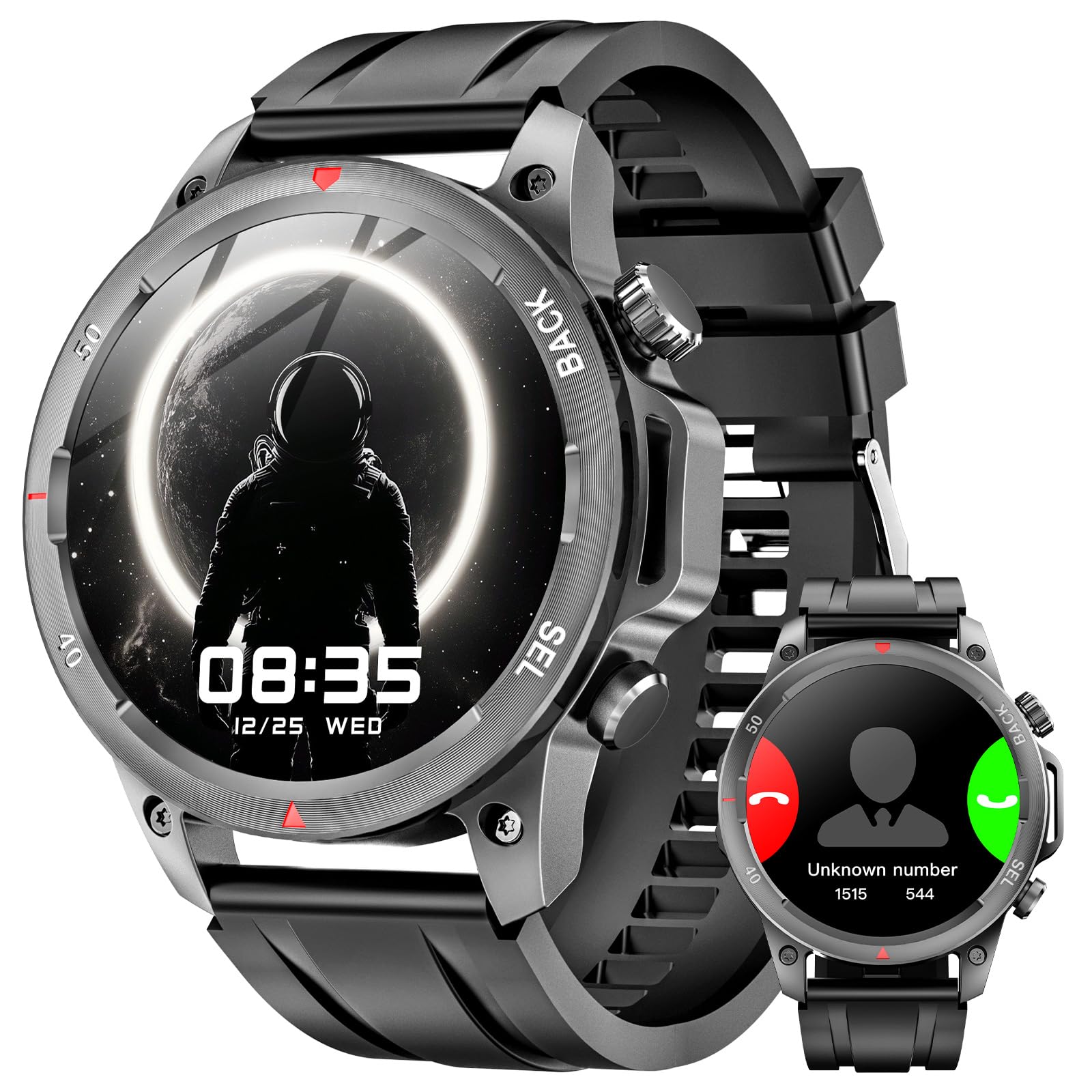
This image shows the mingwear I50 Military Smartwatch. The main display features a digital clock showing 08:35 on December 25th, with an astronaut graphic. The watch has a round face, a black strap, and two buttons on the right side labeled 'BACK' and 'SEL'. A smaller inset image shows the watch displaying an incoming call with options to answer or decline.
Setup
1. Charging the Smartwatch
Before initial use, fully charge your mingwear I50 smartwatch. Connect the provided charging cable to the charging port on the back of the watch and to a standard USB power adapter (not included). The watch display will indicate charging status.
2. App Installation
To unlock full functionality, download and install the companion application on your smartphone. Scan the QR code provided in the watch's packaging or search for the official app in your device's app store (Google Play Store for Android, Apple App Store for iPhone).
3. Pairing with Your Smartphone
- Ensure Bluetooth is enabled on your smartphone.
- Open the companion app and follow the on-screen instructions to add a new device.
- Select 'I50' or the corresponding device name from the list of available Bluetooth devices.
- Confirm the pairing request on both your smartphone and the smartwatch.
Operating Instructions
Basic Navigation
- Touch Screen: Swipe left, right, up, or down to navigate through menus and notifications. Tap to select an option.
- Side Buttons: The 'BACK' button typically returns to the previous screen or the watch face. The 'SEL' (Select) button often confirms selections or accesses specific functions.
Call Functions
Once paired via Bluetooth, you can answer or make calls directly from your smartwatch.
- Answering Calls: When an incoming call is received, tap the green icon on the watch screen.
- Making Calls: Access the dialer or contact list through the watch menu to initiate a call.
Fitness Tracking and Sport Modes
The I50 smartwatch includes a pedometer and supports over 100 sport modes to track your physical activity.
- Pedometer: Automatically tracks your steps, distance, and calories burned throughout the day.
- Sport Modes: Select a specific sport mode from the menu to track performance metrics relevant to that activity.
Other Features
- Alarm Clock: Set alarms through the app or directly on the watch.
- Stopwatch/Timer: Utilize these tools for precise timing.
- Music Controller: Control music playback on your smartphone from your watch.
- Weather Display: View current weather conditions (requires app synchronization).
- Sedentary Reminder: Receive alerts to move after periods of inactivity.
- Adjustable Brightness: Customize screen brightness for optimal viewing.
- Find Your Phone: Use the watch to locate your paired smartphone.
- DIY Dial: Personalize your watch face with custom designs.
Maintenance
Water Resistance (IP67)
The mingwear I50 smartwatch is IP67 waterproof, meaning it is resistant to splashes, rain, and brief immersion in water. You can wear it while washing hands or during outdoor activities. However, it is not suitable for swimming, showering with hot water, or diving, as steam and prolonged water pressure can damage the device.
Cleaning
Regularly clean your smartwatch and strap with a soft, dry cloth. If necessary, use a slightly damp cloth with mild soap, then wipe dry. Avoid using harsh chemicals or abrasive materials.
Battery Care
To prolong battery life, avoid exposing the watch to extreme temperatures. Charge the device using only the provided cable and a compatible power adapter. Do not leave the watch fully discharged for extended periods.
Troubleshooting
- Watch not turning on: Ensure the watch is fully charged. Connect it to the charger and wait a few minutes before attempting to power it on.
- Unable to pair with smartphone:
- Ensure Bluetooth is enabled on your phone and the watch is discoverable.
- Restart both your phone and the smartwatch.
- Clear any previous pairing records for the watch on your phone's Bluetooth settings.
- Ensure the companion app has necessary permissions.
- Inaccurate fitness data: Ensure the watch is worn snugly on your wrist. Calibrate settings within the companion app if available.
- Notifications not received: Check app permissions on your smartphone to ensure the companion app can access notifications. Verify notification settings within the app and on the watch.
- Short battery life: Reduce screen brightness, disable unnecessary features, and ensure background app usage is optimized on your phone.
Specifications
| Feature | Detail |
|---|---|
| Model Name | I50 |
| Brand | mingwear |
| Screen Size | 1.32 Inches |
| Shape | Round |
| Connectivity Technology | Bluetooth |
| Wireless Communication Standard | Bluetooth |
| Water Resistance | IP67 |
| Battery Cell Composition | Lithium Polymer |
| Special Feature | Activity Tracker |
| Operating System Compatibility | Android, iOS |
Warranty and Support
For warranty information, please refer to the documentation included with your purchase or contact the retailer where the product was acquired. For technical support or further assistance, please visit the official mingwear website or contact their customer service department.