
Introduction
This manual provides essential information for the safe and efficient operation, maintenance, and troubleshooting of your Philips 3300-Series Fully Automatic Espresso Machine. Please read it thoroughly before first use and keep it for future reference.
The Philips 3300-Series machine is designed to deliver fresh bean coffee with ease, offering 6 hot and refreshing drinks with optimal crema, aroma, and temperature. It features the LatteGo milking system for smooth milk froth and a 100% ceramic grinder for enriched flavor.
Product Overview
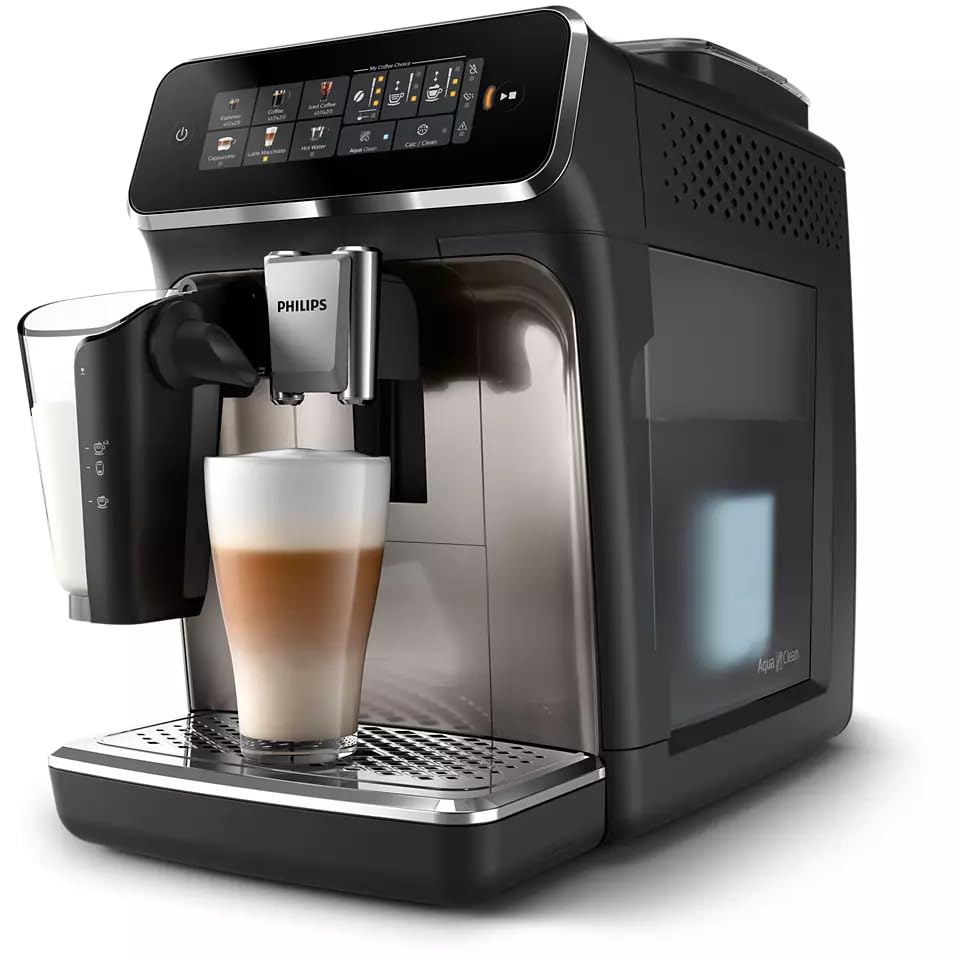
Front view of the Philips 3300-Series Fully Automatic Espresso Machine, showcasing the control panel, coffee dispenser, and LatteGo milk system with a prepared latte.

Side view of the Philips 3300-Series Fully Automatic Espresso Machine, highlighting its compact design and the LatteGo milk container.
Key Features:
- 6 Drink Options: Enjoy Espresso, Coffee, Cappuccino, Latte Macchiato, Iced Coffee, and Hot Water.
- LatteGo Milking System: Automatically prepares silky smooth milk froth. Easy to set up and clean in approximately 10 seconds.
- SilentBrew Technology: Reduces machine sounds by 40% compared to earlier models for a quieter brewing experience.
- 100% Ceramic Grinder: Durable grinder with 12 adjustable steps, from fine to coarse, to extract full coffee flavor.
- AquaClean Filter: Allows for up to 5000 cups without descaling when the filter is changed as prompted by the machine.
- Modern Colour Touch Screen: Intuitive interface for drink selection and customization.
Setup
- Unpack the Machine: Carefully remove all packaging materials and place the machine on a stable, level surface.
- Rinse Components: Wash the water tank, LatteGo system, and drip tray with warm water and a mild detergent. Rinse thoroughly.
- Fill Water Tank: Fill the water tank with fresh tap water up to the MAX indication. Ensure the AquaClean filter is correctly installed if using.
- Fill Bean Hopper: Open the bean hopper lid and fill it with fresh whole coffee beans. Do not use ground coffee in the bean hopper.
- Connect Power: Plug the power cord into a grounded wall socket.
- First Use Cycle: Follow the on-screen instructions for the initial setup and rinsing cycle. This primes the system and ensures optimal performance.
Operating Instructions
Making a Coffee Drink:
- Turn On: Press the power button to switch on the machine. Wait for the machine to complete its start-up cycle.
- Select Drink: On the color touch screen, select your desired drink (e.g., Espresso, Coffee, Cappuccino, Latte Macchiato, Iced Coffee, Hot Water).
- Adjust Settings (Optional): For some drinks, you can adjust coffee strength, volume, and milk foam quantity using the on-screen options.
- Place Cup: Place a cup under the coffee dispenser. For milk-based drinks, ensure the LatteGo system is attached and filled with milk.
- Start Brewing: Press the start button. The machine will begin preparing your drink.
Using the LatteGo System:
- Attach the LatteGo milk container to the machine.
- Fill the LatteGo with fresh milk up to the indicated level.
- Select a milk-based drink (e.g., Cappuccino, Latte Macchiato).
- The machine will automatically froth and dispense milk into your cup before brewing the coffee.
Hot Water Dispensing:
- Select the "Hot Water" option on the touch screen.
- Place a cup under the hot water spout.
- Press the start button to dispense hot water for tea or other beverages.
Maintenance
Daily Cleaning:
- LatteGo System: After each use, rinse the LatteGo system under running water. It can be disassembled into two parts for thorough cleaning.
- Drip Tray and Coffee Grounds Container: Empty and rinse daily.
- Coffee Dispenser: Wipe with a damp cloth.
Weekly Cleaning:
- Brew Group: Remove the brew group and rinse it under running water. Allow it to air dry before reinserting.
- Water Tank: Clean the water tank with a soft brush and mild detergent.
AquaClean Filter and Descaling:
- The machine will indicate when to replace the AquaClean filter. Replacing it regularly can prevent the need for descaling for up to 5000 cups.
- If not using an AquaClean filter, or if prompted by the machine, perform a descaling cycle using Philips descaling solution. Follow the on-screen instructions carefully.
Troubleshooting
| Problem | Possible Cause | Solution |
|---|---|---|
| No coffee is dispensed. | Water tank empty, brew group clogged, or coffee beans are low. | Refill water tank, clean the brew group, or add coffee beans. |
| Coffee is too weak or watery. | Grind setting too coarse, insufficient coffee dose, or brew group dirty. | Adjust grinder to a finer setting, increase coffee strength on the display, or clean the brew group. |
| Milk is not frothing correctly. | LatteGo system dirty, milk type unsuitable, or milk temperature too high/low. | Clean the LatteGo system thoroughly, use cold fresh milk (dairy or plant-based suitable for frothing). |
| Machine displays a warning icon. | Indicates an issue such as empty water tank, full grounds container, or descaling required. | Refer to the on-screen message for specific instructions and follow the recommended action. |
For more detailed troubleshooting, please consult the full product manual or contact Philips customer support.
Specifications
- Brand: Philips
- Model Name: Philips 3300 Series
- Model Number: EP3347
- Capacity: 1.8 Liters (Water Tank)
- Color: Black Chrome
- Special Features: Auto Clean Function, Removable Tank
- Coffee Maker Type: Espresso Machine
- Specific Uses: Cappuccino, Espresso, Iced Coffee, Latte
- Operation Mode: Fully Automatic
- Wattage: 230 watts
- Voltage: 230
- Human Interface Input: Buttons, Touchscreen
- Coffee Input Type: Whole Beans
- Filter Type: Reusable (AquaClean)
- Item Weight: 8 Kilograms
- Included Components: LatteGo lid, AquaClean filter, Coffee Measuring Spoon, Grease Tube
- UPC: 796575403079
Warranty and Support
This Philips 3300-Series Fully Automatic Espresso Machine comes with a 90-day limited warranty. For warranty claims, technical support, or service inquiries, please refer to the contact information provided in your product packaging or visit the official Philips support website.


