
Aheaplus 73 Inch L-Shaped Desk (ASIN: B0D4Z3QBC2)
Aheaplus L-Shaped Gaming Desk User Manual
Model: 73 Inch L-Shaped Desk (ASIN: B0D4Z3QBC2)
Introduction
Thank you for choosing the Aheaplus 73-inch L-Shaped Gaming Desk. This manual provides essential information for the assembly, operation, and maintenance of your new desk. Please read these instructions carefully before beginning assembly to ensure proper setup and safe use.

Figure 1: Overview of the Aheaplus 73-inch L-Shaped Gaming Desk.
Safety Information
- Ensure all parts are present and undamaged before assembly. Do not proceed with assembly if any parts are missing or damaged.
- Assemble the desk on a soft, clean surface to prevent scratches.
- Use the provided tools and hardware. Do not overtighten screws.
- Keep small parts and packaging materials away from children and pets.
- Do not exceed the desk's weight capacity. Refer to the Specifications section for details.
- Ensure the power outlet is properly grounded and not overloaded.
Setup and Assembly
The Aheaplus L-Shaped Gaming Desk is designed for easy assembly. All necessary accessories and tools are included, and all parts are clearly labeled to simplify the process.
Reversible Design
This desk features a reversible design, allowing you to configure it as a left-sided or right-sided L-shape to best fit your space and preferences. Follow the detailed instructions provided in the assembly manual included with your product for specific steps on configuring the desk.
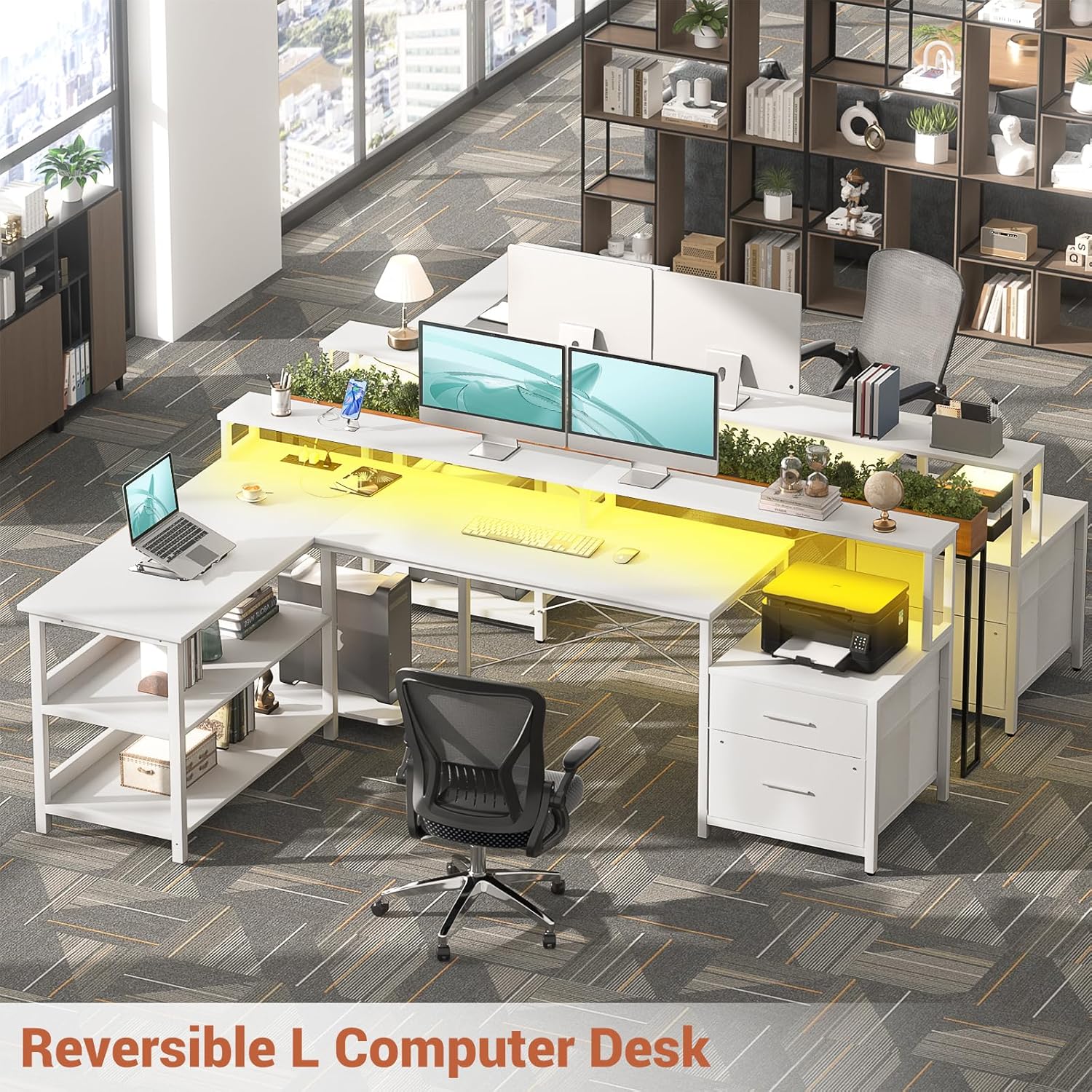
Figure 2: The desk's reversible design allows for left or right L-shaped configuration.

Figure 3: Detailed dimensions and reversible assembly options for optimal space utilization.
For detailed step-by-step assembly instructions, please refer to the separate assembly guide included in your product packaging.
Operating Instructions
Integrated Power Outlet
The desk is equipped with a built-in power strip featuring 3 AC outlets and 2 USB charging ports. This allows you to conveniently power up to 5 devices simultaneously, such as laptops, phones, and gaming consoles, directly from your desk.

Figure 4: The recessed power strip provides convenient access to 3 AC outlets and 2 USB ports.
LED Strip Lights
Enhance your gaming or work environment with the integrated RGB LED strip lights. These lights can be controlled via a smart application, offering over 60,000 colors and multiple modes. The music synchronization feature allows the lights to change color with the rhythm of sound and music, creating an immersive experience.
- Control: Use the dedicated smart application (refer to the app's instructions for pairing) to manage colors, modes, and brightness.
- Music Sync: Activate the music sync feature within the app to synchronize light changes with audio.
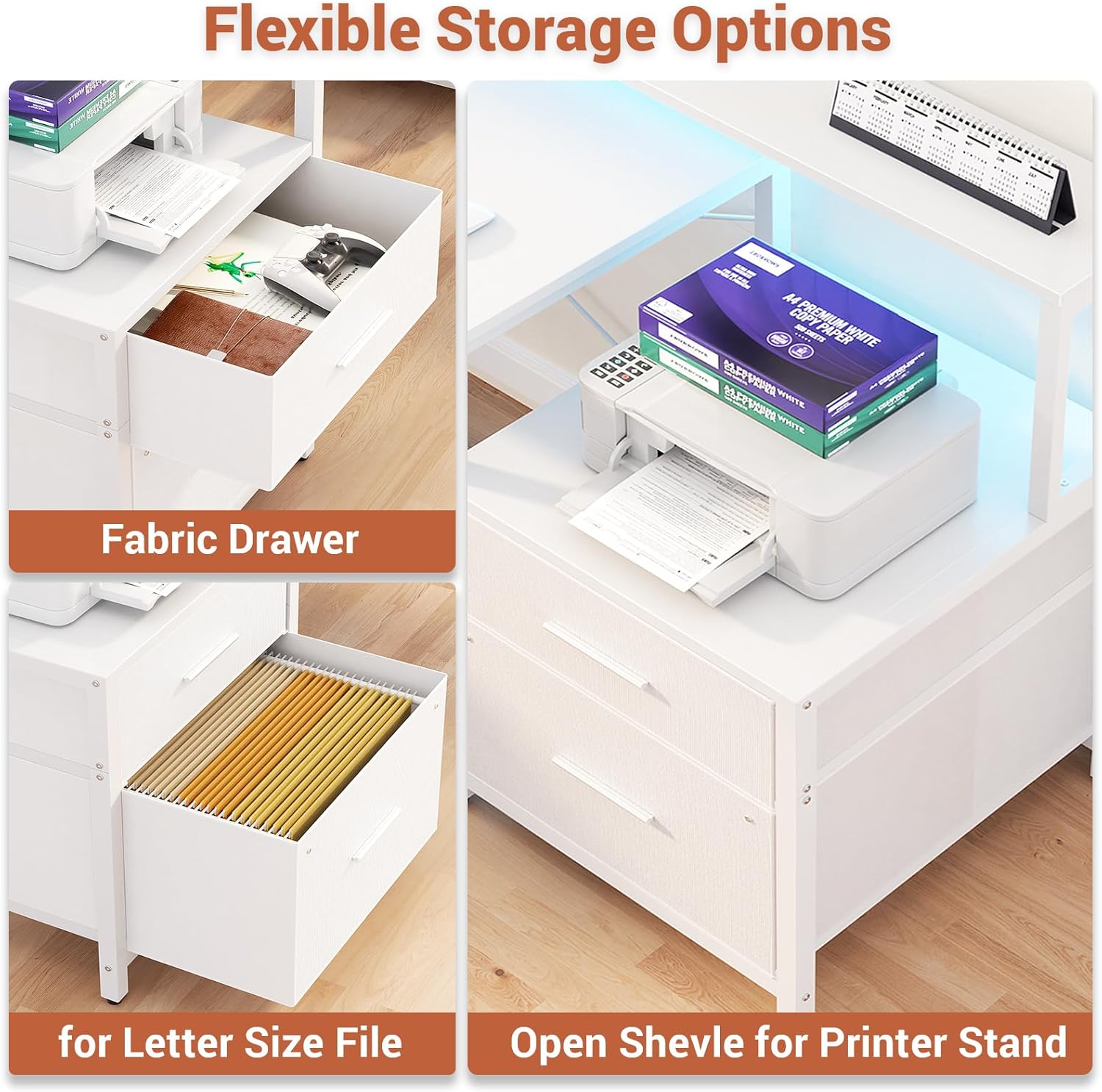
Figure 5: The L-shaped desk features RGB LED strips with various control options for an enhanced user experience.
Storage and Ergonomics
Ample Storage Space
The desk provides extensive storage solutions to keep your workspace organized. This includes two fabric file drawers, two levels of under-desk storage shelves, a dedicated printer cabinet, and a CPU stand.

Figure 6: Various storage options including fabric drawers, file drawers, and an open shelf for a printer.
Long Monitor Stand
A long monitor stand is integrated into the desk design, elevating your monitors to an ergonomic height. This helps maintain correct sitting posture, protecting your neck and spine, and also creates additional storage space underneath for desk accessories.

Figure 7: The long monitor stand promotes correct posture and provides extra storage.
Maintenance
- Cleaning: Wipe the desk surfaces with a soft, damp cloth. Avoid harsh chemicals or abrasive cleaners that may damage the finish.
- Hardware: Periodically check and tighten all screws and fasteners to ensure stability.
- LED Strips: Keep the LED strips free from dust. If issues arise, refer to the app's troubleshooting guide or contact support.
Troubleshooting
| Problem | Possible Cause | Solution |
|---|---|---|
| Missing or Damaged Parts | Shipping damage or packaging error. | Do not proceed with assembly. Contact Aheaplus customer service immediately with your order details. |
| Desk is Unstable/Wobbly | Screws are loose or uneven assembly. | Ensure all screws are securely tightened. Check that the desk is on a level surface. Adjust leveling feet if present. |
| LED Lights Not Working | Power connection issue, app malfunction, or damaged strip. | Check power connection to the LED strip. Ensure the app is correctly paired and updated. If issues persist, contact customer support. |
| Power Outlets Not Functioning | Desk not plugged in, circuit breaker tripped, or faulty outlet. | Ensure the desk's power cord is securely plugged into a working wall outlet. Check your home's circuit breaker. Avoid overloading the power strip. |
Specifications
- Brand: Aheaplus
- Model: 73 Inch L-Shaped Desk (ASIN: B0D4Z3QBC2)
- Shape: L-Shape
- Dimensions (L x W x H): 185.42 x 100.08 x 88.9 cm (73 x 39.4 x 35 inches)
- Material: Engineered Wood, Metal Frame
- Number of Drawers: 2 (Fabric File Drawers)
- Special Features: Integrated USB Power Outlet (3 AC, 2 USB), RGB LED Lights, Reversible Design, File Drawer, Monitor Stand
- Assembly Required: Yes
- Product Weight: Approximately 8.94 kg (19.7 lbs)
Warranty and Support
Aheaplus is committed to providing excellent after-sales service. If your item arrives damaged, scratched, or with missing parts, please do not hesitate to contact us. We are dedicated to resolving all issues for you promptly, typically within one business day.
For support, please refer to the contact information provided in your purchase documentation or visit the official Aheaplus website.
Related documents73 Inch L-Shaped Desk (ASIN: B0D4Z3QBC2)

Ask a question about this manual
Ask about setup, troubleshooting, compatibility, parts, safety, or missing instructions. Manuals+ will review the question and use this page’s manual context to help answer it.