
Important Safety Information
Always assemble the desk according to the provided instructions. Ensure the desk is stable and secure at the desired height before use. Do not exceed the maximum weight limit of 100 lbs (45 kg) for the desktop. Keep all electrical components away from liquids. Do not attempt to modify the desk's electrical system.
Introduction
Thank you for choosing the Besiost 32-inch Height Adjustable Standing Desk. This manual provides essential information for the proper assembly, operation, and maintenance of your new desk. Please read it thoroughly before use and retain it for future reference.
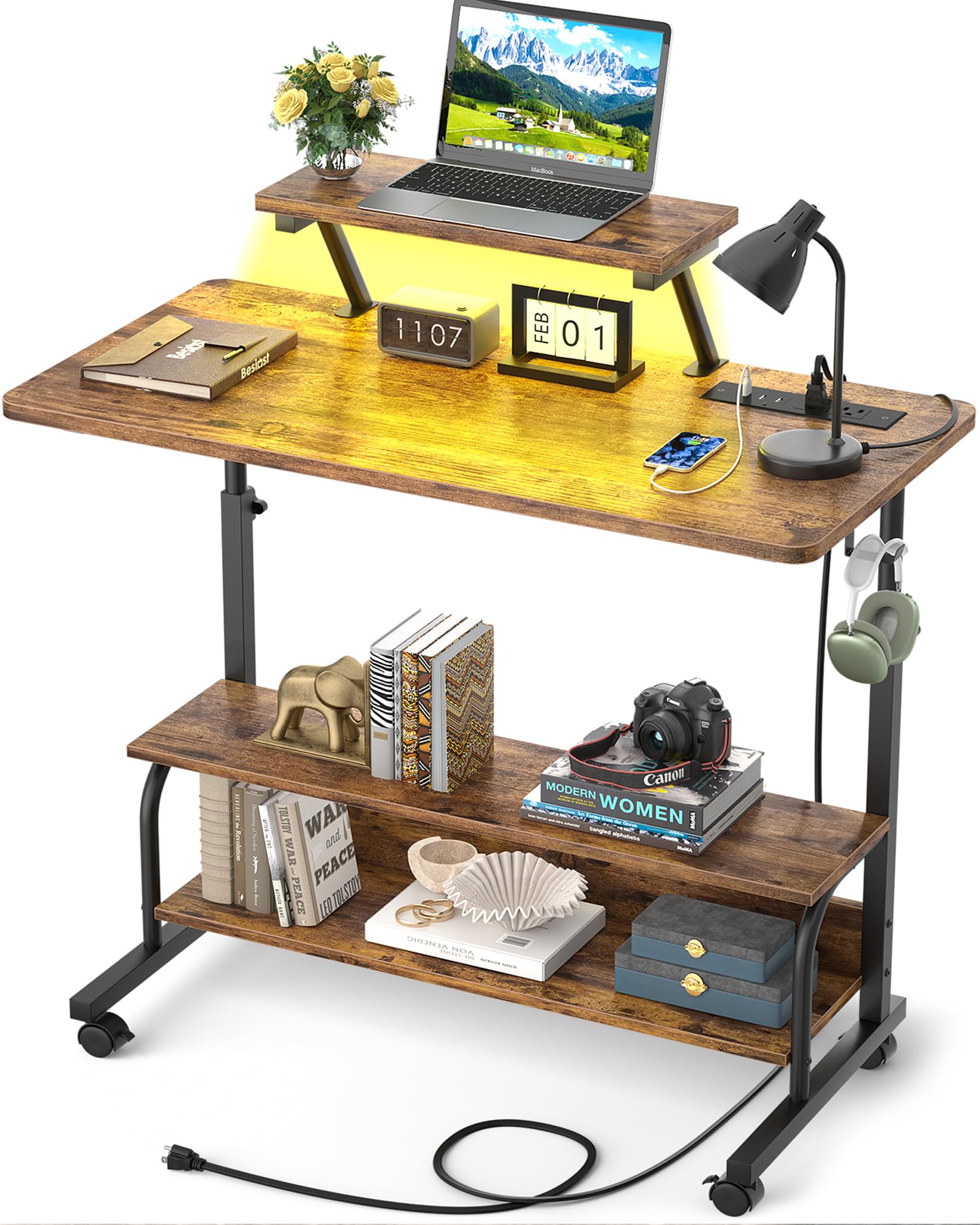
Figure 1: Besiost 32-inch Height Adjustable Standing Desk
1. Setup and Assembly
The Besiost standing desk requires assembly. All necessary tools are included in the package. We recommend two people for assembly to ensure stability and ease of installation.
1.1 Unpacking
- Carefully open the packaging and remove all components.
- Verify that all parts listed in the assembly guide are present and undamaged.
- Keep packaging materials until assembly is complete in case any parts need to be returned or replaced.
1.2 Assembly Steps
Follow the detailed instructions provided in the separate assembly guide included with your product. Ensure all screws and fasteners are tightened securely before using the desk.

Figure 2: Desk Dimensions Overview
This diagram illustrates the key dimensions of the desk, including the adjustable height range of 27.5 to 41 inches, desktop size, and shelf measurements. Refer to this for placement and space planning.
2. Operating Instructions
2.1 Height Adjustment
The desk features a manual height adjustment mechanism, allowing you to transition between sitting and standing positions. The height can be adjusted between 27.5 inches and 41 inches. To adjust, loosen the locking knobs on the vertical supports, raise or lower the desktop to your desired height, and then securely tighten the knobs.

Figure 3: Ergonomic Height Adjustment
Adjusting the desk height helps reduce neck and back strain by promoting proper posture whether sitting or standing.
2.2 Power Outlets and USB Ports
The desk is equipped with an integrated power strip featuring 2 AC outlets and 3 USB ports. A 6.5-foot power supply cord is provided. Use the included Velcro tape to manage and tidy your device cords.

Figure 4: Integrated Power Outlets and USB Ports
This feature provides convenient charging for laptops, phones, and other electronic devices directly at your workspace.
2.3 Smart LED Lights
The desk includes a smart RGB LED light strip offering over 60,000 colors and 29 flashing modes. Control the lights via a dedicated mobile application. Features include CCT mode, a built-in microphone for music sync, and timer functions to customize your ambiance.

Figure 5: Smart LED Lighting Features
The LED lights enhance the desk's functionality and aesthetic, allowing for personalized lighting effects.
2.4 Moveable Monitor Stand and Storage
The desk features a moveable monitor stand to elevate your screen, further reducing neck and back strain. Additionally, two open storage shelves provide space for books, office supplies, and other items. The desk is equipped with 4 high-quality smooth rotary wheels for mobility and 2 extra desk iron hooks for hanging headphones or bags.

Figure 6: Desk Features Overview
The design incorporates practical elements like a round protective edge for safety and lockable wheels for stability when stationary.
3. Maintenance
3.1 Cleaning
- Wipe the desk surfaces with a soft, damp cloth. Avoid abrasive cleaners or harsh chemicals that may damage the finish.
- For the metal frame, use a mild detergent solution if necessary, then wipe dry.
- Ensure no liquids enter the power outlets or USB ports during cleaning.
3.2 General Care
- Regularly check all screws and fasteners to ensure they remain tight. Retighten as needed.
- Avoid placing excessively hot or cold items directly on the desktop without protective coasters.
- Do not drag the desk; use the wheels for movement. Ensure wheels are unlocked before moving and locked when stationary.
4. Troubleshooting
| Problem | Possible Cause | Solution |
|---|---|---|
| Desk is unstable or wobbly. | Loose fasteners; uneven floor; improper weight distribution. | Check and tighten all assembly screws. Ensure the desk is on a level surface. Distribute weight evenly on the desktop and shelves. |
| Height adjustment is difficult. | Locking knobs are too tight; mechanism needs lubrication. | Ensure locking knobs are sufficiently loosened. Apply a small amount of silicone lubricant to the adjustment mechanism if resistance persists. |
| LED lights not working. | Power connection issue; app malfunction. | Check if the LED strip is properly connected to its power source. Ensure the mobile app is updated and correctly paired with the lights. |
| Power outlets/USB ports not functioning. | Desk not plugged in; circuit breaker tripped. | Ensure the desk's main power cord is securely plugged into a working wall outlet. Check your home's circuit breaker. |
5. Specifications
| Feature | Detail |
|---|---|
| Brand | Besiost |
| Model Number | SJZJZT-32 |
| Product Dimensions (D x W x H) | 15.7" x 31.5" x 41" |
| Minimum Height | 27.5 Inches |
| Maximum Height | 41 Inches |
| Lifting Mechanism | Manual |
| Material | High Quality MDF Board and Sturdy Steel Frame |
| Color | Rustic Brown |
| Power Outlets | 2 AC Outlets (120V/12A) |
| USB Ports | 3 USB Ports (5V/2A) |
| Power Cord Length | 6.5 Feet |
| LED Lights | RGB with 60,000+ colors, 29 modes, CCT, music sync, timer functions |
| Storage | 2 Tier Opening Storage Shelves |
| Mobility | 4 High-quality Smooth Rotary Wheels (Lockable) |
| Additional Features | Moveable Monitor Stand, 2 Iron Hooks, Round Protective Edge |
| Maximum Weight Capacity | 100 lbs (45 kg) |
6. Warranty and Support
6.1 Limited Warranty
This Besiost product comes with a limited warranty. Please refer to the warranty card included in your packaging or visit the official Besiost website for detailed terms and conditions regarding coverage and duration.
6.2 Customer Support
For any questions, assistance with assembly, or troubleshooting not covered in this manual, please contact Besiost customer support. Contact information can typically be found on the product packaging, the official Besiost website, or through your purchase platform.