
1. Product Overview
The Yale YDM 4115-A is a smart digital door lock designed for wooden doors, offering multiple access methods for enhanced security and convenience. This lock integrates advanced technology to provide a secure and user-friendly experience for your home or office.
Key Features:
- Multiple Access Options: Fingerprint, Pincode, Mechanical Keys, Bluetooth, and App-enabled remote access (via Yale Access app).
- Smart Connectivity: Bluetooth and Wi-Fi capabilities (requires Yale Access app and Wifi-bridge for remote functions).
- Automatic Locking: Features an auto-lock function that secures the door once closed, providing peace of mind.
- Emergency Power: In case of complete battery discharge, the lock can be temporarily powered using a standard 9V battery.
- Low Battery Warning: Provides audible alarms and LED indicators when batteries are low.
- Compatibility: Suitable for door thicknesses ranging from 40 mm to 80 mm.

2. Setup and Installation
Proper installation is crucial for the optimal performance and security of your Yale YDM 4115-A lock. It is highly recommended to have the lock installed by an authorized technician to ensure correct setup and to maintain warranty validity.
2.1 Unpacking and Components
Before beginning installation, verify that all components are present in the package:
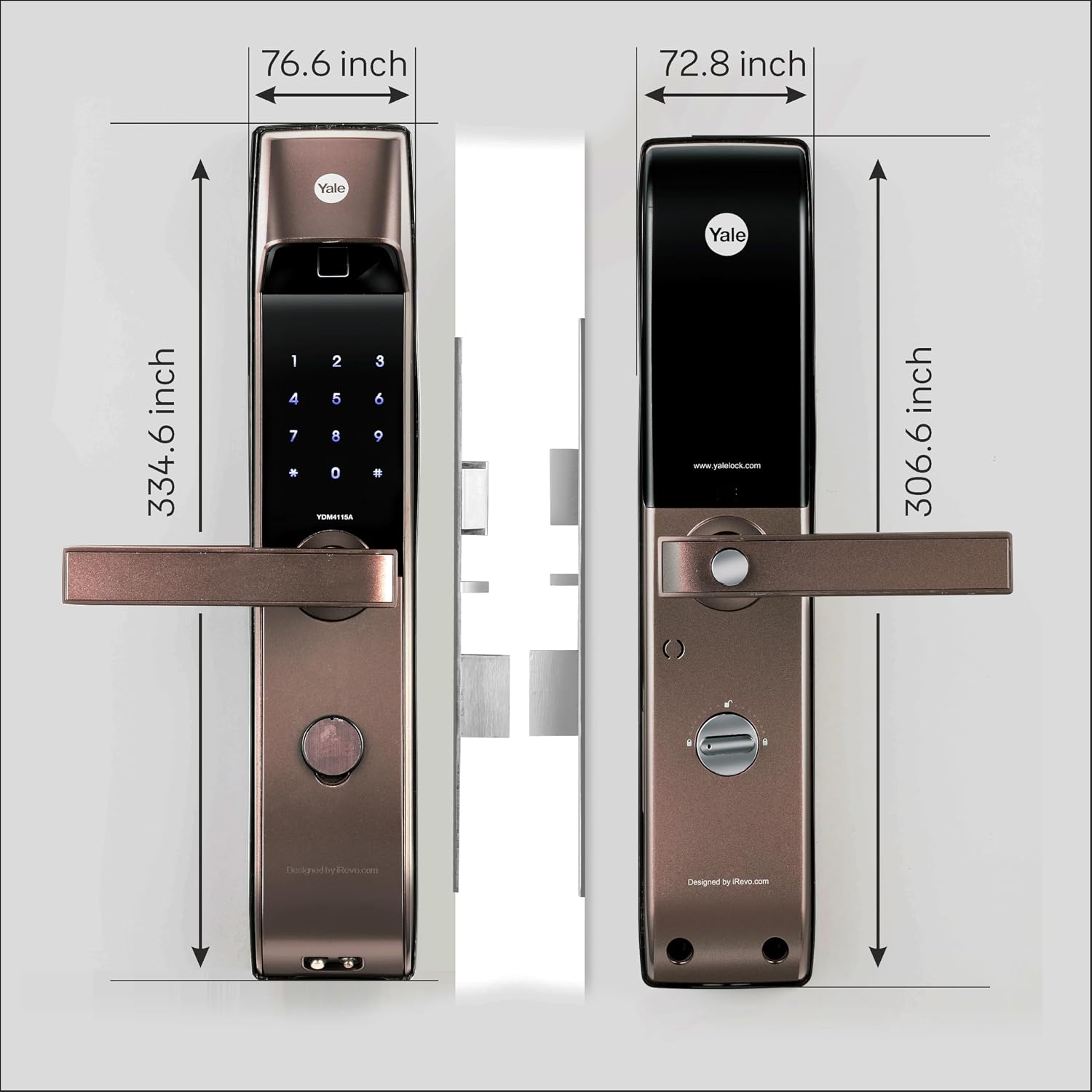
- Front Panel
- Back Panel
- 4 AA Batteries
- Strike Plate
- User Manual (this document)
- Installation Accessories (screws, spindle, etc.)

2.2 Door Preparation
Ensure your door meets the following specifications:
- Door Thickness: Minimum 40 mm, Maximum 80 mm.
- Door Material: Designed for wooden doors.

2.3 Battery Installation
Insert the four AA batteries into the battery compartment located on the back panel of the lock. Ensure correct polarity (+/-) as indicated. The lock will emit a confirmation sound or light upon successful battery installation.
2.4 Initial Configuration and App Pairing
After physical installation, follow the on-screen instructions in the Yale Access app to pair your lock. A Yale Wifi-bridge is required for remote access functionalities. The app will guide you through setting up initial user codes and fingerprints.
3. Operating Instructions
The Yale YDM 4115-A offers several convenient ways to lock and unlock your door.
3.1 Unlocking the Door
- Fingerprint: Place your registered finger on the fingerprint scanner. The lock will unlock if the fingerprint is recognized.
- Pincode: Enter your registered pincode on the smart keypad, followed by the '#' key.
- Mechanical Key: Insert the mechanical key into the emergency keyhole and turn to unlock.
- Yale Access App: Use the Yale Access app on your smartphone to remotely unlock the door (requires Wifi-bridge).
3.2 Locking the Door
- Automatic Locking: The lock is equipped with an auto-lock feature that engages the deadbolt a few seconds after the door is closed.
- Manual Locking: Press the '#' key on the keypad or use the Yale Access app to manually lock the door.

3.3 Managing Users and Settings
All user management (adding/deleting fingerprints, pincodes) and advanced settings are controlled via the Yale Access app. Refer to the app's help section for detailed instructions on these features.
4. Maintenance
Regular maintenance ensures the longevity and reliable operation of your Yale YDM 4115-A smart lock.
4.1 Battery Replacement
When the low battery warning (audible alarm and LED) is activated, replace all four AA batteries promptly. Use high-quality alkaline batteries for best performance. To replace, remove the back panel cover, replace the old batteries with new ones, and reattach the cover.
4.2 Emergency Power
If the batteries are completely drained and the lock is unresponsive, you can temporarily power it using a standard 9V battery. Touch the terminals of the 9V battery to the emergency power contacts on the front panel of the lock while entering your pincode or using your fingerprint.
4.3 Cleaning
Clean the lock's exterior surfaces with a soft, dry cloth. Avoid using abrasive cleaners, solvents, or chemical sprays, as these can damage the finish and internal components.
5. Troubleshooting
This section addresses common issues you might encounter with your Yale YDM 4115-A lock.
5.1 Lock Not Responding / No Power
- Check Batteries: Ensure the AA batteries are correctly installed and not depleted. Replace if necessary.
- Emergency Power: Use a 9V battery on the emergency terminals to temporarily power the lock and gain access.
5.2 Fingerprint Reader Issues
- Clean Sensor: Ensure the fingerprint sensor is clean and free of dirt or moisture.
- Re-register Fingerprint: If issues persist, delete and re-register your fingerprint through the Yale Access app.
- Proper Placement: Ensure your finger covers the entire sensor surface during scanning.
5.3 Pincode Not Working
- Correct Code: Verify you are entering the correct pincode.
- Keypad Response: Ensure the keypad lights up and responds to touches.
- Reset Code: If necessary, reset or re-add the pincode via the Yale Access app.
5.4 Lock Not Engaging/Disengaging Properly
- Door Alignment: Check if the door and frame are properly aligned. Misalignment can prevent the deadbolt from extending or retracting smoothly.
- Obstructions: Ensure there are no obstructions in the door frame or strike plate area.
- Professional Inspection: If the issue persists, contact customer support for a professional inspection, as mechanical issues may require service.
5.5 App Connectivity Issues
- Bluetooth/Wi-Fi: Ensure your phone's Bluetooth is enabled and the Yale Wifi-bridge is powered on and connected to your home Wi-Fi network.
- App Update: Make sure the Yale Access app is updated to the latest version.
- Restart Devices: Try restarting your smartphone, the Yale Wifi-bridge, and the lock (by temporarily removing batteries).
6. Specifications
| Feature | Specification |
|---|---|
| Brand | Yale |
| Model Name | YDM 4115-A Smart Lock |
| Lock Type | Biometric |
| Access Methods | Fingerprint, Pincode, Mechanical Key, App (Bluetooth/Wi-Fi) |
| Special Feature | Automatic Locking |
| Material | Zinc |
| Color | Bronze |
| Dimensions (L x W x H) | 7.2 x 4.7 x 36.4 Centimeters |
| Item Weight | 5.5 kg (5500 Grams) |
| Door Thickness Compatibility | 40 mm to 80 mm |
| Power Source | 4 AA Batteries |
| Emergency Power | 9V Battery |
| Connectivity Protocol | Wi-Fi (via Wifi-bridge) |
| Controller Type | Amazon Alexa (with compatible accessories) |
7. Warranty Information
The Yale YDM 4115-A Smart Digital Door Lock typically comes with a 3-year warranty. Please refer to the official warranty card included with your product or the Yale website for the most accurate and up-to-date warranty terms and conditions.
Important Note: The product warranty may be void if installation is performed by yourself or an unauthorized technician. Always ensure installation is carried out by a certified professional.
8. Customer Support
For any assistance, service requests, or technical support regarding your Yale YDM 4115-A Smart Digital Door Lock, please contact Yale customer support using the details below:
- Toll-Free Number: 1800-103-5606 (Available 24x7x365 Days)
- Service Requests Email: customercare1.india@assaabloy.com
- WhatsApp Support: 8929-788-788 (Available 9:30 AM – 06:00 PM, All days)


