
1. Introduction
Thank you for choosing the JONYJ LT-156 Cordless Handheld Vacuum Cleaner. This manual provides essential information for the safe and efficient operation, maintenance, and troubleshooting of your new device. Please read it thoroughly before first use and keep it for future reference.
2. Safety Instructions
- Read all instructions before using the appliance.
- Do not use the vacuum cleaner outdoors or on wet surfaces.
- Do not allow children to operate the vacuum cleaner. Close supervision is necessary when used near children.
- Do not pick up flammable or combustible liquids, such as gasoline, or use in areas where they may be present.
- Do not pick up anything that is burning or smoking, such as cigarettes, matches, or hot ashes.
- Do not use without dust cup and filters in place.
- Turn off the appliance before connecting or disconnecting the battery charger.
- Use only the charger supplied by the manufacturer to recharge.
- Store the vacuum cleaner indoors in a cool, dry place.
3. Package Contents
Verify that all items are present in the package:
- Vacuum Cleaner
- Instruction Manual
- Type-C Charging Cable
- HEPA Filter (2 pieces)
- Metal Filter
- Brush Suction Nozzle
- Long Suction Nozzle
- Extended Hose

Image: The JONYJ LT-156 Handheld Vacuum Cleaner and its included accessories, including the main unit, various nozzles, filters, and charging cable.
4. Product Overview
The JONYJ LT-156 is a powerful and portable cordless handheld vacuum cleaner designed for versatile cleaning tasks in your home, car, or office. It features a robust motor and efficient filtration system.
Key Features:
- 16000PA Powerful Suction: Equipped with an advanced high-performance motor, providing 16kPa suction and 72,000 RPM high-speed rotation for thorough cleaning.
- Lightweight & Ergonomic Design: Weighing just 1.7 lbs, its ergonomic handle and cordless design offer effortless maneuverability.
- Built-in LED Light: Illuminates dark corners and crevices to reveal hidden dust.
- Dual Filtration System: Features a washable and reusable HEPA filter and a metal filter, intercepting 99.99% of particles.
- 400ml Large Dust Cup: Designed for one-click emptying for convenient waste disposal.
- Type-C Fast Charging: Built-in 7800mAh high-capacity battery, fully charged in 3.5 hours, offering up to 30 minutes of runtime.

Image: The JONYJ LT-156 Handheld Vacuum Cleaner showcasing its 16000PA strong suction power and cyclonic vacuuming technology.

Image: The JONYJ LT-156 Handheld Vacuum Cleaner highlighting its lightweight design (1.7 lbs) and ergonomic handle for comfortable use.
5. Setup and Assembly
Your JONYJ LT-156 vacuum cleaner comes with various nozzles to suit different cleaning needs. To attach a nozzle:
- Ensure the vacuum cleaner is turned off.
- Align the desired nozzle with the suction port of the vacuum cleaner.
- Push firmly until it clicks into place.
Nozzle Types:
- Long Suction Nozzle: Ideal for reaching tight crevices and narrow spaces like car seats, sofa gaps, or cabinet corners.
- Brush Suction Nozzle: Suitable for cleaning dust from cushions, keyboards, air vents, and other delicate surfaces.
- Extended Hose: Provides flexibility to clean hard-to-reach areas such as behind sofas or between bookshelves.
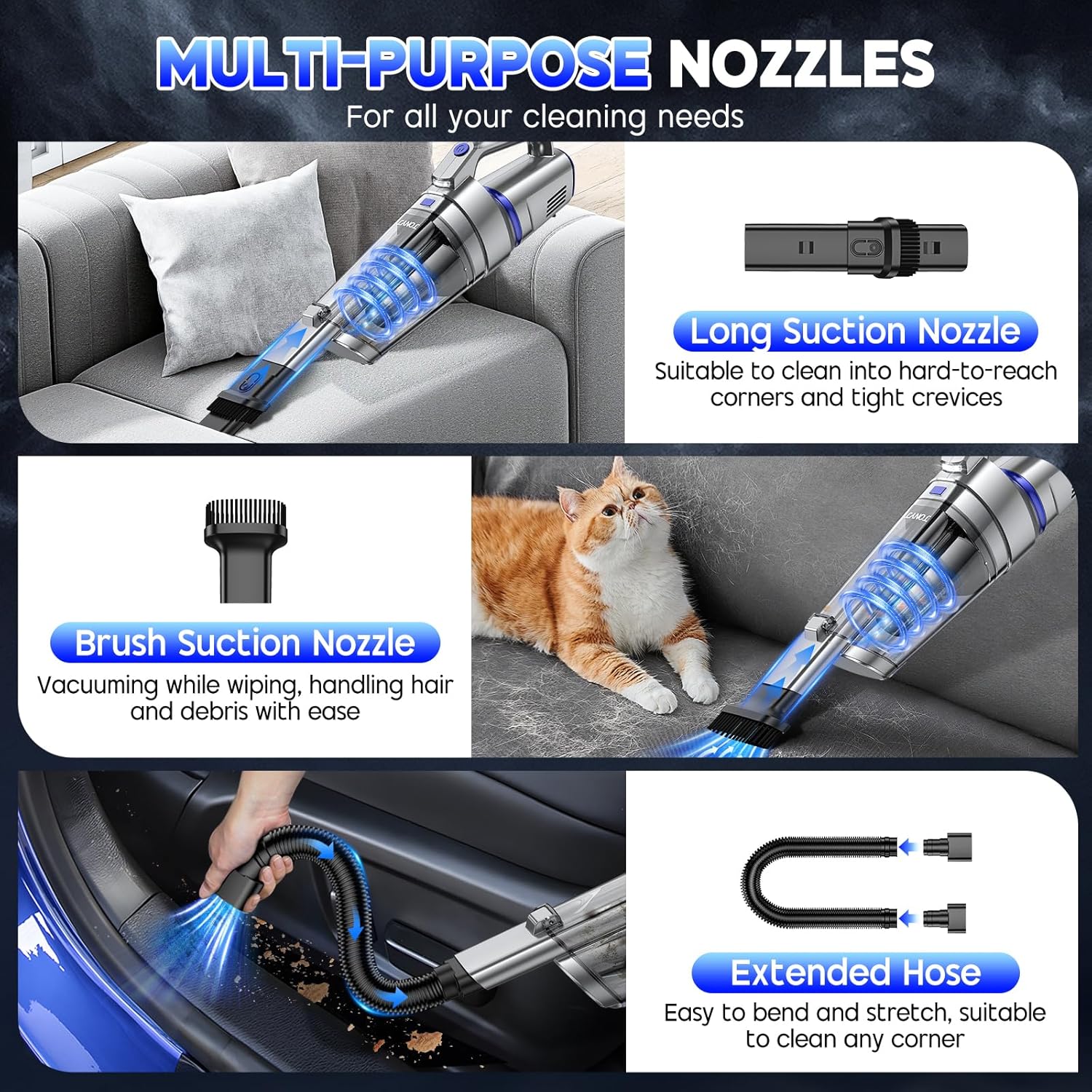
Image: The JONYJ LT-156 Handheld Vacuum Cleaner demonstrating its multi-purpose accessories, including the long suction nozzle, brush suction nozzle, and extended hose.
6. Charging the Vacuum Cleaner
Before first use, fully charge the vacuum cleaner. The device uses a Type-C fast charging system.
- Connect the Type-C charging cable to the charging port on the vacuum cleaner.
- Plug the other end of the cable into a compatible USB power source (e.g., car charger, power bank, adapter, laptop).
- The indicator light will show charging status. A full charge takes approximately 3.5 hours.
- Once fully charged, the vacuum cleaner provides up to 30 minutes of continuous runtime.

Image: The JONYJ LT-156 Handheld Vacuum Cleaner connected via its Type-C charging cable, illustrating its fast charging capability and 7800mAh battery.
7. Operating Instructions
To operate your JONYJ LT-156 Handheld Vacuum Cleaner:
- Ensure the vacuum is fully charged and the desired nozzle is securely attached.
- Press the power button located on the handle to turn on the vacuum cleaner. The LED light will also activate, illuminating the cleaning area.
- Guide the nozzle over the surface you wish to clean. For optimal suction, maintain close contact with the surface.
- To turn off the vacuum cleaner, press the power button again.
Video: An official product video demonstrating the JONYJ Handheld Vacuum Cordless in various cleaning scenarios, highlighting its ease of use and effectiveness.
8. Maintenance
Regular maintenance ensures optimal performance and extends the lifespan of your vacuum cleaner.
Emptying the Dust Cup:
- Ensure the vacuum cleaner is turned off.
- Locate the dust cup release button (often near the handle or base of the dust cup).
- Press the button to detach the dust cup from the main unit.
- Hold the dust cup over a trash bin and press the one-click emptying button to release collected debris.
Cleaning the Filters:
The JONYJ LT-156 features a dual filtration system with a metal filter and a HEPA filter, both of which are washable and reusable.
- After emptying the dust cup, carefully remove the metal filter and then the HEPA filter.
- Rinse both filters under running water until clean. Do not use harsh detergents.
- Allow the filters to air dry completely before reassembling. Ensure they are fully dry to prevent damage and maintain suction power.
- Reinsert the HEPA filter, then the metal filter, and finally reattach the dust cup to the vacuum cleaner.
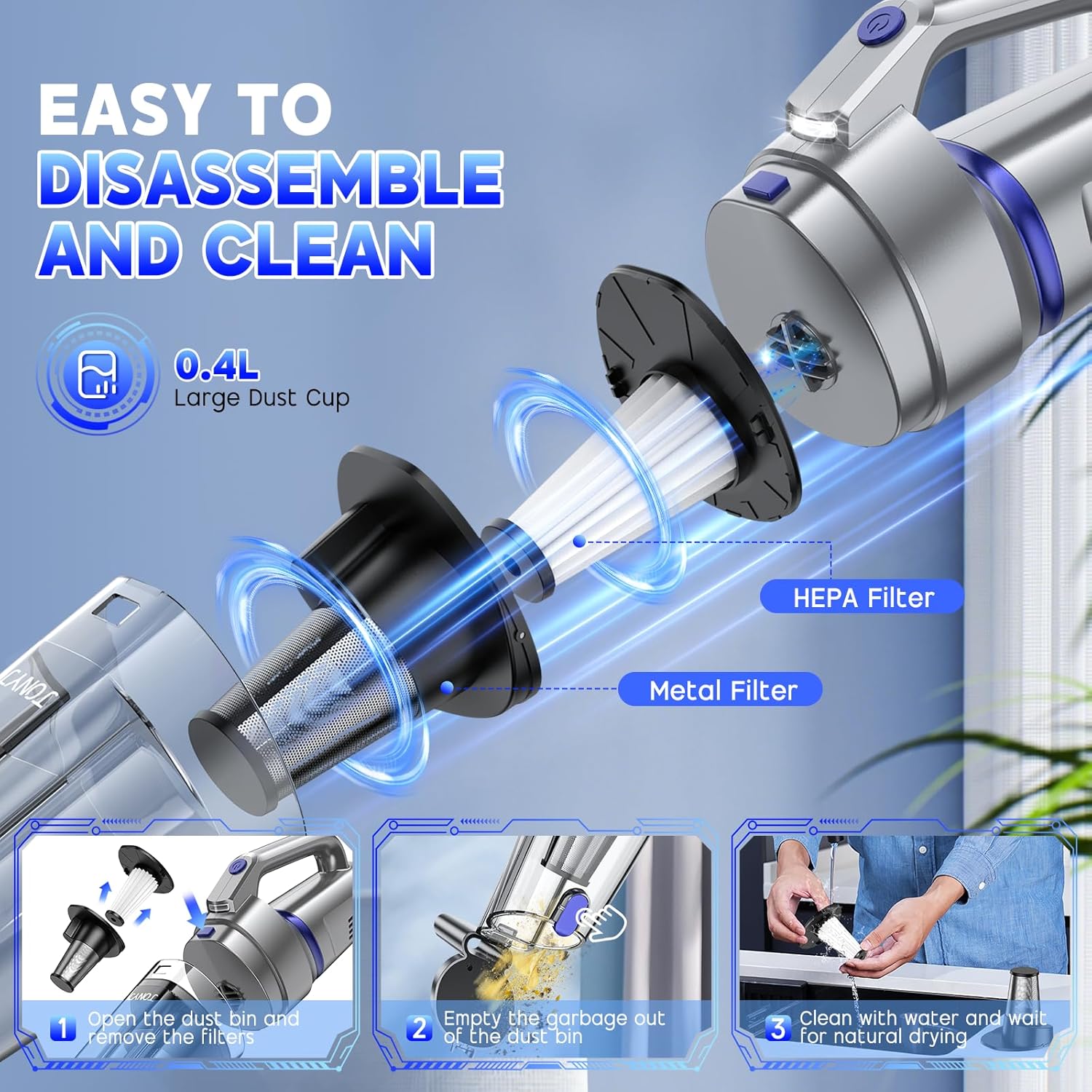
Image: A step-by-step guide showing how to easily disassemble the JONYJ LT-156 Handheld Vacuum, remove filters, empty the dust bin, and clean the components.

Image: An illustration of the JONYJ LT-156 Handheld Vacuum's dual filtration system, featuring a washable and reusable HEPA filter and a metal filter.
9. Troubleshooting
If you encounter issues with your JONYJ LT-156, refer to the following common problems and solutions:
| Problem | Possible Cause | Solution |
|---|---|---|
| Vacuum does not turn on | Battery is low or depleted. | Charge the vacuum cleaner fully. |
| Reduced suction power | Dust cup is full. Filters are clogged. Nozzle is blocked. | Empty the dust cup. Clean or replace filters. Check and clear any blockages in the nozzle or suction path. |
| Battery not charging | Charging cable or adapter is faulty. Connection is loose. | Ensure the charging cable is securely connected. Try a different compatible Type-C cable and power adapter. |
| Unusual noise during operation | Blockage in the suction path or motor issue. | Turn off the vacuum and check for any foreign objects in the nozzle or dust cup. If the issue persists, contact customer service. |
10. Specifications
| Feature | Detail |
|---|---|
| Brand | JONYJ |
| Model Name | LT-156 |
| Special Features | Cordless, HEPA, Lightweight, Rechargeable, Washable Filter |
| Filter Type | HEPA Filter, Metal Filter |
| Capacity | 400 Milliliters |
| Wattage | 120 watts |
| Recommended Uses | All Floors, Car, Carpet, Furniture, Home, Office |
| Form Factor | Handheld |
| Color | Silver & Blue |
| Product Dimensions | 17.4"L x 3.9"W x 5.5"H |
| Battery Type | Lithium-Ion |
| Noise Level | 75 Decibels |
| Battery Life | 30 minutes |
| Item Weight | 2.67 pounds |
| UPC | 755801806206 |
11. Warranty and Support
The JONYJ LT-156 Cordless Handheld Vacuum Cleaner is designed for reliable performance. If you have any questions or require assistance after purchase, please contact JONYJ customer service for support.