
1. Introduction
Thank you for choosing the OREiN Motion Sensor Outdoor Lights. This manual provides detailed instructions for the safe installation, operation, and maintenance of your new floodlights. These lights are designed to provide bright, energy-efficient security lighting for various outdoor applications, featuring advanced motion sensing and multiple operating modes.
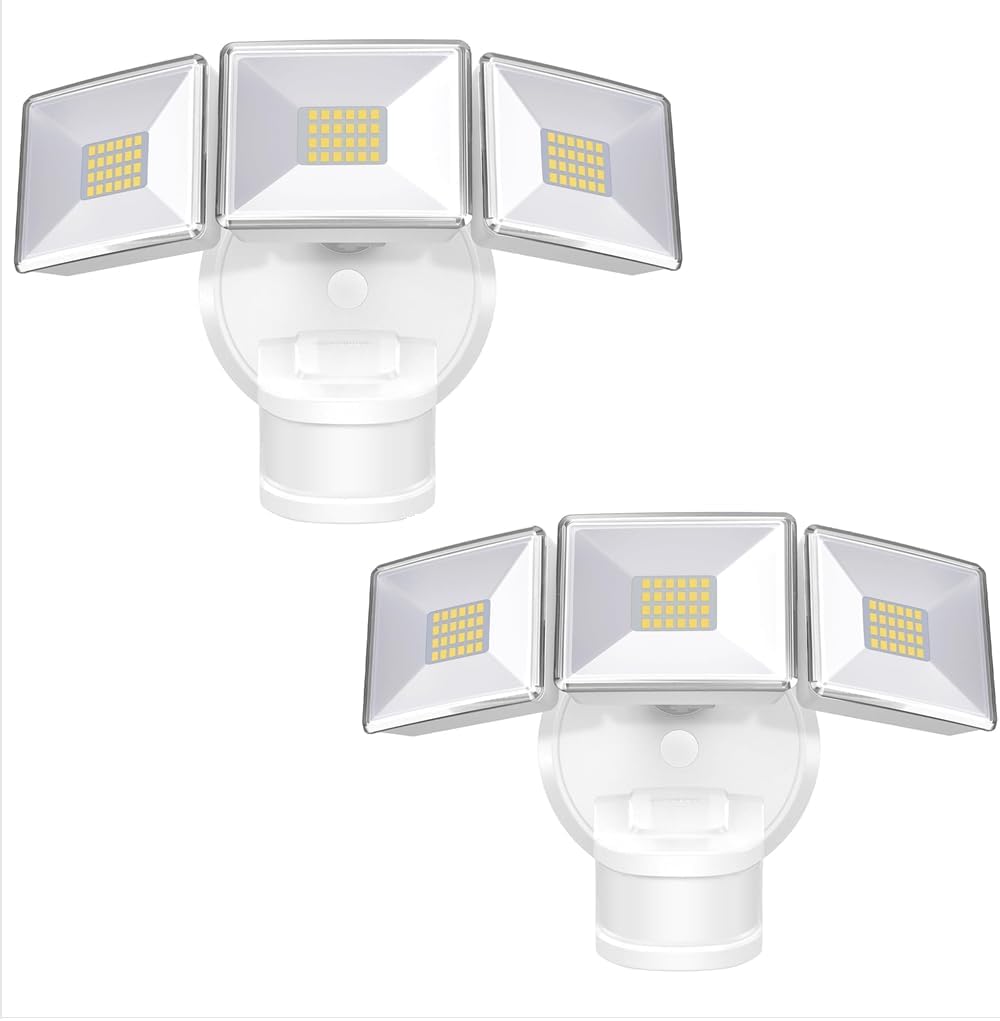
Image: Two OREiN Motion Sensor Outdoor Lights, showcasing their design and dual-pack offering.
2. Safety Information
Please read all safety instructions carefully before installation and operation. Failure to follow these instructions may result in electric shock, fire, or other hazards.
- WARNING: Risk of Electric Shock. Disconnect power at the fuse or circuit breaker before installing or servicing.
- This product must be installed in accordance with the applicable installation code by a person familiar with the construction and operation of the product and the hazards involved.
- Use only UL-listed wire connectors suitable for the size, type, and number of conductors.
- Do not install near combustible materials.
- Ensure the fixture is securely mounted to a junction box.
- Do not look directly into the LED light source when the light is on.
3. Package Contents
Verify that all components are present before beginning installation:
- 2 Pack 4500LM Flood Lights
- Mounting Bracket
- Screws
- Instruction Manual
- Wire Nuts
4. Specifications
| Feature | Specification |
|---|---|
| Brand | OREiN |
| Model Name | OL3600354 |
| Color | White |
| Material | Acrylonitrile Butadiene Styrene, Aluminum |
| Light Fixture Form | Floodlight |
| Room Type | Garden, Garage, Yard, Front Door, Patio |
| Product Dimensions | 11.61"L x 8.98"W x 6.5"H |
| Indoor/Outdoor Usage | Outdoor |
| Power Source | Corded Electric (AC) |
| Installation Type | Wall Mount and Soffit Mount |
| Light Source Type | LED |
| Number of Light Sources | 144 |
| Voltage | 220 Volts |
| Light Color | White |
| Item Weight | 3.31 Pounds |
| Wattage | 30 watts |
| Water Resistance Level | IP65 Waterproof |
| Brightness | 4500 Lumen |
| Efficiency | 150 lumens per watt |
| Color Temperature | 5000 Kelvin |

Image: Detailed specifications comparing different OREiN 3-head floodlight models, including lumen output, wattage, sensor features, and lighting area range.
5. Installation
The OREiN Motion Sensor Outdoor Lights are hardwired and designed for easy installation on a junction box. They support both wall mounting and soffit mounting.
Installation Steps:
- Secure the Mounting Bracket: Attach the mounting bracket to the junction box using the provided screws. Ensure it is firmly secured.
- Connect the Wires: Connect the household wiring to the light fixture's wires using the provided wire nuts. Follow standard electrical wiring practices (e.g., black to black, white to white).
- Secure the Light: Align the light fixture with the mounting bracket and secure it in place.
- Insert the Waterproof Plug: Ensure the waterproof plug is properly inserted to maintain the IP65 rating.
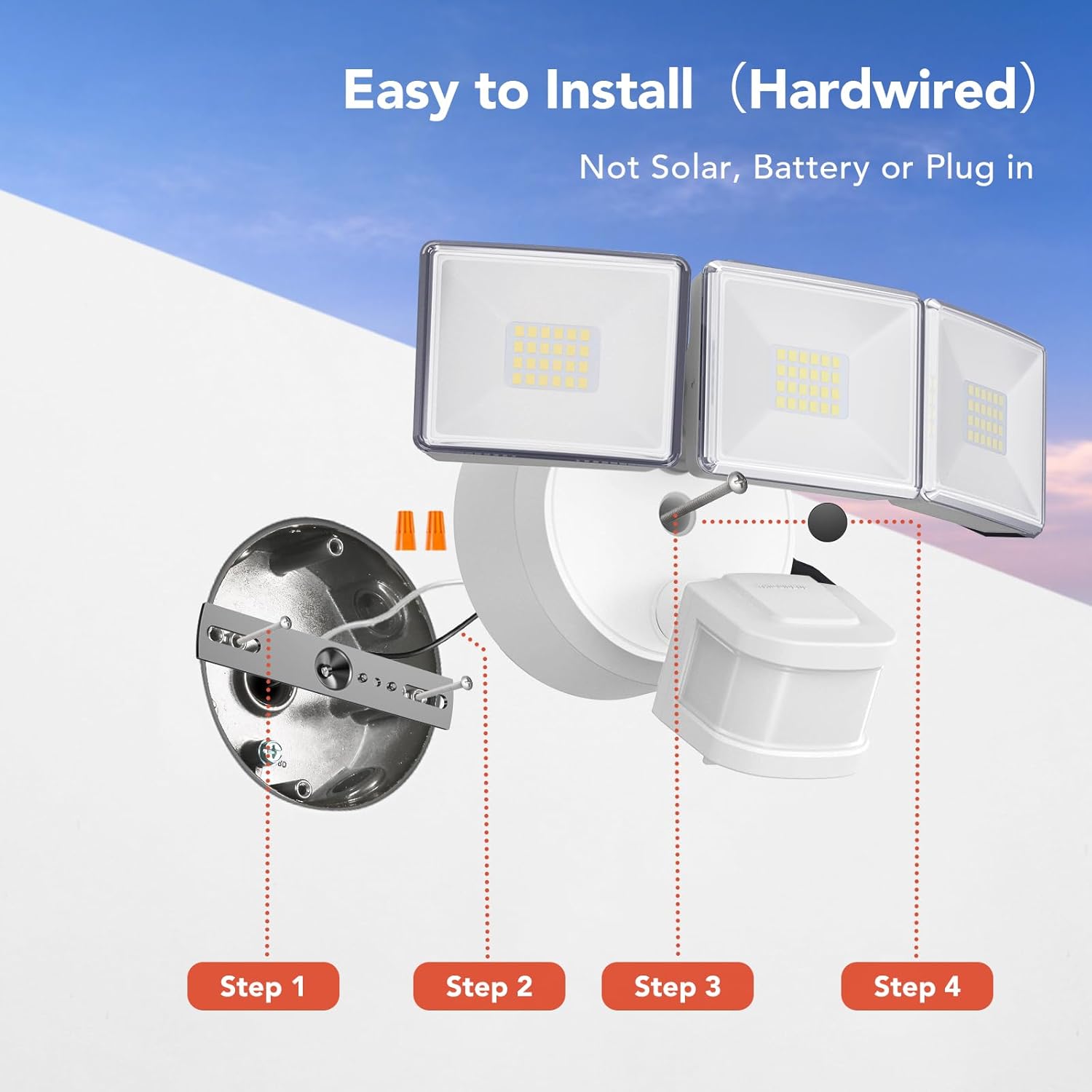
Image: Step-by-step diagram illustrating the hardwired installation process, from securing the mounting bracket to inserting the waterproof plug.

Image: Visual representation of the two installation methods: wall-mounted and soffit-mounted, demonstrating versatility.

Image: Diagram illustrating the flexible adjustment angles of the three light heads (up to 340° horizontal, 90° vertical) and the motion sensor (up to 270° horizontal, 120° vertical).
Video: An official product video demonstrating the features and installation process of the OREiN motion sensor outdoor lights, including motion detection, adjustable settings, and waterproof capabilities.
6. Operating Modes
The OREiN Motion Sensor Outdoor Lights offer three distinct operating modes, selectable via a dial on the sensor unit:
- TEST Mode: The light turns on for 5 seconds when motion is detected, regardless of ambient light conditions (day or night). This mode is ideal for testing the sensor's range and light coverage during installation.
- AUTO Mode: The light activates only at night when motion is detected. The illumination duration can be adjusted (1, 5, or 10 minutes) and the sensing distance can be set (10ft-40ft).
- D2D Mode (Dusk to Dawn): The light automatically turns on at dusk and turns off at dawn. In this mode, the motion sensing function is inactive, providing continuous ambient lighting throughout the night.
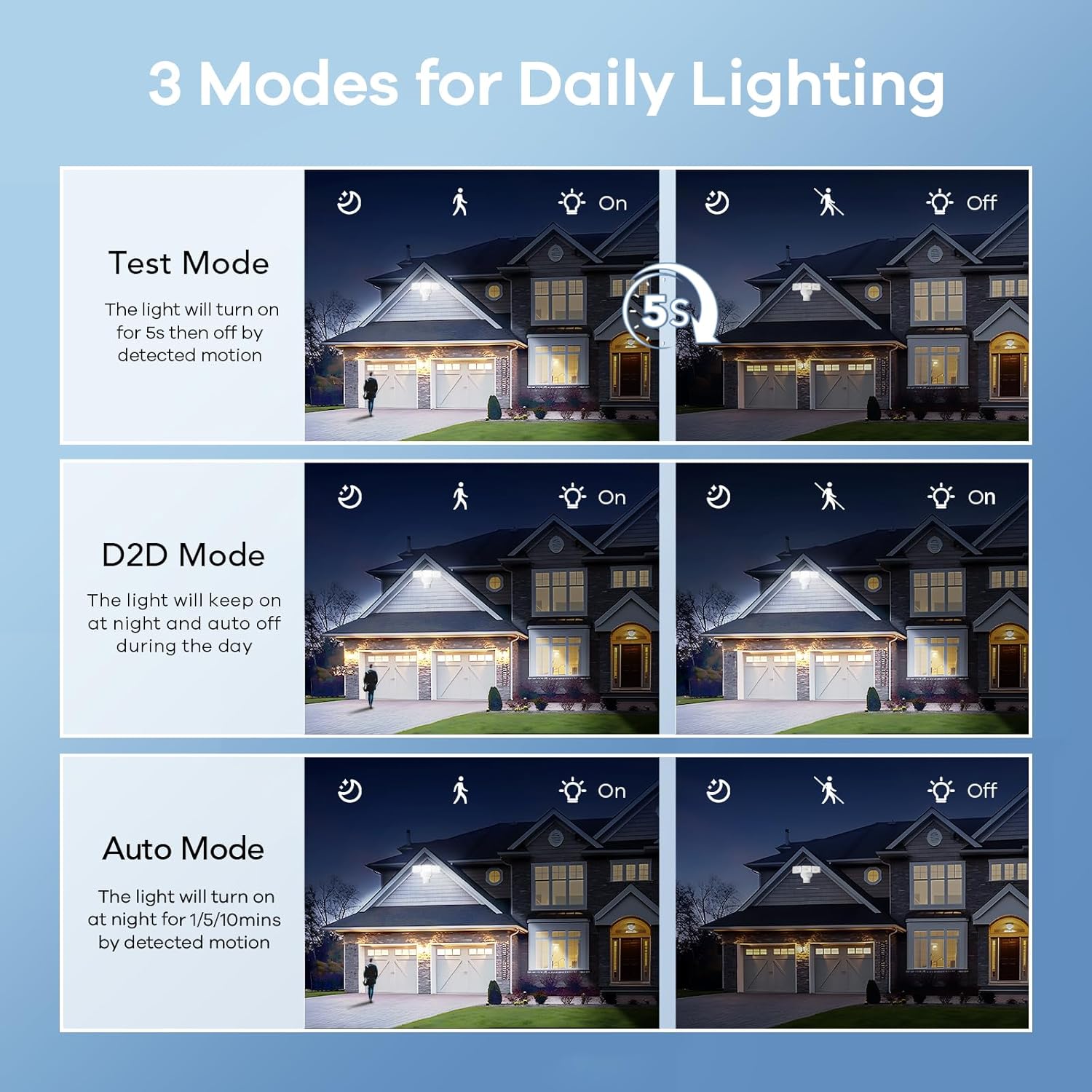
Image: Visual explanation of the three daily lighting modes: Test Mode (5s on), D2D Mode (dusk to dawn), and Auto Mode (motion-activated at night).

Image: Depiction of the Dusk to Dawn mode, where the light automatically illuminates when surroundings are dark and turns off when bright.

Image: A comprehensive visual comparison of D2D, TEST, and AUTO modes, showing how the light behaves in different scenarios and light conditions.
7. Motion Sensor Adjustment
The integrated motion sensor offers a wide 180° detection angle and an adjustable sensing distance up to 50 feet, providing comprehensive coverage for your security needs.
Adjusting Time and Sensitivity:
The sensor unit features two dials for customization:
- TIMER MINUTES: Adjusts the duration the light stays on after motion is detected in AUTO mode (1, 5, or 10 minutes).
- SENSITIVITY: Adjusts the motion detection range (10ft, 20ft, 30ft, 50ft). A longer detection distance corresponds to higher sensor sensitivity.

Image: Illustration highlighting the 180-degree wide-angle motion sensor and its 50-foot detection range, capable of sensing people, cars, and dogs.

Image: Detailed view of the adjustable motion sensor, showing the 'TIME' dial (1, 5, 10 minutes) and 'SENSITIVITY' dial (10, 20, 30, 50 feet) for precise control.

Image: An aerial view demonstrating the wide detection area (240° sensing angle, max 40 ft) provided by the floodlight, enhancing house security.
8. Product Features
- High Brightness & Energy Efficiency: The 4500LM floodlight provides powerful illumination while consuming only 30W, achieving 150LM/W efficiency. This significantly reduces electricity consumption compared to standard bulbs.
- IP65 Waterproof Design: Built to withstand various weather conditions, the IP65 rating ensures protection against rain, dust, and snow, making it suitable for year-round outdoor use.
- Excellent Heat Dissipation: Constructed with polycarbonate material, the fixture offers superior heat dissipation, high-temperature resistance, and frost resistance, contributing to a long lifespan of 50,000 hours.

Image: Visual representation of the light's key performance metrics: 4500 Lumens brightness, 5000 Kelvin color temperature, and 30 Watts power consumption.

Image: Diagram illustrating the high efficiency of 150 lumens per watt and the potential for 83% electricity bill savings due to the 30W power consumption supporting 4500 lumens.

Image: The floodlight shown under simulated rain, emphasizing its IP65 waterproof capability against rain, frost, and wind.

Image: A cutaway diagram illustrating the internal heat dissipation mechanism of the floodlight, showing airflow for cooling.
9. Maintenance
To ensure optimal performance and longevity of your OREiN Motion Sensor Outdoor Lights, follow these simple maintenance guidelines:
- Cleaning: Periodically wipe the light fixture and sensor lens with a soft, damp cloth to remove dust, dirt, or debris. Do not use abrasive cleaners or solvents.
- Inspection: Regularly check the wiring and mounting for any signs of wear, damage, or loosening. Ensure the waterproof plug is securely in place.
- Obstruction Clearance: Keep the area around the motion sensor clear of any obstructions (e.g., overgrown plants, hanging decorations) that might interfere with its detection capabilities.
10. Troubleshooting
If you experience issues with your OREiN Motion Sensor Outdoor Lights, refer to the following common problems and solutions:
| Problem | Possible Cause & Solution |
|---|---|
| Light does not turn on at night. |
|
| Light stays on continuously. |
|
| Light turns on too frequently or for no apparent reason. |
|
| Light turns off too quickly. |
|
11. Warranty and Support
OREiN provides a 24-month warranty for the motion sensor outdoor lights. For any usage issues, technical assistance, or warranty claims, please contact our customer support team:
- Phone Support: 1-844-506-1530 (available during working hours)
- Online Help: 7 days a week, 24 hours a day. Please refer to the product listing or the OREiN brand store on Amazon for contact details.

Image: A customer service representative ready to assist, symbolizing OREiN's commitment to support.


