
1. Introduction
Thank you for choosing the AJAZZ AJ159P Superlight Wireless Gaming Mouse. This high-performance gaming mouse is engineered for precision, speed, and comfort, featuring an ultra-lightweight design, advanced sensor technology, and versatile connectivity options. This manual provides detailed instructions to help you set up, operate, and maintain your new gaming mouse.

Figure 1: AJAZZ AJ159P Superlight Wireless Gaming Mouse with Magnetic Charging Dock.
2. Package Contents
Please check the package contents to ensure all items are present:
- AJAZZ AJ159P Wireless Gaming Mouse
- Magnetic Charging Dock
- USB-C to USB-A Paracord Cable (1.6m)
- USB 2.4GHz Receiver (stored inside the mouse)
3. Product Overview
Familiarize yourself with the components of your AJAZZ AJ159P mouse:
- Left Click Button
- Right Click Button
- Scroll Wheel / Middle Click Button
- Forward Button (Side)
- Backward Button (Side)
- DPI Switching Key (Bottom)
- Power On/Off Switch (Bottom)
- USB-C Port (Front)
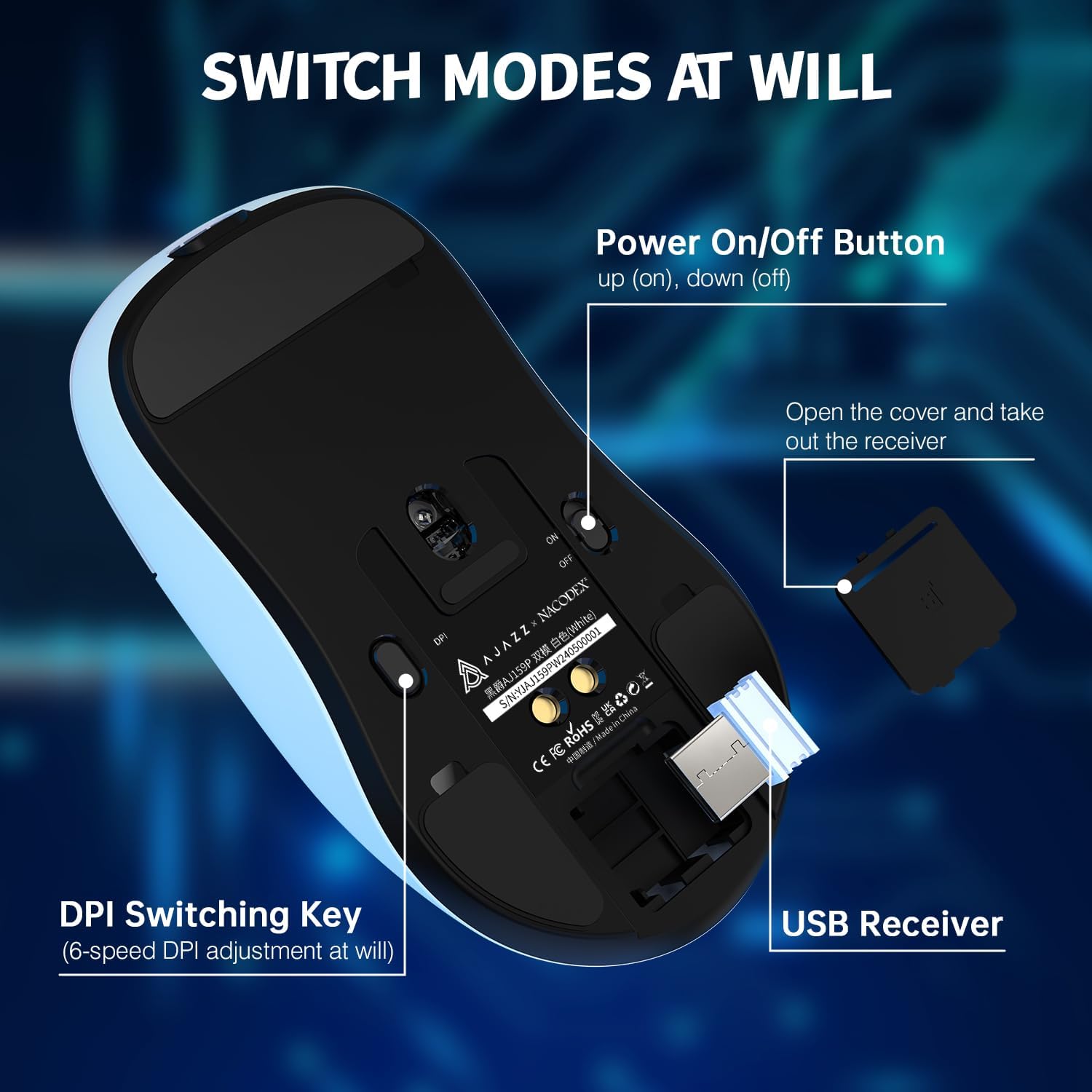
Figure 2: Underside of the mouse showing the power switch, DPI switch, and USB receiver storage.

Figure 3: Top view of the mouse highlighting programmable buttons and software interface.
4. Setup
4.1. Wireless Connection (2.4GHz)
- Locate the USB 2.4GHz receiver stored in the compartment on the underside of the mouse. Gently open the cover and remove the receiver.
- Plug the USB receiver into an available USB port on your computer (PC or Mac).
- Flip the power switch on the bottom of the mouse to the 'ON' position.
- The mouse should automatically connect to your computer. If not, ensure the receiver is securely plugged in and the mouse is powered on.
4.2. Wired Connection (USB-C)
- Connect the included USB-C paracord cable to the USB-C port on the front of the mouse.
- Connect the other end of the cable (USB-A) to an available USB port on your computer.
- The mouse will function in wired mode and will also charge simultaneously.
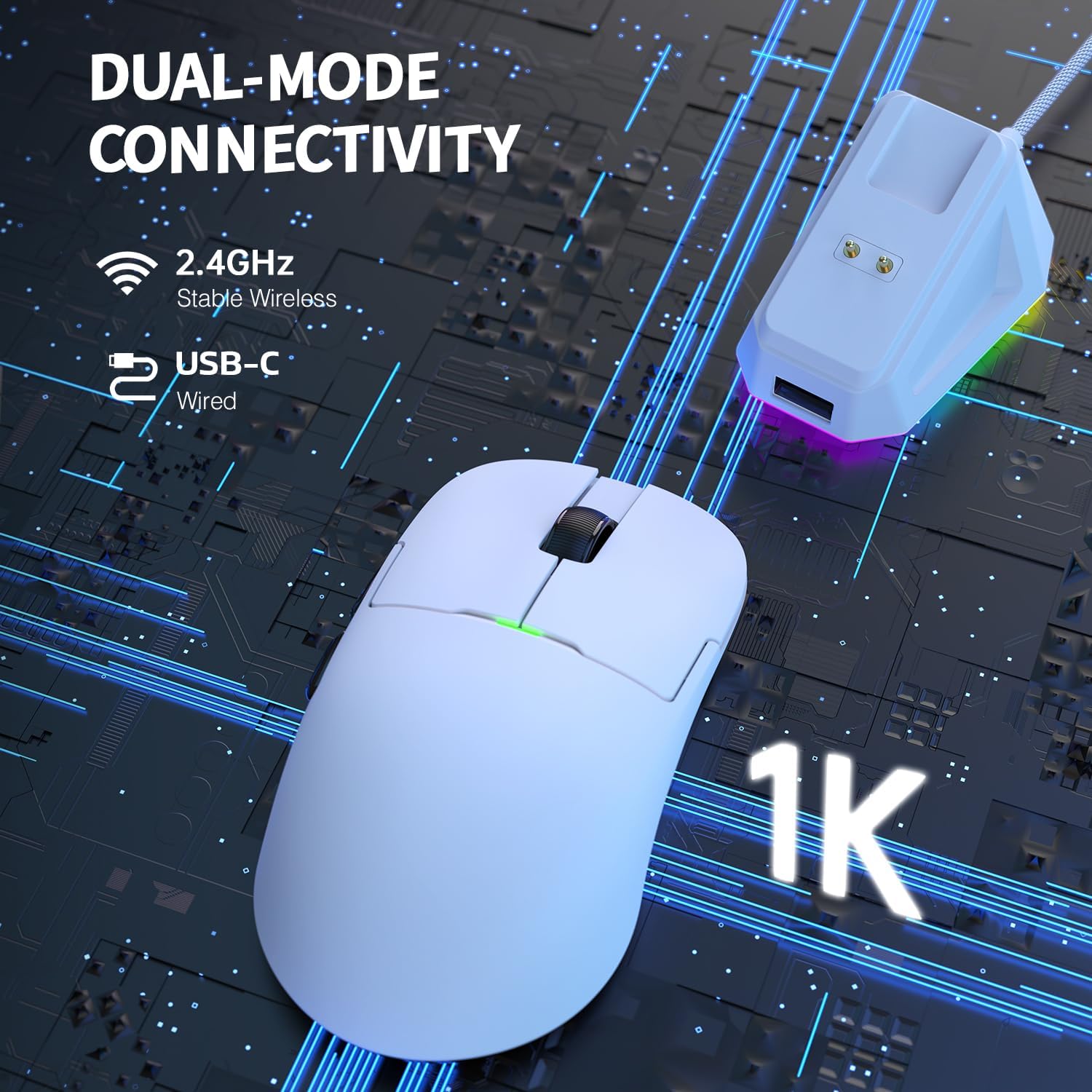
Figure 4: Dual-mode connectivity via 2.4GHz wireless and USB-C wired.
5. Operating Instructions
5.1. DPI Adjustment
The mouse features 6 adjustable DPI levels, allowing you to customize sensitivity for different tasks or games. Press the DPI switching key on the bottom of the mouse to cycle through the preset DPI values. The default DPI settings are typically 400, 800, 1600, 2400, 3200, and 26000 DPI.

Figure 5: PixArt PAW3395 sensor provides up to 26,000 DPI for precise tracking.
5.2. Programmable Buttons
The AJAZZ AJ159P features 6 programmable buttons. To customize button functions, macro settings, and lighting effects, please download the official AJAZZ software from the manufacturer's website. The software allows for advanced personalization to suit your gaming and productivity needs.
5.3. Power Management
To conserve battery life, always switch the power button on the bottom of the mouse to 'OFF' when not in use for extended periods.
6. Charging
The AJAZZ AJ159P mouse can be charged using the included magnetic charging dock or directly via the USB-C cable.
6.1. Using the Magnetic Charging Dock
- Connect the USB-C cable to the charging dock and then to a USB power source (e.g., computer USB port, USB wall adapter).
- Place the mouse onto the charging dock, aligning the two magnetic charging points on the mouse with those on the dock. The magnetic connection will secure the mouse and initiate charging.
- The charging dock features an RGB switch on its base, allowing you to change its lighting effect.

Figure 6: Magnetic RGB Charging Dock for convenient and fast charging.
6.2. Direct USB-C Charging
You can also charge the mouse by connecting the USB-C cable directly to the mouse's USB-C port and a USB power source. The mouse can be used in wired mode while charging.
7. Maintenance
To ensure the longevity and optimal performance of your AJAZZ AJ159P mouse, follow these maintenance guidelines:
- Cleaning: Use a soft, dry cloth to wipe the mouse and charging dock. For stubborn dirt, slightly dampen the cloth with water or a mild cleaning solution. Avoid using harsh chemicals or abrasive materials.
- Sensor Care: Keep the optical sensor on the bottom of the mouse clean and free from dust or debris to ensure accurate tracking.
- Storage: When not in use for extended periods, store the mouse in a cool, dry place away from direct sunlight and extreme temperatures.
- Cable Care: Avoid sharp bends or kinks in the USB-C cable to prevent damage.
8. Troubleshooting
If you encounter any issues with your AJAZZ AJ159P mouse, refer to the following common problems and solutions:
| Problem | Possible Cause | Solution |
|---|---|---|
| Mouse not responding (Wireless) | Low battery, USB receiver disconnected, mouse powered off, interference. | Charge the mouse. Ensure USB receiver is securely plugged in. Turn mouse power switch to 'ON'. Try a different USB port. Move closer to the receiver or remove obstructions. |
| Mouse not responding (Wired) | Cable not connected properly, damaged cable, faulty USB port. | Ensure USB-C cable is securely connected to both mouse and computer. Try a different USB port. Test with another USB-C cable if available. |
| DPI not changing | DPI button not pressed correctly, software conflict. | Ensure you are pressing the dedicated DPI button on the bottom of the mouse. If using custom software, check its settings. |
| Charging issues | Dock/cable not connected, faulty power source, misaligned mouse on dock. | Ensure dock/cable is securely connected to a working USB power source. Verify mouse is correctly aligned on the magnetic dock. Try direct USB-C charging. |
| Intermittent disconnection | Wireless interference, low battery, outdated firmware. | Ensure no strong wireless signals are interfering. Charge the mouse. Check the official AJAZZ website for any firmware updates. |
9. Specifications
Key technical specifications for the AJAZZ AJ159P Superlight Wireless Gaming Mouse:
| Feature | Detail |
|---|---|
| Brand | AJAZZ |
| Model Number | AJAZZ AJ159P |
| Color | AJ159P with Charging Dock (White) |
| Connectivity Technology | Dual Mode (2.4GHz Wireless, USB-C Wired) |
| Sensor | PixArt PAW3395 Optical Sensor |
| DPI (Dots Per Inch) | Up to 26,000 DPI (Programmable, 6 levels) |
| IPS (Inches Per Second) | 650 IPS |
| Acceleration | Up to 50G |
| Polling Rate | 1000 Hz / 1ms |
| Weight | 56g (Ultra Lightweight) |
| Number of Buttons | 6 (Programmable) |
| Switch Type | HUANO Switches (80 Million Clicks) |
| Encoder | FSWQ TTC Encoder (1 Million Clicks) |
| Battery Type | Lithium-Polymer |
| Compatible Devices | PC, Mac |
| Special Features | Magnetic Charging Dock, PAW3395 Sensor, 80 Million Clicks |
10. Warranty and Support
AJAZZ products are designed and manufactured to the highest quality standards. For warranty information and technical support, please refer to the warranty card included with your product or visit the official AJAZZ website. Keep your proof of purchase for any warranty claims.