
1. Introduction
Thank you for choosing the TeckNet 3-in-1 Foldable Wireless Charger. This versatile charging station is designed to power your iPhone, Apple Watch, and AirPods simultaneously, offering a convenient and clutter-free charging experience. Its compact and foldable design makes it ideal for home, office, or travel use. Please read this manual carefully before use to ensure optimal performance and safety.
Package Contents
- TeckNet 3-in-1 Wireless Charger x 1
- 100cm USB-C Cable x 1
- 18W Power Adapter x 1
- User Manual x 1
2. Important Safety Information
- Do not disassemble, modify, or repair the device.
- Do not expose the device to water, moisture, or extreme temperatures.
- Avoid dropping or subjecting the device to strong impacts.
- Keep the device away from heat sources, direct sunlight, and flammable materials.
- Use only the provided power adapter and cable. Using incompatible accessories may cause damage or fire.
- Ensure proper ventilation during charging. Do not cover the charger.
- If the device emits smoke, unusual odors, or makes strange noises, immediately unplug it from the power source.
3. Getting Started
Connecting the Charger
- Connect the USB-C end of the provided cable to the Type-C input port on the back of the TeckNet 3-in-1 Wireless Charger.
- Connect the USB-A end of the cable to the provided 18W power adapter.
- Plug the power adapter into a wall outlet. The indicator light on the charger will briefly illuminate, indicating it is ready for use.

4. Operating Instructions
Charging Your Devices
The TeckNet 3-in-1 Wireless Charger allows you to charge up to three compatible devices simultaneously: a smartphone, an Apple Watch, and AirPods.
Smartphone Charging (Vertical & Horizontal)
Place your Qi-compatible smartphone on the main charging pad. The charger supports both vertical and horizontal orientations, allowing you to watch videos or make video calls while charging.

Apple Watch Charging
Place your Apple Watch on the dedicated magnetic charging module. Ensure the watch is properly aligned for charging to begin.
AirPods Charging
Place your AirPods (with wireless charging case) on the designated AirPods charging area at the base of the charger.
Light Indicator
The charger features an indicator light. You can turn this light on or off by pressing the touch-sensitive button located on the base. This is particularly useful for bedside charging to avoid light disturbance.

Charging with Cases
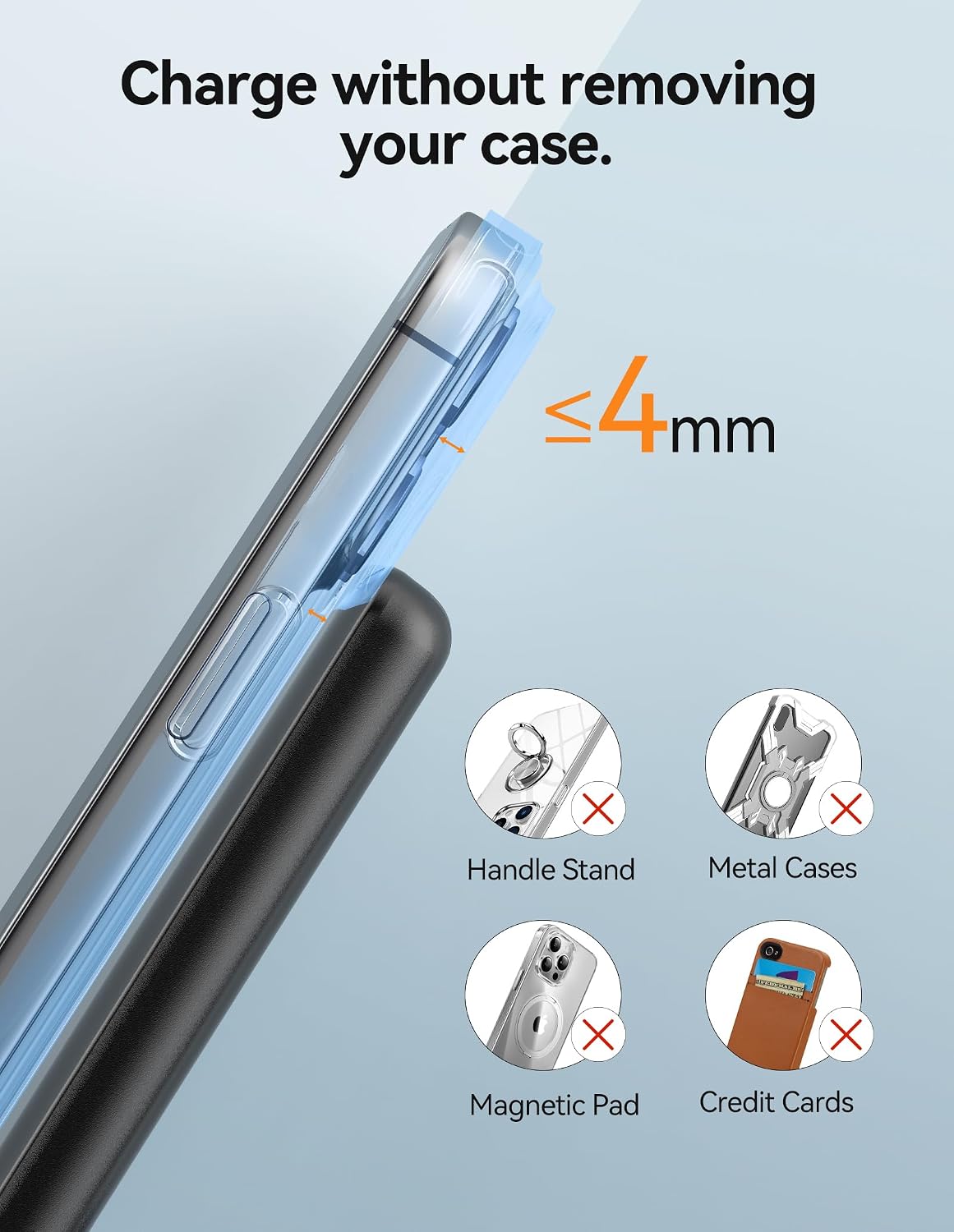
The charger is designed to work with most phone cases up to 4mm thick. However, for optimal charging performance, remove cases that are thicker than 4mm or contain metal, magnetic pads, or credit cards.
5. Device Compatibility
The TeckNet 3-in-1 Wireless Charger is compatible with a wide range of Qi-enabled devices. Below is a detailed compatibility list:

| Device Type | Compatible Models | Charging Power |
|---|---|---|
| iPhone | iPhone 15 Pro Max, 15 Pro, 15 Plus, 15, 14 Pro Max, 14 Pro, 14 Plus, 14, 13 Pro Max, 13 Pro, 13, 13 mini, 12 Pro Max, 12 Pro, 12, 12 mini, 11 Pro Max, 11 Pro, 11, SE (2nd Gen), XS MAX, XS, XR, X, 8 Plus, 8 Note: iPhone 12/13/14/15 Pro Max models may need to be placed horizontally. Mini models may require a spacer for optimal alignment. | Up to 15W |
| Apple Watch | Apple Watch Series 9, Ultra 2, Ultra 1, Series 8, Series 7, Series 6, SE, Series 5, Series 4, Series 3, Series 2 | Up to 2.5W |
| AirPods | AirPods 3, AirPods 2, AirPods 1, AirPods Pro, AirPods Pro 2 (2022) (with wireless charging case) | Up to 3W |
| Samsung Phones | S23, S22 Ultra, S22+, S22, S21 Ultra 5G, S21+, S21, S21 FE, S20, S10, S9, S9+, S8, S8+, S7, S7 Edge, S6 Edge Plus, Note 10 10+, Note 9, Note 8, Note 7, Note 5, Note FE, W2017 (SM-W2017), Kelly (SM-W2018), Galaxy S Lite (SM-G8750) and more Qi-compatible Samsung devices. | Up to 15W (varies by model) |
6. Care and Maintenance
- Cleaning: Disconnect the charger from the power source before cleaning. Use a soft, dry cloth to wipe the surface. Do not use abrasive cleaners or solvents.
- Storage: When not in use, store the charger in a cool, dry place, away from direct sunlight and extreme temperatures. Its foldable design allows for compact storage.
- Handling: Handle the charger with care. Avoid dropping it or exposing it to strong vibrations.
7. Troubleshooting Guide
| Problem | Possible Cause | Solution |
|---|---|---|
| Device not charging. | 1. Device not properly aligned. 2. Phone case is too thick or contains metal. 3. Incompatible power adapter/cable. 4. Charger not powered on. | 1. Re-position the device on the charging area. 2. Remove the phone case or use a compatible one (max 4mm, no metal). 3. Use the provided 18W power adapter and USB-C cable. 4. Ensure the charger is plugged into a working outlet. |
| Slow charging. | 1. Using a low-power adapter. 2. Device not optimally aligned. 3. Background apps consuming power. | 1. Ensure you are using the provided 18W power adapter. 2. Adjust device position for better alignment. 3. Close unnecessary background applications on your device. |
| Charger light is off. | 1. Light feature turned off. 2. No power to the charger. | 1. Press the touch-sensitive button on the base to turn the light on. 2. Check power connection and wall outlet. |
| Device or charger gets warm. | Normal during wireless charging. | Slight warmth is normal. If it becomes excessively hot, discontinue use and contact support. Ensure proper ventilation. |
8. Product Specifications
| Feature | Detail |
|---|---|
| Brand | TeckNet |
| Model Number | TK-WC005 (Black-Adapter) |
| Input Voltage | 9V |
| Max Wireless Output | 15W (Phone), 3W (AirPods), 2.5W (Apple Watch) |
| Power Source | Corded Electric |
| Connector Type | USB Type C (Input), MagSafe (Apple Watch) |
| Material Type | Plastic |
| Form Factor | Adjustable, Foldable |
| Product Dimensions | 12 x 6 x 3.5 cm; 270 g |
| Special Features | Automatic shut-off, Short-circuit protection, Multi-device charging, Magsafe-compatible |
9. Warranty and Customer Support
The TeckNet 3-in-1 Wireless Charger comes with a 36-month warranty (upon registration). This warranty covers manufacturing defects and ensures reliable performance of your device.
For technical support, warranty claims, or any questions regarding your product, please refer to the contact information provided on the TeckNet official website or the welcome guide included in your package. Our customer support team is available to assist you.