
1. Introduction
Thank you for choosing the BENLYDESIGN S3000-C Digital Wristwatch. This manual provides essential information for the proper setup, operation, and maintenance of your new timepiece. Please read these instructions carefully to ensure optimal performance and longevity of your watch.

Image 1.1: Front view of the BENLYDESIGN S3000-C Digital Wristwatch, showcasing its unique open-chip design and red OLED display.
2. Package Contents
Ensure all items are present upon unboxing:
- BENLYDESIGN S3000-C Digital Wristwatch
- Instruction Manual (this document)
- Charging Cable (if applicable, not explicitly mentioned but common for digital watches)

Image 2.1: The BENLYDESIGN S3000-C wristwatch packaging, designed to protect the watch during transit.
3. Setup
3.1 Attaching the Watch Band
The S3000-C features a stainless steel strap. When attaching the band, note that each end may have a slightly different width. Ensure you align the correct end of the band with the corresponding lug on the watch case. Carefully insert the spring bars into the lug holes until they click into place. If you encounter difficulty, ensure the spring bar is fully compressed and aligned.
3.2 Initial Power On and Charging
Your watch comes with a pre-installed Lithium Ion battery. For first use, it is recommended to fully charge the watch. Connect the charging cable (not explicitly detailed in product info, assume standard USB charging) to the designated port on the watch and to a compatible USB power source. The display may indicate charging status.
3.3 Setting Time and Date
The watch features 'SET' and 'MODE' buttons, typically located on the side of the watch case. Refer to the following steps:
- Press the SET button to enter setting mode.
- Use the MODE button to cycle through different settings (e.g., hours, minutes, year, month, day).
- While a setting is blinking, use the SET button to adjust the value.
- Once all settings are adjusted, press and hold the SET button to exit setting mode.
4. Operating Instructions
4.1 Basic Time Display
The S3000-C features a vibrant red OLED display for clear time readability. The time is displayed in a digital format.
4.2 Lift-to-Wake Screen
The watch is equipped with a lift-to-wake feature, which illuminates the display when you raise your wrist to view the time. This feature can be activated or deactivated in the watch settings. For optimal performance, ensure the watch is worn snugly on your wrist.

Image 4.1: The BENLYDESIGN S3000-C worn on a wrist, demonstrating the ergonomic curved back and the lift-to-wake display activation.
4.3 Multi-Functional Smart Features
The S3000-C offers several functions accessible via the MODE button:
- Auto Time Display: Automatically shows the current time.
- Temperature Monitoring: Displays the internal temperature of the watch. Note that this reading may be influenced by body heat when worn.
- Alarm: Set a daily alarm.
- Stopwatch: A standard stopwatch function for timing events.
- Countdown: Set a countdown timer.
To access these functions, repeatedly press the MODE button to cycle through them. Use the SET button to configure settings for each function (e.g., alarm time, countdown duration).
5. Maintenance
5.1 Water Resistance
The BENLYDESIGN S3000-C is water resistant up to 3 ATM (30 meters). This means the watch is suitable for daily use and can withstand splashes, rain, or brief immersion in water. It is not recommended for swimming, diving, or showering with hot water, as steam and pressure changes can compromise the seals.

Image 5.1: The BENLYDESIGN S3000-C demonstrating its water resistance against splashes.
5.2 Cleaning
To clean your watch, wipe the case and strap with a soft, damp cloth. Avoid using harsh chemicals or abrasive materials, which can damage the finish. For the stainless steel strap, a soft brush can be used to remove dirt from crevices.
5.3 Battery Care
The watch uses a Lithium Ion battery. To prolong battery life, avoid extreme temperatures and fully charge the watch when the battery indicator is low. If the watch will not be used for an extended period, store it in a cool, dry place.
6. Troubleshooting
6.1 Display Not Lighting Up
- Check Battery: Ensure the watch is sufficiently charged. Connect it to a power source.
- Button Press: Press any button to manually activate the display.
- Lift-to-Wake Setting: Verify that the lift-to-wake feature is enabled in the watch settings.
6.2 Inconsistent Lift-to-Wake Function
The lift-to-wake feature relies on motion sensors. If it is inconsistent:
- Wear Position: Ensure the watch is worn securely on your wrist, not too loose.
- Movement: A clear, deliberate wrist-lifting motion is usually required.
- Settings: Re-check the lift-to-wake setting in the watch menu.
6.3 Difficulty Attaching Watch Band
If you experience difficulty attaching the watch band:
- Orientation: Confirm that you are attaching the correct end of the band to the corresponding lug. The ends may differ slightly in width.
- Spring Bar: Ensure the spring bar is fully compressed and properly aligned with the lug holes before releasing.
6.4 Inaccurate Temperature Reading
The watch's temperature sensor measures the internal temperature of the device. When worn, this reading will be affected by your body heat. For an ambient temperature reading, remove the watch and allow it to sit for approximately 30 minutes in the desired environment.
7. Specifications
| Feature | Detail |
|---|---|
| Watch Model | S3000-C |
| Mirror Material | Mineral Glass |
| Movement | Self-developed Electronic Movement |
| Watch Chain (Strap) | Stainless Steel |
| Water Resistance | 3 ATM |
| Watch Weight | 120g |
| Display Type | OLED |
| Battery Type | 1 Lithium Ion (included) |
| Clasp Type | Buckle |
| Dimensions (Case) | 40mm (width) x 45mm (height) x 19mm (thickness) |
| Wrist Circumference | 100mm - 220mm |
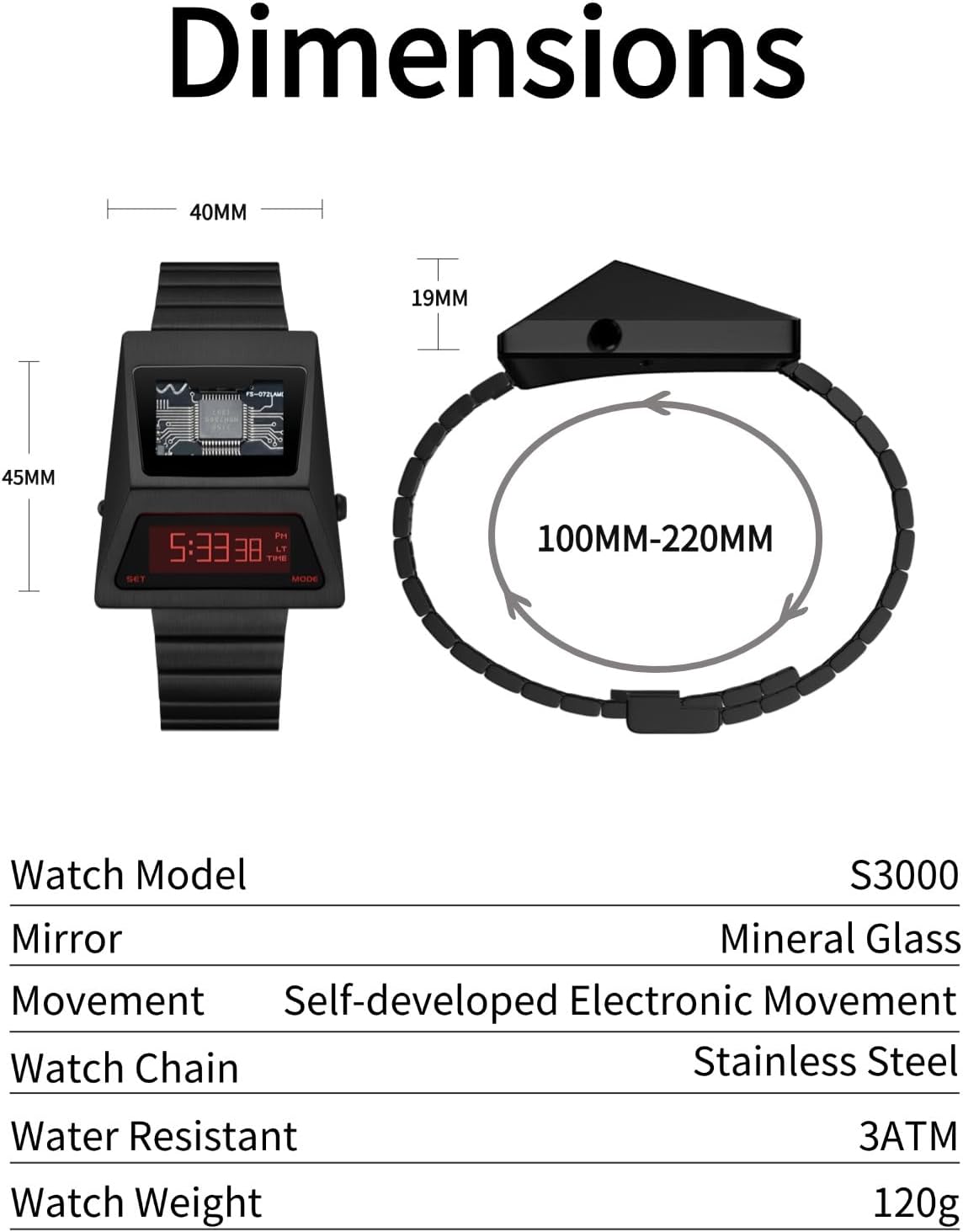
Image 7.1: Diagram illustrating the dimensions of the BENLYDESIGN S3000-C watch case and the adjustable range of the strap.
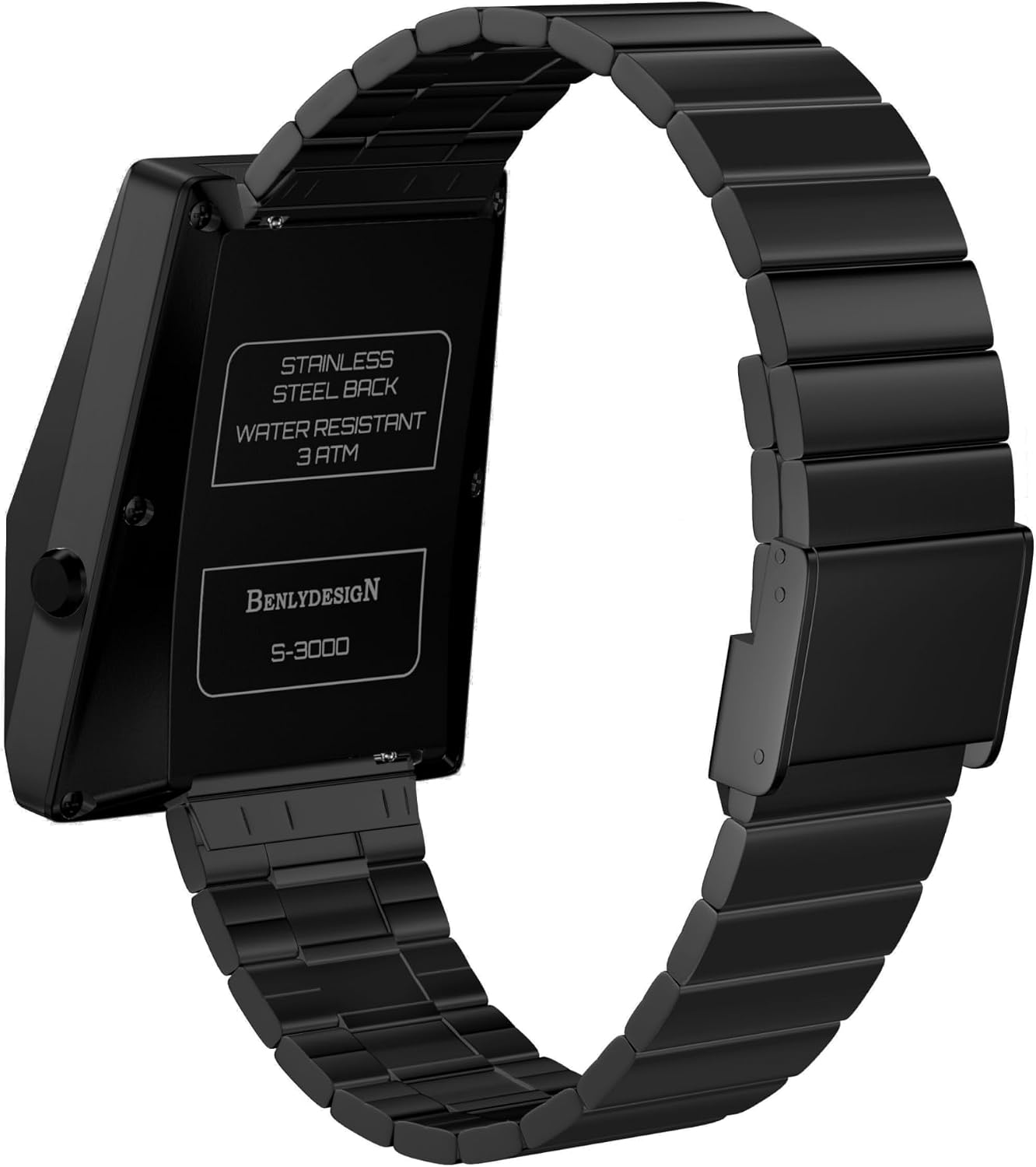
Image 7.2: Rear view of the BENLYDESIGN S3000-C, showing the stainless steel back and water resistance marking.
8. Warranty and Support
For warranty information and customer support, please refer to the purchase documentation or contact BENLYDESIGN directly through their official channels. Keep your proof of purchase for any warranty claims.
For further assistance, you may visit the BENLYDESIGN store on Amazon: BENLYDESIGN Store
