
1. Introduction and Overview
Thank you for choosing the Midea 11S Bagged Vacuum Cleaner. This manual provides essential information for the safe and efficient operation, maintenance, and troubleshooting of your new appliance. The Midea 11S is designed for powerful and versatile cleaning, featuring a 1400W motor, 18kPa suction, and a range of convenient features to keep your home spotless.

Image: Efficient Cleaning. This image shows the Midea 11S in action, demonstrating its powerful suction for effective dust and debris removal from various surfaces.

Image: Lightweight and Portable. This image illustrates the ease of portability of the Midea 11S vacuum cleaner, showing it being carried by its handle.
Product Overview Video: This video demonstrates the key features and benefits of the Midea 11S Bagged Vacuum Cleaner, including its powerful suction, multi-surface cleaning capabilities, and compact design.
2. Important Safety Instructions
Please read all safety warnings and instructions before using this appliance to prevent electric shock, fire, or serious injury.
- Always unplug the vacuum cleaner from the electrical outlet before cleaning or performing any maintenance.
- Do not use the appliance to pick up water or any other liquids, as this may cause electric shock.
- Do not pick up burning or smoking objects such as cigarettes, matches, or hot ashes.
- Keep hair, loose clothing, fingers, and all parts of the body away from openings and moving parts.
- Do not use without the dust bag and/or filters in place.
- Do not allow children to operate the vacuum cleaner. Close supervision is necessary when used near children.
- If the supply cord is damaged, it must be replaced by the manufacturer, its service agent, or similarly qualified persons to avoid a hazard.
- Use only as described in this manual. Use only manufacturer's recommended attachments.
3. What's in the Box
Carefully unpack all components and check against the list below. Ensure all parts are present and undamaged before assembly.
- Midea 11S Vacuum Cleaner Body
- Flexible Hose
- Plastic Tube (Extension Wand)
- Floor Brush (for multi-surface cleaning)
- Crevice Tool (2-in-1 brush)
- Paper Dust Bags (3 included)
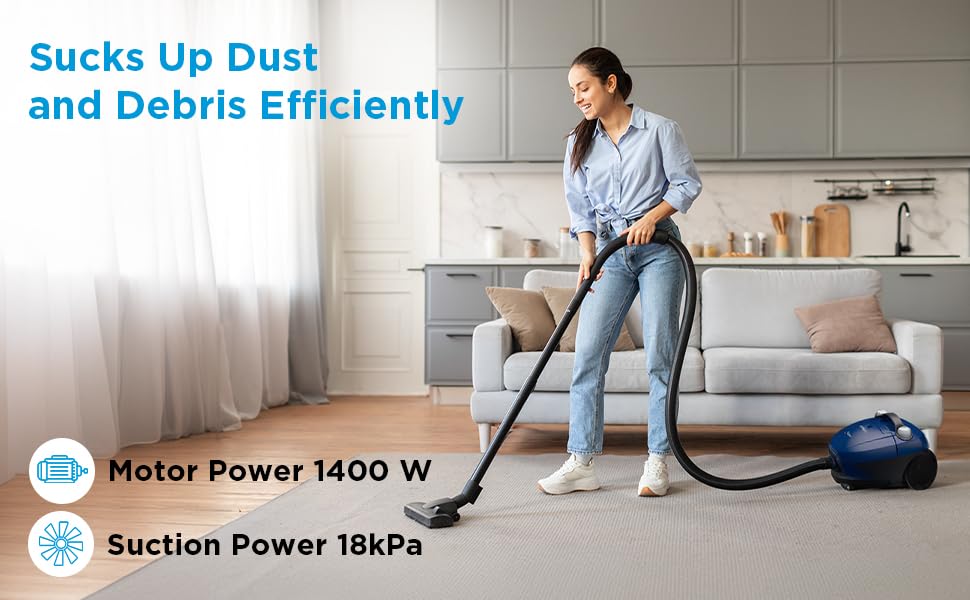
Image: Main Components. This image displays the main body of the Midea 11S vacuum cleaner along with its essential accessories: the flexible hose, plastic tube, floor brush, and crevice tool.
4. Setup Instructions
- Attach the Flexible Hose: Insert the end of the flexible hose into the suction inlet on the main body of the vacuum cleaner until it clicks securely into place.
- Assemble the Extension Tube: Connect the plastic tube (extension wand) to the handle end of the flexible hose.
- Attach the Floor Brush: Connect the floor brush to the end of the plastic tube. Ensure it is firmly attached.
- Install Dust Bag: Open the dust bag compartment. Insert a new paper dust bag, ensuring it is correctly seated and sealed around the inlet. Close the compartment securely.
5. Operating Instructions
Follow these steps for effective and safe operation of your Midea 11S vacuum cleaner.
- Power Connection: Extend the 5m power cord and plug it into a suitable electrical outlet.
- Power On/Off: Press the power button located on the vacuum cleaner body to turn the appliance on or off.
- Multi-Surface Cleaning: The floor brush is suitable for various surfaces including hardwood floors, carpets, tiles, and rugs. Adjust the brush setting if available for optimal performance on different floor types.

Image: Multi-Floor Cleaning. This image illustrates the Midea 11S vacuum cleaner's versatility across different floor types, including marble, wood, tiles, and carpet.
- Using Accessories:
- Crevice Tool (2-in-1 brush): Use this attachment for cleaning narrow spaces, corners, and upholstery. It can be used as a brush or a narrow nozzle.
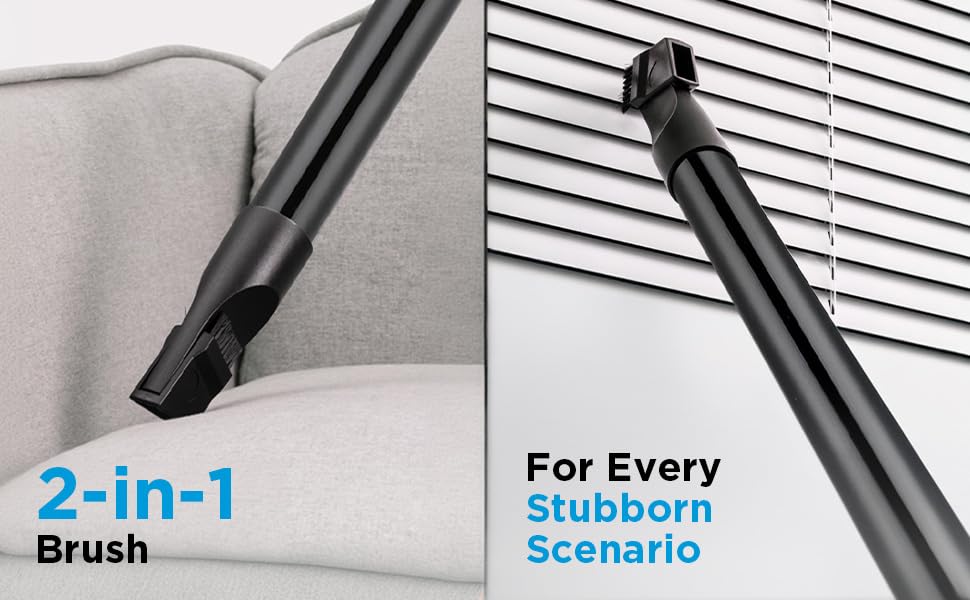
Image: Versatile Attachments. This image highlights the 2-in-1 brush and crevice tool, demonstrating their effectiveness for cleaning various surfaces and tight spots, such as sofa cushions and window blinds.
- Dustbag Full Indicator: The indicator will change color or illuminate when the dust bag is full and needs to be replaced, or if there is a blockage.
- Auto Cord Rewind: After use, press the cord rewind button to automatically retract the power cord into the appliance for neat storage.
6. Maintenance
Regular maintenance ensures optimal performance and extends the lifespan of your vacuum cleaner. Always unplug the appliance before performing any maintenance.
- Replacing the Dust Bag:
- When the dustbag full indicator signals, or suction power decreases, replace the dust bag.
- Open the dust bag compartment, carefully remove the full bag, and dispose of it.
- Insert a new paper dust bag, ensuring it is properly seated.
- Cleaning the Filters:
- The Midea 11S uses a foam filter. Locate the filter compartment (refer to your product diagram if unsure).
- Remove the foam filter and gently tap it to remove loose dust. If heavily soiled, rinse it under cold running water.
- Allow the filter to air dry completely before reinserting it into the vacuum cleaner. Do not use the appliance with a wet filter.
- Cleaning Attachments:
- Wipe down the hose, tubes, and brushes with a damp cloth. Ensure they are dry before reattaching.
- Remove any tangled hair or debris from the floor brush.
- Storage: Store the vacuum cleaner in a cool, dry place. Its compact design allows for easy storage in small spaces.

Image: Compact Storage. This image shows the Midea 11S vacuum cleaner stored conveniently in a kitchen cabinet, highlighting its compact design for easy storage.
7. Troubleshooting
If you encounter any issues with your Midea 11S, refer to the common problems and solutions below.
| Problem | Possible Cause | Solution |
|---|---|---|
| Vacuum cleaner does not turn on. | Not plugged in; power outlet faulty; power button not pressed. | Ensure the plug is securely in the outlet. Test the outlet with another appliance. Press the power button firmly. |
| Low suction power. | Full dust bag; clogged hose/tube/brush; dirty filter. | Check the dustbag full indicator and replace the dust bag if needed. Clear any blockages in the hose, tubes, or brush. Clean or replace the foam filter. |
| Unusual noise during operation. | Blockage in the hose or brush; motor issue. | Check for and remove any blockages. If the noise persists, contact customer support. |
| Dust escaping from the vacuum. | Dust bag not installed correctly; filter missing or damaged. | Ensure the dust bag is properly seated and sealed. Check that all filters are correctly installed and undamaged. |
8. Specifications
| Feature | Detail |
|---|---|
| Brand | Midea |
| Model Name | M11SINBL |
| Wattage | 1400 Watts |
| Maximum Suction | 18 kPa (180 Millimetres) |
| Filter Type | Foam |
| Power Source | Corded Electric |
| Cord Length | 5 meters (Auto Cord Rewind) |
| Noise Level | 80 Decibels |
| Product Dimensions (L x W x H) | 24.5L x 22.8W x 31.6H Centimeters |
| Item Weight | 2.6 Kilograms |
| Vacuum Collection Technology | Bagged |
| Special Features | Automatic Cord Rewind, Compact, Spotless Cleaning, Wheels |

Image: Product Dimensions. This image provides a visual representation of the Midea 11S vacuum cleaner with its key dimensions: 245 mm (length), 228 mm (width), and 316 mm (height).
9. Warranty and Support
The Midea 11S Bagged Vacuum Cleaner comes with a 1-year warranty from the date of purchase. This warranty covers manufacturing defects and material faults under normal use.
For warranty claims, technical support, or any product-related inquiries, please contact Midea customer service. Keep your purchase receipt as proof of purchase.
Manufacturer: JIANGSU MIDEA CLEANING APPLIANCES CO., LTD. SUZHOU, JIANGSU, CHINA
Importer: Midea India Private Limited, Unit 517-522, 5th Floor, BPTP Park Centra, Sector-30, Gurugram-122001, Haryana


