
1. Introduction
This manual provides comprehensive instructions for the setup, operation, maintenance, and troubleshooting of your YIDOFENG 3018-PRO 3 Axis CNC Router Machine Kit. This versatile machine is designed for DIY engraving and milling on various soft materials such as wood, plastic, acrylic, and PVC. Please read this manual thoroughly before operating the machine to ensure safe and efficient use.

Figure 1.1: YIDOFENG 3018-PRO CNC Router Machine Kit assembled with all included accessories.
2. Package Contents
Before beginning assembly, verify that all components listed below are present in your package. If any parts are missing or damaged, please contact customer support.
- 1 Set 3 Axis 3018-Pro CNC Router Engraving Milling Machine Kit
- 1 PC GRBL 1.1f Control Board
- 1 PC Offline Hand Controller
- 1 PC 775 Spindle Motor
- 1 PC ER11 Collet 3.175mm
- 1 PC 24V DC 5A Power Supply
- 10 PCS Tip 0.1 mm, 20° φ3.175 mm Drill Bits
- 4 PCS Plate Clamps
- 1 Set Allen Wrench
- 2 PCS ER Wrench
- 1 PC Brush
- 1 PC Spindle Motor Harness 60cm
- 3 PCS Stepper Motor Harness 60cm
- 1 PC 4G USB Flash Drive (includes English user manual & GRBL software)
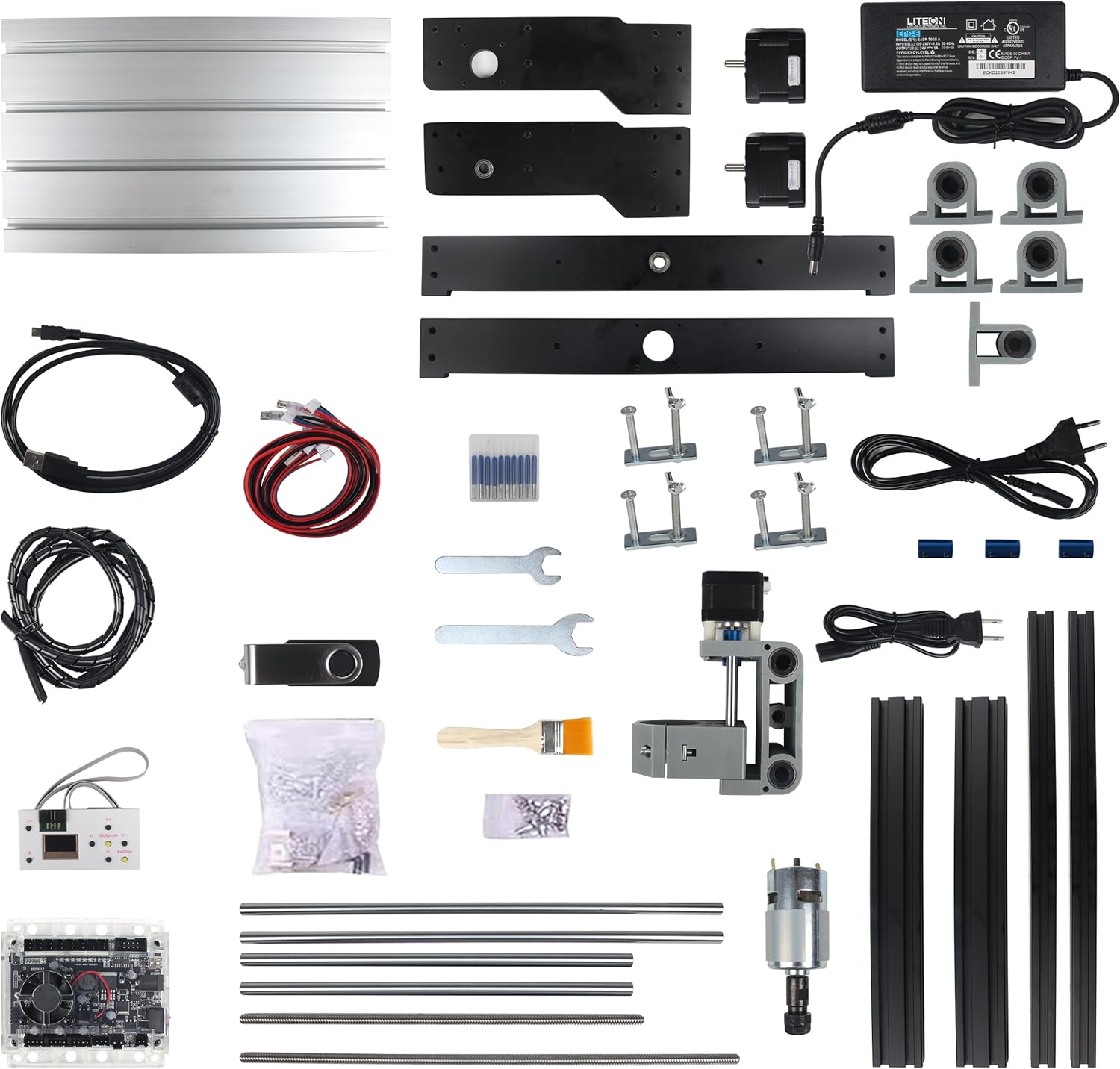
Figure 2.1: All components included in the 3018-PRO CNC Router Machine Kit.
3. Setup
3.1 Assembly
The 3018-PRO CNC machine is designed for straightforward assembly. Refer to the detailed instructions provided on the included 4G USB flash drive for step-by-step guidance. Ensure all screws are tightened securely and connections are firm.
3.2 Connecting Components
Connect the GRBL 1.1f Control Board, 775 Spindle Motor, and stepper motors using the provided harnesses. Ensure the 24V DC 5A Power Supply is connected last and only after all other components are securely in place.

Figure 3.1: Connection diagram for the GRBL control board, power supply, USB, offline controller, probe, and limit switches.

Figure 3.2: Working area dimensions of the 3018-PRO CNC Router, showing 300mm x 180mm x 45mm.
4. Operating Instructions
4.1 GRBL 1.1f Control Board
The GRBL 1.1f control board is the core of the CNC machine. It supports emergency stop and X/Y/Z axis limit functions, enhancing safety during operation. It also features maximum support for spindles with 2000 rpm, tool setting (probe), and a power switch with silent fan cooling. The spindle supports 0-100% adjustable PWM power and PWM/TTL signal control.

Figure 4.1: The GRBL 1.1f control board with its various ports and cooling fan.
4.2 Offline Controller
The offline controller allows you to operate the CNC milling machine without a PC connection. You can manually adjust the starting engraving position of the X, Y, and Z axes, and manually turn the spindle and cooling fan on or off. After saving your G-code file to the controller, it can be connected directly to the GRBL control board for operation.

Figure 4.2: Detailed view of the offline controller's interface and menu options for controlling the CNC machine.
4.3 Software (GRBL Control)
The machine uses GRBL control software (e.g., Candle) and supports G-code files (.nc/.txt/.tape/.gcode...). The software allows for precise control over the engraving process, including setting parameters and monitoring progress. The included USB flash drive contains the necessary GRBL software.

Figure 4.3: The 775 spindle motor, capable of 10000 RPM, with an ER11-3.175mm drill clamp.
Video 4.1: A visual demonstration of the 3018 PRO Router from various angles, illustrating its physical structure and movement capabilities.
5. Applicable Engraving Materials
The YIDOFENG 3018-PRO CNC Router is suitable for engraving and milling a variety of soft materials. These include:
- Wood
- Plastic
- Acrylic
- PVC
- PCB
- Carbon fiber
- Density plate
- Plastic phone cases
- Rubber stamps
- Copper
- Aluminum
Important Note: Materials such as jewelry, jade, stainless steel, stone, ceramics, and other similar hard materials are not supported by this machine.

Figure 5.1: Visual examples of materials that can be engraved, including wood, plastic, paper, bamboo, leather, and sponge paper.
6. Specifications
Detailed technical specifications for the YIDOFENG 3018-PRO CNC Router Machine:
| Feature | Specification |
|---|---|
| Brand | YIDOFENG |
| Model Number | 3018P-OC-L |
| Material | Aluminum |
| Power Source | AC/DC |
| Voltage | 24 Volts |
| Maximum Rotational Speed | 10000 RPM |
| Amperage | 5.6 Amps |
| Base Type | Fixed |
| Item Weight | 14.63 pounds |
| Package Dimensions | 17.99 x 9.72 x 6.85 inches |
| Color | Black |
| Wattage | 100 watts |
| First Available Date | May 22, 2024 |
7. Maintenance
Regular maintenance ensures the longevity and optimal performance of your CNC router. Follow these general guidelines:
- Cleaning: Regularly clean the machine, especially the lead screws, guide rails, and working area, to remove dust, debris, and material residue. Use a soft brush or compressed air.
- Lubrication: Apply a small amount of appropriate lubricant to the lead screws and guide rails periodically to ensure smooth movement.
- Connections: Periodically check all electrical connections and screws to ensure they are secure. Loose connections can lead to erratic behavior or damage.
- Bit Condition: Inspect your drill bits and collets before each use. Replace dull or damaged bits to maintain engraving quality and prevent strain on the spindle motor.
8. Troubleshooting
This section addresses common issues you might encounter. For more complex problems, refer to the detailed troubleshooting guide on the USB flash drive or contact customer support.
- Machine Not Powering On: Ensure the power supply is correctly connected to the machine and plugged into a working outlet. Check the power switch on the GRBL control board.
- Motors Not Moving: Verify all motor harnesses are securely connected to the GRBL board and the motors. Check for any error messages in the GRBL control software.
- Engraving Inaccurate/Skipping Steps: This could be due to loose belts, insufficient motor current, or excessive cutting depth. Check belt tension and ensure the material is securely clamped.
- Software Connection Issues: Ensure the USB cable is properly connected between the machine and your computer. Reinstall the GRBL software drivers if necessary.
- Spindle Not Rotating: Check the spindle motor harness connection to the GRBL board. Ensure the spindle is enabled in the software or via the offline controller.
9. Warranty and Support
YIDOFENG is committed to providing high-quality products and excellent customer service. If you encounter any issues or have questions regarding your 3018-PRO CNC Router Machine, please do not hesitate to contact our customer service team. We are always ready to assist you.
For additional resources and product information, you can visit the official YIDOFENG store on Amazon: YIDOFENG Store