
JINSHANGZI S30 Max
S30 Max Smart Watch
User Manual
1. Introduction
Thank you for choosing the S30 Max Smart Watch. This manual provides essential information for setting up, operating, and maintaining your device. Please read it thoroughly to ensure optimal performance and longevity of your smartwatch.
2. What's in the Box
- S30 Max Smart Watch
- Wireless Charging Dock
- Extra Band
3. Product Overview

Figure 3.1: The S30 Max Smart Watch, showcasing its primary metal band and an additional silicone band for versatile wear.

Figure 3.2: The S30 Max Smart Watch available in black and silver color options, highlighting the 1.62-inch screen and various features like compass, e-book, NFC, AI voice assistant, 4GB storage, and local music.

Figure 3.3: Key features of the S30 Max: 1.62-inch 480x480 pixel screen with metal crown and off-screen display; convenient call answering with pinch gesture; local high-definition voice recording; and new map navigation for easy viewing.
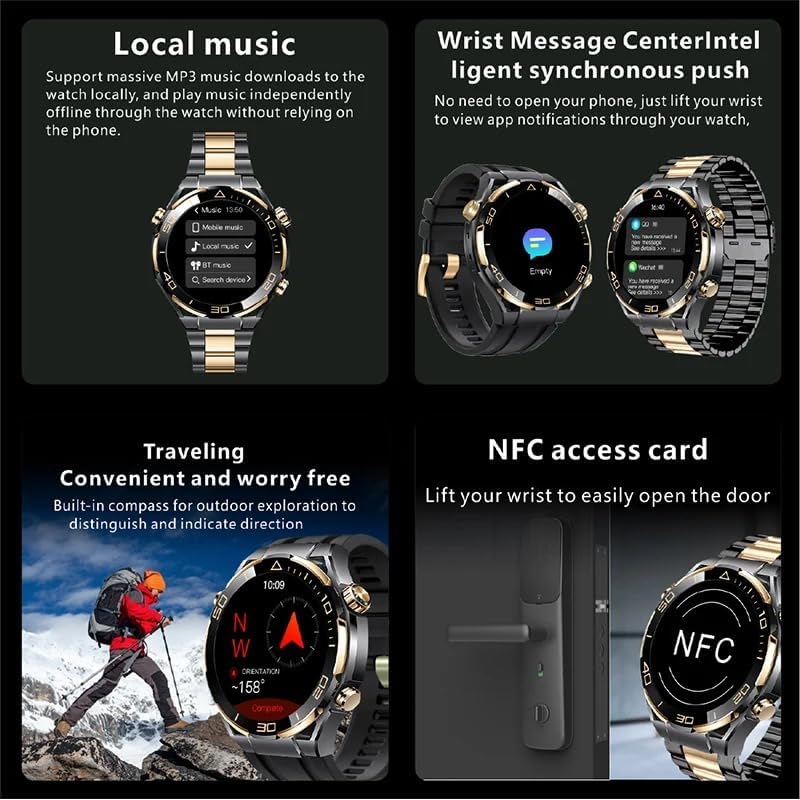
Figure 3.4: Advanced functionalities: support for massive MP3 music downloads and independent playback; intelligent synchronous push for wrist message notifications; built-in compass for outdoor exploration and direction indication; and NFC access card for easy door opening.
4. Setup
4.1 Charging the Device
Place your S30 Max Smart Watch on the provided wireless charging dock. Ensure the watch is properly aligned for charging to begin. A full charge typically takes approximately 2-3 hours. The watch features a 420mAh battery capacity.
4.2 Pairing with Your Smartphone
- Download the HD Fit Pro application from your smartphone's app store (available for Android and iOS).
- Ensure Bluetooth is enabled on your smartphone.
- Open the HD Fit Pro app and follow the on-screen instructions to search for and connect to your S30 Max Smart Watch. The watch uses Bluetooth 5.0 for stable connectivity.
- Confirm the pairing request on both your watch and smartphone.
5. Operating Instructions
5.1 Basic Navigation
The S30 Max Smart Watch features a 1.62-inch full touch screen for intuitive navigation. Swipe left, right, up, or down to access different menus and functions. Press the physical buttons on the side for specific actions like returning to the home screen or accessing quick settings.

Figure 5.1: The 1.62-inch high-definition full-color touch screen with 480x480 resolution, providing rich visual details and clear viewing even in outdoor sunlight.
5.2 Key Features and Functions
- Bluetooth Call: Answer or dial calls directly from your watch after pairing with your smartphone.
- Local Music: With 4GB of ROM, you can store and play music directly on the watch without needing your phone.
- Photo Album: Store and view photos on your watch's display.
- Voice Recording: Utilize the smart recording memo feature for high-definition audio recording.
- NFC Access Card: Use your watch to easily open doors or access compatible systems.
- GPS & Compass: Built-in GPS and compass for navigation and outdoor exploration. Supports Gaode Map.
- Voice Assistant: Built-in voice assistant for hands-free control and information.
- Notifications: Receive message and call reminders, and push notifications from your smartphone.
- Health & Fitness Tracking: Monitor heart rate, track motion data, and analyze sleep patterns.
- Daily Tools: Access features like alarm clock, world time, calendar, calculator, and sedentary reminders.
- E-Book: Read e-books directly on your watch.

Figure 5.2: The smart recording memo feature, allowing easy one-click recording, automatic list generation, and flexible deletion for convenience.
6. Specifications
| Feature | Detail |
|---|---|
| Model | S30 Max |
| Brand | JINSHANGZI |
| CPU Model | 8763-VP |
| Display Size | 1.62 Inches |
| Resolution | 480*480 |
| Screen Material | TFT |
| Touch Screen | Full Touch Screen |
| RAM | 256MB |
| ROM | 4GB |
| Bluetooth Version | 5.0 |
| Battery Capacity | 420mAh |
| Charging Mode | Wireless Charging |
| Waterproof Grade | Life Waterproof |
| Band Material | Silica GEL |
| Case Material | ALLOY |
| App Name | HD Fit Pro |
| Compatibility | Android Wear, Android OS, iOS |

Figure 6.1: Detailed specifications of the S30 Max Smart Watch, including processor, screen size, battery, and key functions.
7. Maintenance
- Cleaning: Regularly wipe the watch screen and body with a soft, dry cloth. For stubborn smudges, a slightly damp cloth can be used, followed by drying.
- Water Resistance: The S30 Max is Life Waterproof. This means it can withstand splashes, rain, and brief immersion in shallow water. It is not suitable for swimming, diving, or high-pressure water activities. Avoid exposing the watch to hot water or steam.
- Band Care: Clean the silicone band with mild soap and water. The metal band can be wiped with a dry cloth. Ensure the band is dry before wearing.
- Charging: Use only the provided wireless charging dock. Avoid exposing the charging contacts to liquids or metal objects.
- Storage: When not in use for extended periods, store the watch in a cool, dry place away from direct sunlight and extreme temperatures.
8. Troubleshooting
- Watch not turning on: Ensure the watch is fully charged. Place it on the wireless charging dock for at least 30 minutes.
- Cannot pair with phone: Make sure Bluetooth is enabled on your phone and the watch. Restart both devices and try pairing again. Ensure the HD Fit Pro app is updated to the latest version.
- Inaccurate readings (heart rate, steps): Ensure the watch is worn snugly on your wrist, not too tight or too loose. Clean the sensor on the back of the watch.
- Notifications not appearing: Check notification settings in the HD Fit Pro app and on your phone's system settings to ensure permissions are granted for the app to display notifications.
- Touch screen unresponsive: Restart the watch. If the issue persists, ensure the screen is clean and dry.
9. Safety Information
- Do not attempt to disassemble or modify the watch. This can cause damage and void the warranty.
- Keep the watch away from extreme temperatures, direct sunlight, and open flames.
- Avoid strong impacts or dropping the watch.
- Do not use corrosive chemicals or abrasive cleaners on the watch.
- If you experience skin irritation from wearing the watch, discontinue use and consult a doctor.
10. Warranty and Support
For warranty information and technical support, please refer to the documentation provided with your purchase or contact the manufacturer, JINSHANGZI, directly through their official support channels. Keep your proof of purchase for warranty claims.
Ask a question about this manual
Ask about setup, troubleshooting, compatibility, parts, safety, or missing instructions. Manuals+ will review the question and use this page’s manual context to help answer it.