1. Introduction
This manual provides detailed instructions for the installation, operation, and maintenance of your Sanpyl XY S220H V5.1 2.1 Channel Amplifier Board. Please read this manual thoroughly before using the product to ensure proper function and safety.
2. Safety Information
WARNING: To prevent fire or electric shock, do not expose this appliance to rain or moisture. Do not open the casing; refer all servicing to qualified personnel.
- Ensure the power supply voltage is within the specified range (12-38V).
- Do not short-circuit the output terminals.
- Avoid exposing the board to extreme temperatures, direct sunlight, or high humidity.
- Keep out of reach of children.
- Disconnect power before making any connections or adjustments.
3. Product Overview
The Sanpyl XY S220H is a high-performance 2.1 channel amplifier board designed for DIY audio projects. It features two TPA7498 amplifier chips, delivering up to 160W x 2 for stereo channels and 220W for the subwoofer.

Figure 3.1: Front view of the XY S220H amplifier board, showing the main control knobs for volume, treble, and bass.
Key features include:
- High Power Output: 160W x 2 (stereo) + 220W (subwoofer).
- Wide Voltage Input: Supports 12-38V DC.
- Multiple Input Modes: Bluetooth 5.1, AUX, and USB (flash drive and sound card).
- Tone Controls: Independent treble and bass adjustment knobs.
- APP Control: Manage settings and sound effects via a dedicated application.
- Protection Mechanisms: Built-in safeguards against over-voltage, under-voltage, overheating, and short circuits.
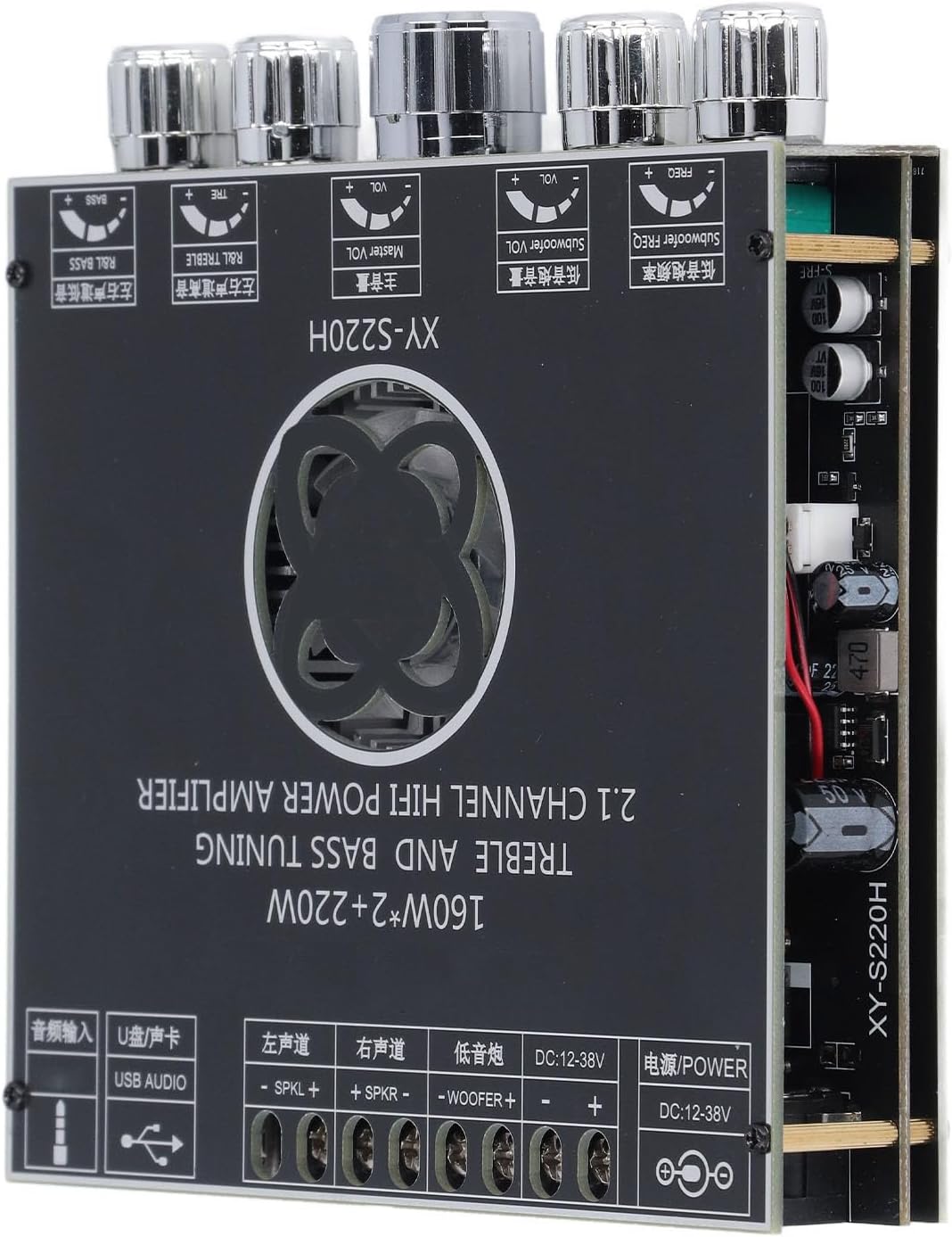
Figure 3.2: Side view illustrating the various input and output terminals, including power, speaker outputs, and audio inputs.
4. Specifications
| Feature | Specification |
|---|---|
| Product Model | XY-S220H |
| Bluetooth Version | 5.1 |
| Supply Voltage | DC 12-38V / 10A (recommended) |
| Audio Input Modes | Bluetooth, AUX, USB (Flash Mode, Sound Card Mode) |
| Number of Channels | 2.1 (Left, Right, Subwoofer) |
| Output Power | 160W x 2 (R&L Channels) + 220W (Subwoofer) |
| R&L Speakers Impedance | 4-8Ω, 10-160W |
| Subwoofer Impedance | 3-8Ω, 20-220W |
| Special Functions | APP Control, Bluetooth Name Modification, Bluetooth Password Setting, Prompt Sound On/Off |
| Protection Mechanisms | Over Voltage, Under Voltage, Overheating, Short Circuit |

Figure 4.1: Bottom view of the amplifier board, showing printed product specifications.
5. Setup Instructions
Follow these steps to set up your XY S220H amplifier board:
- Connect Speakers:
- Connect your left and right passive speakers to the "SPKL+" and "SPKR+" terminals, and their respective negative terminals to "SPKL-" and "SPKR-". Ensure correct polarity.
- Connect your subwoofer to the "WOOFER+" and "WOOFER-" terminals.
- Ensure speaker impedance and power ratings are within the specified ranges (4-8Ω, 10-160W for R&L; 3-8Ω, 20-220W for Subwoofer).
- Connect Audio Input:
- Bluetooth: Power on the board. It will automatically enter Bluetooth pairing mode. Search for "XY-S220H" on your device and connect.
- AUX Input: Connect your audio source (e.g., smartphone, MP3 player) to the 3.5mm AUX input jack using an audio cable.
- USB Input (Flash Mode): Insert a USB flash drive containing audio files into the USB port. The board will automatically switch to USB playback.
- USB Input (Sound Card Mode): Connect the board to a computer via the USB port. The computer should recognize it as an audio output device.
- Connect Power Supply:
- Connect a DC power supply (12-38V, 10A recommended) to the "DC 12-38V" power input terminals. Ensure correct polarity (+ to +, - to -).
- IMPORTANT: Do not connect the power supply before all other connections are made.
- Power On: Once all connections are secure, connect the power supply to a wall outlet. The board will power on.

Figure 5.1: Detailed view of the input and output terminals for power, speakers, and audio sources.
6. Operating Instructions
The XY S220H amplifier board offers various controls and input options:
- Master Volume: Use the central large knob labeled "Master VOL" to adjust the overall output volume.
- Treble Control: The "R&L TREBLE" knob adjusts the high-frequency response for the left and right channels.
- Bass Control: The "R&L BASS" knob adjusts the low-frequency response for the left and right channels.
- Subwoofer Volume: The "Subwoofer VOL" knob controls the volume level of the subwoofer output.
- Subwoofer Frequency: The "Subwoofer FREQ" knob adjusts the crossover frequency for the subwoofer, allowing you to fine-tune its integration with the main speakers.
- Input Mode Selection: The board prioritizes hardware input. You can also switch input sources via the dedicated mobile application.
- APP Control: Download the official Sanpyl APP (refer to product packaging or manufacturer website for download link). The APP allows you to:
- Adjust sound effects (EQ settings).
- Change the Bluetooth name of the device.
- Set a Bluetooth password for secure connection.
- Turn prompt sounds on or off.

Figure 6.1: Top view highlighting the control knobs for volume, treble, bass, and subwoofer settings, along with the cooling fan.
7. Maintenance
To ensure the longevity and optimal performance of your amplifier board:
- Cleaning: Use a soft, dry cloth to clean the surface of the board. Do not use liquid cleaners or solvents.
- Ventilation: Ensure adequate airflow around the board to prevent overheating. Do not block the cooling fan.
- Storage: When not in use for extended periods, store the board in a cool, dry place away from direct sunlight and dust.
- Connections: Periodically check all connections to ensure they are secure and free from corrosion.
8. Troubleshooting
If you encounter issues with your amplifier board, refer to the following common problems and solutions:
| Problem | Possible Cause | Solution |
|---|---|---|
| No sound output |
|
|
| Distorted sound |
|
|
| Bluetooth not connecting |
|
|
| Board shuts off unexpectedly |
|
|
9. Warranty and Support
For warranty information and technical support, please refer to the purchase documentation or contact Sanpyl customer service directly. You can typically find contact details on the product packaging or the official Sanpyl website.
Visit the Sanpyl Store on Amazon for more products and information.


