
Introduction
This manual provides detailed instructions for the assembly, operation, maintenance, and troubleshooting of your SEDETA 60-inch Gaming Desk with Hutch and LED Lights. Please read this manual thoroughly before assembly and use to ensure proper function and safety.
Safety Information
For your safety, carefully follow the assembly instructions provided. Ensure the desk is stable and, if necessary, anchor it to the wall to prevent tipping. Do not exceed the maximum height limit of 60.4 inches, as this may compromise stability. Always use the power outlet and USB ports responsibly, ensuring cords are properly managed to avoid tripping hazards. Regularly inspect the desk for any signs of wear or damage that could affect its stability or functionality.
Setup and Assembly
Assembly of the SEDETA Gaming Desk is required. It is recommended that two people perform the assembly to ensure stability and ease of construction. Please refer to the separate assembly guide included with your product for step-by-step instructions and a complete list of parts and tools.
During assembly, pay close attention to the orientation of parts, especially when installing the LED light strips and the hutch components. Some users have noted that careful alignment is crucial for optimal appearance and functionality of the LED lighting.
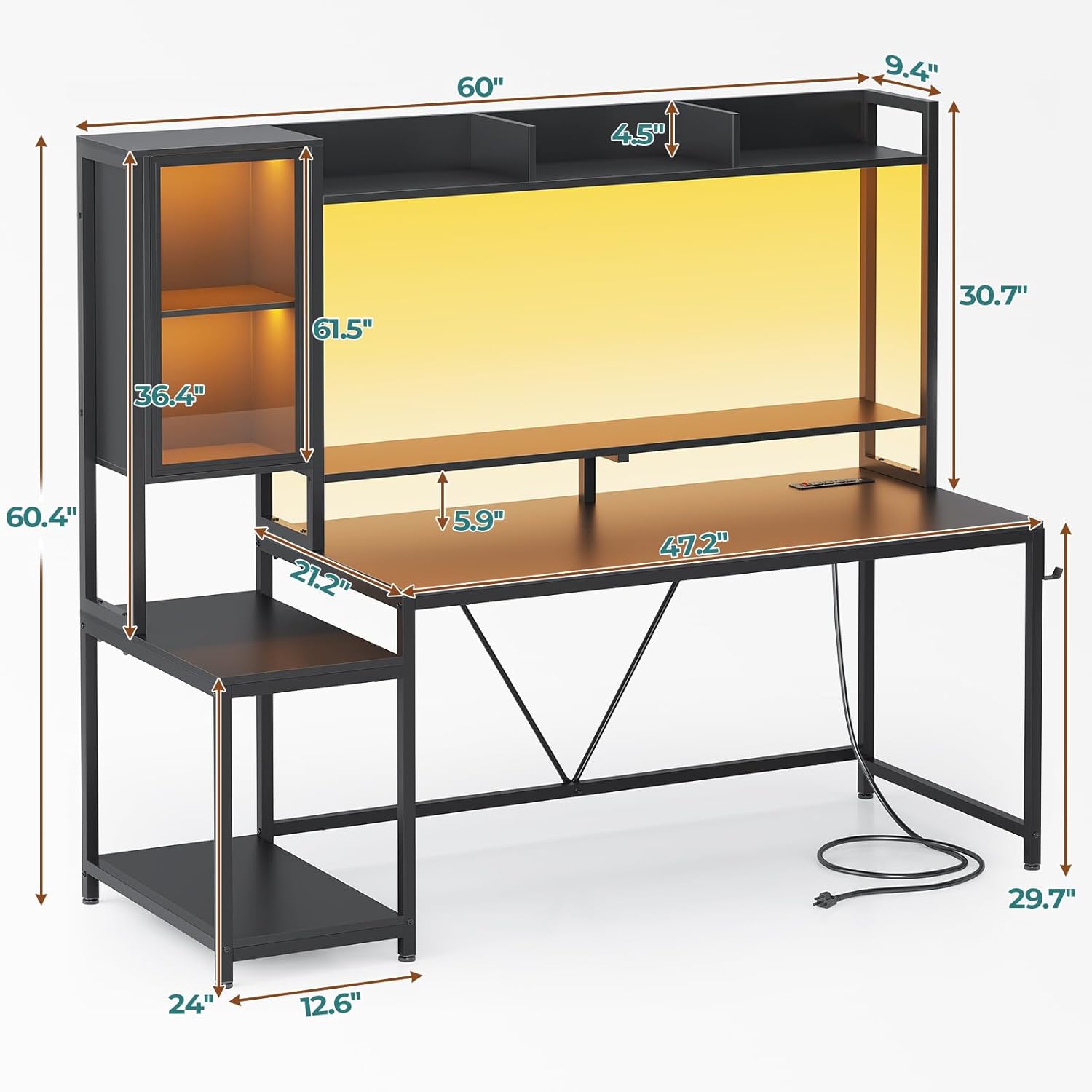
Figure 1: Dimensions diagram of the SEDETA Gaming Desk, showing measurements for width, depth, and height of various sections.
Video 1: An official overview video showcasing the features and design of the SEDETA Gaming Desk with Hutch.
Features
Display and Storage Design
The desk features a hutch with three compartments and two acrylic display cabinets, providing storage for gaming controllers, headphones, or small collectibles. A bottom shelf offers additional space for larger devices such as gaming consoles or computer towers, contributing to an organized gaming area.

Figure 2: SEDETA Gaming Desk in a home office setting with monitors, showing the hutch and storage compartments filled with items.

Figure 3: Diagram illustrating the customizable storage spaces of the SEDETA Gaming Desk, including display cabinet and shelves.
Integrated LED Lights
The desk includes an LED light strip that illuminates the display cabinets and the desktop area. This lighting system offers 6000 colors and 29 flashing modes, which can synchronize with external music rhythms.

Figure 4: SEDETA Gaming Desk with blue LED lights illuminating the hutch and desktop, creating a gaming atmosphere.
Secure High-Capacity Charging Station
The computer desk is equipped with four power sockets and two USB ports to meet the power supply demands of multiple devices. It also features a power switch key for one-touch power-off, enhancing electrical safety and energy efficiency.

Figure 5: Close-up of the integrated power outlet with 4 AC sockets and 2 USB ports on the SEDETA Gaming Desk.
Spacious Workspace
This 60-inch extra-long gaming table includes a separate monitor stand and a printer stand, providing ample desktop storage and a spacious operating area suitable for both home office and gaming use.
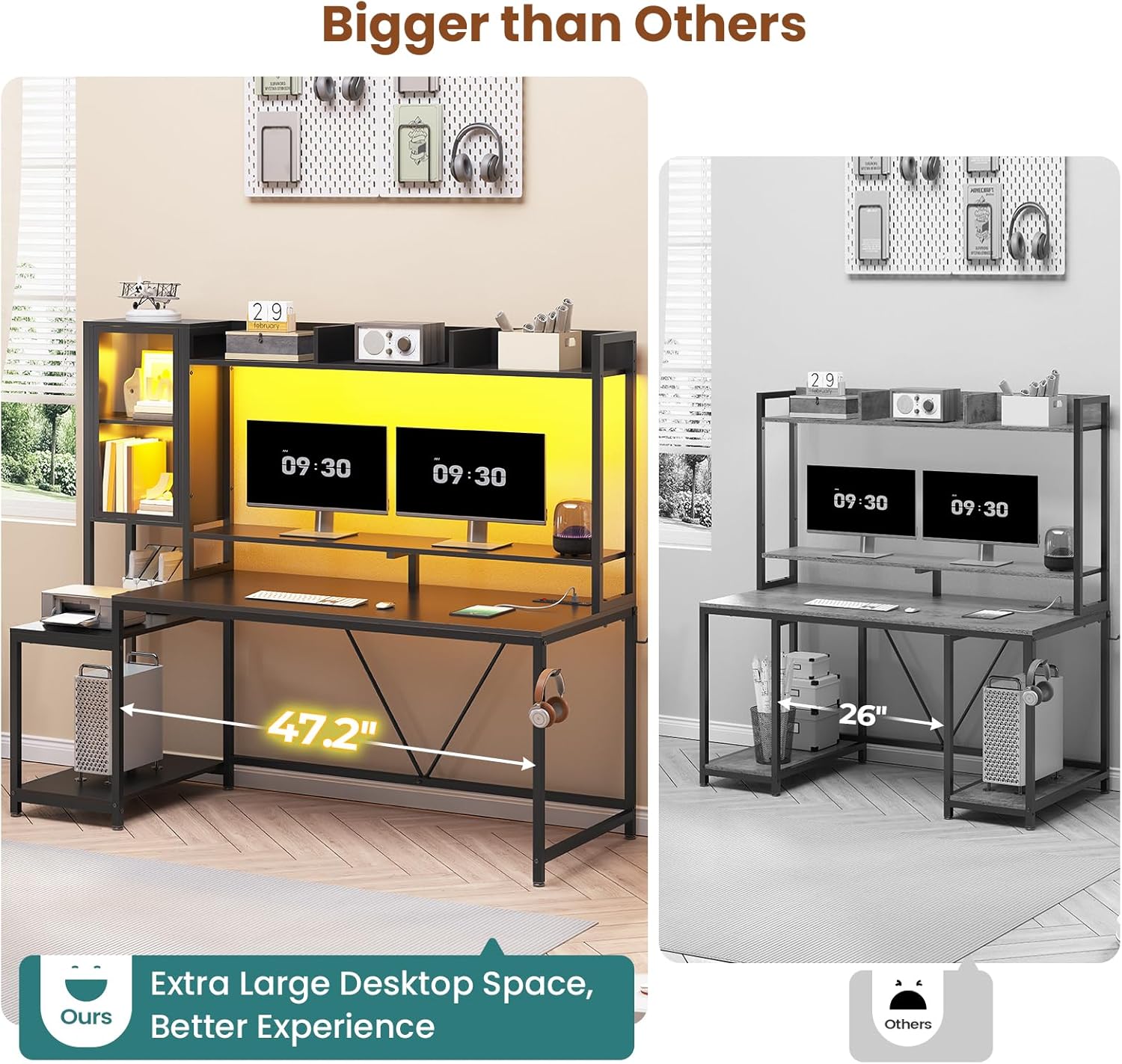
Figure 6: SEDETA Gaming Desk with two monitors on the monitor stand, highlighting the spacious workspace.
Operating Instructions
LED Lights Operation
The LED light strip can be controlled via a key control or a dedicated mobile application. Refer to the LED light strip's specific instructions for pairing with the app and utilizing all color and mode options, including music synchronization and timing functions.

Figure 7: Close-up of the LED light strip remote control and app control interface for the SEDETA Gaming Desk.
Power Outlet Usage
To use the integrated power sockets and USB ports, connect the desk's power cord to a wall outlet. Use the power switch to turn the entire charging station on or off. Ensure all devices are properly connected before activating the power switch.
Maintenance
To maintain the appearance and longevity of your desk:
- Cleaning: Wipe surfaces with a soft, damp cloth. Avoid harsh chemicals or abrasive cleaners that may damage the finish.
- LED Lights: Ensure the LED strips are free from dust. If the adhesive weakens, re-secure them with appropriate adhesive material.
- Power Outlets: Keep the power outlets and USB ports clean and dry. Avoid spilling liquids near them.
- Stability: Periodically check all screws and connections to ensure they remain tight.
Troubleshooting
- LED Lights Not Functioning: Check power connections and ensure the power switch for the charging station is on. Verify the remote control or app is working correctly.
- LED Strip Adhesion Issues: If the LED strip detaches, clean the surface thoroughly and reapply with a stronger adhesive if necessary.
- Desk Instability: Re-tighten all assembly screws. Ensure the desk is on a level surface. If possible, anchor the desk to a wall.
- Computer Tower Fit: If a large computer tower does not fit on the bottom shelf, it may be possible to remove the shelf or front metal bar for additional clearance, but this should be done with caution and may affect stability if heavy items are placed in the hutch.
Specifications
| Attribute | Detail |
|---|---|
| Brand | SEDETA |
| Model Number | GAMING-DESK-WITH-HUTCH-d882643d07 |
| Product Dimensions (D x W x H) | 21.2"D x 60"W x 60.4"H |
| Color | Black |
| Top Material Type | Engineered Wood |
| Base Material | Metal |
| Special Features | Display Cabinet, Monitor Shelf, LED Lights, Power Outlet |
| Number of Shelves | 4 (including hutch compartments) |
| Power Outlets | 4 AC Outlets (125V/12A), 2 USB Ports (5V/2A) |
| Required Assembly | Yes (2 people recommended) |
Warranty and Support
The SEDETA Gaming Desk comes with a limited warranty. For specific details regarding warranty coverage, please refer to the warranty information provided with your purchase documentation.
For any questions, concerns, or assistance with assembly, operation, or troubleshooting, please contact SEDETA customer service. We are committed to providing satisfactory solutions.
Video 2: An official product video highlighting the various functionalities and aesthetic appeal of the SEDETA Gaming Desk.
