
1. Introduction
Thank you for choosing the ONEVAN Cordless Rivet Gun. This manual provides essential information for the safe and efficient operation, maintenance, and troubleshooting of your new tool. Please read this manual thoroughly before first use and keep it for future reference.
2. Safety Information
Always observe basic safety precautions to reduce the risk of fire, electric shock, and personal injury. Keep this manual handy for quick reference.
General Safety Rules:
- Work Area Safety: Keep your work area clean and well-lit. Cluttered or dark areas invite accidents. Do not operate power tools in explosive atmospheres, such as in the presence of flammable liquids, gases, or dust.
- Electrical Safety: Avoid body contact with earthed or grounded surfaces (e.g., pipes, radiators, ranges, refrigerators). Do not expose power tools to rain or wet conditions.
- Personal Safety: Always wear eye protection. Use hearing protection when operating the tool for extended periods. Dress properly; avoid loose clothing or jewelry. Secure long hair.
- Tool Use and Care: Do not force the tool. Use the correct tool for your application. Disconnect the battery pack from the tool before making any adjustments, changing accessories, or storing power tools.
- Battery Pack Use and Care: Recharge only with the charger specified by the manufacturer. Do not use battery packs with any other power tools. When the battery pack is not in use, keep it away from other metal objects.
3. Product Components
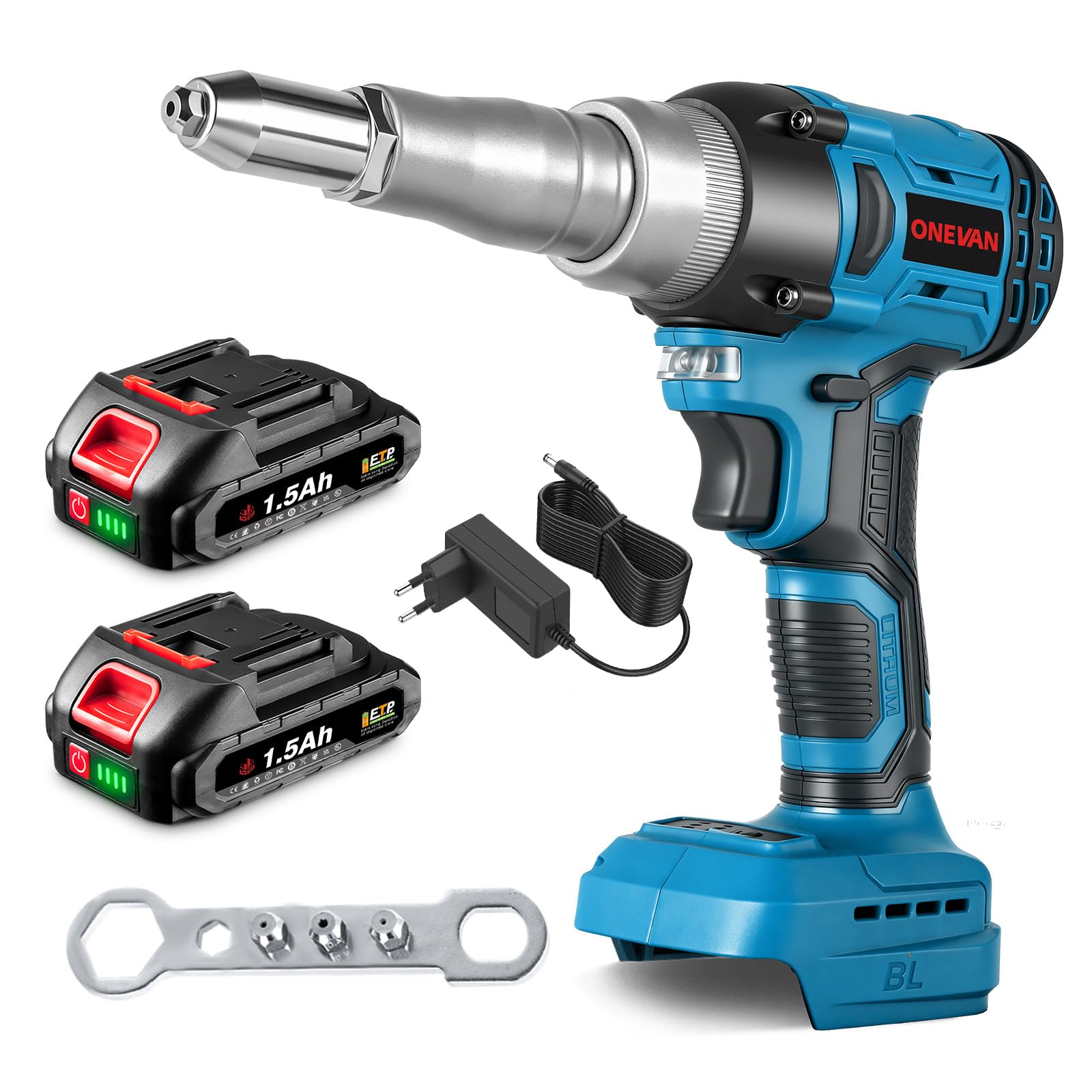
The ONEVAN Cordless Rivet Gun package typically includes the following items:
- ONEVAN Cordless Rivet Gun (Model sku003960)
- 2 x 1500mAh Lithium-ion Batteries
- Battery Charger
- 4 Interchangeable Mandrels (2.4mm, 3.2mm, 4.0mm, 4.8mm)
4. Specifications
| Feature | Specification |
|---|---|
| Model Number | sku003960 |
| Brand | ONEVAN |
| Power Source | Battery-Powered |
| Motor Type | Brushless |
| Max Pulling Force | 20,000 N |
| Stroke Length | 18 mm |
| Rivet Compatibility | 2.4 mm - 5.0 mm diameter |
| Included Mandrels | 2.4 mm, 3.2 mm, 4.0 mm, 4.8 mm |
| Battery Type | Lithium-ion |
| Battery Capacity | 2 x 1500 mAh |
| Package Dimensions | 35.1 x 23.5 x 10.8 cm |
| Weight | 2.13 kg |


5. Setup
5.1 Charging the Battery
- Connect the charger to a standard power outlet.
- Insert the battery pack into the charger. Ensure it is seated correctly.
- The indicator light on the charger will show the charging status. Allow the battery to fully charge before first use.
- Once fully charged, remove the battery from the charger.
5.2 Installing/Removing the Battery
- To Install: Align the battery pack with the receptacle on the tool handle and slide it in until it clicks securely into place.
- To Remove: Press the battery release button (if present) and slide the battery pack out of the tool handle.
5.3 Selecting and Installing the Correct Mandrel
Choose the appropriate mandrel size based on the diameter of the rivet you intend to use. The tool comes with 2.4mm, 3.2mm, 4.0mm, and 4.8mm mandrels.
- Ensure the tool is powered off and the battery is removed.
- Unscrew the current mandrel from the nose piece of the rivet gun.
- Select the correct size mandrel for your rivet.
- Screw the new mandrel firmly into the nose piece.

6. Operating Instructions
6.1 Basic Riveting Procedure
- Select Rivet: Choose the correct rivet for your application and insert it into the guide nozzle of the tool.
- Position Tool: Insert the rivet into the pre-drilled hole in the workpiece. Hold the nozzle firmly against the workpiece.
- Rivet: Press the trigger switch. The tool will automatically pull the rivet, complete the riveting process, and break the rivet stem.
- Stem Ejection: The broken rivet stem will be automatically ejected from the tool.

6.2 Forward and Reverse Function
The tool features a forward/reverse switch for operational flexibility.
- Forward Rotation: Simply press the switch to the forward position (usually left) to initiate the automatic riveting and stem retraction process.
- Reverse Rotation: If a rivet stem is not fully retracted or needs to be removed, switch to the reverse position (usually right) and hold until the stem is fully retracted or removed.
- Center Lock: When the switch is in the center position, the tool is non-operational, providing a safety lock.

6.3 Applications
This cordless rivet gun is suitable for a variety of applications, including:
- Construction Steel Structures
- Automotive and Machinery Manufacturing
- Hardware and Decoration

7. Maintenance
Regular maintenance ensures the longevity and optimal performance of your tool.
- Cleaning: After each use, clean the tool with a soft, dry cloth. Remove any dust or debris from the nozzle and internal mechanisms. Do not use harsh chemicals or abrasive cleaners.
- Mandrel Inspection: Periodically inspect the mandrels for wear or damage. Replace worn mandrels to ensure proper riveting.
- Battery Care: Store batteries in a cool, dry place away from direct sunlight. Do not store fully discharged batteries for extended periods.
- Storage: Store the tool and accessories in a dry, secure location, out of reach of children.
8. Troubleshooting
If you encounter issues with your ONEVAN Cordless Rivet Gun, refer to the following common problems and solutions:
| Problem | Possible Cause | Solution |
|---|---|---|
| Tool does not operate | Battery not charged or improperly installed; Safety switch engaged. | Ensure battery is fully charged and correctly inserted. Check if the forward/reverse switch is in the center (locked) position. |
| Rivet not setting properly | Incorrect mandrel size; Worn mandrel; Rivet too large for tool capacity. | Verify the correct mandrel size for the rivet. Replace worn mandrels. Ensure rivet diameter is within 2.4mm-5.0mm range. |
| Rivet stem not ejecting | Debris in nozzle; Mandrel worn or damaged. | Clean the nozzle area. Inspect and replace the mandrel if necessary. |
| Battery not charging | Charger not connected; Faulty battery or charger. | Check charger connection to power outlet and battery. Try another battery if available. Contact support if problem persists. |
9. Warranty and Support
For warranty information, technical support, or service inquiries, please refer to the warranty card included with your product or contact ONEVAN customer service directly. Keep your purchase receipt as proof of purchase.