
1. Introduction
This manual provides detailed instructions for the installation, operation, and maintenance of your MAIMEIMI Universal Digital Motorcycle Gauge Cluster. This multi-functional instrument is designed to provide comprehensive data monitoring for your motorcycle, ensuring a safer and more informed riding experience.
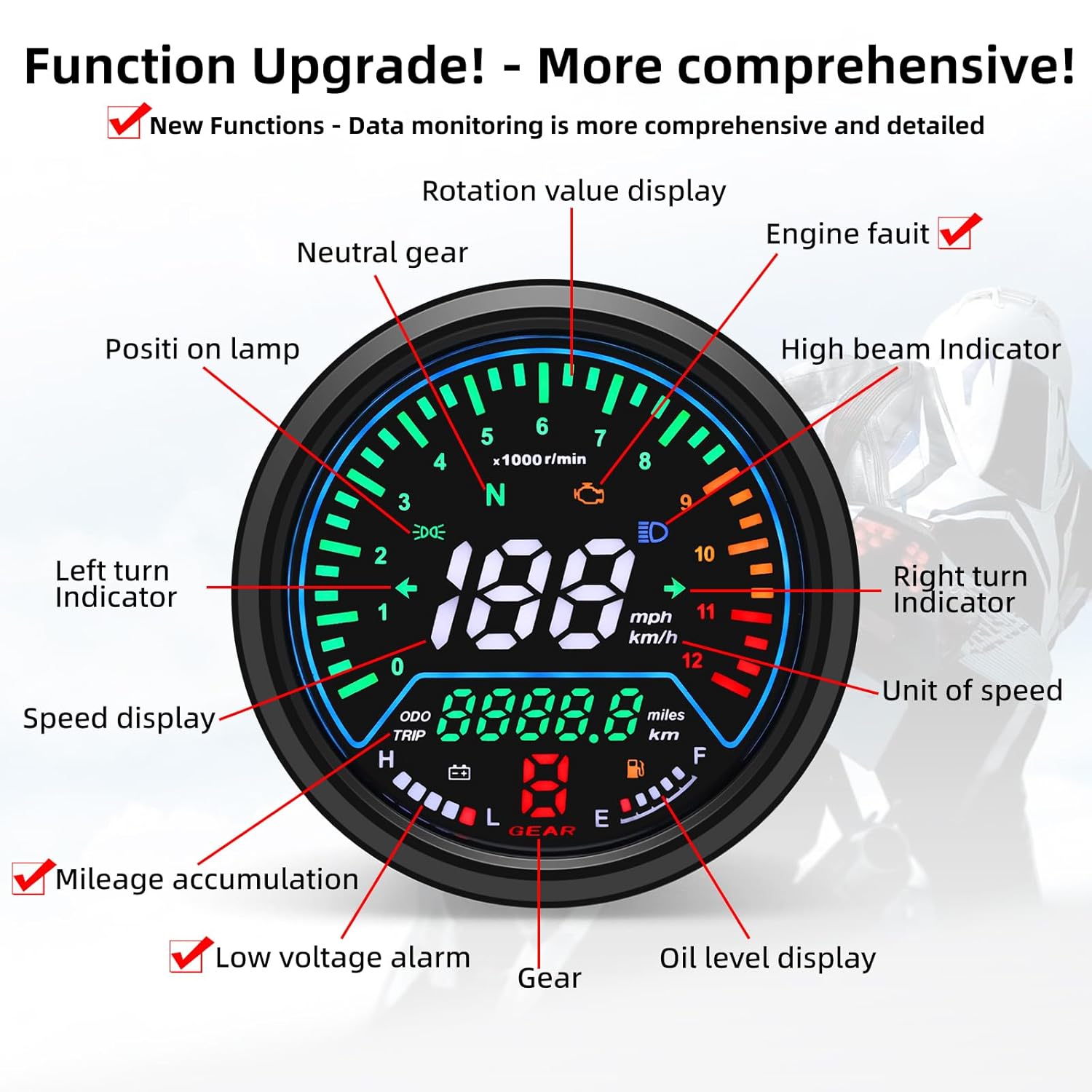
The gauge cluster integrates several key functions including a speedometer, tachometer, odometer, gear indicator, and oil level meter. Additionally, it features indicators for left/right turn signals, high beam, position lights, and neutral (N) gear.
Constructed from high-quality ABS material, the unit is durable, shock-proof, and waterproof, allowing for reliable performance even in adverse weather conditions. The anti-glare LCD screen ensures clear data visibility regardless of ambient light intensity.

2. Setup and Installation
2.1 Package Contents
Upon receiving your MAIMEIMI Digital Motorcycle Gauge Cluster, please verify that all accessories are present:
- Digital Motorcycle Speedometer x 1
- Magnetic Steel x 2
- Sensor Cable x 1
- Instruction Manual x 1
2.2 Wiring Diagram
Refer to the following diagram and table for correct wiring connections. Ensure all connections are secure before powering on the device.

| Wire Color | Function | Signal Type |
|---|---|---|
| Orange | Left Turn Signal | Positive Signal |
| Brown | Low Beam | Positive Signal |
| Light Blue | Right Turn Signal | Positive Signal |
| Green | Positive Power Supply | Positive Signal |
| Black | Negative Power Supply | Negative Signal |
| Purple | Electronic Fuel Injection | Signal |
| Black/Red | Speed Signal | Signal |
| Blue | High Beam | Positive Signal |
| Blue/White | Oil Quantity Signal | Signal |
2.3 Important Notes for Installation
- This speedometer is compatible with most 4-stroke, 2/4-cylinder motorcycles. The default setting is 1-cylinder.
- The unit operates within an 8-18V range, with a rated voltage of 12V DC.
- Fuel sensor compatibility: Supports 2-wire sensors (0-100 ohms) and 3-wire fuel quantity sensors (0-500 ohms).
- The meter output speed voltage is 7-8V.
- Please confirm your motorcycle model's specifications before installation to ensure compatibility.
3. Operating Instructions
The MAIMEIMI Digital Motorcycle Gauge Cluster features a single button for easy navigation and setting adjustments.
3.1 Button Functions

- Total/Subtotal Toggle: Short press the button to switch between ODO (Total mileage) and TRIP (Subtotal mileage).
- Subtotal Reset: While in TRIP interface, long press the button for 3 seconds to reset the subtotal mileage.
- Metric/Imperial Switch: While in ODO mode, long press the button for 5 seconds to toggle between kilometers (km) and miles (mi).
3.2 Parameter Settings
To access and adjust advanced parameters, follow these steps:
- Enter Setup Mode:
- Power off the unit.
- Hold the button while powering on. The screen will display "CCC---".
- Input password "666". Short presses change the value, long presses move the cursor.
- Cylinder Number Adjustment:
- Display: "Y2" in the speed area indicates 2 cylinders (16.6Hz = RPM signal frequency).
- Operation: Short press to modify the value, long press to navigate to the next setting.
- Oil Sensor Type:
- Display: "1" in the gear position area (1 = two-wire oil level sensor).
- Operation: Short press to toggle the type, long press to confirm.
- Speed Calibration:
- Display: "F34.0" in the cumulative speed area (F = frequency coefficient, 34.0 = base value).
- Rule: Value↑ ↔ Actual speed↑, Value↓ ↔ Actual speed↓.
- Operation: Short press adjusts the value, long press saves and reboots the unit.
3.3 Display Features
The anti-glare LCD ensures optimal readability in various lighting conditions, from bright daylight to complete darkness.


4. Maintenance
To ensure the longevity and optimal performance of your MAIMEIMI Digital Motorcycle Gauge Cluster, follow these general maintenance guidelines:
- Cleaning: Use a soft, damp cloth to clean the display and housing. Avoid abrasive cleaners or solvents that could damage the screen or finish.
- Inspection: Periodically check all wiring connections for tightness and signs of wear or corrosion. Ensure the speed sensor and magnets are securely mounted.
- Environmental Protection: While the unit is waterproof, prolonged exposure to extreme temperatures or direct sunlight when parked should be minimized to prevent potential material degradation.
5. Troubleshooting
If you encounter issues with your MAIMEIMI Digital Motorcycle Gauge Cluster, consider the following basic troubleshooting steps:
- No Power/Display: Check the power supply connections (Green and Black wires) to ensure they are correctly connected and receiving adequate voltage (8-18V DC). Verify the motorcycle's battery is charged.
- Incorrect Speed Reading: Ensure the speed sensor is properly installed and aligned with the magnets. Check the speed signal wire (Black/Red) for continuity. Recalibrate the speed setting as described in Section 3.2.
- Inaccurate RPM: Verify the cylinder number setting (Section 3.2) matches your motorcycle's engine configuration. Check the tachometer signal wire connection.
- Fuel Level Issues: Confirm the oil sensor type setting (Section 3.2) is correct for your sensor. Inspect the oil quantity signal wire (Blue/White) and the fuel sensor itself.
- Indicator Lights Not Working: Check the specific wiring for the affected indicator (e.g., Orange for Left Turn, Blue for High Beam) and ensure the corresponding motorcycle system is functioning correctly.
For persistent issues or problems not covered here, please contact MAIMEIMI customer support for further assistance.
6. Specifications
Detailed technical specifications for the MAIMEIMI Universal Digital Motorcycle Gauge Cluster:
| Feature | Detail |
|---|---|
| Product Dimensions (L x W x H) | 3.66 x 3.66 x 3.03 inches (93 x 77 x 52 mm) |
| Item Model Number | MT0085+MT0069-M040-Sensor |
| Manufacturer | MAIMEIMI |
| Material | Acrylonitrile Butadiene Styrene (ABS), Alloy Steel |
| Operating Voltage | 8-18V DC (Rated 12V DC) |
| Display Type | Anti-glare LCD |
| Functions | Speedometer, Tachometer, Odometer, Gear Indicator, Oil Meter, Turn Signals, High Beam, Position Lights, Neutral Light |
| Compatibility | Universal for 4-stroke, 2/4-cylinder motorcycles |

7. Warranty and Support
MAIMEIMI products are designed for reliability and performance. For information regarding warranty coverage, please refer to the warranty card included with your purchase or visit the official MAIMEIMI website.
If you require technical assistance, have questions about installation, or need to report a defect, please contact MAIMEIMI customer support. Provide your product model number (MT0085+MT0069-M040-Sensor) and a detailed description of the issue to facilitate a quicker resolution.
You can typically find contact information for support on the manufacturer's website or through the retailer where the product was purchased.
