
Introduction
This manual provides instructions for the goopow T97 Mini Karaoke Machine. This portable Bluetooth speaker, accompanied by wireless microphones, is designed for audio playback and interactive singing. Please read this manual thoroughly before operating the device to ensure proper use and maintenance.
Package Contents
- goopow T97 Mini Karaoke Machine Speaker
- Wireless Microphones (2 included)
- USB Type-C Charging Cable
- User Manual (this document)
Product Overview
Familiarize yourself with the components and features of your goopow T97 Mini Karaoke Machine.

Image 1: The goopow T97 Mini Karaoke Machine speaker and two wireless microphones. The speaker features a blue fabric top and a white base with a colorful LED light ring around the control panel. The microphones are blue with black grilles.
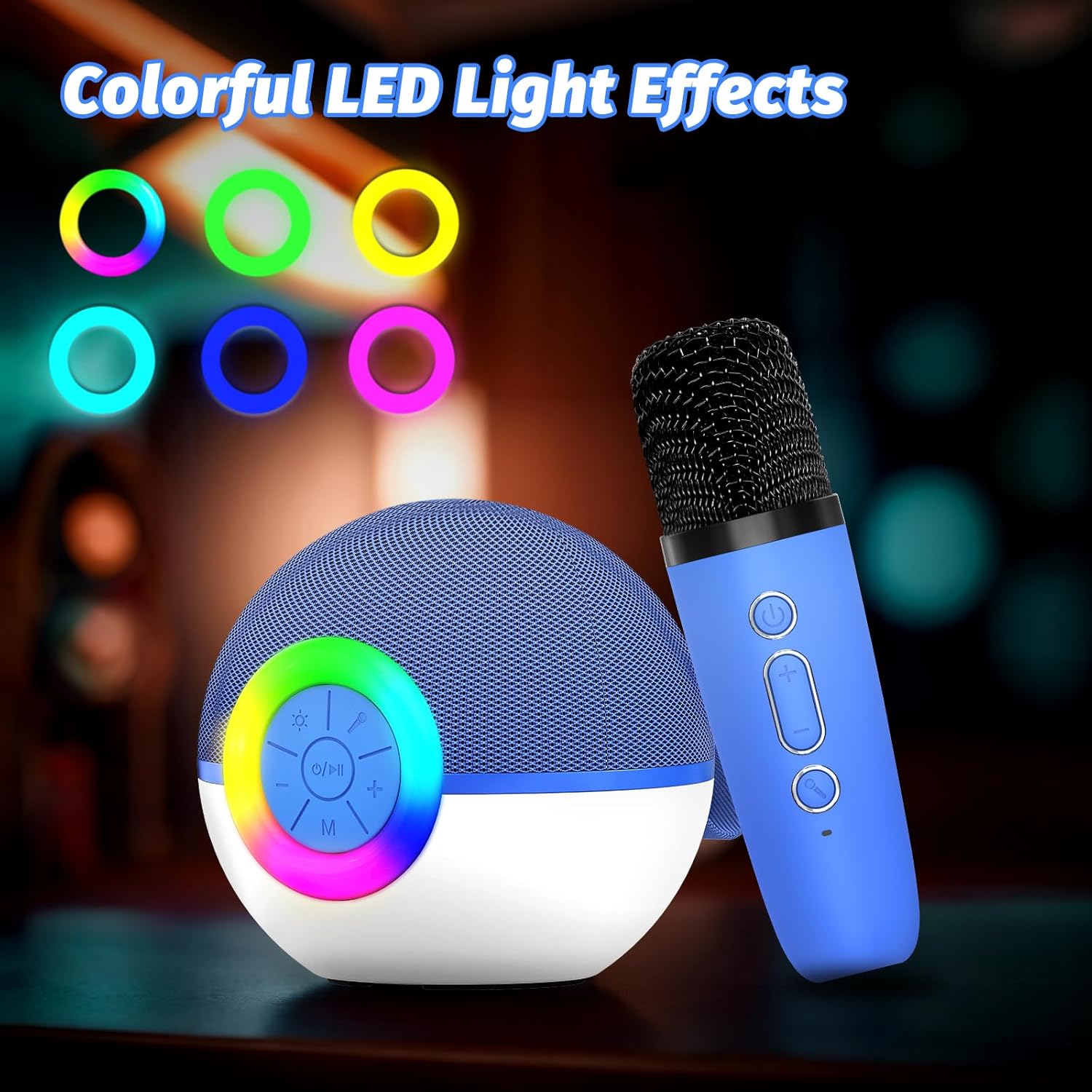
Image 2: Detail of the speaker's control panel. It includes buttons for power/play/pause, volume up/next track, volume down/previous track, and mode selection. The surrounding ring illuminates with various LED colors.

Image 3: Rear view of the speaker, highlighting the AUX input, USB Type-C charging port, and TF (Micro SD) card slot for various audio input options.

Image 4: This image demonstrates the Bluetooth connectivity of the karaoke machine, showing it paired with a smartphone, laptop, and tablet. It also indicates support for TF Card and AUX input.

Image 5: Two wireless microphones are shown in use, highlighting the dual microphone capability for duets or shared singing experiences.

Image 6: The compact size of the goopow T97 speaker and microphone is illustrated, emphasizing its portability for various settings.
Setup
1. Initial Charging
Before first use, fully charge the karaoke machine speaker and both microphones. Connect the provided USB Type-C cable to the charging port on the speaker and a compatible USB power adapter (not included). The charging indicator will show the charging status. A full charge typically takes 2-3 hours.
2. Powering On/Off
- To power on the speaker: Press and hold the power button (O/I) on the speaker's control panel until the LED lights illuminate.
- To power on the microphones: Press and hold the power button on each microphone.
- To power off: Repeat the steps above for both the speaker and microphones.
3. Bluetooth Pairing
- Ensure the speaker is powered on and in Bluetooth pairing mode (indicated by a flashing blue light or an audible prompt).
- On your mobile device (smartphone, tablet, laptop), enable Bluetooth and search for available devices.
- Select "goopow T97" from the list of devices.
- Once paired, the speaker will provide an audible confirmation, and the Bluetooth indicator light will become solid.
The microphones automatically connect to the speaker when both are powered on and within range.
Operating Instructions
1. Playing Music
- Bluetooth: After successful pairing, play music from your connected device.
- TF Card: Insert a Micro SD (TF) card with MP3 audio files into the TF card slot on the speaker. The speaker will automatically switch to TF card mode and begin playback.
- AUX Input: Connect an external audio device using a 3.5mm AUX cable (not included) to the AUX port on the speaker.
2. Speaker Controls
- Power/Play/Pause: Press the O/I button once to play or pause music. Press and hold to power on/off.
- Volume Up/Next Track: Press + button to increase volume. Press and hold to skip to the next track.
- Volume Down/Previous Track: Press - button to decrease volume. Press and hold to go to the previous track.
- Mode (M): Press the M button to switch between Bluetooth, TF Card, and AUX input modes.
- LED Lights: Press the light button (sun icon) to cycle through different LED light modes or turn them off.
3. Microphone Controls
- Power: Press and hold the power button on the microphone to turn it on or off.
- Microphone Volume: Use the + and - buttons on the microphone to adjust its volume.
- Voice Effects: Press the voice effect button (microphone icon) to cycle through available voice changing effects (e.g., Monster Voice, Female Voice, Male Voice, Robot Voice, Baby Voice).
Charging
The goopow T97 Mini Karaoke Machine and its microphones are equipped with rechargeable batteries. Use the provided USB Type-C cable for charging.
- Speaker Charging: Connect the USB Type-C cable to the speaker's charging port and a 5V/1A USB power source.
- Microphone Charging: Each microphone has its own USB Type-C charging port. Connect them individually to a 5V/1A USB power source.
- Charging Time: Approximately 2-3 hours for a full charge.
- Playtime: The speaker provides approximately 4-6 hours of playtime on a full charge. Actual playtime may vary based on volume level, audio content, and usage of LED lights.
Maintenance
- Keep the device away from water, moisture, and extreme temperatures.
- Clean the device with a soft, dry cloth. Do not use abrasive cleaners or solvents.
- Store the device in a cool, dry place when not in use.
- Avoid dropping the device or subjecting it to strong impacts.
Troubleshooting
| Problem | Possible Solution |
|---|---|
| Device does not power on. | Ensure the device is fully charged. Connect to a power source and try again. |
| No sound from speaker. | Check speaker volume and the volume on your connected device. Ensure the correct input mode (Bluetooth, TF Card, AUX) is selected. |
| Microphone not working. | Ensure the microphone is powered on and fully charged. Verify it is within range of the speaker. Adjust microphone volume. |
| Bluetooth pairing fails. | Ensure the speaker is in pairing mode. Turn off Bluetooth on other nearby devices. Try restarting both the speaker and your device's Bluetooth. |
| Poor sound quality. | Ensure the speaker and connected device are within close range without obstructions. Check the audio source quality. |
Specifications
| Feature | Detail |
|---|---|
| Model Number | T97 |
| Brand | goopow |
| Connectivity Technology | Bluetooth |
| Audio Input | Wireless Microphone, Bluetooth |
| Power Source | Battery Powered |
| Connector Type | USB Type C |
| Material | Plastic |
| Item Weight | 14.5 ounces (410 Grams) |
| Product Dimensions (L x W x H) | 3.66 x 3.66 x 3.62 inches |
| Number of Channels | 1 |
| Frequency Response | 10 KHz |
| Batteries | 1 Nonstandard Battery (included) |
Warranty and Support
Specific warranty details are not provided in the product information. For warranty claims, technical support, or further assistance, please contact the manufacturer directly or refer to the official goopow website.
Note: Keep your purchase receipt as proof of purchase for any warranty-related inquiries.