
1. Introduction
This manual provides essential information for the safe and effective use of your DocSmart 2000mAh Li-ion Battery. This battery is designed to power compatible DocSmart mini chainsaws and trimmers, offering reliable performance for your outdoor tasks.
Please read this manual thoroughly before using the battery to ensure proper handling, charging, and maintenance, which will extend the battery's lifespan and ensure your safety.
2. Safety Information
Always observe the following safety precautions when handling and using the battery:
- Do not disassemble, open, or shred battery packs or cells.
- Do not short-circuit a battery pack. Do not store battery packs haphazardly in a box or drawer where they may short-circuit each other or be short-circuited by conductive materials.
- Do not expose battery packs to heat or flame. Avoid storage in direct sunlight.
- Do not subject battery packs to mechanical shock.
- In the event of a battery leaking, do not allow the liquid to come into contact with the skin or eyes. If contact has been made, wash the affected area with copious amounts of water and seek medical advice.
- Keep battery packs clean and dry.
- Recharge only with the charger specified by DocSmart.
- Do not use any battery pack that is not designed for use with the equipment.
- Keep battery packs out of the reach of children.
- Dispose of used battery packs promptly and according to local regulations.
3. Package Contents
Your DocSmart 2000mAh Li-ion Battery package includes:
- 1 x DocSmart 2000mAh Rechargeable Battery
4. Setup
4.1 Initial Charging
Before first use, fully charge the battery. A complete charge typically takes approximately 2 hours. Use only the charger provided with your DocSmart tool or a compatible DocSmart charger.
4.2 Inserting and Removing the Battery
To insert the battery, align the battery with the battery slot on your DocSmart mini chainsaw or trimmer and slide it in until it clicks securely into place. To remove, press the release button(s) on the battery or tool and slide the battery out.

Figure 4.1: The DocSmart 2000mAh Li-ion Battery, ready for insertion into a compatible tool.
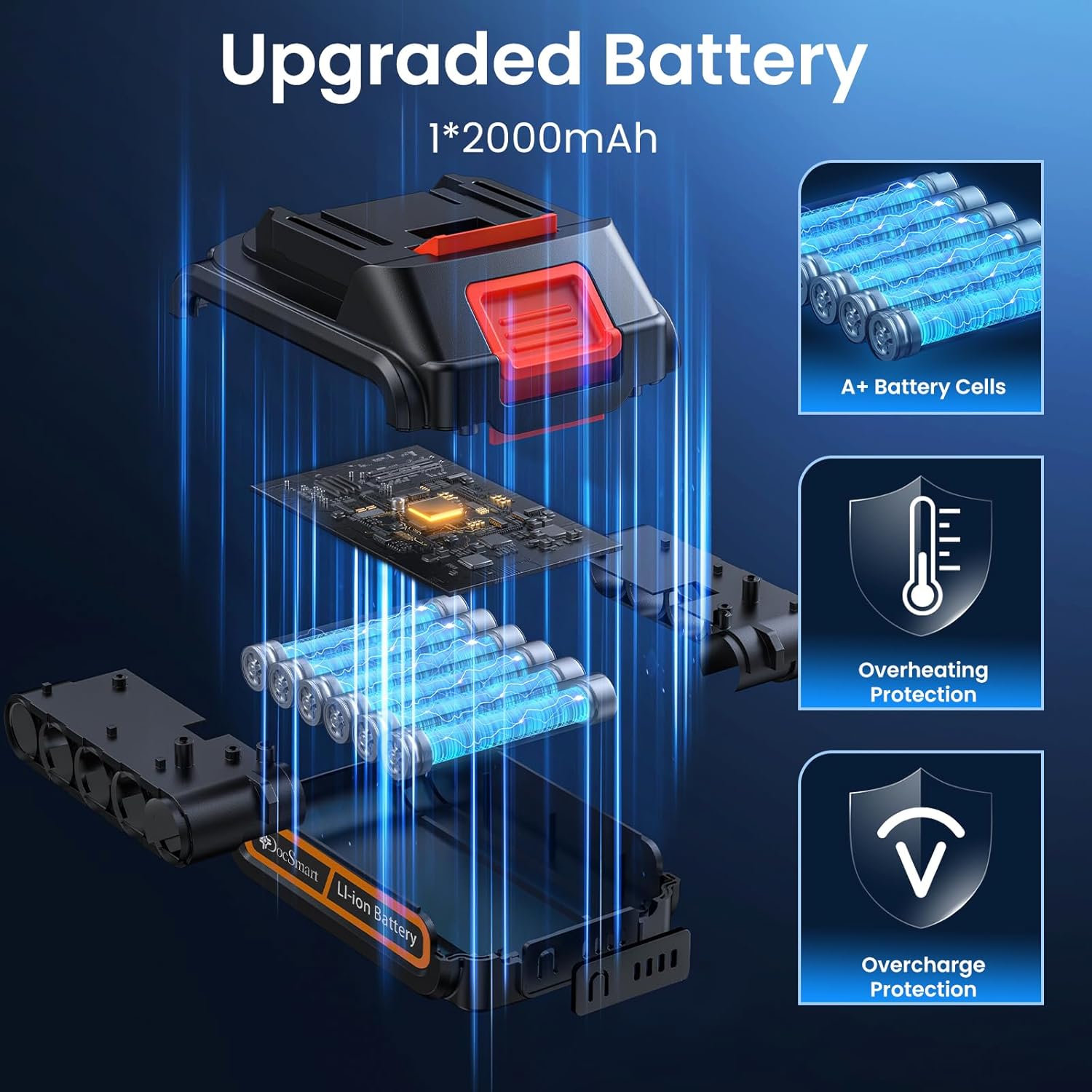
Figure 4.2: Diagram showing the internal components of the DocSmart 2000mAh battery, highlighting A+ battery cells, overheating protection, and overcharge protection for enhanced safety and durability.
5. Operating Instructions
5.1 Battery Usage with Tools
Once the battery is fully charged and securely inserted into your DocSmart mini chainsaw or trimmer, the tool is ready for operation. Refer to your specific tool's user manual for detailed operating instructions.
A single 2000mAh battery can provide approximately 30 minutes of continuous operation, depending on the load and specific tool. When the battery power is low, the tool's performance may decrease, or it may stop operating. Recharge the battery as soon as possible.

Figure 5.1: A person demonstrating the use of a DocSmart mini chainsaw to cut a log, powered by the compatible 2000mAh battery.

Figure 5.2: A person demonstrating the versatility of DocSmart tools, showing both hedge trimming and grass shearing applications, both powered by the 2000mAh battery.
6. Maintenance
6.1 Cleaning
Wipe the battery with a clean, dry cloth to remove any dust or debris. Do not use harsh chemicals or abrasive cleaners. Ensure the battery terminals are clean and free of obstruction.
6.2 Storage
Store the battery in a cool, dry place away from direct sunlight, moisture, and extreme temperatures. For long-term storage, it is recommended to store the battery with a partial charge (around 50%) to preserve its lifespan. Avoid storing fully charged or fully discharged batteries for extended periods.
6.3 Battery Care Tips
- Avoid completely discharging the battery before recharging.
- Do not expose the battery to temperatures below 0°C (32°F) or above 45°C (113°F) during use or storage.
- If the battery becomes hot during use or charging, allow it to cool down before continuing.
7. Troubleshooting
| Problem | Possible Cause | Solution |
|---|---|---|
| Battery not charging | Charger not connected properly; Battery too hot/cold; Faulty charger/battery | Ensure charger is securely plugged in. Allow battery to reach room temperature. Test with another charger/battery if available. |
| Battery not holding charge | Battery lifespan reached; Improper charging/storage | Ensure proper charging and storage practices are followed. If battery is old, consider replacement. |
| Tool not operating with battery | Battery not fully inserted; Battery discharged; Tool malfunction | Ensure battery is fully clicked into place. Charge battery. Refer to tool's manual for troubleshooting tool-specific issues. |
8. Specifications
| Feature | Specification |
|---|---|
| Model Number | MT-5S1P |
| Battery Capacity | 2000 mAh |
| Battery Type | Lithium Ion |
| Nominal Voltage | 20V (typical for mini chainsaw/trimmer batteries) |
| Product Dimensions | 1.18 x 1.06 x 0.79 inches |
| Item Weight | 13.4 ounces (0.66 lbs) |
| Charging Time | Approx. 2 hours |
| Operating Time | Approx. 30 minutes (varies by load) |
| Manufacturer | DocSmart |
| Country of Origin | China |
9. Warranty and Support
DocSmart is committed to providing quality products and customer satisfaction. Your DocSmart 2000mAh Li-ion Battery is manufactured with high standards.
For any inquiries, technical support, or warranty claims, please contact DocSmart customer service. DocSmart offers a 365-day service period and free replacement for eligible issues. 24/7 support is available to assist you with your product needs.
Please retain your proof of purchase for any warranty-related requests.