
Introduction
Welcome to the user manual for your new TECNO Spark 20 Pro 5G smartphone. This guide provides essential information to help you set up, operate, maintain, and troubleshoot your device. Please read through this manual carefully to ensure optimal performance and longevity of your smartphone.

Image: Front and back view of the TECNO Spark 20 Pro 5G smartphone, showcasing its design and camera module.
1. Setup
1.1 Package Contents
Before you begin, ensure all items are present in the package:
- TECNO Spark 20 Pro 5G Smartphone
- USB Type-C Cable
- Power Adapter (33W)
- SIM Ejector Tool
- Quick Start Guide (if applicable)
- Warranty Card (if applicable)
1.2 Inserting the SIM Card
- Locate the SIM card tray on the side of your device.
- Insert the SIM ejector tool into the small hole next to the tray and press gently until the tray pops out.
- Place your Nano SIM card into the designated slot on the tray. Ensure the gold contacts face downwards.
- Carefully push the tray back into the phone until it clicks into place.

Image: Side view of the smartphone showing the SIM card tray and power/volume buttons.
1.3 Initial Charging and Power On
It is recommended to fully charge your device before first use.
- Connect the USB Type-C cable to the phone's charging port and the power adapter.
- Plug the power adapter into a wall outlet.
- Once sufficiently charged, press and hold the Power button (located on the side) until the TECNO logo appears.
- Follow the on-screen instructions to complete the initial setup, including language selection, Wi-Fi connection, and Google account setup.
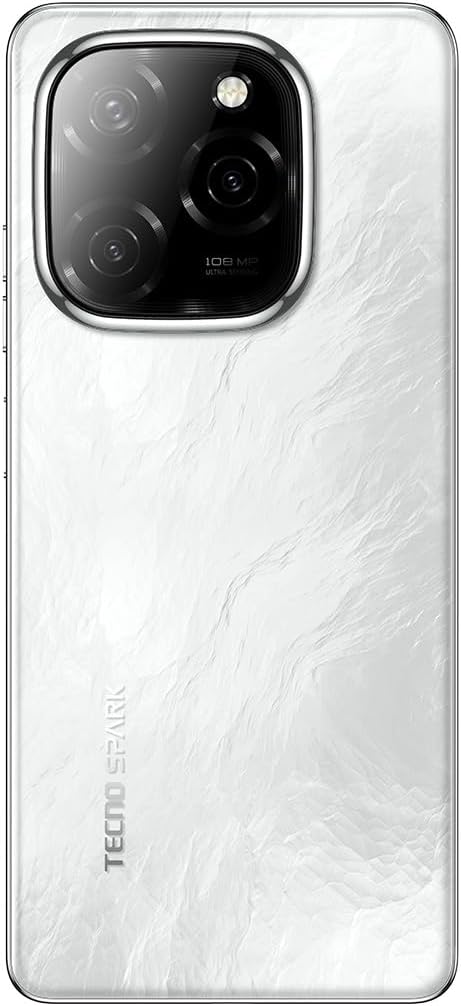
Image: Bottom view of the smartphone, highlighting the USB Type-C charging port and speaker grille.
2. Operating Your Device
2.1 Basic Navigation
Your TECNO Spark 20 Pro 5G runs on Android 14 with HiOS 14. Navigate using touch gestures:
- Tap: Select an item or open an app.
- Swipe: Scroll through screens or lists.
- Pinch: Zoom in or out on images and web pages.
- Long Press: Access contextual menus or move icons.
2.2 Camera Functions
The device features a 108MP Ultra Clear rear camera and an 8MP front camera with dual LED flash.
- Rear Camera: Open the Camera app, select "Photo" for standard shots, "Pro" for advanced settings, or "Macro" for close-up photography.
- Front Camera: Switch to the front camera for selfies. The dual LED flash assists in low-light conditions.
- Video Recording: Select "Video" mode to record in up to 4K resolution.

Image: Rear view of the smartphone, highlighting the 108MP camera system with its triple lens setup.
2.3 5G Connectivity
Experience high-speed internet with 5G connectivity, supported by 10 5G bands, Linkbooming, and Smart 5G 3.0 technology for wider coverage and faster speeds.
- Ensure your SIM card supports 5G and your network provider offers 5G services in your area.
- Access network settings to manage 5G preferences.
2.4 Audio and Display
- Audio: Enjoy immersive sound with Dolby Atmos and dual stereo speakers, featuring Hi-Res Audio certification.
- Display: The 6.78-inch LTPS display offers a 120Hz adaptive refresh rate for smooth scrolling and gaming. The Dynamic Port 2.0 provides interactive notifications.
2.5 Security Features
Unlock your device securely using the side-mounted fingerprint sensor.
- Go to Settings > Security & Privacy > Fingerprint Unlock to set up your fingerprint.
3. Maintenance
3.1 Cleaning Your Device
- Use a soft, lint-free cloth to clean the screen and body of the phone.
- Avoid using harsh chemicals or abrasive materials.
- The device has an IP53 rating, meaning it is resistant to dust and splashing water, but it is not waterproof. Avoid submerging it in water.
3.2 Battery Care
- To prolong battery life, avoid exposing the phone to extreme temperatures.
- Use the original 33W fast charger for optimal charging performance.
- Avoid completely draining the battery frequently.
3.3 Software Updates
Regularly check for and install software updates to ensure your device has the latest features and security patches.
- Go to Settings > System > Software Update to check for available updates.
4. Troubleshooting
| Problem | Possible Solution |
|---|---|
| Device does not power on. | Ensure the battery is charged. Connect to the charger for at least 10 minutes, then try powering on again. If it still doesn't work, perform a forced restart by holding the Power button for 10-15 seconds. |
| Cannot connect to Wi-Fi. | Check if Wi-Fi is enabled in settings. Restart your router and phone. Forget the network and reconnect. |
| Poor 5G signal. | Ensure you are in a 5G coverage area. Check your SIM card is properly inserted. Contact your network provider for assistance. |
| Camera not working. | Restart the phone. Clear the cache and data of the Camera app (Settings > Apps > Camera > Storage > Clear Cache/Data). |
| Battery drains quickly. | Close background apps. Reduce screen brightness. Disable unnecessary features like GPS, Bluetooth, or Wi-Fi when not in use. Check battery usage in settings to identify power-hungry apps. |
5. Specifications
| Feature | Detail |
|---|---|
| Brand | Tecno |
| Model Name | Spark 20 Pro |
| Operating System | Android 14, HiOS 14 |
| RAM Size | 16 GB (8GB physical + 8GB memory fusion) |
| Storage Capacity | 256 GB (UFS 2.2) |
| Processor Model | MediaTek Dimensity 6080 5G (6nm) |
| CPU Speed | 2.4 GHz |
| Screen Size | 6.78 inches |
| Display Resolution | 3840 x 2160 (4K) |
| Refresh Rate | 120 Hz Adaptive |
| Display Type | LCD (LTPS) |
| Rear Camera Resolution | 108 Megapixels |
| Front Camera Resolution | 8 Megapixels |
| Camera Features | Macro mode, Integrated Flash (Dual LED for front camera) |
| Video Capture Resolution | 4K |
| Battery Capacity | 5000 mAh (Lithium Polymer) |
| Charging | 33W Fast Charging, 10W Reverse Charging |
| Cellular Technology | 5G |
| Connectivity | 5G, Wi-Fi, USB Type-C, 3.5mm Headphone Jack |
| SIM Card Slots | Single SIM (Nano) |
| Biometric Security | Fingerprint Recognition |
| Water Resistance Level | IP53 (Splash Resistant) |
| Included Components | USB Cable, Power Adapter |
| Product Dimensions | 16.9 x 7.6 x 0.9 cm |
| Item Weight | 199 grams |
| Manufacturing Year | 2024 |
6. Warranty Information
Your TECNO Spark 20 Pro 5G smartphone comes with a one-year limited warranty from the date of purchase. This warranty covers manufacturing defects under normal use. It does not cover damage caused by misuse, accidents, unauthorized repairs, or normal wear and tear.
Please retain your proof of purchase for warranty claims. For detailed terms and conditions, refer to the warranty card included in your product package or visit the official Tecno website.
7. Support
For further assistance, technical support, or service inquiries, please contact Tecno customer support through one of the following channels:
- Official Website: Visit the Tecno official website for FAQs, support resources, and contact information.
- Email Support: Refer to your warranty card or the official website for specific email addresses.
- Service Centers: Locate authorized service centers in your region via the Tecno website.
When contacting support, please have your device model (Spark 20 Pro) and serial number ready.


