
litillbuly XTJE72C-HS19
litillbuly Car Stereo User Manual
Model: XTJE72C-HS19
Brand: litillbuly
Introduction
This manual provides detailed instructions for the installation, operation, and maintenance of your litillbuly 7-inch Touch Screen Android 13 Car Stereo. Please read this manual thoroughly before use to ensure proper functionality and safety.
Applicable Car Models
This car stereo is compatible with a range of vehicle models. Please verify your vehicle's compatibility before installation.
- For Jeep Wrangler/Unlimited 2007-2018
- For Jeep Compass 2009-2016
- For Jeep Patriot 2009-2016
- For Jeep Grand Cherokee 2005-2011
- For Jeep Liberty 2008-2011
- For Jeep Commander 2008-2011
- For Chrysler Sebring 2007-2010
- For Town&Country 2007-2010
- For Dodge Grand Caravan 2011-2014
- For Dodge Charger 2008-2010
- For Dodge Ram Pickup 1500/2500/3500 2009-2012

Figure 1: List of compatible car models for the litillbuly car stereo.
What's in the Box
Your litillbuly Car Stereo package includes the following components:
- Car Radio Unit
- Power Cable
- RCA Cable
- Reversing Line
- Can Bus
- GPS Module
- USB Cable
- Antenna
- Crowbar Screwdriver
- Reversing Radar (if included with specific model)
- Microphone
- Rear Reversing Camera (included with this specific model)

Figure 2: All components included with the litillbuly Car Stereo.
Setup and Installation
Installation of the litillbuly Car Stereo is designed to be straightforward, often plug-and-play for compatible vehicles. However, professional installation is recommended if you are unfamiliar with car audio systems.
Wiring Diagram
Refer to the following diagram for proper wiring connections. Ensure all connections are secure before powering on the unit.

Figure 3: Comprehensive wiring diagram for the car stereo unit.
CAN Bus and Harness Connection
For Jeep Wrangler vehicles with Alpine or Infinity sound systems, use the specific plug indicated in the image below. The unit comes with a harness that has multiple plug options; match the live pins on your OEM Jeep plug to the corresponding option on the head unit's harness.

Figure 4: Specific harness plug for Jeep Wrangler with Alpine or Infinity sound systems.
Operating Instructions
Wireless CarPlay & Android Auto
Connect your iPhone or Android phone wirelessly via Bluetooth to access CarPlay or Android Auto. This allows you to use smart voice assistants, get directions, make calls, send messages, and enjoy music directly from your phone's interface on the car stereo screen.

Figure 5: Wireless CarPlay and Android Auto interface.
Video 1: Demonstration of XT Wireless CarPlay connection setup and operation.
Bluetooth Hands-Free and Steering Wheel Controls
The built-in Bluetooth function supports hands-free calling for all Android and iOS phones. Utilize the steering wheel controls to safely manage calls, adjust volume, and change songs without taking your hands off the wheel. An external microphone is included for improved call clarity.
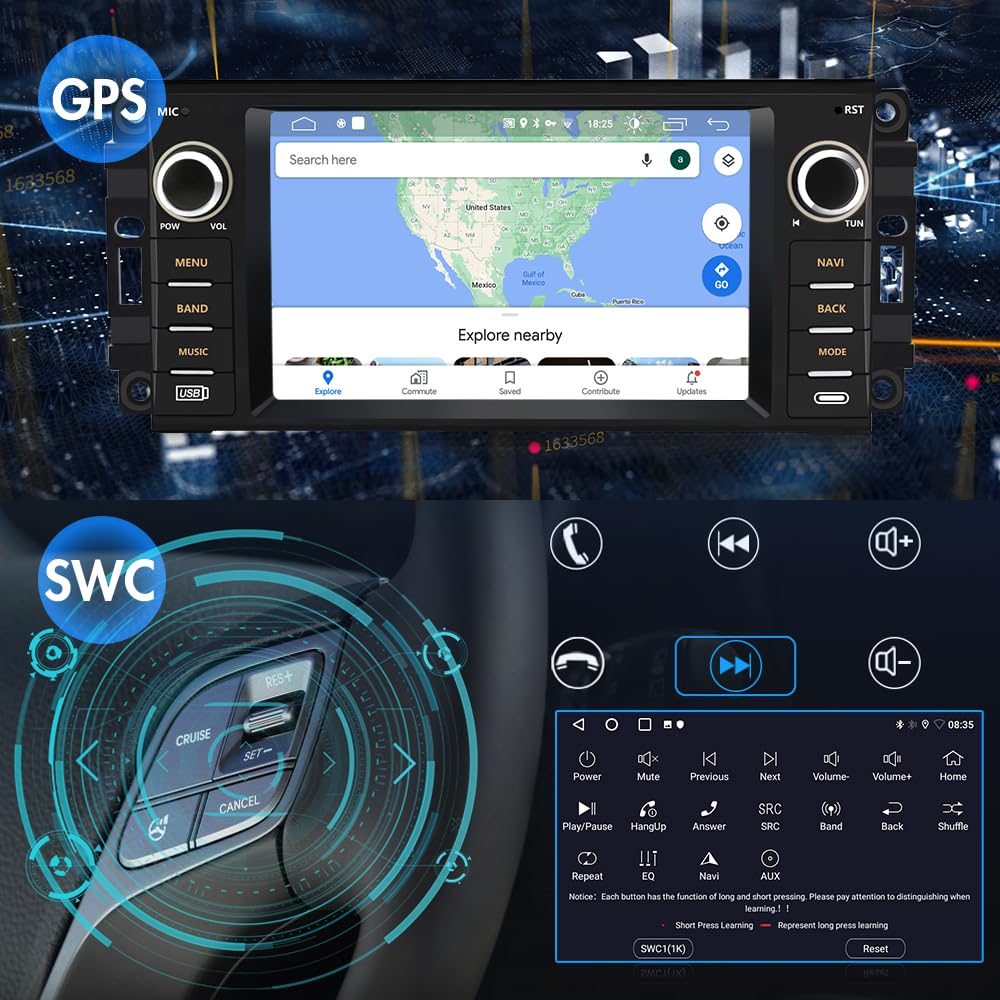
Figure 6: Steering wheel control integration for safe operation.
Video 2: Overview of the car stereo features, including screen clarity, CarPlay/Android Auto, DSP, steering wheel controls, and colorful light function.
Multiple Media Playback Methods
Enjoy various media options including built-in microphone, iOS and Android mobile Bluetooth hands-free. The high-quality digital stereo (RDS) FM tuner allows for automatic or semi-automatic radio station search. Adjust individual speaker volumes and utilize the stereo EQ with presets like jazz, rock, pop, and classic. You can play both offline multimedia and stream music or video online via network connection.

Figure 7: Wi-Fi and Bluetooth media playback options.
Online Maps and GPS Navigation
After connecting the included GPS antenna, you can use coordinates, postal codes, addresses, or Points of Interest (POI) to plan your routes. For real-time traffic flow, download online map applications from the app store. The system supports 2D/3D maps for enhanced navigation.
Figure 8: GPS navigation interface.
Other Main Functions
- Reversing Assistance: Connect the included rear reversing camera for automatic display when shifting into reverse.
- Video Output: You can transfer video output to a headrest monitor.
- Mirror Link: Compatible with both Android and iOS mobile phones for screen mirroring.
- WiFi/WLAN Internet: Supports internet connectivity, allowing you to download apps like YouTube and Gmail.
- DSP Sound Effects: Features DSP functionality for advanced sound control, including a stereo equalizer with various presets.
- Split Screen: Enjoy two views on the same screen simultaneously.
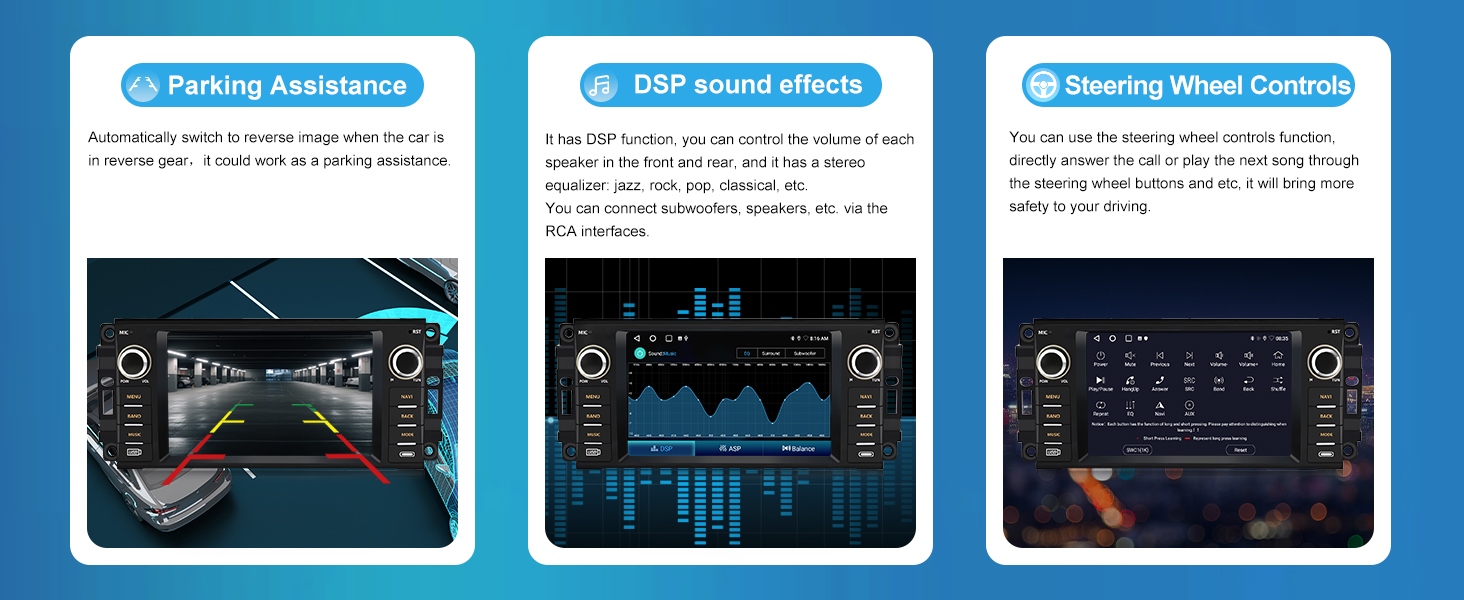
Figure 9: Key features including parking assistance, DSP, and steering wheel controls.
Maintenance
To ensure the longevity and optimal performance of your litillbuly Car Stereo, follow these general maintenance guidelines:
- Keep the screen clean using a soft, lint-free cloth. Avoid abrasive cleaners.
- Ensure all cables are securely connected and free from damage.
- Periodically check for software updates to enhance performance and add new features.
- Avoid exposing the unit to extreme temperatures or direct sunlight for prolonged periods.
Troubleshooting
If you encounter any issues with your car stereo, refer to the following common solutions:
| Problem | Solution |
|---|---|
| Buttons on the left side don't work? | Please go into the settings -> car settings -> factory (code: 000000) -> Touch learning. |
| How to change the temperature from Celsius to Fahrenheit? | Please go into the settings -> car settings -> factory (code: 000000) -> CAN related settings -> Temperature unit. |
| How can I change KM to MPH? | Please go into the settings -> car settings -> factory (code: 000000) -> speed unit 0. |
| Why don't my steering wheel buttons work? |
|

Figure 10: Troubleshooting steps and CAN bus connection diagram.
Specifications
| Feature | Detail |
|---|---|
| Brand | litillbuly |
| Model Number | XTJE72C-HS19 |
| Operating System | Android 13 |
| Screen Size | 7 Inches |
| Special Feature | Touchscreen |
| Connectivity Technology | Wi-Fi |
| Map Type | North America (Preloaded) |
| Audio Output Mode | Stereo |
| Mounting Type | Panel Mount |
| Package Dimensions | 11.77 x 9.57 x 3.98 inches |
| Item Weight | 2.2 Pounds |
| Country of Origin | China |
Warranty and Support
litillbuly is committed to providing top-tier customer support. For any inquiries, technical assistance, or warranty claims, please contact us directly.
Customer Support Email: litillbuly@outlook.com

Figure 11: litillbuly Customer Support Information.
Ask a question about this manual
Ask about setup, troubleshooting, compatibility, parts, safety, or missing instructions. Manuals+ will review the question and use this page’s manual context to help answer it.