
1. Product Overview
The Creality Smoke Purifier 180W is a high-efficiency fume extractor designed for use with laser engraving machines. It provides a healthy and safe working environment by effectively removing smoke and harmful substances through its advanced 3-stage filtration system. This unit is pre-assembled for user convenience and features a sealed design to prevent smoke leakage.
- Powerful Suction: Equipped with a 180W motor for strong smoke extraction.
- Advanced Filtration: Features a 3-layer filtration system (pre-filter, extended HEPA filter, activated carbon) achieving 99.97% purification of smoke, dust, and harmful gases.
- Sealed Design: Integrated design with foam and metal buckle on the exhaust port to prevent smoke leakage and enhance purification.
- User-Friendly: Pre-assembled with handles and wheels for easy mobility.
- Wide Compatibility: Suitable for Creality Falcon 2 Pro Laser Engraver and most enclosed laser engraving machines/enclosures with a 3-3.5 inch exhaust duct diameter.

Figure 1.1: Creality Smoke Purifier 180W with its main components including filters, clamp, and duct adapter.
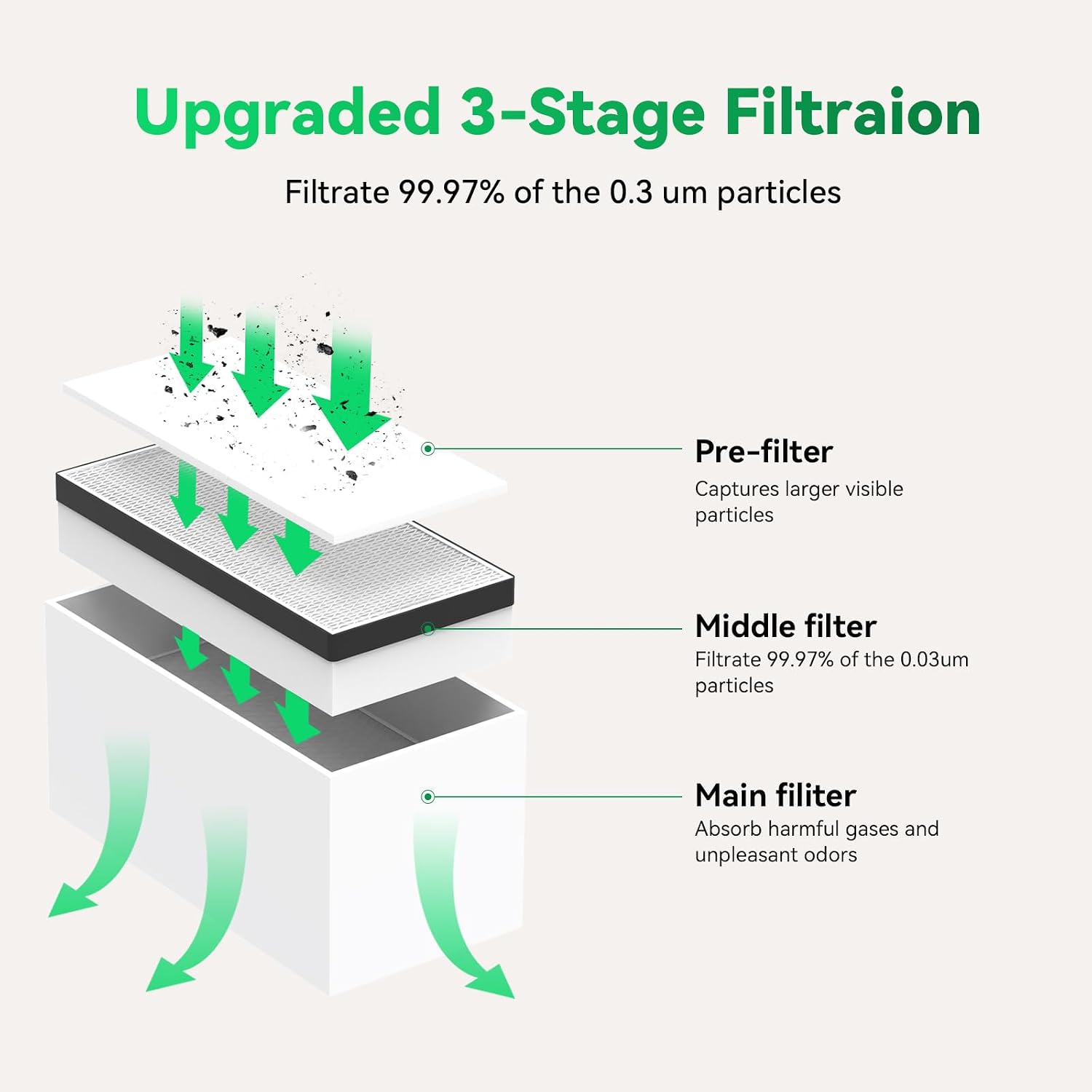
Figure 1.2: Illustration of the upgraded 3-stage filtration process, showing how air passes through the pre-filter, middle filter, and main filter.
2. Safety Information
Please read all safety instructions carefully before operating the Creality Smoke Purifier. Failure to follow these instructions may result in electric shock, fire, or serious injury.
- Ensure the power supply voltage matches the specifications of the purifier (110 Volts).
- Do not operate the purifier with a damaged power cord or plug.
- Keep the air inlet and outlet clear of obstructions to ensure proper airflow.
- Do not immerse the unit in water or other liquids.
- Always unplug the unit before performing any maintenance or cleaning.
- Use only genuine Creality replacement filters to maintain optimal performance and safety.
- This device is intended for indoor use only.
- Keep out of reach of children.
3. Package Contents
Verify that all items listed below are included in your package:
- Creality Smoke Purifier 180W Unit (Pre-assembled)
- Pre-filter (Installed)
- Middle Filter (Installed)
- Main Filter (Installed)
- Duct Adapter
- Hose Clamp
- Power Cable
- User Manual (This document)
4. Specifications
| Feature | Specification |
|---|---|
| Model Number | 180W Power |
| Manufacturer | Creality |
| Power Source | AC/DC |
| Voltage | 110 Volts |
| Wattage | 180 Watt-hours |
| Item Weight | 39.4 pounds (approx. 17.87 kg) |
| Package Dimensions | 24.4 x 20.3 x 12.4 inches (approx. 61.98 x 51.56 x 31.5 cm) |
| Filtration System | 3-Stage (Pre-filter, Middle Filter, Main Filter) |
| Purification Rate | 99.97% for 0.3 µm particles |
| Exhaust Duct Diameter | 3-3.5 inches (7.5-9 cm) |

Figure 4.1: Physical dimensions of the Creality Smoke Purifier, showing approximate height, width, and depth.
5. Setup Instructions
The Creality Smoke Purifier comes largely pre-assembled. Follow these steps to set up your unit:
- Unpacking: Carefully remove the smoke purifier and all accessories from the packaging. Retain packaging for future transport or storage.
- Positioning: Place the smoke purifier on a stable, level surface near your laser engraver or enclosure. The unit is equipped with wheels and handles for easy movement.

Figure 5.1: The smoke purifier features handles and wheels for convenient positioning.
- Connecting the Exhaust Duct:
- Attach the provided duct adapter to the smoke purifier's inlet port.
- Connect the exhaust duct from your laser engraver or enclosure (not included, diameter 3-3.5 inches) to the duct adapter on the purifier. Secure it with the hose clamp.
- Ensure a tight seal to prevent smoke leakage. The purifier's design includes foam sealing for enhanced effectiveness.

Figure 5.2: Examples of connecting the smoke purifier to various laser engravers and enclosures, highlighting the exhaust duct connection.
- Power Connection: Insert the power cable into the power inlet on the back of the purifier, then plug the other end into a standard 110V AC power outlet.
6. Operating Instructions
Once set up, operating the smoke purifier is straightforward:
- Power On: Locate the power switch on the back of the unit and flip it to the 'ON' position.
- Adjusting Suction Power: Use the rotary knob on the front panel to adjust the suction power. Turn the knob clockwise to increase suction (towards 'MAX') and counter-clockwise to decrease it (towards 'OFF').

Figure 6.1: The control panel with the rotary knob for stepless airflow adjustment and the power switch.
- During Operation: Ensure the purifier is running whenever your laser engraver is in use to effectively capture fumes and particles.
- Power Off: After use, turn the rotary knob to the 'OFF' position and then flip the power switch on the back to 'OFF'. Unplug the unit from the power outlet if not in use for an extended period.

Figure 6.2: Visual comparison of air quality before and after using the smoke purifier during laser engraving.
7. Maintenance
Regular maintenance ensures the longevity and optimal performance of your smoke purifier. Always unplug the unit before performing any maintenance.
7.1 Filter Replacement
The smoke purifier utilizes a 3-stage filtration system. Filters should be inspected regularly and replaced as needed, depending on usage frequency and the type of materials being engraved. Signs of needing filter replacement include reduced suction, persistent odors, or visible clogging.
- Accessing Filters: Open the top lid of the smoke purifier. The filters are stacked inside.
- Removing Filters: Carefully lift out the filters one by one, starting with the top-most filter (pre-filter). Dispose of used filters according to local regulations.
- Installing New Filters: Insert new genuine Creality replacement filters in the correct order: Main Filter (bottom), Middle Filter, then Pre-filter (top). Ensure they are seated properly.
- Closing the Unit: Close the top lid securely.

Figure 7.1: Detailed view of the three filter components: pre-filter, middle filter (honeycomb structure), and main filter (activated carbon).
7.2 Cleaning
- Wipe the exterior of the unit with a soft, damp cloth. Do not use abrasive cleaners or solvents.
- Periodically check the air inlet and outlet for any dust or debris accumulation and clean as necessary.
8. Troubleshooting
If you encounter issues with your smoke purifier, refer to the following table for common problems and solutions:
| Problem | Possible Cause | Solution |
|---|---|---|
| Unit does not power on. | No power supply; Power switch off; Damaged power cable. | Ensure power cable is securely plugged into unit and outlet. Check power switch. Try a different outlet. Inspect power cable for damage. |
| Low suction power. | Clogged filters; Air inlet/outlet blocked; Duct connection loose. | Check and replace filters if clogged. Ensure air vents are clear. Verify exhaust duct is securely connected and sealed. Adjust suction knob to MAX. |
| Smoke leakage. | Improper duct connection; Lid not sealed properly. | Ensure exhaust duct is tightly secured with the clamp. Verify the top lid is closed and sealed correctly. |
| Unusual noise during operation. | Foreign object in fan; Unit not on level surface. | Turn off and unplug the unit. Inspect the fan area for obstructions (if accessible). Ensure the unit is placed on a stable, level surface. |
| Persistent odors. | Saturated activated carbon filter. | Replace the main activated carbon filter. |
9. Warranty and Support
9.1 Warranty Information
Creality products are manufactured to high quality standards. For specific warranty terms and conditions applicable to your Creality Smoke Purifier 180W, please refer to the warranty card included with your product or visit the official Creality website. Warranty coverage typically includes defects in materials and workmanship under normal use.
9.2 Customer Support
For technical assistance, troubleshooting not covered in this manual, or inquiries regarding replacement parts and accessories, please contact Creality customer support through their official channels. You can typically find contact information on the Creality website or through the retailer where you purchased the product.
Official Creality Store: Visit the Creality Store on Amazon