
1. Introduction
This manual provides detailed instructions for the installation, operation, and maintenance of your Targa TG-230BC Media Player. Please read this manual thoroughly before using the product to ensure proper function and to prevent damage.
The Targa TG-230BC is a versatile car media player featuring USB, TF card, Bluetooth connectivity, and FM radio, designed to enhance your in-car audio experience.
2. Safety Information
- Ensure proper wiring and insulation to prevent short circuits and electrical hazards.
- Do not attempt to disassemble or modify the unit. Refer all servicing to qualified personnel.
- Avoid operating the unit at excessively high volumes for prolonged periods to prevent hearing damage.
- Do not install the unit where it may obstruct the driver's view or interfere with vehicle operation.
- Disconnect the vehicle's battery negative terminal before installation to prevent electrical damage.
3. Package Contents
Verify that all items are present in the package:
- 1 x Targa TG-230BC Media Player
- 1 x EvoTuning 300W Super Tweeters
- 1 x Gel Key Holder
- Wiring Harness
- Mounting Hardware
- User Manual (this document)
4. Product Overview
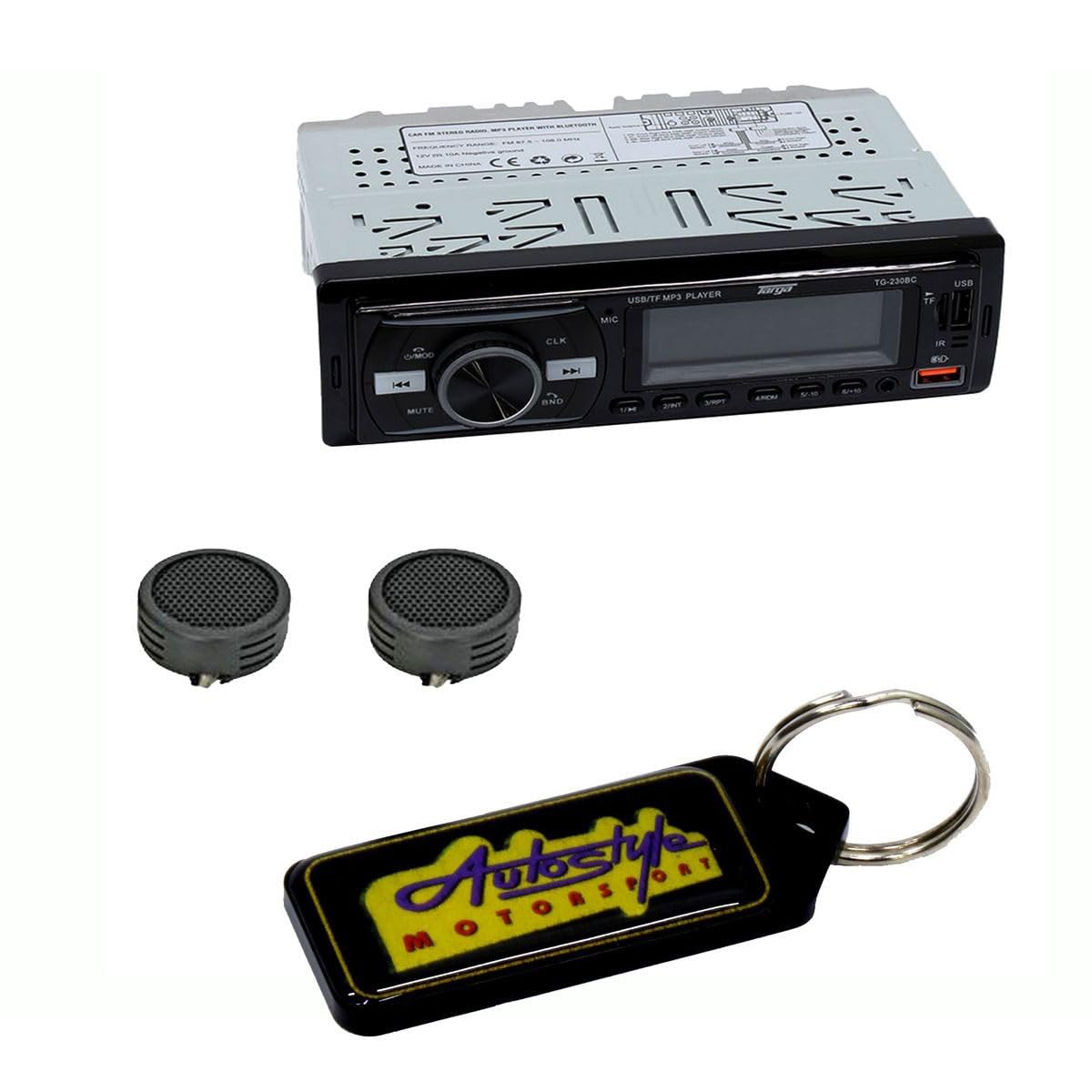
Image 1: Front view of the Targa TG-230BC Media Player. This image displays the main unit with its LCD screen, control buttons, USB port, and TF card slot.
4.1 Front Panel Controls
- LCD Display: Shows current status, time, and track information.
- USB Port: For USB flash memory playback and phone charging (5V/1A).
- TF Card Slot: For TF card music playback.
- AUX Input (3.5mm): For connecting external audio devices.
- Power/Mode Button: Turns the unit on/off and cycles through audio sources.
- Volume/Select Knob: Adjusts volume; press to access audio settings.
- Seek/Track Buttons: Skips tracks or tunes radio stations.
- Bluetooth Call Buttons: Answer/End calls.
- EQ Button: Selects equalizer presets.
- Band Button: Selects radio bands (FM1, FM2, FM3).
- LOC/DX Button: Toggles between local and distance radio reception.
- Stereo/Mono Button: Selects stereo or mono radio reception.
- Clock Button: Displays and sets the digital clock.
4.2 Rear Connections
- ISO Connector: Standard wiring harness for power and speaker connections.
- RCA (L/R) Preamp Audio Output: For connecting to external amplifiers.
- Antenna Input: For connecting the vehicle's radio antenna.
5. Setup
5.1 Installation
- Disconnect the negative terminal of the vehicle's battery.
- Remove the existing car stereo (if any) and its mounting bracket.
- Install the provided mounting sleeve into the dashboard opening. Bend the tabs to secure it.
- Connect the wiring harness as described in Section 5.2.
- Slide the Targa TG-230BC Media Player into the mounting sleeve until it locks into place.
- Reconnect the vehicle's battery negative terminal.
5.2 Wiring Connections
Refer to the wiring diagram provided with your unit for specific color codes. General connections are as follows:
- Yellow Wire (B+): Connect to constant 12V power (always on).
- Red Wire (ACC): Connect to switched 12V power (ignition).
- Black Wire (GND): Connect to vehicle chassis ground.
- Speaker Wires: Connect to corresponding vehicle speakers (e.g., White/White-Black for Front Left, Grey/Grey-Black for Front Right, Green/Green-Black for Rear Left, Purple/Purple-Black for Rear Right). Ensure correct polarity.
- Antenna: Connect the vehicle's radio antenna cable.
- RCA Outputs: If using an external amplifier, connect RCA cables from the unit's RCA outputs to the amplifier's inputs.
6. Operating Instructions
6.1 Power On/Off and Source Selection
- Power On: Press the MODE button.
- Power Off: Press and hold the MODE button.
- Source Selection: Briefly press the MODE button to cycle through available sources: FM Radio, USB, TF Card, AUX Input, Bluetooth.
6.2 Radio Operation
- Band Selection: In FM mode, press the BAND button to switch between FM1, FM2, and FM3.
- Auto Seek: Briefly press the SEEK buttons (◀◀ / ▶▶) to automatically search for the next strong station.
- Manual Tune: Press and hold the SEEK buttons (◀◀ / ▶▶) to manually tune the frequency.
- Store Presets: The unit supports 18 station presets. To store a station, tune to the desired frequency, then press and hold one of the numeric preset buttons (1-6) until you hear a beep.
- LOC/DX: Press the LOC/DX button to toggle between local (strong signals only) and distance (all signals) reception modes.
- Stereo/Mono: Press the STEREO/MONO button to switch between stereo and mono reception for FM broadcasts.
6.3 USB/TF Card Operation
- Insert Media: Insert a USB flash drive (up to 64GB) into the USB port or a TF card into the TF card slot. The unit will automatically switch to USB/TF mode and begin playback.
- Track Navigation: Press the SEEK buttons (◀◀ / ▶▶) to skip to the previous or next track.
- Repeat/Random/Intro Play: Use the corresponding buttons (if available, or cycle through options via the MODE button or menu) to activate repeat, random, or intro play functions.
- USB Charging: The USB port provides 5V/1A output for charging most mobile phones.
6.4 Bluetooth Operation
- Pairing:
- Ensure the unit is in Bluetooth mode.
- Enable Bluetooth on your mobile device and search for available devices.
- Select "Targa TG-230BC" from the list. If prompted for a password, enter "0000".
- Once paired, the Bluetooth icon on the display will illuminate.
- Hands-Free Calling:
- Press the Answer button (usually a green phone icon) to accept an incoming call.
- Press the End button (usually a red phone icon) to end a call.
- Press and hold the End button to reject an incoming call.
- Audio Streaming: Play audio from your paired device. Use the unit's controls or your device to manage playback.
6.5 AUX Input
Connect an external audio device (e.g., MP3 player, smartphone) to the 3.5mm AUX input jack on the front panel using an audio cable. Switch the unit to AUX mode using the MODE button.
6.6 Audio Settings
- Volume: Rotate the Volume/Select knob.
- Bass/Treble/Balance/Fader: Press the Volume/Select knob repeatedly to cycle through audio settings (BASS, TREB, BAL, FAD). Rotate the knob to adjust the selected setting.
- EQ Presets: Press the EQ button to cycle through preset equalizer modes (e.g., POP, ROCK, CLASSIC, FLAT).
6.7 Digital Clock Display
Press the CLOCK button to display the current time. To set the time, press and hold the CLOCK button until the hour digits flash. Use the SEEK buttons to adjust the hour, then press the CLOCK button again to switch to minutes and adjust. Press CLOCK once more to save.
7. Maintenance
- Cleaning: Use a soft, dry cloth to clean the unit's front panel. Do not use abrasive cleaners or solvents.
- Fuse Replacement: If the unit does not power on, check the fuse located on the rear of the unit or in the wiring harness. Replace it with a fuse of the same amperage rating (e.g., 10A or 15A, refer to unit markings).
- Avoid Liquids: Keep the unit away from water and other liquids to prevent damage.
8. Troubleshooting
| Problem | Possible Cause | Solution |
|---|---|---|
| No power | Blown fuse; incorrect wiring; loose connection. | Check and replace fuse; verify wiring connections (B+, ACC, GND); ensure secure connections. |
| No sound | Volume too low; incorrect source selected; speaker wires disconnected; mute function active. | Increase volume; select correct source; check speaker wiring; deactivate mute. |
| Poor radio reception | Antenna not connected; weak signal; LOC mode active. | Ensure antenna is connected; switch to DX mode; try a different location. |
| Bluetooth not pairing | Unit not in pairing mode; device Bluetooth off; incorrect password. | Ensure unit is in Bluetooth mode; enable Bluetooth on device; enter "0000" if prompted. |
| USB/TF card not reading | Unsupported file format; corrupted media; media capacity too large. | Ensure files are in supported format (e.g., MP3); try a different USB/TF card; ensure media is 64GB or less. |
9. Specifications
- Model: TG-230BC
- Power Output: 60W x 4 Max
- USB Support: Up to 64GB flash memory
- USB Charging: 5V/1 Amp Current
- TF Card Slot: Yes, for music playback
- Bluetooth: Hands-Free Calling, Audio Streaming
- Radio: FM Band, PLL Tuning, 18 Station Presets, LOC/DX Selector, Stereo/Mono Selector
- Audio Features: Bass/Treble/Balance/Fader, EQ Presets
- Aux Input: 3.5mm Connector Jack
- Preamp Output: RCA (L/R) Audio Output
- Display: LCD Digital Clock Display
- Item Weight: 400 Grams
10. Warranty and Support
This Targa TG-230BC Media Player comes with a 6-month warranty from the date of purchase, covering manufacturing defects. Please retain your proof of purchase for warranty claims.
For technical support or warranty inquiries, please contact your retailer or the authorized service center. Do not attempt to repair the unit yourself, as this may void the warranty.