
Feelfunn PAC002-8KWH-USZX
Feelfunn 8000 BTU Portable Air Conditioner Instruction Manual
Brand: Feelfunn
Model: PAC002-8KWH-USZX
1. Product Overview
The Feelfunn 8000 BTU Portable Air Conditioner is engineered to provide efficient and versatile climate control for your living spaces. This 3-in-1 unit offers powerful cooling, effective dehumidification, and air circulation through its fan mode. Designed for convenience, it features a user-friendly digital control panel, a remote control, and a quiet operation suitable for bedrooms and other quiet environments.
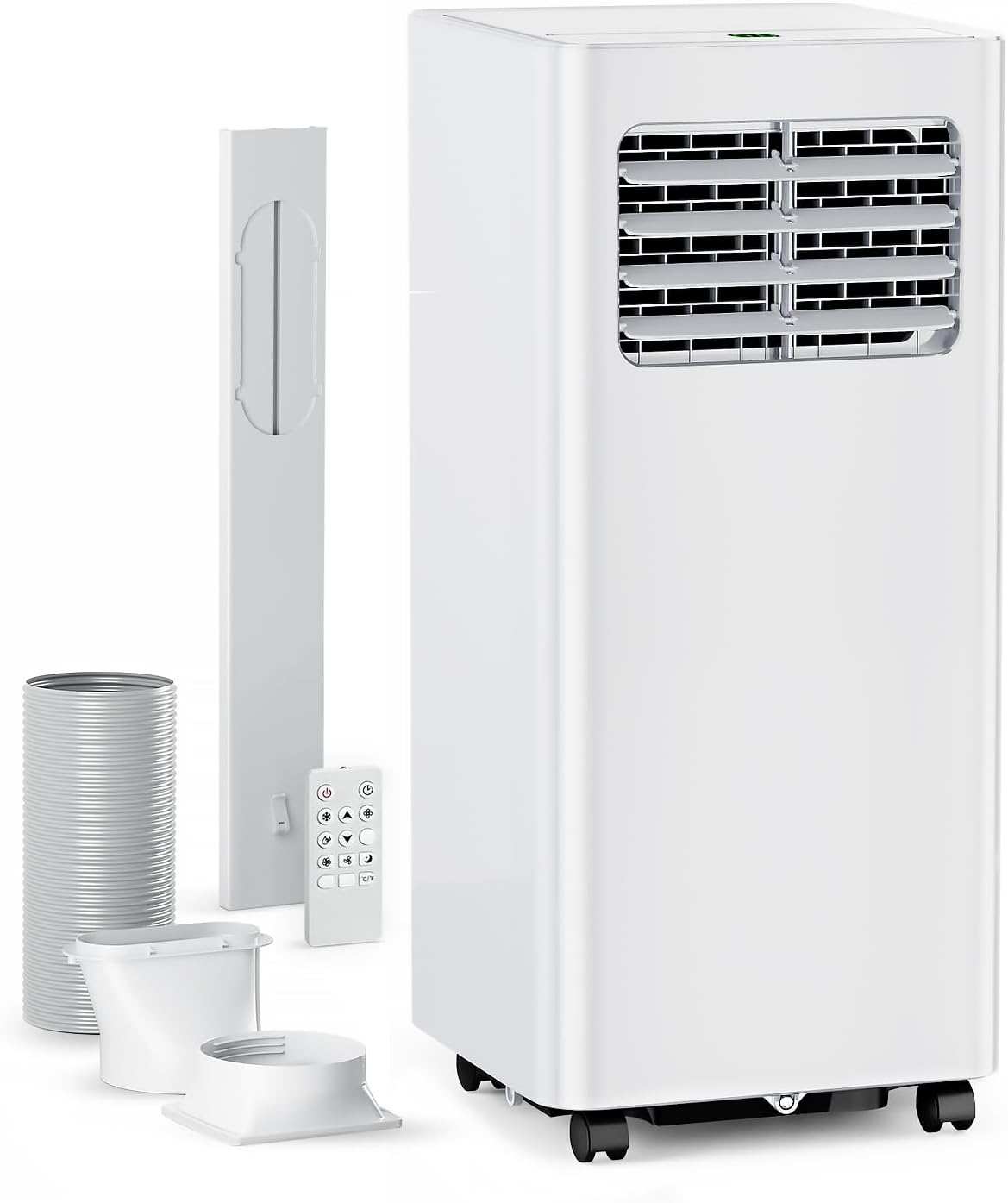
Figure 1: Feelfunn 8000 BTU Portable Air Conditioner with included accessories.
- Fast Cooling: Quickly cools rooms up to 350 sq. ft. within 6 minutes, with a temperature range of 60°F to 86°F.
- 3-in-1 Functionality: Offers Cool, Dehumidifier (up to 45 pints/day), and Fan modes to suit various needs.
- Quiet Operation: Features a premium compressor for whisper-quiet operation at less than 48dB.
- Energy Efficient: Boasts a Combined Energy Efficiency Ratio (CEER) of 6.3 for optimal cooling with minimized energy costs.
- Portable Design: Compact (12x11.4x26.7 inches, 40.8 lbs) with 360° rotatable casters and ergonomic handles for easy movement.
2. Included Components
Your Feelfunn Portable Air Conditioner package contains the following items:
- Portable AC Unit
- Window Installation Kits (including exhaust hose and window adapter)
- Remote Control
- Instruction Manual (this document)
3. Setup Guide
Before initial use, allow the unit to stand upright for at least 24 hours to ensure optimal performance of the refrigerant system. Follow these steps for quick and easy installation:
- Move the portable AC unit to your desired location.
- Connect one end of the exhaust hose to the hose connector.
- Connect the window kit adapter to the other end of the exhaust hose.
- Extend the adjustable window kit to match the length of your window opening and secure it.
- Connect the exhaust hose to the window kit. Screws may be needed to fix it securely.
- Close your window to firmly secure the kit in place, ensuring no gaps for air leakage.
- Attach the hose connector to the exhaust air outlet on the unit.

Figure 2: Step-by-step guide for window kit installation.
Ensure the exhaust hose is not kinked or obstructed to allow proper heat dissipation.
4. Operating Instructions
The unit can be controlled via its intuitive digital control panel on top or the included compact remote control.

Figure 3: Digital control panel and remote control for easy operation.
Control Panel Functions:
- Power Button: Turns the unit On or Off.
- Mode Button: Cycles through Cool, Dehumidifier, and Fan modes.
- Up/Down Buttons: Adjust the desired temperature setting.
- Speed Button: Selects fan speed (High or Low).
- Timer Button: Sets the 24-hour timer for automatic on/off operation.
- Sleep Mode: Activates a quiet, energy-saving mode for nighttime use.
5. Modes of Operation
- Cool Mode: Provides powerful cooling to lower room temperature quickly. Set your desired temperature using the Up/Down buttons.
- Dehumidifier Mode: Removes excess moisture from the air, collecting up to 45 pints per day, contributing to a healthier indoor environment.
- Fan Mode: Circulates air without cooling, offering a refreshing breeze. Adjust fan speed as desired.
6. Maintenance
Regular maintenance ensures the longevity and efficiency of your air conditioner.
Air Filter Cleaning:
The unit features a removable, washable double-layer filter. It is recommended to clean the filter every two weeks for optimal performance and to safeguard against dust and pollutants.

Figure 4: The removable back panel allows access to the washable air filter.
Water Drainage:
This unit features a self-evaporating system, which typically handles most of the condensed water. In highly humid conditions, a continuous drain port is available. Connect a suitable hose (not included) to this port for continuous drainage, preventing the internal tank from filling up.
7. Troubleshooting
If you encounter issues with your unit, refer to the following common troubleshooting tips:
- Unit not cooling effectively: Ensure the air filter is clean and free of debris. Verify that the exhaust hose is properly connected and sealed to the window kit, and that it is not kinked or obstructed. Check that windows and doors are closed to prevent warm air from entering the room.
- Unusual noises or odors: If you notice any burning plastic smells or unusual loud noises, immediately power off the unit and unplug it from the power outlet. Inspect the unit for any visible damage or blockages. Contact customer support if the issue persists.
- Unit does not turn off immediately: Some models may have a slight delay in completely shutting down after pressing the power button. This is a normal operational characteristic.
For issues not covered here, please contact customer support.
8. Product Specifications
| Specification | Detail |
|---|---|
| Product Dimensions | 12 x 11.4 x 26.7 inches |
| Item Weight | 40.8 pounds |
| Manufacturer | Feelfunn |
| Model Number | PAC002-8KWH-USZX |
| Noise Level | 48 dB |
| Cooling Power | 8000 British Thermal Units (ASHRAE) / 5000 BTU (SACC) |
| Floor Area Coverage | 350 Square Feet |
| Voltage | 115 Volts |
| Seasonal Energy Efficiency Ratio (CEER) | 6.3 |
| Refrigerant | R-32 (Environmentally-Friendly) |
9. Warranty and Support
Your Feelfunn Portable Air Conditioner comes with a 1-year accessory maintenance service.
For any questions, technical assistance, or support regarding your product, please feel free to contact Feelfunn customer service. We are committed to providing satisfactory answers and ensuring your experience with our products is exceptional.
Note: Specific contact details for customer service are typically found on the product packaging or the official brand website.
10. Official Product Videos
There are currently no official seller videos available for this product. Please refer to the text and image instructions provided in this manual for guidance.
Ask a question about this manual
Ask about setup, troubleshooting, compatibility, parts, safety, or missing instructions. Manuals+ will review the question and use this page’s manual context to help answer it.