
MechMaxx SM-32
MechMaxx SM-32 Portable Sawmill User Manual
Model: SM-32
1. Introduction and Overview
The MechMaxx SM-32 Portable Sawmill is a high-performance, gasoline-powered band sawmill designed for efficiently converting logs into lumber. It features a robust 420cc 15HP E-Start gasoline engine, capable of handling logs up to 32 inches in diameter and cutting boards up to 29 inches wide and 7 inches thick. Its durable construction ensures reliable operation for heavy work and extended hours, even in remote locations. This manual provides essential information for the safe and effective operation, maintenance, and troubleshooting of your sawmill.
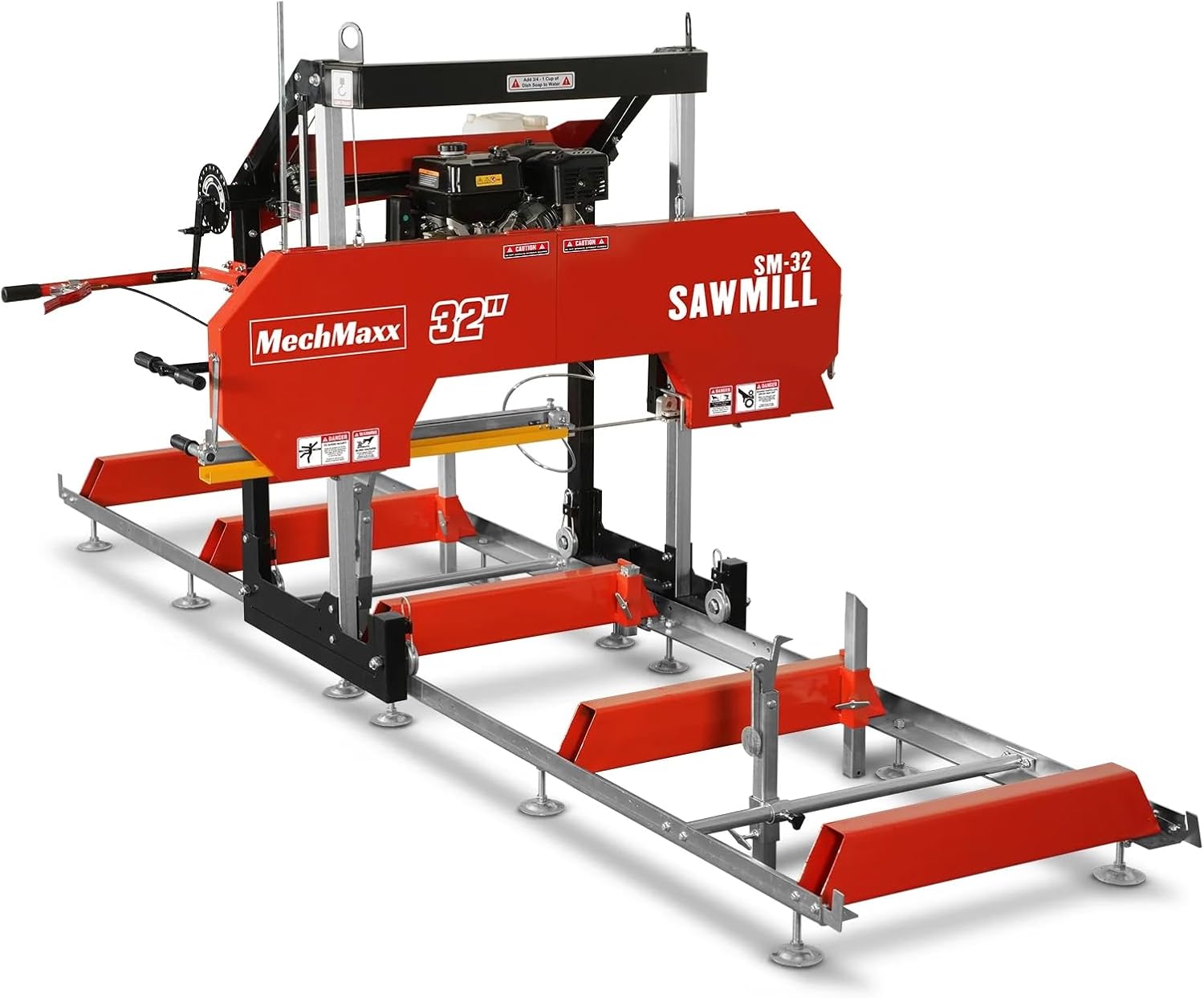
Figure 1.1: The MechMaxx SM-32 Portable Sawmill, a robust machine designed for converting logs into lumber.
Video 1.1: SM-32 Sawmill Display Video. This video provides a brief overview of the sawmill's features and capabilities.
2. Safety Information
WARNING: Read and understand all safety warnings and instructions before operating this machine. Failure to follow the warnings and instructions may result in serious injury or death.
- Always wear appropriate personal protective equipment (PPE), including safety glasses, hearing protection, gloves, and steel-toed boots.
- Ensure the work area is clear of debris, bystanders, and any obstructions.
- Never operate the sawmill under the influence of drugs or alcohol.
- Keep hands and clothing away from moving parts, especially the saw blade and belts.
- The emergency stop button is located very close to the operator. In case of emergency or equipment malfunctions, the machine can be quickly stopped to protect the safety of the equipment and operators.

Figure 2.1: Close-up of the emergency stop button, designed for quick machine shutdown in critical situations.
3. Components and Parts Identification
Familiarize yourself with the main components of your MechMaxx SM-32 Portable Sawmill:
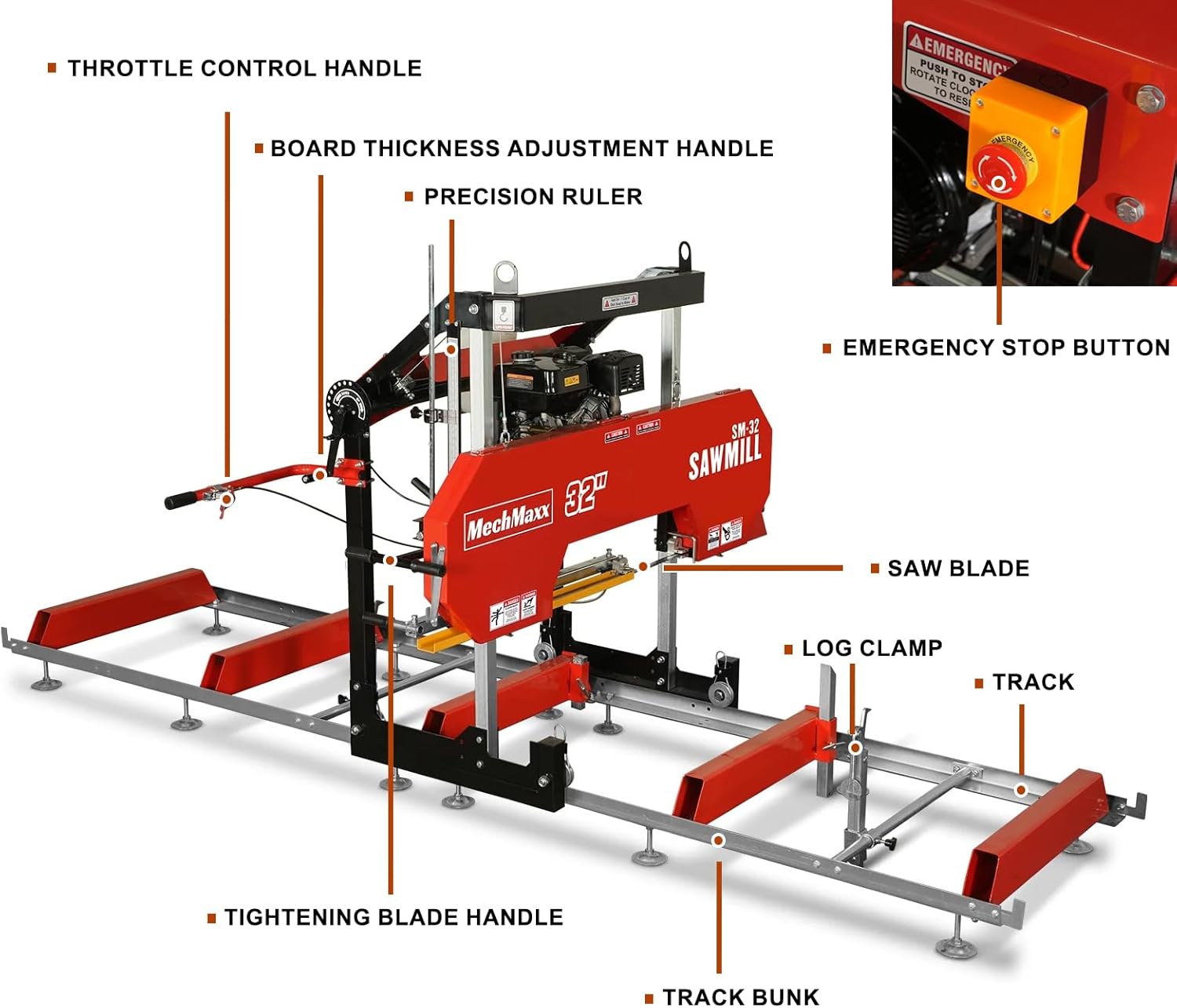
Figure 3.1: Labeled diagram showing key components such as the Throttle Control Handle, Board Thickness Adjustment Handle, Precision Ruler, Emergency Stop Button, Saw Blade, Log Clamp, Track, and Track Bunk.
- Engine: 420cc 15HP E-Start Gasoline Engine, providing power for the saw blade.
- Saw Blade: Carbonized steel blade (1.58"x1.3"x0.04") for cutting logs.
- Track: The main frame along which the saw head travels, 13 ft in length.
- Log Clamps: Securely hold logs in place during cutting.
- Throttle Control Handle: Allows adjustment of cutting speed.
- Board Thickness Adjustment Handle: Used with the precision ruler to set cutting thickness.
- Emergency Stop Button: For immediate shutdown of the machine.
- Manual Tube: Storage for manuals, drawings, or small tools.

Figure 3.2: The durable carbonized steel saw blade, designed for smooth and stable cutting.

Figure 3.3: The spiral log clamps effectively hold logs firmly during the cutting process.

Figure 3.4: A convenient manual tube is included for storing operation manuals, drawings, or small maintenance tools.
4. Setup (Assembly)
The MechMaxx SM-32 Sawmill is designed for straightforward assembly. Follow these steps carefully:
Video 4.1: SM-32 Sawmill Assembly Video. This video provides a comprehensive guide to assembling your sawmill.
4.1 Unpacking and Inspection
- Carefully unpack all components from the shipping crate.
- Lay out all parts and compare them against the packing list to ensure everything is present and undamaged.
4.2 Track Assembly
- Assemble the track system using the provided nuts and bolts. Do not fully tighten bolts at this stage.
- Install the leveling feet and fasteners to the track sections.
- Use joining plates to connect the two track sections securely.
- Attach the track cross supports to the 'L' channel using the provided nuts and bolts.
- Install the sliding tube on the track. Apply waterproof grease to the threaded handle and 'T' handle.
- Assemble carriage stops at the ends of the tracks and tighten.
- Once the track is fully assembled, ensure it is straight and level before fully tightening all bolts.
4.3 Carriage Assembly
- Assemble the vertical post to the wheel assembly.
- With one person on each post, stand the head assembly up on the wheels.
- Insert vertical post assemblies into corresponding locations in the head assembly.
- Bolt the top of the square tube post and the cross beam.
- Install the lifting system, ensuring the cables are correctly routed through the pulleys.
- Place the measuring scale assembly onto the carriage.
- Install the cooling box bracket on the beam and place the cooling box.
- Install the throttle handle and emergency switch to the round bar.
- Pull the cable tight at the engine and tighten the screw to hold it in place.
- Connect the electrical wires according to the corresponding numbers on the wires.
5. Operating Instructions
Operating your MechMaxx SM-32 Sawmill effectively requires understanding its controls and proper log handling techniques.
Video 5.1: How to Use the MechMaxx 32-Inch Portable Sawmill SM-32. This video demonstrates the sawmill in operation.
Video 5.2: How to use SM-32 sawmill. Another visual guide to operating the sawmill.
5.1 Log Placement and Securing
- Carefully roll the log onto the sawmill track.
- Use the log clamps to firmly secure the log to prevent movement during cutting.
5.2 Adjusting Cutting Depth and Speed
- Utilize the board thickness adjustment handle and precision ruler to set the desired cutting thickness. The maximum thickness is 7 inches.
- Control the cutting speed by pushing the throttle handle. You can speed up or slow down at any time to optimize the cutting process.

Figure 5.1: Precision ruler and handle for adjusting the maximum cutting thickness up to 7 inches.

Figure 5.2: The throttle control handle allows the operator to adjust the cutting speed for efficient wood processing.
6. Maintenance
Regular maintenance is crucial for the longevity and optimal performance of your sawmill. Always ensure the machine is turned off and cooled down before performing any maintenance.
Video 6.1: How to replace belt and blade of sawmill. This video guides you through the process of replacing key wear parts.
6.1 Saw Blade Replacement
- Open the body cover of the saw head.
- Loosen the saw blade tension using the adjustment handle.
- Remove the blade support arm.
- Carefully remove the old saw blade from the wheels and guides.
- Install the new saw blade, ensuring it is correctly seated on the wheels and within the guides.
- Reinstall the blade support arm.
- Tighten the saw blade tension until it is firm but not overly tight.
- Close the body cover.
6.2 Belt Replacement
- Open the body cover.
- Loosen the four screws securing the engine to relieve belt tension.
- Remove the old belt from the pulleys.
- Install the new belt, ensuring it is properly seated on all pulleys.
- Tighten the belt tension by adjusting the position of the engine.
- Tighten the four screws securing the engine.
- Close the body cover.
6.3 General Cleaning
After each use, clean sawdust and debris from the saw head, track, and engine area. This prevents buildup that can affect performance and lead to premature wear.
7. Troubleshooting
If you encounter issues with your MechMaxx SM-32 Sawmill, consider the following common troubleshooting steps:
- Saw Blade Issues: If cuts are uneven or slow, check if the blade is dull and needs replacement, or if the blade tension is incorrect. Refer to Section 6.1 for blade replacement.
- Engine Problems: Ensure the engine has sufficient fuel and oil. Check spark plug and air filter for cleanliness. If the engine does not start, verify all electrical connections are secure, especially those connected during assembly (refer to Section 4.3).
- Track Alignment: If the saw head does not move smoothly, check the track for debris or misalignment. Ensure all track assembly bolts are properly tightened and the track is level (refer to Section 4.2).
- Belt Slippage: If the blade is not spinning at full speed, the drive belt may be loose or worn. Refer to Section 6.2 for belt inspection and replacement.
For persistent issues, contact MechMaxx customer support for assistance.
8. Specifications
Detailed specifications for the MechMaxx SM-32 Portable Sawmill:

Figure 8.1: Key dimensions of the sawmill, including maximum log diameter and overall size.
| Feature | Specification |
|---|---|
| Engine | DUCAR DH420E |
| Engine Type | Single Cylinder, 4 Stroke, Air-Cooled, OHV |
| Engine Displacement | 420 cc |
| Horsepower | 15 HP |
| Start | E-Start |
| Log Diameter (Max) | 32 in |
| Board Width (Max) | 29 in |
| Standard Cutting Length | 10.5 ft (Extendable with additional track) |
| Max Board Thickness | 7 in |
| Blade Engagement System | Centrifugal Clutch |
| Cast Iron Bandwheel Diameter | 19 in |
| Blade Wheel Engagement | Belt Drive |
| Blade Guide | By Roller |
| Blade Tension | By Adjustable Lever |
| Blade Size | 158 x 1.3 in |
| Blade Pitch | 7/8 in |
| Blade Lubrication | Water Lube - Manual Valve |
| Lubricant Tank Size | 2.6 gal |
| Height (Max Head Position) | 83 in |
| Track Width | 37 in |
| Track Length | 13 ft |
| Levelling Feet | 12 |
| Log Rests | 2 Long and 2 Short Rests |
| Log Clamps | 2 x Quick Lock |
| 4 Post Head Design | Yes |
| Finish | Powder Coat Paint Galvanized Steel |
| Emergency Stop | Button |
| Model | SM-32 |
| Package Method | Wood |
| Packing Size | 90 x 25 x 34 in |
| Weight (N.W./G.W.) | 790/884 lbs |

Figure 8.2: Detailed view of the 420cc 15HP engine, highlighting its power and electric start feature.

Figure 8.3: Illustration of the sawmill's maximum cutting width of 29 inches.

Figure 8.4: The sawmill's track can be extended for longer cutting lengths with optional accessories.
9. Warranty and Support
The MechMaxx SM-32 Portable Sawmill comes with a limited warranty. For specific warranty details, please refer to the documentation included with your product or contact MechMaxx customer support.
MechMaxx is committed to providing comprehensive pre-sales and after-sales services to ensure customer satisfaction. If you have any questions regarding assembly, operation, maintenance, or troubleshooting, please do not hesitate to contact our support team.
Contact Information: Please refer to the official MechMaxx website or your purchase documentation for the most current contact details.
Related documentsSM-32


Ask a question about this manual
Ask about setup, troubleshooting, compatibility, parts, safety, or missing instructions. Manuals+ will review the question and use this page’s manual context to help answer it.