
ODK ZJZ-SBWJDD
ODK L-Shaped Gaming Desk with LED User Manual
Model: ZJZ-SBWJDD
Introduction
Thank you for choosing the ODK L-Shaped Gaming Desk with LED. This manual provides essential information for the safe and efficient assembly, operation, and maintenance of your new desk. Please read it thoroughly before beginning assembly or use, and keep it for future reference.

Figure 1: Overview of the ODK L-Shaped Gaming Desk with LED, highlighting its spacious layout and integrated lighting features.
Safety Information
WARNING: This furniture contains electrical components. Ensure to follow all instructions for safe handling and installation to minimize the risk of electric shock or other injuries.
- Always disconnect the power cord from the outlet before cleaning or performing any maintenance.
- Do not expose electrical components to water or excessive moisture.
- Ensure the desk is placed on a stable and level surface to prevent tipping or collapse.
- Be aware of the desk's weight (approximately 27.9 kg / 61.5 lbs) during assembly and relocation. It is recommended to have two people for assembly and moving.
- Keep children and pets away from the desk during assembly.
- Do not overload the desk or shelves beyond their specified weight capacities.
Setup and Assembly
The ODK L-Shaped Gaming Desk is designed for flexible installation, allowing you to configure it to suit your room layout.
1. Unpacking and Component Check
- Carefully unpack all components and lay them out on a clean, soft surface to prevent scratches.
- Verify that all parts listed in the assembly instructions (not provided in this manual, refer to included paper manual) are present and undamaged.
2. Reversible Design Configuration
The L-shaped design can be assembled with the longer side on either the left or right, depending on your preference and room space.

Figure 2: The desk's reversible design allows for left or right L-shape configuration. Dimensions are provided for planning your space.
3. Assembly Steps
Follow the detailed step-by-step instructions provided in the separate assembly manual that came with your product. Ensure all screws and fasteners are tightened securely.
4. Power Connection
Once assembled, connect the desk's power cord to a standard wall outlet. The integrated power strip includes 2 AC outlets and 2 USB ports for convenient device charging.
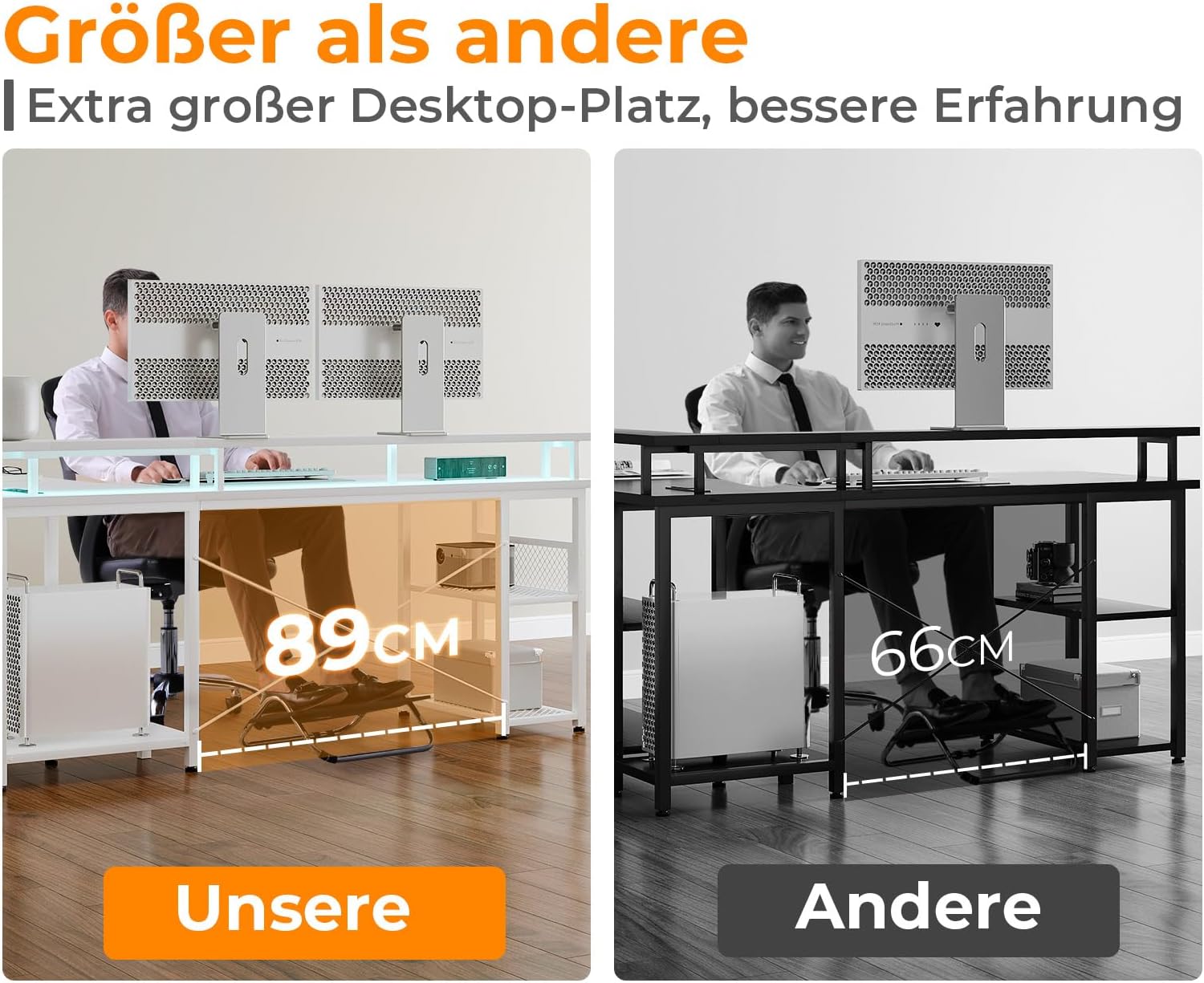
Figure 3: The integrated power strip provides convenient access to 2 AC outlets and 2 USB charging ports. The image also displays various LED lighting color options.
Operating Instructions
1. LED Lighting Control
The desk features an integrated LED strip with multiple lighting modes and color options to enhance your workspace ambiance.
- Power On/Off: Use the dedicated button or remote control (if included) to turn the LED lights on or off.
- Mode Selection: Cycle through 13 different lighting modes, which may include static colors, fading, flashing, or dynamic effects.
- Color Selection: Choose from 7 distinct color options to match your mood or decor.
- Brightness Adjustment: Adjust the brightness level to your preference.
2. Using Power Outlets and USB Ports
The built-in power strip provides convenient access to power for your electronic devices.
- AC Outlets: Plug in your computer, monitors, lamps, or other AC-powered devices. (220-250V/15A)
- USB Ports: Use the 5V/2.1A USB ports to charge smartphones, tablets, or other USB-powered accessories.
- Avoid overloading the power strip. Do not exceed the maximum rated current.
3. Utilizing Storage and Ergonomics
The desk is designed with practical storage solutions and ergonomic considerations.

Figure 4: The two-tier storage shelves provide ample space for organizing books, files, and other office supplies.
- Two-Layer Storage Shelf: Utilize the mesh shelves for organizing books, files, and other items. The height of these shelves is adjustable to accommodate different sized objects.
- Monitor Stand: The ultra-long monitor stand helps elevate your screens to an ergonomic viewing height, reducing strain on your neck and eyes.
- Legroom: The desk offers generous legroom for comfortable seating during long work or gaming sessions.
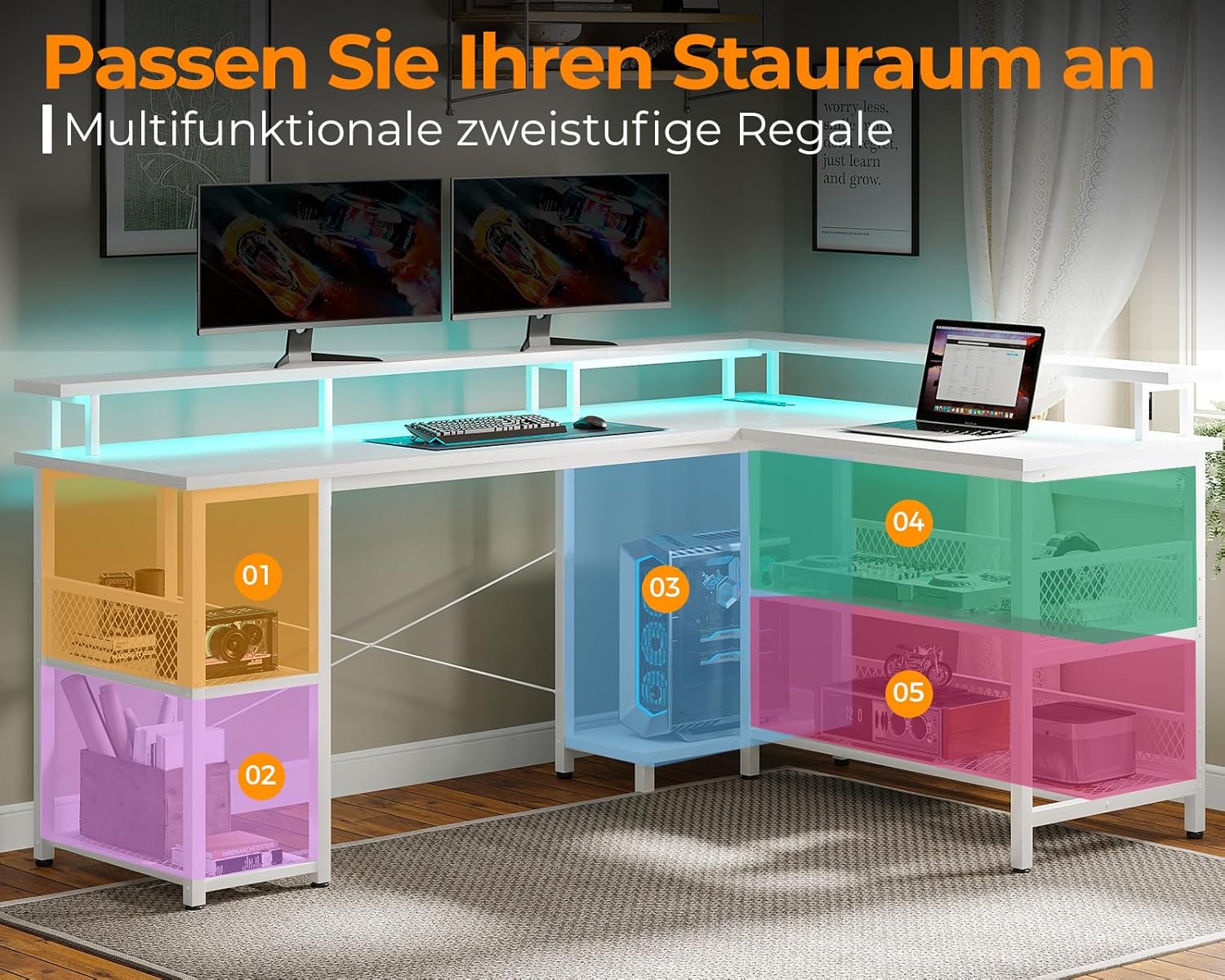
Figure 5: The ODK desk provides significantly more legroom (89cm) compared to standard desks, enhancing user comfort.
Maintenance
Regular maintenance will help prolong the life and appearance of your ODK Gaming Desk.
- Cleaning: Wipe the desk surfaces with a soft, damp cloth. Avoid harsh chemicals or abrasive cleaners that could damage the finish.
- Electrical Components: Ensure all electrical connections are secure. Do not attempt to repair or modify the electrical components yourself. Contact qualified personnel for service.
- Structural Integrity: Periodically check all screws and fasteners to ensure they remain tight. Retighten if necessary to maintain stability.
- LED Strip: Keep the LED strip free from dust and debris. If the lights malfunction, check the power connection before seeking professional assistance.
Troubleshooting
| Problem | Possible Cause | Solution |
|---|---|---|
| LED lights do not turn on. |
|
|
| Power outlets/USB ports not working. |
|
|
| Desk feels wobbly or unstable. |
|
|
Specifications
| Feature | Detail |
|---|---|
| Brand | ODK |
| Model Number | ZJZ-SBWJDD |
| Color | White |
| Product Dimensions | 168 x 120 x 88.7 cm (L x W x H) |
| Material | Engineered Wood, Alloy Steel (Base) |
| Special Features | Adjustable, Reversible L-shape, Integrated LED Lighting, Built-in Power Outlets (2x AC), Built-in USB Ports (2x USB) |
| Power Outlet Rating | 220-250V/15A |
| USB Port Rating | 5V/2.1A |
| Item Weight | 27.1 kg (approx. 61.5 lbs) |
Warranty and Support
For warranty information and customer support, please refer to the documentation included with your purchase or contact ODK customer service directly.
Manufacturer: ODK
Seller: ODK EU (via Amazon.se)
Return Policy: 30-day refund/replacement (as per Amazon.se policy at time of purchase).
Please retain your proof of purchase for any warranty claims.
Related documentsZJZ-SBWJDD


Ask a question about this manual
Ask about setup, troubleshooting, compatibility, parts, safety, or missing instructions. Manuals+ will review the question and use this page’s manual context to help answer it.