
1. Introduction
This manual provides detailed instructions for the installation, operation, and maintenance of your ELIVED Flip Down Ceiling TV Mount, model YD3030. This mount is designed to securely hold most 14-40 inch televisions with VESA patterns ranging from 75x75mm to 200x200mm, supporting a maximum weight of 22 lbs. It features a foldable design, height adjustment, 360° swivel, and tilt capabilities for optimal viewing flexibility. Please read this manual thoroughly before installation and use to ensure safe and correct operation.
2. Important Safety Information
- Weight Capacity: Do not exceed the maximum weight capacity of 22 lbs (10 kg). Exceeding this limit may result in serious injury or property damage.
- TV Size: This mount is designed for TVs between 14 and 40 inches.
- VESA Compatibility: Ensure your TV's VESA mounting pattern is compatible (75x75mm to 200x200mm).
- Installation Surface: This mount is intended for installation on wood joists or solid concrete/brick walls. DO NOT install into drywall alone. Do not use anchors on wood joists.
- Professional Installation: If you are unsure about the installation process or the suitability of your mounting surface, consult a qualified professional.
- Hardware: Use only the provided mounting hardware. If your installation requires different hardware, ensure it is of appropriate strength and quality.
- Moving Parts: Keep hands and fingers clear of moving parts during adjustment to prevent pinching or injury.
- Regular Checks: Periodically check that the mount and all connections are secure and free from damage.

Image: A warning graphic indicating not to install into drywall alone and not to use anchors on wood joists, showing compatible wood joist and solid concrete/brick wall installations.
3. Package Contents
Please verify that all parts are present and undamaged before proceeding with installation. If any parts are missing or damaged, contact ELIVED customer support.

Image: An overhead view of the ELIVED Flip Down Ceiling TV Mount, showing the ceiling plate, adjustable pole, and VESA mounting plate.
The package typically includes:
- Ceiling Mount Assembly
- TV Mounting Plate
- Various Screws, Washers, and Spacers for TV attachment
- Lag Bolts for Ceiling Attachment
- Allen Wrench
- Instruction Manual (this document)
4. Product Overview
The ELIVED Flip Down Ceiling TV Mount YD3030 offers a versatile solution for mounting your television from the ceiling. Key features include:
- Foldable Design: Allows the TV to be folded up against the ceiling when not in use, saving space.
- Height Adjustment: 6 adjustable height settings from 11.3 inches to 15.3 inches.
- Full Motion: 360° swivel, +/-90° rotation, and +3°/-10° tilt for optimal viewing angles.
- VESA Compatibility: Supports VESA patterns from 75x75mm to 200x200mm.
- Durable Construction: Made from alloy steel for stability and safety.

Image: A diagram illustrating the height adjustment range of the mount, from a minimum of 11.3 inches to a maximum of 15.3 inches.
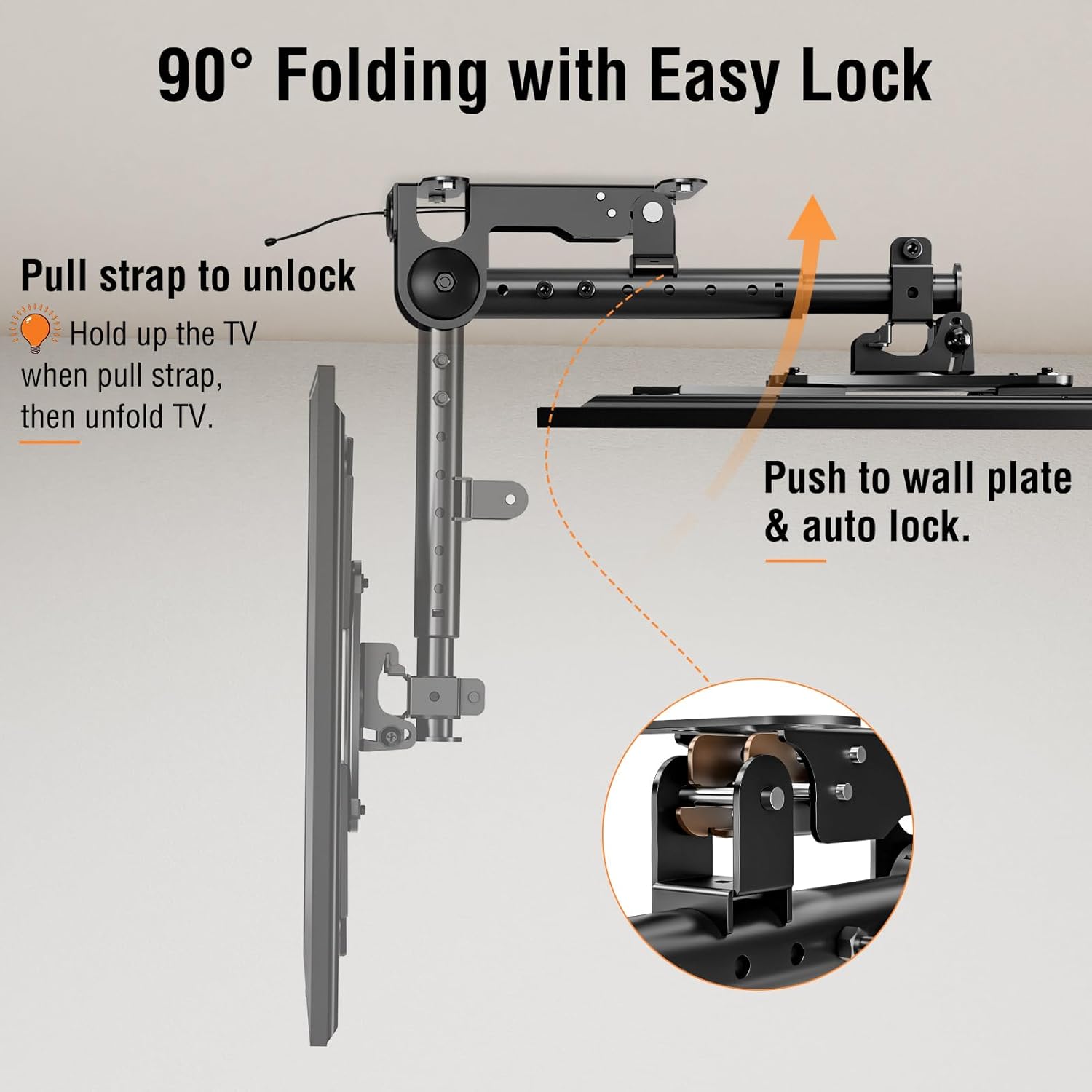
Image: A diagram demonstrating the 90-degree folding mechanism with an easy lock, showing how to pull a strap to unlock and push to lock.

Image: A graphic illustrating the flexible viewing capabilities of the mount, including 360-degree swivel, +3/-10 degree tilt, and +/-90 degree rotation.

Image: A diagram detailing the various VESA mounting patterns supported by the mount, including 75x75mm, 100x100mm, 200x100mm, 100x200mm, 150x150mm, and 200x200mm.
5. Setup and Installation
Before beginning installation, ensure you have all necessary tools and have read the safety information. It is recommended to have a second person assist with the installation, especially when lifting the TV.
5.1 Pre-Installation Checklist
- Verify TV weight and VESA pattern compatibility.
- Identify suitable mounting surface (wood joist or solid concrete/brick).
- Gather tools: drill, stud finder (for wood joists), level, measuring tape, pencil, screwdriver.
5.2 Attaching the TV Plate to Your TV
- Carefully place your TV face down on a soft, clean surface to prevent screen damage.
- Identify the VESA mounting holes on the back of your TV.
- Select the appropriate screws, washers, and spacers from the provided hardware kit that fit your TV's mounting holes.
- Attach the TV mounting plate to the back of your TV, ensuring it is centered and securely fastened. Do not overtighten.
5.3 Mounting the Ceiling Plate
- Determine the desired location for your TV mount on the ceiling. Ensure there are no electrical wires or plumbing in the drilling path.
- For Wood Joists: Use a stud finder to locate the center of a wood joist. Mark the pilot hole locations through the ceiling plate. Drill pilot holes (refer to the manual for specific drill bit size). Secure the ceiling plate using the provided lag bolts.
- For Solid Concrete/Brick Walls: Mark the pilot hole locations. Drill holes using a masonry drill bit (refer to the manual for specific drill bit size). Insert concrete anchors (if provided and necessary for your wall type, otherwise use appropriate hardware). Secure the ceiling plate using the provided lag bolts.
- Ensure the ceiling plate is level and securely fastened to the ceiling.
5.4 Attaching the TV to the Mount
- With assistance, carefully lift the TV (with the TV plate attached) and align it with the main mount assembly.
- Hook the TV plate onto the mount. Ensure it is properly seated and secured according to the specific design of your mount.
- Tighten any safety screws or locking mechanisms to prevent accidental dislodgement.
For a more detailed visual guide, please refer to the official Installation Manual (PDF).
6. Operating Instructions
6.1 Folding and Unfolding the TV
- To Unfold: Gently pull the release strap to unlock the mount. While holding the TV, slowly lower it to the desired viewing position.
- To Fold: Lift the TV upwards until it clicks into the locked position against the ceiling. Ensure it is securely locked.
Image: A diagram illustrating the 90-degree folding mechanism with an easy lock, showing how to pull a strap to unlock and push to lock.
6.2 Adjusting Height
The mount offers 6 height adjustment levels. To adjust the height:
- Loosen the height adjustment screws on the main pole using the provided Allen wrench.
- Carefully slide the TV and lower pole to the desired height.
- Ensure the TV is level and securely tighten the height adjustment screws.
Image: A diagram illustrating the height adjustment range of the mount, from a minimum of 11.3 inches to a maximum of 15.3 inches.
6.3 Adjusting Swivel, Tilt, and Rotation
- Swivel: The mount allows for a full 360° swivel. Gently rotate the TV to achieve your desired horizontal viewing angle.
- Tilt: The TV can be tilted +3° upwards and -10° downwards to reduce glare and optimize vertical viewing. Loosen the tilt adjustment knob, set the angle, and retighten.
- Rotation: The TV can be rotated +/-90° for portrait or landscape viewing. Loosen the rotation screws, adjust, and retighten.
Image: A graphic illustrating the flexible viewing capabilities of the mount, including 360-degree swivel, +3/-10 degree tilt, and +/-90 degree rotation.
7. Maintenance
- Cleaning: Wipe the mount with a soft, dry cloth. Avoid abrasive cleaners or solvents.
- Periodic Inspection: Regularly check all screws, bolts, and connections to ensure they are tight and secure. Retighten if necessary.
- Moving Parts: Ensure that the folding and adjustment mechanisms operate smoothly. Do not force any movements.
- Damage: If any part of the mount appears damaged or worn, discontinue use and contact customer support for replacement parts or advice.
8. Troubleshooting
| Problem | Possible Cause | Solution |
|---|---|---|
| TV mount feels unstable or wobbly. | Loose mounting bolts or screws. Incorrect installation surface. Exceeded weight capacity. | Check and tighten all mounting bolts and screws. Ensure installation is on a solid wood joist or concrete/brick wall. Verify TV weight is within limits. |
| TV does not fold up or down smoothly. | Release strap not fully pulled. Mechanism obstructed. | Ensure the release strap is fully engaged. Check for any obstructions around the folding mechanism. Do not force movement. |
| Difficulty adjusting height, tilt, or swivel. | Adjustment screws/knobs are too tight. | Loosen the relevant adjustment screws or knobs before attempting to adjust. Retighten once the desired position is achieved. |
| TV is not level after installation. | Ceiling plate not level. TV plate not centered. | Re-check the level of the ceiling plate during installation. Adjust the TV plate on the mount if possible, or use the rotation feature for minor leveling. |
9. Specifications
| Model | YD3030 |
| Brand | ELIVED |
| TV Size Compatibility | 14 - 40 inches |
| Weight Capacity | Up to 22 lbs (10 kg) |
| VESA Compatibility | 75x75mm, 100x100mm, 200x100mm, 100x200mm, 150x150mm, 200x200mm |
| Height Adjustment | 11.3" to 15.3" (6 levels) |
| Swivel Range | 360° |
| Tilt Range | +3° / -10° |
| Rotation Range | +/-90° |
| Mounting Type | Ceiling Mount |
| Material | Alloy Steel |
| Color | Black |
| Item Weight | 3.5 pounds |
10. Warranty and Support
ELIVED products are manufactured with quality and durability in mind. For specific warranty information, please refer to the documentation included with your purchase or visit the official ELIVED website.
If you encounter any issues or have questions regarding your ELIVED Flip Down Ceiling TV Mount, please contact ELIVED customer support. You can often find contact information on the ELIVED brand store page or through the retailer where you purchased the product.
Online Resources:
- Official ELIVED Store: ELIVED Store on Amazon
- Installation Manual (PDF): Download PDF
