
1. Introduction
Thank you for choosing the TecTake Mobile Pedestal Filing Cabinet. This manual provides essential information for the safe assembly, operation, and maintenance of your new office furniture. Please read these instructions carefully before use and retain them for future reference.
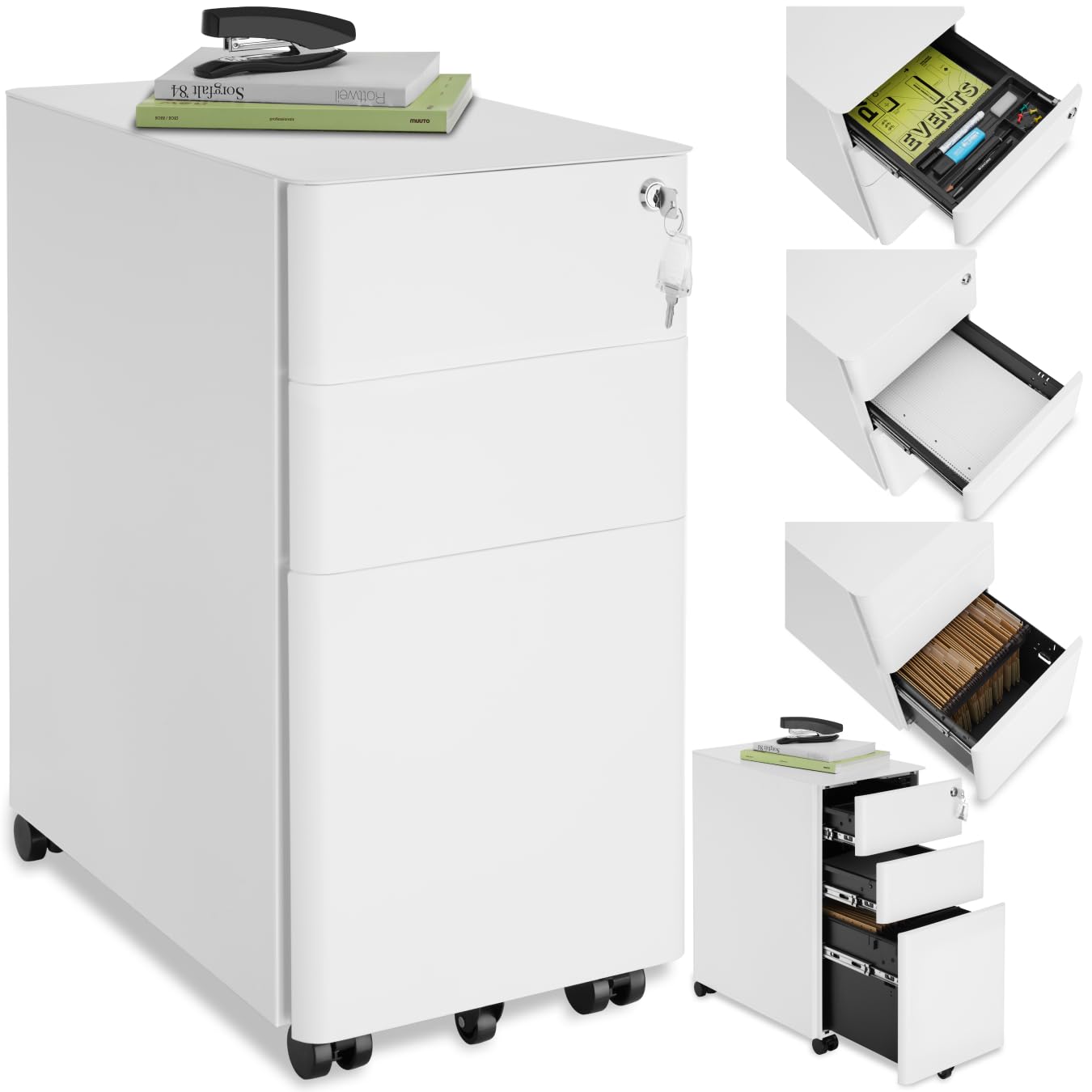
Image 1: The TecTake Mobile Pedestal Filing Cabinet, a compact and functional storage solution for office environments.
2. Safety Instructions
- Ensure all components are present and undamaged before assembly. Do not use if any parts are missing or broken.
- Assemble the cabinet on a soft, clean surface to prevent scratches.
- Always follow the assembly steps in the correct order.
- Do not overload the drawers. The maximum load capacity per drawer is 15 kg.
- Distribute weight evenly in the drawers to maintain stability.
- Keep children and pets away during assembly. Small parts can be a choking hazard.
- Use the locking brakes on the casters when the cabinet needs to remain stationary.
- Do not stand or sit on the cabinet.
3. Package Contents
Please check that all the following items are included in your package:
- 1 x Mobile Pedestal Filing Cabinet body
- 3 x Drawers (2 standard, 1 hanging file drawer)
- 4 x Double Swivel Casters (2 with locking brakes)
- 1 x Support Wheel for bottom drawer
- 1 x Pen Tray insert
- 2 x Keys for central lock
- 1 x Assembly Instructions
- Mounting Material (screws, etc.)
4. Setup and Assembly
The TecTake Mobile Pedestal Filing Cabinet requires minimal assembly. Follow these steps:
- Unpack Components: Carefully remove all parts from the packaging. Place them on a soft, clean surface to avoid damage.
- Attach Casters: Turn the cabinet body upside down. Securely attach the four double swivel casters to the designated holes on the bottom of the cabinet using the provided screws. Ensure the two casters with locking brakes are positioned at the front for easy access.
- Install Support Wheel: Attach the support wheel to the underside of the bottom drawer. This wheel provides additional stability when the drawer is fully extended.
- Insert Drawers: Carefully slide each drawer into its respective compartment. The drawers are equipped with smooth telescopic rails for easy operation. The top two drawers are standard, and the bottom drawer is designed for hanging files.
- Place Pen Tray: Insert the pen tray into the top drawer for organizing small office supplies.
- Test Lock: Insert a key into the central cylinder lock located on the top drawer and test its functionality. Ensure all three drawers lock simultaneously.

Image 2: Detailed view of the pen tray, hanging file storage, lockable casters, and central locking system.
5. Operating Instructions
5.1 Using the Drawers
- To open a drawer, gently pull the handle. The telescopic rails allow for full extension.
- To close a drawer, push it firmly until it clicks into place.
- The top two drawers are suitable for general office supplies and DIN A4 documents.
- The bottom drawer is designed for hanging files. Ensure files are properly seated on the rails.
5.2 Locking Mechanism
- The cabinet features a central cylinder lock located on the top drawer.
- To lock all three drawers, ensure all drawers are fully closed. Insert the key and turn it clockwise. Remove the key.
- To unlock, insert the key and turn it counter-clockwise.
- Always remove the key after locking or unlocking to prevent loss or unauthorized access.
5.3 Mobility and Stability
- The four double swivel casters allow for easy movement of the cabinet.
- To secure the cabinet in place, press down on the levers of the two locking casters until they click.
- To release the brakes, lift the levers.
- The support wheel on the bottom drawer provides anti-tilt stability when the drawer is open.

Image 3: The cabinet with drawers open, illustrating the spacious storage capacity for various office items and hanging files.
6. Maintenance
- Cleaning: Wipe the cabinet surfaces with a soft, damp cloth. Avoid abrasive cleaners or harsh chemicals, as they may damage the powder coating.
- Inspection: Periodically check all screws and connections to ensure they are tight. Retighten if necessary.
- Caster Care: Keep the casters free of dust and debris to ensure smooth movement.
- Lubrication: If drawers become stiff, a small amount of silicone spray lubricant can be applied to the telescopic rails.
7. Troubleshooting
| Problem | Possible Cause | Solution |
|---|---|---|
| Drawers are stiff or difficult to open/close. | Rails are dirty or dry. | Clean the rails and apply a silicone spray lubricant. |
| Cabinet is unstable or wobbles. | Casters are loose or not properly installed. Uneven weight distribution. | Check and tighten all caster screws. Redistribute contents evenly in drawers. Ensure support wheel is correctly installed. |
| Lock is not engaging all drawers. | Drawers are not fully closed. | Ensure all three drawers are pushed in completely before attempting to lock. |
| Casters are not rolling smoothly. | Debris caught in casters. | Clean any hair or debris from the caster wheels. |
8. Specifications

Image 4: Dimensional overview of the cabinet and its internal compartments.
- Model Number: 405235
- Brand: tectake
- Material: Powder-coated steel
- Color: White
- Overall Dimensions (L x W x H): 50 x 30 x 59.5 cm (19.7 x 11.8 x 23.4 inches)
- Weight: Approximately 17.3 kg (38.1 lbs)
- Number of Drawers: 3 (2 standard, 1 hanging file)
- Inner Dimensions (Standard Drawers): 24 x 42 x 7 cm (9.4 x 16.5 x 2.8 inches)
- Inner Dimensions (Hanging File Drawer): 24 x 42 x 25 cm (9.4 x 16.5 x 9.8 inches)
- Pen Tray Dimensions: 25.5 x 11 cm (10 x 4.3 inches)
- Max. Load Capacity per Drawer: 15 kg (33 lbs)
- Features: Central cylinder lock, 4 double swivel casters (2 with brakes), support wheel for bottom drawer, smooth telescopic rails.
9. Warranty and Support
For warranty information, technical support, or to order replacement parts, please refer to the manufacturer's official website or contact their customer service directly. Details are typically provided with your purchase documentation or on the product packaging.