
Introduction
This manual provides essential information for the safe and efficient operation of your Midea WQP14W5233CS Dishwasher. Please read these instructions carefully before using the appliance and retain them for future reference. This dishwasher is designed for household use to clean dishes, cutlery, and other kitchenware.
Safety Information
Always follow basic safety precautions when using electrical appliances to reduce the risk of fire, electric shock, or injury.
- Ensure the dishwasher is properly grounded.
- Do not operate the dishwasher if it is damaged. Contact qualified service personnel.
- Keep children away from the dishwasher, especially when it is operating.
- Use only detergents and rinse aids specifically designed for automatic dishwashers.
- Do not touch the heating element during or immediately after use.
- Load sharp items with the handles up to prevent injury.
- Never immerse the appliance, cord, or plug in water or other liquids.
Product Overview
The Midea WQP14W5233CS is a freestanding dishwasher with a stainless steel finish, offering 10 wash programs and a capacity for 14 place settings. It features touch controls, an LED display, and Wi-Fi connectivity for remote operation.

Image 1: Front view of the Midea WQP14W5233CS Dishwasher. This image displays the appliance's sleek stainless steel exterior and the control panel located at the top.
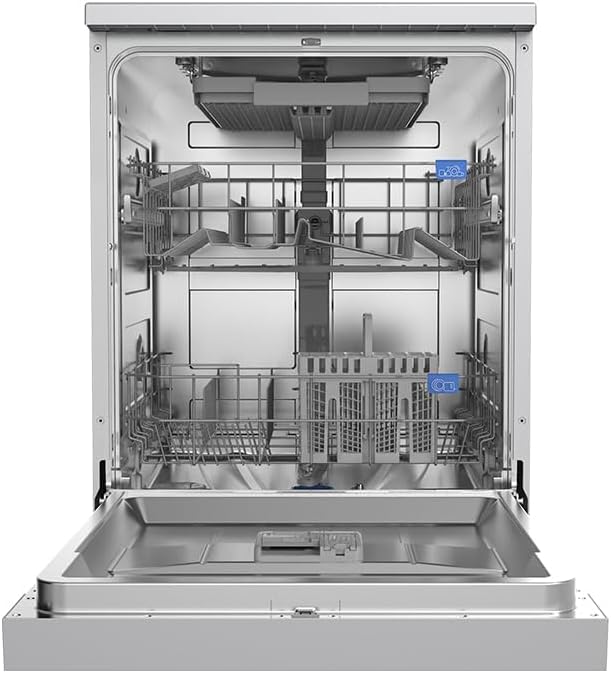
Image 2: Interior view of the Midea WQP14W5233CS Dishwasher with racks. This image shows the three internal racks, including an extra basket, designed for versatile loading of dishes and cutlery.
Key Components:
- Control Panel: Touch-sensitive buttons and LED display for program selection and status indication.
- Upper Rack: Adjustable for various dish sizes.
- Lower Rack: For larger plates and pots.
- Cutlery Basket: For forks, knives, and spoons.
- Extra Basket: Provides additional loading flexibility.
- Detergent Dispenser: For dishwasher detergent.
- Rinse Aid Dispenser: For improved drying and shine.
- Filters: Located at the bottom of the wash tub.
Setup
Installation:
The Midea WQP14W5233CS is a freestanding unit. Ensure it is placed on a level, stable surface. Connect the water inlet hose to a cold water supply and the drain hose to a suitable drain. Plug the power cord into a grounded electrical outlet (220 Volts).
Initial Use:
- Fill the rinse aid dispenser with rinse aid.
- Add dishwasher salt to the salt reservoir (if applicable to your water hardness).
- Run a short wash cycle without dishes to clean the interior.
Operating Instructions
Loading the Dishwasher:
- Scrape off large food particles from dishes.
- Place larger items in the lower rack and smaller, delicate items in the upper rack.
- Ensure spray arms can rotate freely.
- Load cutlery into the cutlery basket, handles up for forks and spoons, handles down for knives.
Adding Detergent:
Open the detergent dispenser and add the recommended amount of dishwasher detergent. Close the dispenser cover securely.
Selecting a Program:
Press the Power button to turn on the dishwasher. Use the Program selection button to cycle through the 10 available wash programs. The LED display will show the selected program and estimated cycle time.
Wi-Fi Connectivity:
To use Wi-Fi features, download the Midea app on your smartphone. Follow the in-app instructions to connect your dishwasher to your home Wi-Fi network. This allows for remote monitoring and control of wash cycles.
Starting a Cycle:
Close the dishwasher door firmly. Press the Start/Pause button to begin the selected wash cycle. The dishwasher will automatically proceed through the wash, rinse, and dry phases.
Maintenance and Care
Cleaning Filters:
Regularly clean the filter system located at the bottom of the wash tub. Remove the coarse filter, fine filter, and main filter. Rinse them under running water to remove food particles. Reassemble and replace them correctly.
Cleaning Spray Arms:
Check the spray arm nozzles for blockages. If necessary, remove the spray arms and clear any debris from the holes using a thin object like a toothpick.
Exterior Cleaning:
Wipe the exterior surfaces with a soft, damp cloth. For stainless steel, use a specialized stainless steel cleaner to maintain its finish.
Door Seal:
Clean the door seal regularly with a damp cloth to remove food residue and prevent mold buildup.
Troubleshooting
Before contacting service, review the following common issues and solutions:
| Problem | Possible Cause | Solution |
|---|---|---|
| Dishes not clean | Improper loading, clogged spray arms, insufficient detergent, incorrect program. | Reload dishes, clean spray arms, add more detergent, select appropriate program. |
| Water not draining | Clogged filter, kinked drain hose, drain pump issue. | Clean filters, check drain hose for kinks, contact service if pump is faulty. |
| Dishwasher not starting | Door not closed properly, power supply issue, program not selected. | Ensure door is latched, check power connection, select a wash program. |
| Excessive noise | Dishes interfering with spray arms, foreign object in pump, improper leveling. | Rearrange dishes, check for foreign objects, ensure dishwasher is level. |
Specifications
Detailed technical specifications for the Midea WQP14W5233CS Dishwasher:
- Model Name: WQP14W5233CS
- Brand: Midea
- Installation Type: Freestanding
- Capacity: 14 Place Settings
- Number of Programs: 10
- Special Features: Smart (Wi-Fi), LED Display, Touch Controls
- Color: Stainless Steel
- Inner Material: Stainless Steel
- Product Dimensions (D x W x H): 59.8 x 60 x 84.5 cm
- Item Weight: 45.5 Kilograms
- Voltage: 220 Volts
- Noise Level: 47 Decibels
- Included Components: Dishwasher
Warranty and Support
Your Midea WQP14W5233CS Dishwasher comes with a 5-year warranty. This warranty covers manufacturing defects under normal household use. For warranty claims, technical support, or service inquiries, please refer to the contact information provided with your purchase documentation or visit the official Midea website.
Always ensure to have your model number (WQP14W5233CS) and purchase date available when contacting support.


