
1. Introduction
This manual provides essential instructions for the safe and effective use of your RDSJ 14.4V 6800mAh replacement battery. Please read this manual thoroughly before installation and use, and retain it for future reference.
2. Safety Information and Warnings
Observe the following safety precautions to prevent damage to the battery, the vacuum cleaner, or personal injury:
- Use the battery in dry locations only.
- Do not disassemble, impact, or crush the battery.
- Do not expose the battery to fire or excessive heat.
- Discontinue use immediately if the battery shows signs of severe swelling or damage.
- Do not immerse the battery in water or any other liquids.
- For first use, discharge the battery to approximately 5% (do not fully deplete to 0%) and then charge it to 95%. Repeat this charge/discharge cycle 3-4 times to optimize battery performance.

Figure 1: Battery label displaying product parameters and safety warnings.
3. Product Specifications
- Battery Type: Li-ion
- Voltage: 14.4V / 14.8V
- Capacity: 6800mAh / 97.92Wh
- Recharge Cycles: Up to 500 cycles over the life of the battery
- Battery Weight: 410 Grams
- Item Weight: 425 Grams

Figure 2: Front view of the replacement battery.
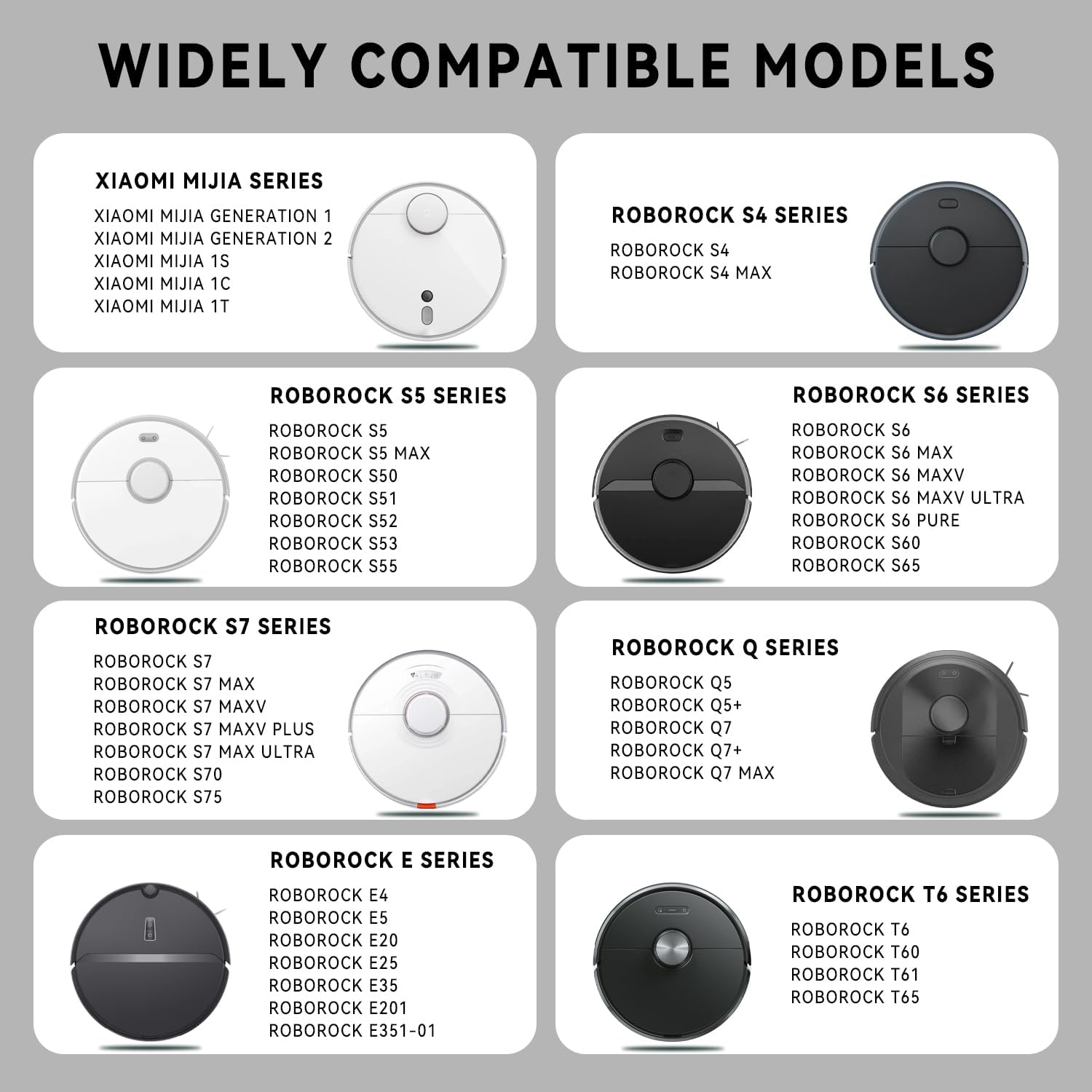
Figure 3: Back view of the replacement battery.
4. Compatibility
This replacement battery is compatible with a wide range of Xiaomi Mijia, Xiaowa, and Roborock robot vacuum cleaner models. Please verify your vacuum cleaner model against the list below:
- Xiaomi Mijia Series: 1C, Q7 Max, Q7 Max+, Sweep One S50, Sweep One S51, Sweep One S55
- Roborock S Series: S4, S4 Max, S5, S5 Max, S50, S51, S52, S53, S55, S6, S6 Max, S6 MaxV, S6 Pure, S60, S65, S7, S7 Max, S7 MaxV, S7 MaxV Plus, S7 MaxV Ultra, S70, S75
- Roborock T Series: T4, T6, T7, T60, T61, T65
- Roborock E Series: E4, E5, E20, E25, E35
- Roborock C Series: C10, CT10

Figure 4: Visual guide to compatible robot vacuum models.
5. Setup and Installation
The RDSJ replacement battery is designed for easy installation, matching the original battery's plug and size. Installation typically takes approximately 2 minutes.
- Turn off your robot vacuum cleaner and disconnect it from any power source.
- Locate the battery compartment on your vacuum cleaner. Refer to your vacuum cleaner's original manual for specific instructions on accessing the battery.
- Carefully remove the old battery. Disconnect its plug from the vacuum cleaner's port.
- Connect the new RDSJ battery's plug to the corresponding port in the vacuum cleaner. Ensure the connection is secure.
- Place the new battery into the compartment and close the cover.
- Power on your robot vacuum cleaner.
Note: Ensure the connector type on the replacement battery matches your original battery's connector before installation.

Figure 5: Close-up of the battery connector for verification.
6. Operating Instructions
After installation, ensure the battery is properly charged before initial use. For optimal battery life and performance:
- Initial Charging: For the first few uses, allow the battery to discharge to approximately 5% of its capacity (avoid complete discharge to 0%). Then, fully charge the battery to 95%. Repeat this cycle 3-4 times.
- Regular Use: The actual operating time of the vacuum cleaner will vary depending on the device's power requirements and usage patterns.
7. Maintenance
To prolong the life and maintain the performance of your RDSJ replacement battery:
- Store the battery in a cool, dry place when not in use for extended periods.
- Avoid exposing the battery to extreme temperatures.
- The battery features multiple protection mechanisms, including over-charge, over-discharge, over-voltage, over-current, and over-temperature protection, to ensure safe operation.

Figure 6: Battery with integrated multiple protection features.

Figure 7: Robot vacuum cleaner in use with the replacement battery.
8. Troubleshooting
No specific troubleshooting steps are provided for this battery. If you encounter issues after installation, please ensure the battery is correctly installed and fully charged. Refer to your robot vacuum cleaner's original manual for troubleshooting steps related to the vacuum itself. If problems persist, contact customer support.
9. Warranty and Support
RDSJ provides a 12-month warranty for this product, along with a 30-day money-back guarantee. For any inquiries or support, please contact our customer service team, available 24x7 via email.
For further assistance, please refer to the contact information provided with your purchase or visit the official RDSJ support channels.