
NEWTRY ZZD-5A
NEWTRY ZZD-5A Electric Vegetable Slicer, Dicer, Shredder & Strip Cutter
Model: ZZD-5A
Instruction Manual
1. Introduction
Thank you for choosing the NEWTRY ZZD-5A Electric Vegetable Slicer, Dicer, Shredder & Strip Cutter. This multifunctional appliance is designed to simplify food preparation in both commercial and home kitchen environments. Please read this manual thoroughly before operating the machine to ensure safe and efficient use, and to maximize the lifespan of your product.
2. Safety Instructions
Always follow basic safety precautions when using electrical appliances to reduce the risk of fire, electric shock, and personal injury.
- Electrical Safety: Ensure the power supply matches the voltage specified on the appliance (110V). Do not operate the machine with a damaged cord or plug. Keep the motor unit dry and do not immerse it in water.
- Blade Safety: Blades are extremely sharp. Handle them with extreme care during assembly, disassembly, and cleaning. Always power off and unplug the machine before changing blades or performing maintenance.
- Operation Safety: Keep hands and utensils away from moving parts and the feeding chute during operation. Use the provided food pusher to guide ingredients. Never force food into the machine.
- Supervision: This appliance is not intended for use by persons with reduced physical, sensory, or mental capabilities, or lack of experience and knowledge, unless they have been given supervision or instruction concerning use of the appliance by a person responsible for their safety. Children should be supervised to ensure that they do not play with the appliance.
- Cleaning: Refer to the cleaning section for detailed instructions. Do not submerge the entire machine in water.
Video: Precautions For Use. This video demonstrates important safety precautions to observe when operating the NEWTRY ZZD-5A food chopper.
3. Product Overview
The NEWTRY ZZD-5A is a versatile electric food processor designed for efficiency and durability. It features a robust cast aluminum body and food-grade stainless steel blades.
Key Features:
- 4-in-1 Functionality: Dicing (8x8mm & 10x10mm), Adjustable Slicing (1-5mm), Shredding (2mm & 3mm), and 10mm Slitting.
- Powerful Motor: 200W DC motor for efficient processing of various vegetables and fruits.
- Durable Construction: Rust-resistant aluminum body and stainless steel blades.
- Large Feeding Chute: Accommodates whole vegetables with minimal pre-cutting.
- Easy to Clean: Dishwasher-safe blades and a body that can be wiped clean.

Figure 3.1: Main Unit of the NEWTRY ZZD-5A. This image displays the overall design of the electric vegetable slicer.

Figure 3.2: Enhanced Stability and Durability. This image highlights the shortened motor shaft and longer connector for reduced instability, along with the rust and corrosion-resistant stainless steel blade disc.

Figure 3.3: Product Dimensions and Performance. This image illustrates the machine's dimensions (9.9"L x 9.7"W x 15.2"H), large inlet, 200W DC motor, and capacity for continuous operation.
4. Setup
Before first use, ensure all packaging materials are removed and the machine is placed on a stable, flat surface.
4.1 Blade Installation for Dicing / Strips Cutting
- Select the desired dicing (8x8mm or 10x10mm) or slitting (10x90mm) blade.
- Carefully place the blade into the designated slot.
- Tighten the screws in a counter-clockwise direction to secure the main blade. Ensure it is firmly in place before operation.

Figure 4.1: Installation of Dicing/Strips Cutting Blades. This image shows the steps for installing the blades for dicing and strips cutting, emphasizing tightening the screws.
4.2 Blade Installation for Slicing / Shredding
- Select the desired slicing (adjustable 1-5mm) or shredding (2mm or 3mm) disc.
- Align the center shaft holes of the disc with the motor shaft and carefully place the disc onto the shaft.
- For slicing, adjust thickness by adding or removing 1mm slicer spacers (0-4 gaskets).
- The food pusher is used only when slicing and shredding to guide ingredients.

Figure 4.2: Installation of Slicing/Shredding Discs. This image demonstrates how to install the slicing and shredding discs and the proper use of the food pusher.
5. Operating Instructions
Ensure the machine is properly assembled and plugged into a grounded outlet before operation.
5.1 General Operation
- Prepare ingredients by washing them thoroughly. For larger items, pre-cut them to fit the feeding chute if necessary, though the large chute minimizes this need.
- Place a suitable collection bowl or container beneath the discharge chute.
- Turn on the machine using the power switch.
- Carefully feed ingredients into the chute. Use the appropriate pusher bar to guide the food through the blades.
- Once processing is complete, turn off the machine and unplug it before disassembling or cleaning.
5.2 Cutting Functions
The ZZD-5A offers four primary cutting functions:
- Dicing: Achieves uniform 8x8mm or 10x10mm cubes. Ideal for salads, stews, and garnishes.
- Slicing: Adjustable thickness from 1mm to 5mm. Perfect for cucumbers, carrots, potatoes, and fruits.
- Shredding: Produces 2mm or 3mm shreds. Suitable for cabbage, carrots, and other vegetables for coleslaw or stir-fries.
- Strip Cutting (Slitting): Creates 10mm strips. Excellent for French fries or vegetable sticks.

Figure 5.1: Dicing and Slitting Capabilities. This image illustrates the dicing (10x10mm, 8x8mm) and slitting (10x90mm) functions of the machine, showing examples of diced carrots and potato strips.
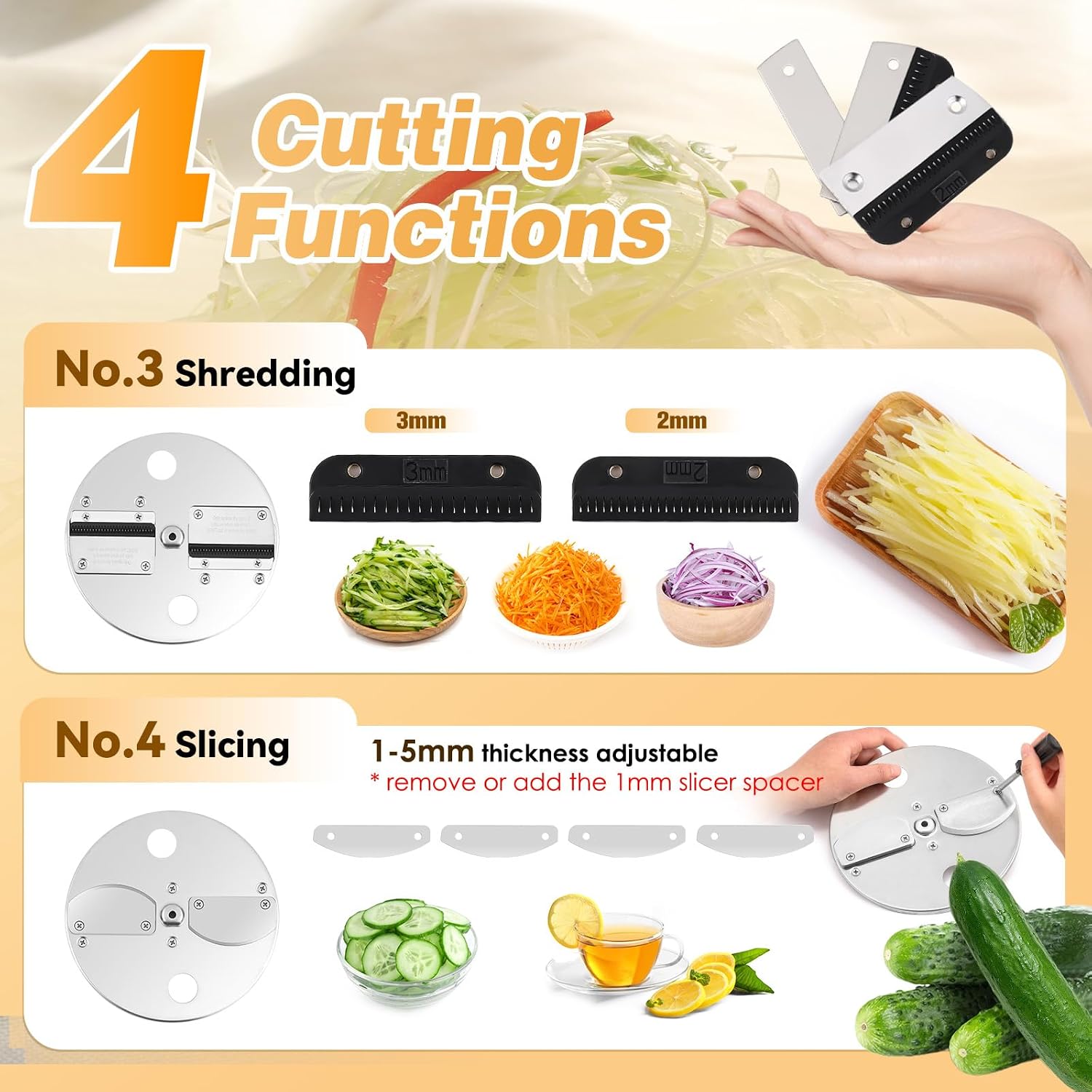
Figure 5.2: Shredding and Slicing Capabilities. This image demonstrates the shredding (3mm, 2mm) and adjustable slicing (1-5mm) functions, with examples of shredded cucumber, carrot, and sliced cucumber.

Figure 5.3: Adjustment of Cutting Sizes. This image details how to adjust the dicing, slitting, slicing (using gaskets), and shredding (2mm/3mm blades) sizes.
Video: Demonstration Of Usage. This video provides a visual guide on how to operate the NEWTRY ZZD-5A for various cutting tasks, including dicing, slicing, and shredding.
6. Maintenance and Cleaning
Regular cleaning and maintenance will ensure optimal performance and extend the life of your appliance.
6.1 Daily Cleaning
- Power Off: Always unplug the machine from the power outlet before cleaning.
- Rinse Chamber: Pour water into the chamber to flush out debris.
- Blade Cleaning: Remove blades carefully. The stainless steel blades are dishwasher safe. For stubborn food particles, especially in dicing grids, use the provided mini brush or a chopstick to dislodge them.
- Body Cleaning: The cast aluminum body can be wiped clean with a damp cloth. Do not submerge the entire machine in water.
- Drying: Ensure all parts are thoroughly dry before reassembling or storing.

Figure 6.1: Easy Cleaning Process. This image demonstrates pouring water into the chamber for flushing and using a mini brush for cleaning blades, highlighting the machine's easy-to-clean design.

Figure 6.2: Cast Aluminum Body. This image shows the cast aluminum body being rinsed, with a reminder not to submerge the entire machine in water.
7. Troubleshooting
If you encounter any issues with your NEWTRY ZZD-5A, refer to the following common problems and solutions:
| Problem | Possible Cause | Solution |
|---|---|---|
| Machine does not turn on. | Not plugged in; power switch off; power outage; safety lock not engaged. | Check power cord connection; ensure power switch is ON; check circuit breaker; ensure lid and safety lock are properly engaged. |
| Poor cutting results (uneven, mushy). | Incorrect blade/disc for ingredient; dull blade; food forced too quickly; motor overloaded. | Ensure correct blade/disc is installed; inspect blades for sharpness (replace if dull); feed food at a steady pace; do not overload the machine. |
| Food gets stuck in the chute or blades. | Too much food at once; food not pre-cut sufficiently; incorrect pusher used. | Feed smaller quantities; pre-cut larger items to fit the chute; use the appropriate pusher bar. Power off and unplug before clearing any blockages. |
| Excessive noise or vibration. | Loose parts; unstable surface; motor issue. | Check that all blades and components are securely installed; place machine on a stable surface. If noise persists, contact customer support. |
If the problem persists after attempting these solutions, please contact NEWTRY customer support.
8. Specifications
Technical details for the NEWTRY ZZD-5A Electric Vegetable Slicer.
- Model: ZZD-5A
- Power: 200W
- Voltage: 110V
- Material: Aluminum (Body), Stainless Steel (Blades)
- Product Dimensions (L x W x H): 9.9" x 9.7" x 15.2"
- Item Weight: 14.3 Pounds
- Functions: Dicing (8x8mm, 10x10mm), Slicing (1-5mm adjustable), Shredding (2mm, 3mm), Strip Cutting (10mm)
- Operation Mode: Automatic
- Product Care: Partly Dishwasher Safe (Blades)
9. Warranty and Support
NEWTRY products are manufactured to high-quality standards and are warranted against defects in materials and workmanship. For specific warranty details, please refer to the warranty card included with your purchase or visit the official NEWTRY website.
For technical assistance, troubleshooting, or to inquire about replacement parts, please contact NEWTRY customer support:
- Website: Visit the NEWTRY Store on Amazon
- Email: (Please refer to product packaging or official website for current email address)
- Phone: (Please refer to product packaging or official website for current phone number)
Ask a question about this manual
Ask about setup, troubleshooting, compatibility, parts, safety, or missing instructions. Manuals+ will review the question and use this page’s manual context to help answer it.