
1. Introduction
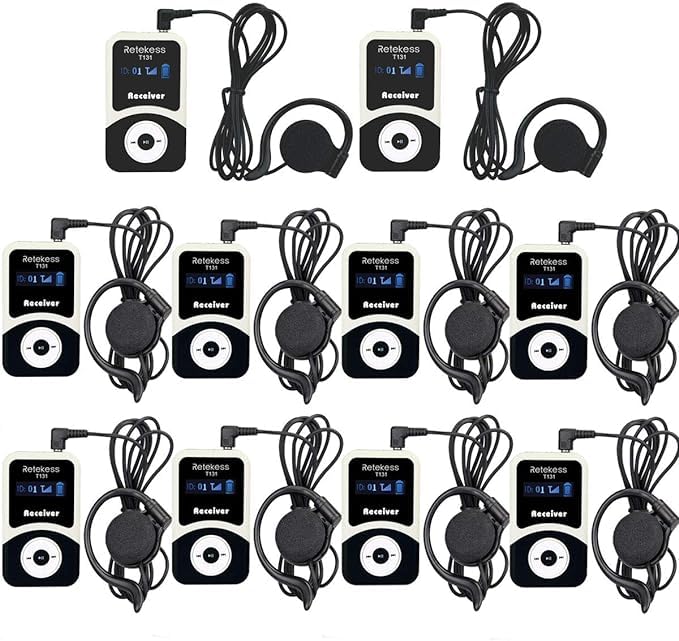
This manual provides detailed instructions for the proper use and maintenance of your Retekess T131 Tour Guide System Receiver. The T131 receiver is designed to work seamlessly with the Retekess T130 transmitter, providing clear audio for tour groups, simultaneous interpretation, assistive listening, and other applications requiring one-way communication.
2. Product Overview
2.1 Key Features
- Wide Operating Range: Effective transmission distance of approximately 50-60 meters (164-197 feet) in open areas.
- Adjustable Volume: Users can freely adjust the listening volume on each receiver.
- Multiple Channels: Supports up to 99 independent IDs (channels), allowing multiple groups to operate simultaneously without interference.
- Long Battery Life: Built-in 600mAh rechargeable battery provides up to 18 hours of continuous operation.
- Compact and Portable Design: Lightweight and easy to carry with a clip and lanyard.
2.2 Components
Each Retekess T131 receiver package typically includes:
- T131 Receiver Unit
- Earhook Headphone (3.5mm single-sided)
- USB Charging Cable
- Lanyard


3. Setup
3.1 Charging the Receiver
Before first use, fully charge the T131 receiver. Connect the provided USB charging cable to the receiver's charging port and plug the other end into a USB power adapter (not included) or a computer's USB port. The battery indicator on the display will show charging status.

3.2 Connecting Headphones
Insert the 3.5mm jack of the earhook headphone into the headphone port on the T131 receiver. Ensure the connection is secure.

3.3 Powering On/Off
- To power on: Press and hold the power button (usually the 'Play/Pause' button) until the display lights up.
- To power off: Press and hold the power button until the display turns off.
3.4 Channel Selection
The T131 receiver needs to be set to the same channel (ID) as the T130 transmitter it will receive audio from. Use the channel selection buttons (typically 'Previous' and 'Next' track buttons) to cycle through the available IDs (01-99) until it matches the transmitter's channel.

4. Operating Instructions
4.1 Listening to Audio
Once the receiver is powered on and set to the correct channel, you should begin to hear audio from the paired T130 transmitter through your headphones. Ensure the transmitter is also powered on and transmitting.

4.2 Adjusting Volume
Use the volume up and down buttons on the side of the T131 receiver to adjust the listening volume to a comfortable level. Avoid excessively high volumes to protect your hearing.
4.3 Monitoring Battery Life
The display on the T131 receiver shows a battery icon indicating the remaining charge. Recharge the device when the battery level is low to ensure uninterrupted use.
4.4 Signal Distance
The system maintains a clear signal within a range of 50-60 meters (164-197 feet) from the transmitter. Performance may vary based on environmental conditions and obstacles.

5. Maintenance
5.1 Cleaning
Wipe the receiver and headphones with a soft, dry cloth. Do not use liquid cleaners or abrasive materials, as they may damage the device. Ensure no moisture enters the ports.
5.2 Storage
Store the T131 receivers in a cool, dry place away from direct sunlight and extreme temperatures. When storing for extended periods, ensure the batteries are partially charged (around 50%) to prolong their lifespan.
5.3 Battery Care
To maximize battery life, avoid fully discharging the receiver frequently. Recharge the battery regularly, even if the device is not in constant use.
6. Troubleshooting
6.1 No Sound from Receiver
- Ensure the receiver is powered on.
- Check if the headphones are properly plugged into the receiver.
- Verify that the receiver's volume is turned up.
- Confirm that the receiver's channel (ID) matches the transmitter's channel.
- Ensure the T130 transmitter is powered on and transmitting.
- Check the battery level of both the receiver and transmitter.
6.2 Poor Reception or Static
- Move closer to the T130 transmitter to ensure you are within the effective range.
- Check for potential sources of interference (e.g., other wireless devices, large metal structures).
- Ensure the transmitter and receiver are not obstructed.
- Try switching to a different channel if multiple groups are operating nearby.
6.3 Receiver Not Powering On
- Ensure the battery is charged. Connect the receiver to a charger for at least 30 minutes.
- If the issue persists, contact customer support.
6.4 Short Battery Life
- Ensure the receiver is fully charged before use.
- Battery performance can degrade over time; if significantly reduced, consider battery replacement or contact support.
7. Specifications
| Feature | Specification |
|---|---|
| Model Name | T131 |
| Brand | Retekess |
| Connectivity Technology | 2.4GHz |
| Connector Type | 3.5 mm Jack (for headphones) |
| Special Feature | Clip |
| Power Source | Battery Powered |
| Battery Type | Built-in 600mAh Lithium Ion |
| Operating Time | Up to 18 hours |
| Number of Channels | 99 |
| Effective Distance | 50-60 meters (164-197 feet) |
| Item Dimensions | 3.78 x 2.6 x 1.77 inches |
8. Warranty and Support
8.1 Warranty Information
Retekess provides a 3-year warranty for the T131 Tour Guide System Receiver. Additionally, a 30-day no-reason return policy is offered. This warranty covers manufacturing defects and ensures the product functions as intended under normal use.
8.2 Customer Support
Lifetime customer support is available for your Retekess T131 receiver. If you encounter any issues or have questions, please contact Retekess customer service through Amazon. Inquiries are typically responded to within 12 hours.
Manufacturer: Retekess