
1. Introduction
The FULAIM X5M is a high-performance wireless lavalier microphone system designed for content creators, videographers, and anyone requiring clear, reliable audio recording. This system includes two transmitters (TX), one receiver (RX), and a portable charging case. Key features include 4GB onboard recording, broad compatibility with various devices, and advanced noise reduction technology.
This manual provides detailed instructions for setting up, operating, maintaining, and troubleshooting your FULAIM X5M system to ensure optimal performance.
2. Package Contents
Please verify that all items listed below are included in your package:
- 1 x Charging Case
- 1 x Receiver (RX)
- 2 x Transmitters (TX)
- 1 x Type-C Adapter
- 1 x 3.5mm Adapter
- 1 x Lightning Adapter
- 2 x Wind Muffs
- 2 x Magnetic Plates
- 1 x USB-C to 3.5mm Adapter Cable
- 1 x Charging Cable
- 1 x Cold Shoe Mount

Image: Detailed view of all components included in the FULAIM X5M package.

Image: The FULAIM X5M system, highlighting its dual-channel capability for two-person interviews, videos, and streaming.
3. Product Overview
The FULAIM X5M system consists of compact and lightweight transmitters and a receiver, designed for portability and ease of use. The charging case serves as both storage and a power bank.
Transmitter (TX)
- Integrated microphone
- 4GB internal memory for up to 9 hours of 48kHz 16-bit uncompressed audio recording
- Magnetic attachment and clip
- Power/Mute button
- SET button for recording and noise reduction
Receiver (RX)
- TFT HD display showing battery life, volume, and recording mode
- 3.5mm headphone jack for real-time monitoring
- Gain control
- USB-C, Lightning, and 3.5mm TRS output ports via adapters
Charging Case
- Charges both transmitters and the receiver
- Provides up to two full recharges for the system
- Automatic calibration and charging upon insertion
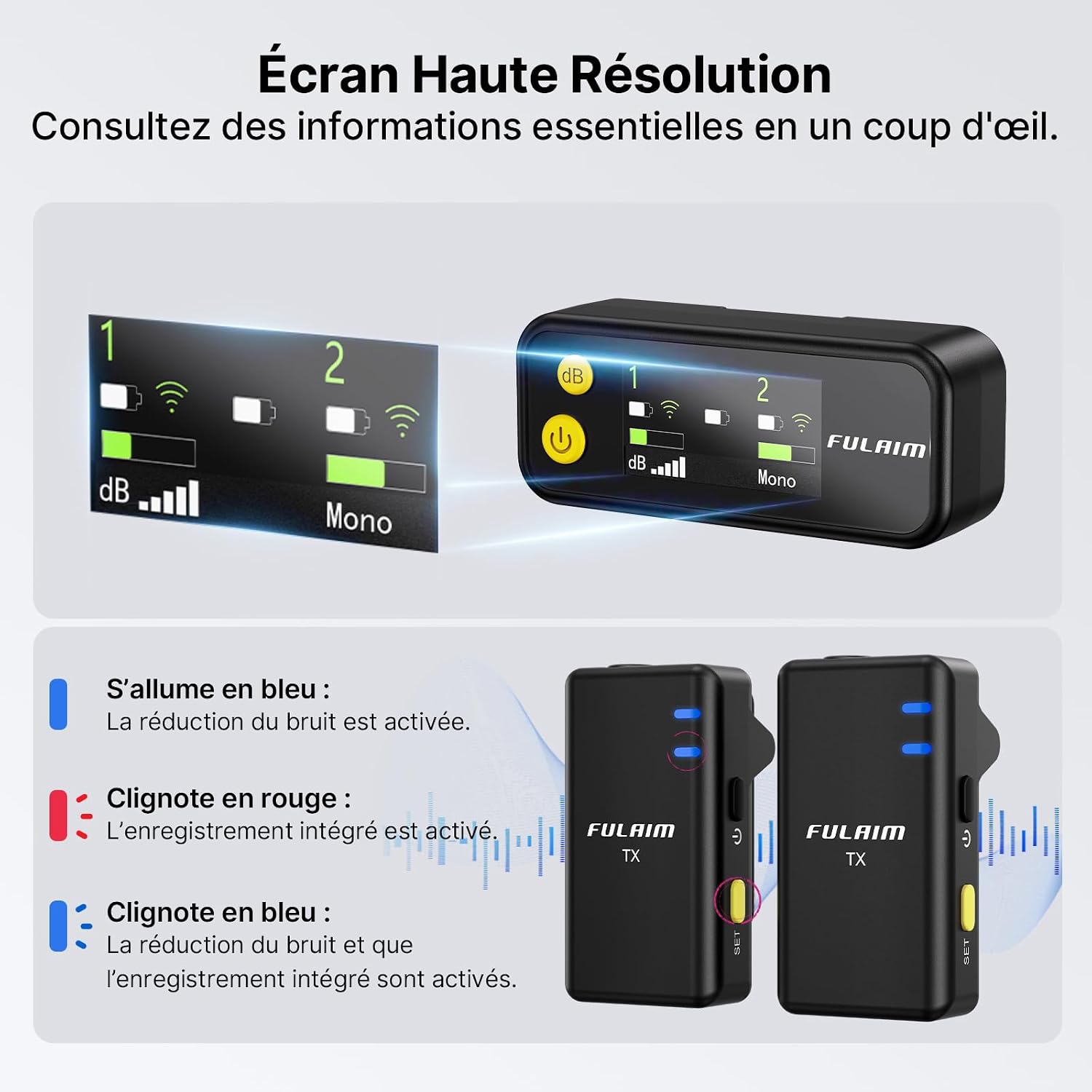
Image: The receiver's high-resolution TFT display, showing essential information like battery levels, signal strength, and audio mode.
4. Setup
4.1 Initial Charging
Before first use, fully charge the charging case, transmitters, and receiver. Place the transmitters and receiver into the charging case. Connect the charging case to a power source using the provided USB-C cable. The indicators on the case will show charging status.

Image: The FULAIM X5M charging case with transmitters and receiver, illustrating the charging process.

Image: Individual components of the FULAIM X5M system being charged via USB-C, demonstrating universal charging capability.
4.2 Connecting to Your Device (Plug and Play)
The FULAIM X5M system is designed for plug-and-play operation. The devices automatically pair when powered on.
- For iPhone/iPad: Use the Lightning adapter.
- For Android Phones/Tablets: Use the Type-C adapter.
- For Cameras/Laptops: Use the 3.5mm TRS adapter or the USB-C to 3.5mm adapter cable.
Simply attach the appropriate adapter to the receiver, then plug the receiver into your recording device's audio input port. The system will automatically connect.

Image: The FULAIM X5M receiver with interchangeable Lightning, USB-C, and 3.5mm adapters for broad compatibility.

Image: Demonstrates the FULAIM X5M receiver connected to an iPhone, highlighting its plug-and-play functionality.
4.3 Mounting the Transmitters
The transmitters can be attached to clothing or other objects using the integrated clip or the magnetic plates.
- Clip-on: Securely attach the transmitter to your collar or lapel using the built-in clip.
- Magnetic Attachment: For discreet placement, use the magnetic plate. Place the magnetic plate inside your clothing and the transmitter on the outside, allowing the magnets to hold it in place.

Image: Various methods of attaching the FULAIM X5M transmitter, including clip-on and magnetic options for versatile placement.
5. Operating Instructions
5.1 Power On/Off and Pairing
- Power On: Press and hold the power button on the TX and RX units for a few seconds.
- Automatic Pairing: The transmitters and receiver will automatically pair upon powering on. The display on the receiver will indicate successful connection.
- Power Off: Press and hold the power button on the TX and RX units until they power down.
5.2 Onboard Recording (4GB Internal Memory)
Each transmitter features 4GB of internal memory, allowing for up to 9 hours of 48kHz 16-bit uncompressed audio recording. This provides a reliable backup during shoots.
- Start Recording: Press and hold the 'SET' button on the transmitter for 2 seconds. The indicator light will flash red.
- Stop Recording: Press and hold the 'SET' button again for 2 seconds. The indicator light will stop flashing.
- Transfer Files: Connect the transmitter to a computer using the USB-C cable to transfer recorded audio files.

Image: The FULAIM X5M transmitter's onboard recording function and the process of transferring audio files to a computer.
5.3 Noise Reduction
The FULAIM X5M incorporates DSP sound processing and noise reduction technology to deliver clear audio. Activate noise reduction with a single click on the transmitter.
- Activate Noise Reduction: Short press the 'SET' button on the transmitter. The indicator light will turn blue.
- Deactivate Noise Reduction: Short press the 'SET' button again. The indicator light will turn off.

Image: Visual representation of the FULAIM X5M's noise reduction capability, showing audio waveform before and after processing.
5.4 Audio Output Modes
The wireless microphone offers three audio output modes for flexible post-production:
- Mono Mode: Ideal for single audio sources like interviews or vlogs, capturing one channel of sound.
- Stereo Mode: Perfect for capturing spatial audio, such as music or ambient sounds, with distinct left and right channels.
- Safety Mode: Helps eliminate audio pops and prevents sound loss by recording a secondary track at -6dB.
You can select the desired mode via the receiver's settings.

Image: Illustration of the FULAIM X5M's various recording modes, including Mono, Stereo, and Safety Mode with a -6dB backup track.
5.5 Real-time Monitoring and Gain Control
The receiver features a 3.5mm headphone jack for real-time audio monitoring, allowing you to listen to the sound being recorded and make adjustments as needed. The gain control function on the receiver enables you to optimize sound signals for superior output.

Image: A person monitoring audio with headphones while operating a camera, demonstrating the real-time monitoring feature of the FULAIM X5M.
5.6 Playback Monitoring
The FULAIM X5M supports playback even when the receiver is connected to your device. This allows you to review recorded audio instantly without disconnecting the microphone, ensuring sound quality on the spot.

Image: A smartphone on a tripod displaying a video, with a hand interacting with the screen, illustrating the playback monitoring feature of the FULAIM X5M.
5.7 Pass-Through Phone Charging
The receiver supports pass-through charging for your phone during recording, ensuring uninterrupted work. Please note that disconnecting or connecting the charging cable during recording will cause a 5-second interruption.

Image: A person recording with a smartphone while the FULAIM X5M receiver is connected and charging the phone, demonstrating the pass-through charging feature.
6. Maintenance
Proper maintenance ensures the longevity and optimal performance of your FULAIM X5M system.
- Cleaning: Use a soft, dry cloth to clean the devices. Avoid using harsh chemicals or abrasive materials.
- Storage: Store the microphone system in its charging case when not in use to protect it from dust and physical damage. Keep it in a cool, dry place away from direct sunlight and extreme temperatures.
- Battery Care: For optimal battery life, avoid fully discharging the devices frequently. Recharge them regularly, especially if they will be stored for an extended period.
- Wind Muffs: Clean wind muffs gently by hand with mild soap and water, then air dry completely before reattaching.
7. Troubleshooting
If you encounter issues with your FULAIM X5M system, refer to the following common problems and solutions:
| Problem | Possible Cause | Solution |
|---|---|---|
| No sound or poor audio quality | Incorrect connection, low battery, receiver not paired, gain too low/high, noisy environment. | Ensure receiver is correctly plugged into device. Check battery levels. Verify TX and RX are paired. Adjust gain settings. Activate noise reduction. Test in a quieter environment. |
| Transmitter/Receiver not charging | Charging cable/adapter faulty, improper placement in charging case, charging case low on battery. | Check charging cable and adapter. Ensure TX/RX are correctly seated in the charging case. Charge the charging case. |
| Connection issues with smartphone (e.g., iPhone 13) | Device settings, specific app requirements. | Ensure the correct adapter is used. Check your smartphone's audio input settings. Some apps (e.g., Blackmagic Camera) may require manual microphone selection. |
| Recorded files not timestamped | Product design limitation. | The FULAIM X5M does not timestamp recorded files. It is recommended to manually organize files into dated folders immediately after transfer to avoid confusion. |
| Limited range or signal drops | Obstructions, interference, exceeding maximum range. | Ensure a clear line of sight between TX and RX. Avoid environments with strong wireless interference. Stay within the recommended operating range (up to 200m in open areas). |
8. Specifications
| Feature | Detail |
|---|---|
| Brand | FULAIM |
| Model Name | X5M |
| Connectivity Technology | 2.4 GHz Wireless |
| Connector Type | 3.5mm Jack, Lightning, USB Type-C |
| Special Features | Magnetic Attachment, Hi-Fi Stereo - 48kHz/16bit, Real-time Monitoring, Plug & Play, One-Click Noise Reduction |
| Compatible Devices | Camcorder, Personal Computer, Laptop, Smartphone, Tablet |
| Color | Black |
| Components Included | 1 Receiver (RX) + 2 Transmitters (TX) |
| Polar Pattern | Omnidirectional |
| Audio Sensitivity | 30 Decibels |
| Microphone Features | Lavalier Microphone |
| Power Source | Battery Powered (1 Lithium-polymer battery included) |
| Signal-to-Noise Ratio | 70 dB |
| Hardware Platform | Camera, Camcorder, Computer, Laptop, Smartphone, Tablet |
| Number of Channels | 2 |
| Frequency Response | 48 KHz |
| Noise Level | 70 Decibels |
| Internal Material | Plastic |
9. Warranty and Support
9.1 Warranty Information
The FULAIM X5M Wireless Lavalier Microphone System comes with a 1-year manufacturer's warranty. This warranty covers defects in materials and workmanship under normal use. It does not cover damage caused by misuse, accidents, unauthorized modifications, or normal wear and tear.
Please retain your proof of purchase for warranty claims.
9.2 Customer Support
For technical assistance, warranty claims, or any questions regarding your FULAIM X5M system, please contact FULAIM customer support through the retailer where you purchased the product or visit the official FULAIM website for contact information.
Before contacting support, please review this manual and the troubleshooting section, as many common issues can be resolved quickly.


