
1. Introduction
The Libec BL-F Flat Base Conversion Adapter is designed to convert 75mm and 100mm bowl-type tripods into a flat base mounting platform. This allows for the attachment of various camera heads and accessories that require a flat base, expanding the versatility of your existing tripod system. This manual provides instructions for the proper setup, operation, and maintenance of your BL-F adapter.
2. What's in the Box
Please check the contents of your package to ensure all items are present:
- Main unit (Libec BL-F Flat Base Conversion Adapter)
3. Setup Instructions
Follow these steps to properly install the Libec BL-F Flat Base Conversion Adapter onto your tripod:
- Identify Tripod Bowl Size: Determine if your tripod has a 75mm or 100mm bowl. The BL-F adapter is compatible with both.
- Insert Adapter: Place the bowl-shaped component of the BL-F adapter into the tripod's bowl. Ensure it sits flush and centered.
- Secure Adapter: Use your tripod's existing bowl locking mechanism (typically a knob or lever on the side of the tripod's bowl) to firmly secure the BL-F adapter in place. Ensure there is no wobble.
- Attach Camera Head: Mount your desired flat-base camera head onto the 3/8-inch mounting screw located on the top flat plate of the BL-F adapter.
- Tighten Camera Head: Rotate the camera head clockwise until it is securely fastened to the adapter. Ensure it is tight enough to prevent rotation during use, but do not overtighten.
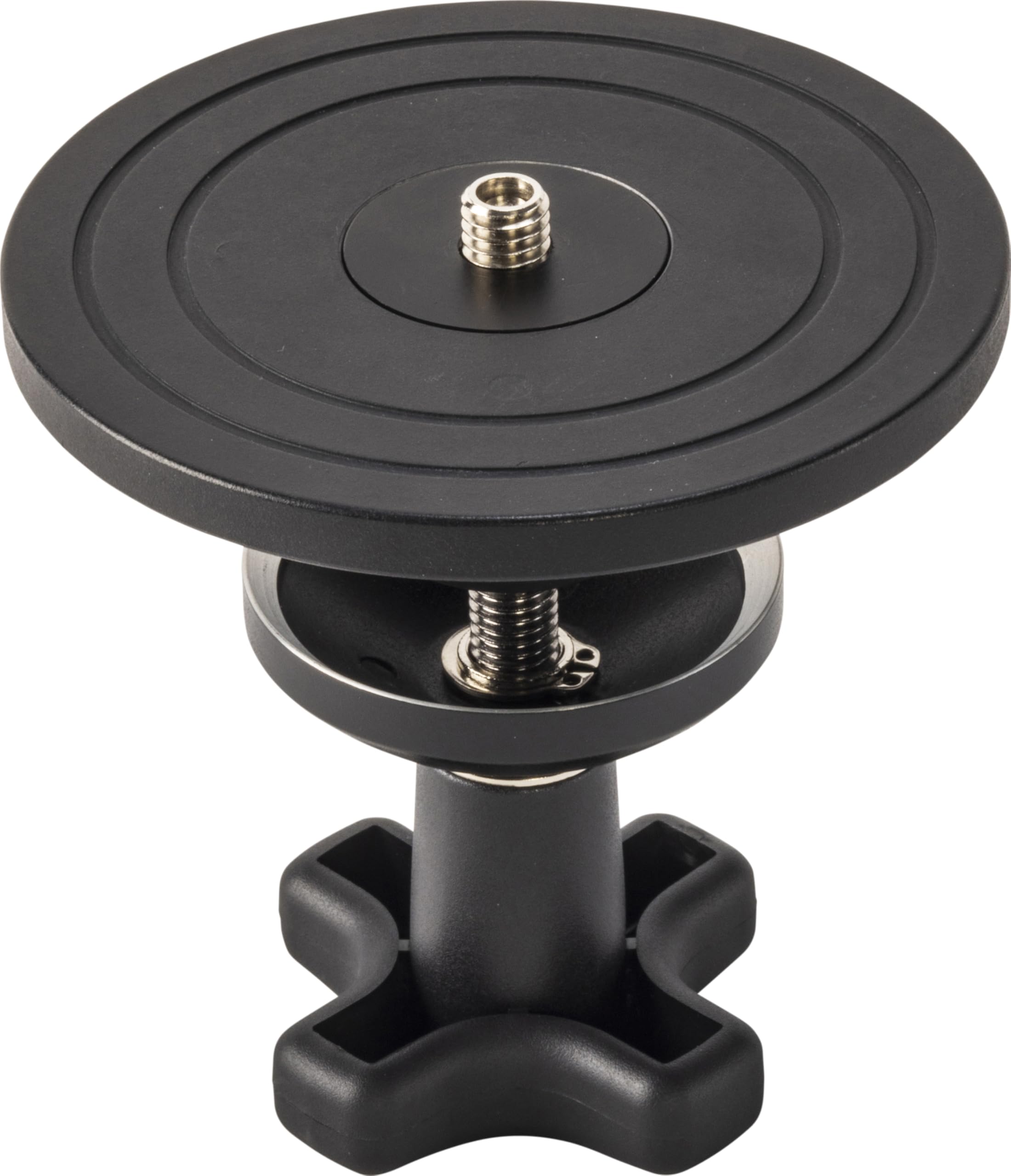
This image displays the Libec BL-F Flat Base Conversion Adapter. It consists of two primary parts: an upper flat plate with a standard camera mounting screw, and a lower bowl-shaped component designed to fit into a tripod's bowl, secured by a large, ergonomic locking knob. The components are shown slightly separated, illustrating how they connect.
4. Operating Instructions
Once the BL-F adapter is securely installed and your camera head is attached, ensure all connections are stable before mounting any camera equipment. The adapter provides a stable flat surface for various camera heads, allowing for precise adjustments. Always verify the stability of your entire setup before operation to prevent damage to equipment.
5. Maintenance
To ensure the longevity and optimal performance of your Libec BL-F adapter, follow these maintenance guidelines:
- Cleaning: Keep the adapter clean and free from dust, dirt, and debris. Use a soft, dry cloth for cleaning. Avoid abrasive cleaners or solvents that could damage the finish or materials.
- Storage: Store the adapter in a dry, cool environment when not in use. Protect it from extreme temperatures and humidity.
- Inspection: Regularly check all screws and connections for tightness. Ensure the mounting screw on the flat plate is secure and the bowl locking mechanism functions correctly.
6. Troubleshooting
If you encounter any issues with your BL-F adapter, consider the following:
- Instability: If the adapter feels unstable or wobbly after installation, ensure it is correctly seated in the tripod bowl and that the tripod's bowl locking mechanism is fully engaged and tightened.
- Difficulty Attaching Camera Head: If a camera head does not attach properly, check for thread alignment between the camera head and the adapter's mounting screw. Ensure there are no obstructions or cross-threading.
- Loose Connections: Periodically check and tighten all connections to maintain a secure setup.
7. Specifications
| Feature | Detail |
|---|---|
| Model Number | BL-F |
| Compatibility | 75mm / 100mm bowl tripods |
| Item Weight | 1.32 pounds |
| Package Dimensions | 5.51 x 5.51 x 5.12 inches |
| Manufacturer | Libec(リーベック) |
| Date First Available | May 30, 2024 |
8. Warranty Information
For detailed warranty information regarding your Libec BL-F Flat Base Conversion Adapter, please refer to the official Libec website or the warranty card included with your purchase. It is recommended to retain your purchase receipt as proof of purchase for any warranty claims.
9. Support
Should you require technical assistance, have questions about product functionality, or need to report an issue, please visit the official Libec website for their customer support contact information. You can typically find FAQs, user guides, and contact details for service and support on their dedicated support pages.