1. Product Overview
The Generic Aquaguard Nova is an advanced water purification system designed to provide clean and safe drinking water for your home or office. It incorporates multiple purification stages including RO, UV, UF, and MTDS technologies to effectively remove impurities and enhance water quality. This manual provides essential information for the proper installation, operation, and maintenance of your water purifier.
Key Features:
- Water Saving RO Technology: Minimizes water wastage during the purification process.
- UV E-Boiling+: Ensures sterilization of water, making it as safe as boiled water.
- Ultra Filtration (UF): Provides crystal-clear water by removing fine suspended particles.
- 4-in-1 Active Copper*#: Infuses water with beneficial minerals.
- Taste Adjuster: Allows adjustment of water taste based on source water.
- Zero Pressure Pump (ZPP): Ensures efficient operation even with low water pressure.
- Health Protect Technology: Designed for comprehensive water safety.
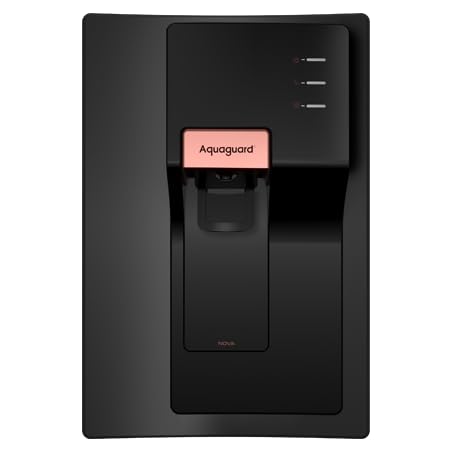
Image 1.1: Front view of the Generic Aquaguard Nova Water Purifier, showcasing its sleek black design and dispenser.
2. Safety Instructions
Please read all safety instructions carefully before operating the appliance to prevent injury or damage. Keep this manual for future reference.
- Ensure the power supply matches the specifications (240 Volts AC, 45 Watts).
- Do not immerse the appliance in water or other liquids.
- Keep the purifier away from direct sunlight, heat sources, and corrosive chemicals.
- Only use genuine replacement filters and parts.
- Do not attempt to repair the appliance yourself. Contact authorized service personnel.
- Ensure proper ventilation around the unit.
- This appliance is intended for indoor use only.
3. Unboxing and Package Contents
Carefully unpack the water purifier and check for all included components. Retain the packaging for future transport or service needs.
Package Includes:
- Generic Aquaguard Nova Water Purifier Unit
- Installation Kit
- User Manual (this document)
4. Setup and Installation
The Aquaguard Nova water purifier can be installed as a tabletop unit or wall-mounted. Professional installation is recommended.
Installation Steps:
- Choose Location: Select a clean, dry, and well-ventilated location near a water source and power outlet. Ensure the surface is flat and stable for tabletop installation, or a sturdy wall for mounting.
- Wall Mounting (Optional): If wall-mounting, use the provided template (if any) to mark drilling points. Drill holes and insert wall plugs. Secure the mounting bracket (if separate) or the unit directly using appropriate screws.
- Connect Water Inlet: Connect the raw water supply to the purifier's inlet port using the provided tubing and connectors. Ensure all connections are tight to prevent leaks.
- Connect Drain Line: Connect the reject water drain line to a suitable drainage point.
- Power Connection: Plug the power cord into a grounded electrical outlet.
- Initial Flush: Before first use, allow the purifier to run for 10-15 minutes to flush out any manufacturing residues. Discard the first few liters of purified water.
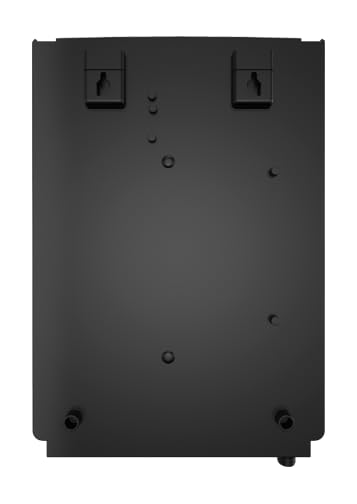
Image 4.1: Back view of the Aquaguard Nova Water Purifier, illustrating the wall mounting points and connection ports.
5. Operating Instructions
Once installed and flushed, your Aquaguard Nova water purifier is ready for use.
Basic Operation:
- Power On: Switch on the main power supply to the purifier. The indicator lights will illuminate, indicating the unit is active.
- Water Dispensing: Place a clean container under the dispenser tap. Push or turn the tap to dispense purified water. Release to stop.
- Storage Tank: The purifier features an internal storage tank (6 litres capacity). It will automatically refill as water is consumed.
- TDS Adjustment: If your model includes a taste adjuster, consult a service technician for initial adjustment based on your source water TDS levels.

Image 5.1: The Aquaguard Nova Water Purifier positioned on a kitchen counter, ready for use.
6. Maintenance
Regular maintenance ensures optimal performance and longevity of your water purifier.
Maintenance Schedule:
- Filter Replacement: Filters (I-Filter, RO Cartridge, UF, etc.) have a limited lifespan. Replace them as recommended by the manufacturer or when the purification efficiency decreases. Refer to the indicator lights for filter change alerts.
- Cleaning the Exterior: Wipe the exterior of the purifier with a soft, damp cloth. Do not use harsh chemicals or abrasive cleaners.
- Storage Tank Cleaning: Periodically clean the internal storage tank. This should ideally be done by a qualified service technician during routine maintenance.
- Service Check-up: Schedule regular professional service check-ups at least once a year to ensure all components are functioning correctly.
7. Troubleshooting
Refer to this section for common issues and their potential solutions. If the problem persists, contact customer support.
| Problem | Possible Cause | Solution |
|---|---|---|
| No water dispensing | No power; Water supply off; Storage tank empty; Clogged filters | Check power connection; Turn on water supply; Wait for tank to fill; Contact service for filter check/replacement |
| Slow water flow | Low water pressure; Clogged filters; Airlock in system | Check water pressure; Contact service for filter check/replacement; Contact service to release airlock |
| Unusual taste/odor | Expired filters; Contaminated storage tank | Replace filters; Contact service for tank cleaning/sanitization |
| Water leakage | Loose connections; Damaged components | Check all connections and tighten; Immediately turn off water supply and power, then contact service |
8. Specifications
Technical details of the Generic Aquaguard Nova Water Purifier.
| Feature | Detail |
|---|---|
| Brand | Generic |
| Model Name | Aquaguard Nova |
| Special Feature | Reduce TDS |
| Product Dimensions (L x W x H) | 29L x 36W x 48H Centimeters |
| Installation Type | Table top & Wall mounted |
| Power Source | Corded Electric |
| Voltage | 240 Volts (AC) |
| Wattage | 45 Watts |
| Item Weight | 10 kg |
| Material | Acrylonitrile Butadiene Styrene |
| Capacity | 6 litres |
| Operating Temperature Range | 10 to 40 Degrees Celsius |
9. Warranty and Support
Warranty Information:
This Generic Aquaguard Nova Water Purifier comes with a 1 Year Warranty from the date of purchase. The warranty covers manufacturing defects and faulty components under normal use conditions. It does not cover damage due to improper installation, misuse, neglect, or unauthorized repairs. Consumable parts like filters are typically not covered under the standard warranty and require periodic replacement at the user's expense.
Customer Support:
For any service requests, technical assistance, or to purchase genuine spare parts and filters, please contact the manufacturer's customer service. Refer to your purchase documentation or the product packaging for specific contact details.